
Introduction
The Carbest Two-Way Car Alarm System is an advanced security and convenience solution for your vehicle. It integrates a two-way alarm, remote engine start, push-button start/stop, and Bluetooth APP control, offering comprehensive protection and ease of use. This manual provides essential information for understanding, installing, operating, and maintaining your Carbest alarm system.
Key Features
- FSK Technology for reliable communication.
- Ultra-long remote control distance up to 800M.
- Paging monitoring range up to 2000M.
- Powerful anti-hijacking technology.
- LCD color changes on remote to indicate different alarm states.
- Supports both electronic lock and pneumatic lock systems.
- Negative output for window closing and trunk release.
- Automatic central door locking.
- GPS positioning and car search function (requires compatible module, if not built-in).
- Programmable automatic deployment.
- Vibration induction and false alarm prevention.
- Dedicated ports for vibration sensor and ultrasonic sensor connection.
- Automatic intelligent window lifting.
- Turbine Timed Start Mode (optional feature).
- One-button start with Bluetooth APP remote control.
- Lock/unlock vehicle by shaking your phone.
- Remote engine start via remote key or mobile phone.
Specifications
| Parameter | Value |
|---|---|
| Working Frequency | 433-434 MHz |
| Main Unit Working Voltage | 12V ± 3V |
| Main Unit Static Current | ≤20mA (with vibration sensor) |
| Siren Volume | 110-125 dB |
| Main Unit Operating Temperature | -40°C to +80°C |
| Remote Control Working Voltage | 3.3V to 4.3V |
| Remote Control Static Current | ≤20μA |
| Remote Control Operating Temperature | -20°C to +60°C |
| Noise Level | 125 dB |
| UPC | 731173813417 |
Components Overview
The Carbest Two-Way Car Alarm System typically includes the following main components:

Image Description: This image displays the complete contents of the Carbest Two-Way Car Alarm System package. Visible components include the main control unit, two two-way remote controls, a comprehensive wiring harness, a siren, a shock sensor, and the engine start/stop push-button. A user manual is also shown.
- Main Control Unit: The central processing unit of the alarm system.
- Two-Way Remote Controls (2x): Handheld devices for arming, disarming, remote start, and receiving alarm notifications.
- Engine Start/Stop Push-Button: For keyless ignition and engine shutdown.
- Wiring Harnesses: Various cables for connecting components to the vehicle's electrical system.
- Siren: Produces loud audible alerts during an alarm event.
- Shock Sensor: Detects impacts or vibrations to the vehicle.
- Antenna: For remote control and Bluetooth communication.
- User Manual: Provides detailed installation and operation instructions.
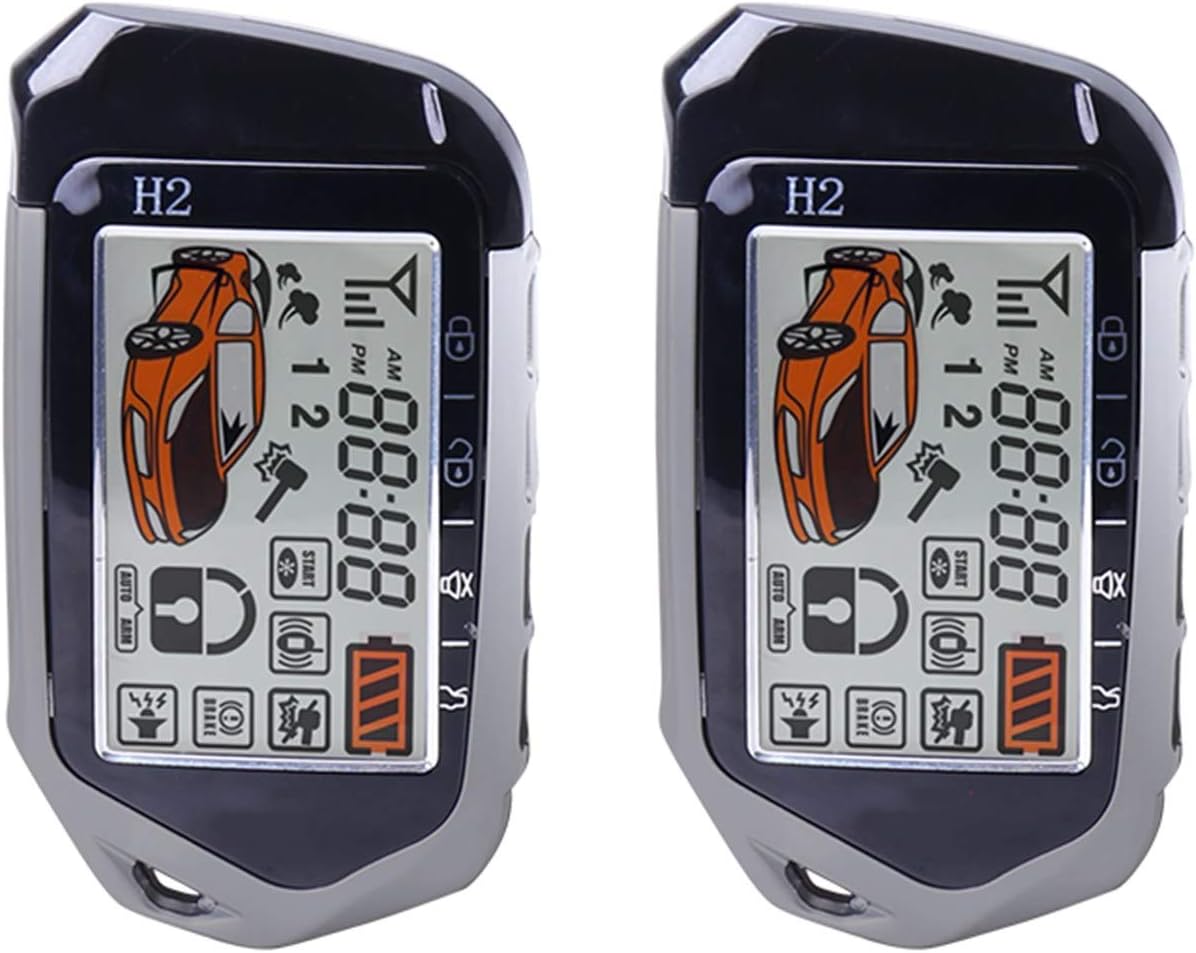
Image Description: This image shows two Carbest two-way remote controls. Each remote features an LCD screen that displays the car's status, current time, signal strength, battery level, and various icons indicating armed/disarmed status, engine start, and other functions.
Setup and Installation
Due to the complexity of vehicle electrical systems and the critical nature of security components, professional installation by a qualified technician is highly recommended. Improper installation can lead to vehicle damage, system malfunction, or safety hazards.
General Installation Steps (Overview):
- Disconnect Battery: Always disconnect the vehicle's negative battery terminal before beginning any electrical work.
- Mount Main Unit: Securely mount the main control unit in a hidden, dry location within the vehicle, away from excessive heat or moisture.
- Wiring Connections: Carefully connect all wiring harnesses according to the detailed wiring diagram provided in the full installation manual. This includes power, ground, ignition, accessory, door triggers, trunk trigger, siren, and central locking wires.
- Sensor Installation: Install the shock sensor and any optional ultrasonic sensors in appropriate locations as per the manual.
- Antenna Placement: Position the antenna for optimal signal reception, typically on the windshield or dashboard, away from metal obstructions.
- Push-Button Installation: Install the engine start/stop button in the desired location, often replacing the traditional ignition cylinder.
- Test System: After all connections are made and secured, reconnect the battery and perform a thorough test of all system functions.
Safety Precautions:
- Ensure all connections are insulated to prevent short circuits.
- Use appropriate fuses for all power connections.
- Do not attempt installation if you are not familiar with automotive electrical systems.
- Refer to your vehicle's service manual for specific wiring diagrams.
Operating Instructions
Using the Two-Way Remote Control

Image Description: This image demonstrates the remote engine start capability of the Carbest system. One hand holds the physical two-way remote control, while another hand holds a smartphone displaying the car alarm application. A car is visible in the background, indicating that the engine can be started remotely using either device.
- Arming the System: Press the Lock button once. The siren will chirp once, and the vehicle lights will flash. The remote LCD will show the armed status.
- Disarming the System: Press the Unlock button once. The siren will chirp twice, and the vehicle lights will flash. The remote LCD will show the disarmed status.
- Remote Engine Start: Press and hold the Start button (or designated button) for 3 seconds. The vehicle will start, and the remote will confirm the engine status.
- Trunk Release: Press and hold the Trunk button (or designated button) for 3 seconds.
- Car Finding/Panic: Press the Bell or Search button. The vehicle will chirp and flash its lights to help locate it.
- LCD Display: The remote's LCD screen provides real-time feedback on the vehicle's status, including door open/closed, armed/disarmed, battery level, and alarm triggers. The LCD color changes to indicate different alarm events.
Bluetooth APP Control
The Carbest system can be controlled via a dedicated smartphone application, offering enhanced convenience and features.

Image Description: This image illustrates the smartphone application control feature. A hand holds a smartphone displaying the Carbest car alarm app interface, which includes a car graphic and virtual control buttons. In the background, the physical alarm components (main unit, remotes) and a car are visible, demonstrating the system's integration.
- App Download: Download the official Carbest alarm app from your smartphone's app store (iOS/Android).
- Pairing: Follow the in-app instructions to pair your smartphone with the alarm system via Bluetooth.
- Lock/Unlock by Shaking Phone:Enable this feature in the app settings. A quick shake of your phone can arm or disarm the system, or lock/unlock the doors, depending on configuration.

Image Description: This image shows a smartphone with the car alarm app, featuring animated arrows suggesting a shaking motion. Next to it, a car is depicted with an open door and a red lock icon, illustrating the feature where the car can be locked or unlocked by simply shaking the paired smartphone.
- Bluetooth PKE (Passive Keyless Entry):With your phone in your pocket, the system can automatically unlock the car doors when you approach within 0-5 meters and lock them when you walk away from the vehicle. Ensure Bluetooth is active on your phone.

Image Description: This image depicts a person reaching for a car door handle. Red signal waves are shown emanating from the person's pocket, indicating the presence of a device (likely a smartphone) that enables Bluetooth Passive Keyless Entry (PKE). This feature automatically unlocks the car door when the user approaches within 0-5 meters and locks it when they walk away.
- Other App Functions: The app typically allows for remote engine start, arm/disarm, trunk release, car finding, and monitoring of vehicle status.
Engine Start/Stop Push-Button

Image Description: This image provides a close-up view of the "ENGINE START STOP" push-button, typically installed on a car's dashboard. A hand is shown reaching towards the button, indicating its use for starting and stopping the vehicle's engine without needing a traditional key.
- Starting the Engine: With the system disarmed and the brake pedal pressed, press the "ENGINE START STOP" button once to start the engine.
- Stopping the Engine: With the vehicle stationary, press the "ENGINE START STOP" button once to turn off the engine.
- Accessory Mode: Press the button once without pressing the brake pedal to enter accessory mode.
- Ignition ON: Press the button twice without pressing the brake pedal to turn on the ignition (dashboard lights).
Maintenance
- Remote Control Batteries: Replace the remote control batteries when the low battery indicator appears on the LCD or when the remote's range decreases significantly. Refer to the remote's specific instructions for battery type and replacement procedure.
- Sensor Cleaning: Ensure that all sensors (e.g., shock sensor, ultrasonic sensors if installed) are kept clean and free from obstructions to ensure proper operation.
- Wiring Inspection: Periodically check visible wiring for any signs of wear, fraying, or loose connections.
- Software Updates: Check for updates to the smartphone application to ensure optimal performance and access to new features.
Troubleshooting
| Problem | Possible Cause | Solution |
|---|---|---|
| Remote control not responding. | Low or dead battery in remote. Out of range. Interference. | Replace remote battery. Move closer to the vehicle. Move away from sources of strong electromagnetic interference. |
| Alarm triggers falsely. | Shock sensor sensitivity too high. Loose components in vehicle. | Adjust shock sensor sensitivity (refer to installation manual). Secure any loose items in the vehicle. |
| Remote engine start fails. | Vehicle not in neutral/park. Hood/trunk open. Low fuel. System not armed. | Ensure vehicle is in park/neutral. Close all doors, hood, and trunk. Check fuel level. Arm the system before attempting remote start. |
| Bluetooth APP not connecting. | Bluetooth off on phone. App not paired. App outdated. | Ensure Bluetooth is enabled on your phone. Re-pair the app with the system. Update the app to the latest version. |
| Push-button start not working. | Brake pedal not pressed. System armed. Immobilizer issue. | Ensure brake pedal is firmly pressed. Disarm the system. Consult a professional if immobilizer issues are suspected. |
Warranty and Support
For warranty information, technical support, or service inquiries, please refer to the warranty card included with your product or contact Carbest customer service directly. Keep your purchase receipt as proof of purchase.
Manufacturer: CarBest