
havit HV-MS733
havit RGB Gaming Mouse HV-MS733 Instruction Manual
Model: HV-MS733
Introduction
Thank you for choosing the havit RGB Gaming Mouse HV-MS733. This manual provides detailed instructions on how to set up, operate, and maintain your new gaming mouse. Please read this manual carefully before use to ensure optimal performance and longevity of your device.

Front-top view of the havit RGB Gaming Mouse, showcasing its pink color, ergonomic design, and RGB lighting.
Setup
Connecting the Mouse
- Unpack the havit RGB Gaming Mouse from its packaging.
- Locate an available USB port on your computer (PC or laptop).
- Plug the USB connector of the mouse into the USB port.
- Your operating system should automatically detect and install the necessary drivers. No additional software installation is typically required for basic functionality.
- The mouse is now ready for use.

The havit RGB Gaming Mouse connected to a computer, ready for use.
Operating Instructions
Button Functions
The havit RGB Gaming Mouse features 7 programmable buttons for enhanced control and customization.
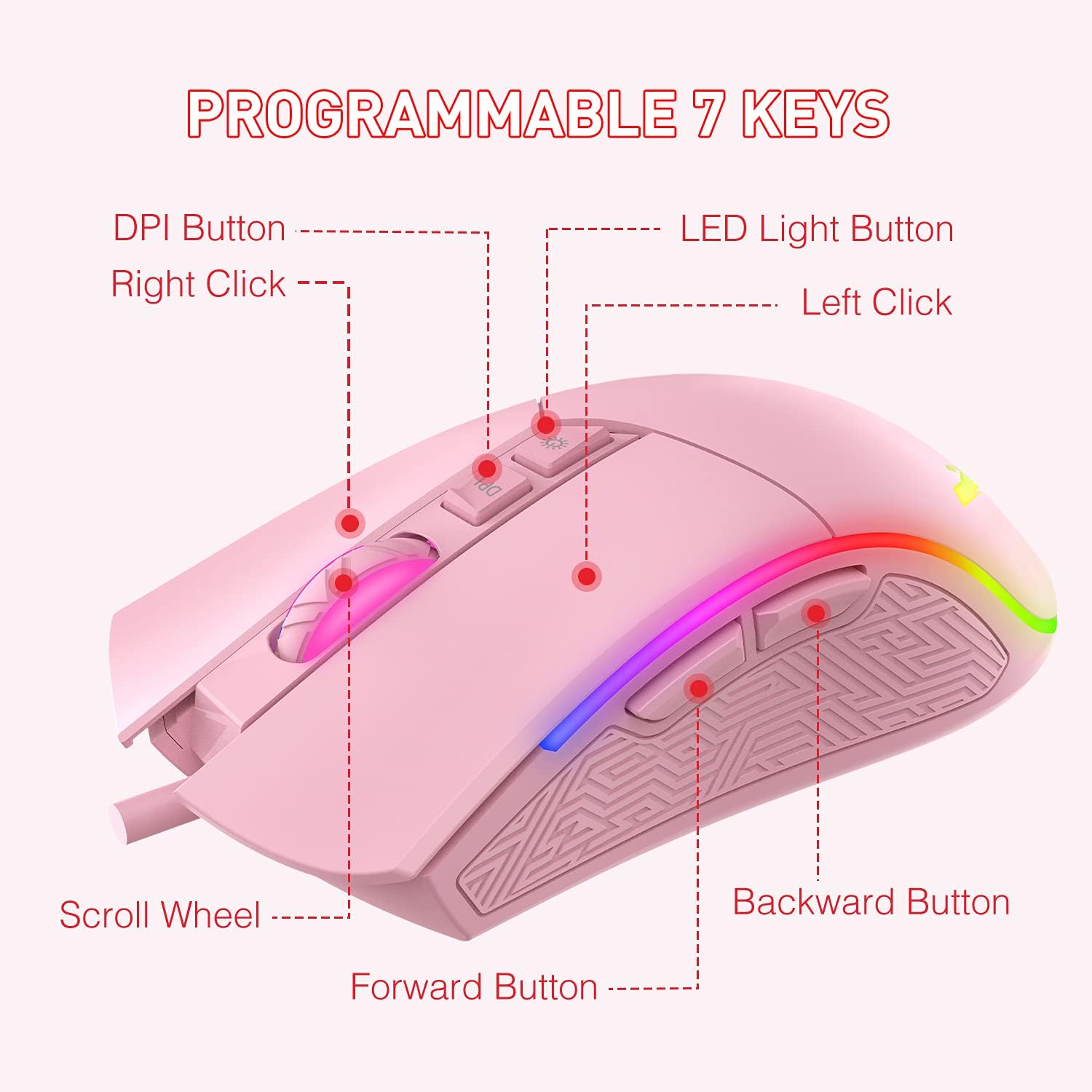
A diagram illustrating the function of each of the 7 programmable buttons on the mouse: Left Click, Right Click, Scroll Wheel, DPI Button, LED Light Button, Forward Button, and Backward Button.
- Left Click: Standard primary mouse button.
- Right Click: Standard secondary mouse button.
- Scroll Wheel: For vertical scrolling and as a clickable middle button.
- DPI Button: Cycles through DPI sensitivity levels.
- LED Light Button: Changes RGB lighting modes.
- Forward Button: Navigates forward in web browsers or file explorers.
- Backward Button: Navigates backward in web browsers or file explorers.
DPI Adjustment
The mouse offers 6 adjustable DPI (Dots Per Inch) levels, allowing you to customize cursor sensitivity to your preference. Press the DPI Button to cycle through the available settings. Each DPI level is indicated by a specific LED color:

A visual representation of the six DPI levels (800, 1600, 2400, 3200, 4000, 4800) and their corresponding LED colors (Green, Purple, Blue, Red, Cyan, Yellow).
- 800 DPI: Green LED
- 1600 DPI: Purple LED
- 2400 DPI: Blue LED
- 3200 DPI: Red LED
- 4000 DPI: Cyan LED
- 4800 DPI: Yellow LED
RGB Lighting Modes
The mouse features 7 distinct RGB lighting modes. Press the LED Light Button to switch between these modes or to turn the lighting off.

An image displaying the seven different RGB lighting modes available on the havit gaming mouse: Breathing, Colorful Streaming, Rainbow, Floe Light, Waltz, 4-Seasons, and LED Off.
- Breathing Mode
- Colorful Streaming Mode
- Rainbow Mode
- Floe Light Mode
- Waltz Mode
- 4-Seasons Mode
- LED Off
Maintenance
Proper care and maintenance will extend the life of your gaming mouse.
- Cleaning: Use a soft, dry cloth to wipe the surface of the mouse. For stubborn dirt, slightly dampen the cloth with water. Avoid using harsh chemicals or abrasive materials.
- Cable Care: Do not pull or yank the USB cable. Store the cable neatly to prevent tangling and damage.
- Storage: When not in use, store the mouse in a clean, dry environment away from extreme temperatures.
- Avoid Liquids: Keep the mouse away from liquids to prevent internal damage.
Troubleshooting
If you encounter any issues with your havit RGB Gaming Mouse, please refer to the following common solutions:
| Problem | Solution |
|---|---|
| Mouse not responding |
|
| DPI settings not changing |
|
| RGB lighting not working or stuck |
|
| Cursor movement is erratic |
|
Specifications
Below are the technical specifications for the havit RGB Gaming Mouse HV-MS733:

A diagram showing the physical dimensions of the mouse: 132mm length, 68mm width, and 42.5mm height.
| Feature | Detail |
|---|---|
| Model Number | HV-MS733 |
| Connectivity | Wired USB |
| DPI Levels | 800, 1600, 2400, 3200, 4000, 4800 |
| Number of Buttons | 7 (Programmable) |
| Lighting | RGB Backlit (7 modes) |
| Hand Orientation | Ambidextrous |
| Special Feature | Ergonomic Design |
| Item Weight | 7 ounces (approximately 198 grams) |
| Dimensions (L x W x H) | 132mm x 68mm x 42.5mm (5.2 x 2.68 x 1.67 inches) |
Warranty and Support
For warranty information and customer support, please refer to the documentation included with your purchase or visit the official havit website. Keep your proof of purchase for warranty claims.
Related documentsHV-MS733


Ask a question about this manual
Ask about setup, troubleshooting, compatibility, parts, safety, or missing instructions. Manuals+ will review the question and use this page’s manual context to help answer it.