
1. Introduction
Thank you for choosing the AOGITKE European to US Plug Adapter. This adapter is designed to allow electrical devices with European (Type C, E, F), Australian (Type I), Chinese (Type I), Italian (Type L), and Brazilian (Type N) plugs to be used in countries with Type B outlets, such as the United States, Canada, Japan, and Mexico. Please read this manual carefully before use to ensure proper operation and safety.
2. Product Overview
The AOGITKE plug adapter is a compact and lightweight solution for international travel. It features a robust design for durability and ease of use.

Image: Front view of the AOGITKE European to US Plug Adapter, showing the US Type B prongs and the universal input socket.

Image: Illustration showing the AOGITKE adapter is suitable for 2-pole unearthed devices, with icons of compatible electronics like phones, laptops, and cameras.

Image: Diagram illustrating the various plug types the adapter accepts, including AU (Type I), CN (Type I), EU (Type C, E, F), IT (Type L), and BR (Type N).

Image: Visual representation of countries where the adapter can be used, including America, Canada, Japan, and Mexico, all utilizing the US Type B outlet.

Image: Important notice stating the adapter supports 110-250 volt standard voltage but does NOT have voltage conversion functionality. It passes through the input voltage directly.

Image: Diagram showing the compact dimensions of the adapter: approximately 45 mm (1.77 in) in length, 35 mm (1.38 in) in width, and 14 mm (0.55 in) in thickness.
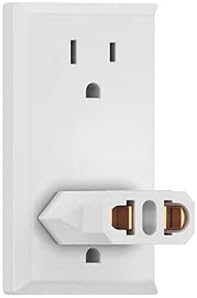
Image: The AOGITKE adapter plugged into a standard US wall outlet, demonstrating its compact and unobtrusive fit.
3. Specifications
| Feature | Detail |
|---|---|
| Product Dimensions | 3.54 x 2.76 x 0.79 inches |
| Item Weight | 0.317 ounces |
| ASIN | B08SKGBCQY |
| Input Voltage Compatibility | 110-250 Volts (Pass-through, no voltage conversion) |
| Output Plug Type | Type B (US, Canada, Japan, Mexico) |
| Accepted Input Plug Types | Type C, E, F (European), Type I (AU, CN), Type L (Italy), Type N (Brazil) |
| Manufacturer | AOGITKE |
4. Setup
- Verify Voltage Compatibility: Before connecting any device, ensure that your electronic device is rated for the voltage of the country you are visiting (e.g., 110V-120V for the US). This adapter does NOT convert voltage.
- Insert Device Plug: Insert the plug of your European, Australian, or Chinese device firmly into the universal input socket of the AOGITKE adapter.
- Plug into Wall Outlet: Insert the US Type B prongs of the adapter into a standard US wall outlet.
5. Operating Instructions
Once the adapter is securely plugged into the wall outlet and your device is connected to the adapter, your device should receive power. The adapter functions as a simple pass-through for the electrical current, changing only the physical plug shape.
Important Safety Note:
- This adapter is NOT a voltage converter. It will not change the voltage from the wall outlet.
- Ensure your device is dual voltage (100-240V) or compatible with the local voltage (e.g., 110V-120V in the US) before use. Using a device not rated for the local voltage can cause damage to the device or pose a fire hazard.
- Do not exceed the maximum current rating of the adapter (typically 10A or 15A, check product labeling if available).
6. Maintenance
- Keep the adapter clean and dry. Wipe with a soft, dry cloth if necessary.
- Do not expose the adapter to liquids, extreme temperatures, or direct sunlight.
- Store in a cool, dry place when not in use.
- Avoid dropping or subjecting the adapter to strong impacts.
7. Troubleshooting
- Device not powering on:
- Ensure the adapter is fully inserted into the wall outlet.
- Ensure your device's plug is fully inserted into the adapter.
- Verify that the wall outlet is active.
- Confirm your device is compatible with the local voltage (e.g., 110V-120V in the US). This adapter does not convert voltage.
- Adapter feels hot:
- Immediately unplug the adapter and the device.
- This may indicate an overload or a faulty device. Ensure the power consumption of your device does not exceed the adapter's rating.
8. Warranty and Support
AOGITKE products are manufactured with quality and reliability in mind. For specific warranty information or technical support, please refer to the product packaging or contact AOGITKE customer service directly through their official channels. You can often find support information on the AOGITKE brand store page on Amazon or their official website.
Visit the AOGITKE Store: AOGITKE Amazon Store