Introduction
This manual provides comprehensive instructions for the assembly, operation, and maintenance of your Harper & Bright Designs Twin Loft Bed with Desk. Please read this manual thoroughly before beginning assembly or use to ensure safe and proper installation and longevity of your product.
The Twin Loft Bed with Desk is designed to maximize space in bedrooms, offering a sleeping area, a functional desk, storage cabinet, and a bookshelf. It is constructed from high-quality solid pine wood for stability and durability.
Important Safety Information
WARNING: Failure to follow these instructions can result in serious injury.
- Exercise caution around sharp edges during assembly.
- Do not exceed the maximum weight capacity of 250 pounds for the loft bed.
- Always use the guardrail when the loft bed is in use to prevent falls.
- Ensure all connections are securely tightened before use. Periodically check and re-tighten hardware.
- Keep small parts away from children during assembly to prevent choking hazards.
Setup and Assembly
Assembly is required for this product. It is recommended that two adults assemble the bed. Please ensure you have all parts and hardware before beginning. A cordless driver can expedite assembly, but avoid over-tightening screws.
Package Contents:
Verify that all components listed in your packaging manifest are present. Missing or damaged parts should be reported to customer support immediately.
- Loft Bed Frame Components
- Desk Unit with Rolling Wheels
- Storage Cabinet
- Bookshelf Unit
- Hardware Pack (screws, bolts, nuts, etc.)
- Assembly Tools (basic wrench provided)
Assembly Steps:
- Unpack and Organize: Carefully unpack all components and lay them out on a clean, soft surface to prevent scratches. Group similar parts and hardware.
- Assemble Bed Frame: Follow the step-by-step diagrams provided in your separate assembly guide. Begin by connecting the main bed frame rails and posts. Ensure all connections are finger-tight before final tightening.
- Install Slats and Guardrails: Securely attach the bed slats to the frame. Install the full-length guardrail as instructed.
- Assemble Desk Unit: Construct the rolling portable desk, ensuring the wheels are properly attached for smooth movement.
- Assemble Storage Cabinet and Bookshelf: Put together the storage cabinet and bookshelf units. These are designed to fit beneath the loft bed.
- Integrate Components: Position the assembled desk, cabinet, and bookshelf under the loft bed as desired. The design allows for flexible arrangement.
- Final Tightening: Once all components are in place and aligned, systematically tighten all screws and bolts using the provided tools or a cordless driver (set to a low torque to avoid stripping).

Figure 1: Fully assembled Twin Loft Bed with Desk, cabinet, and rolling desk.
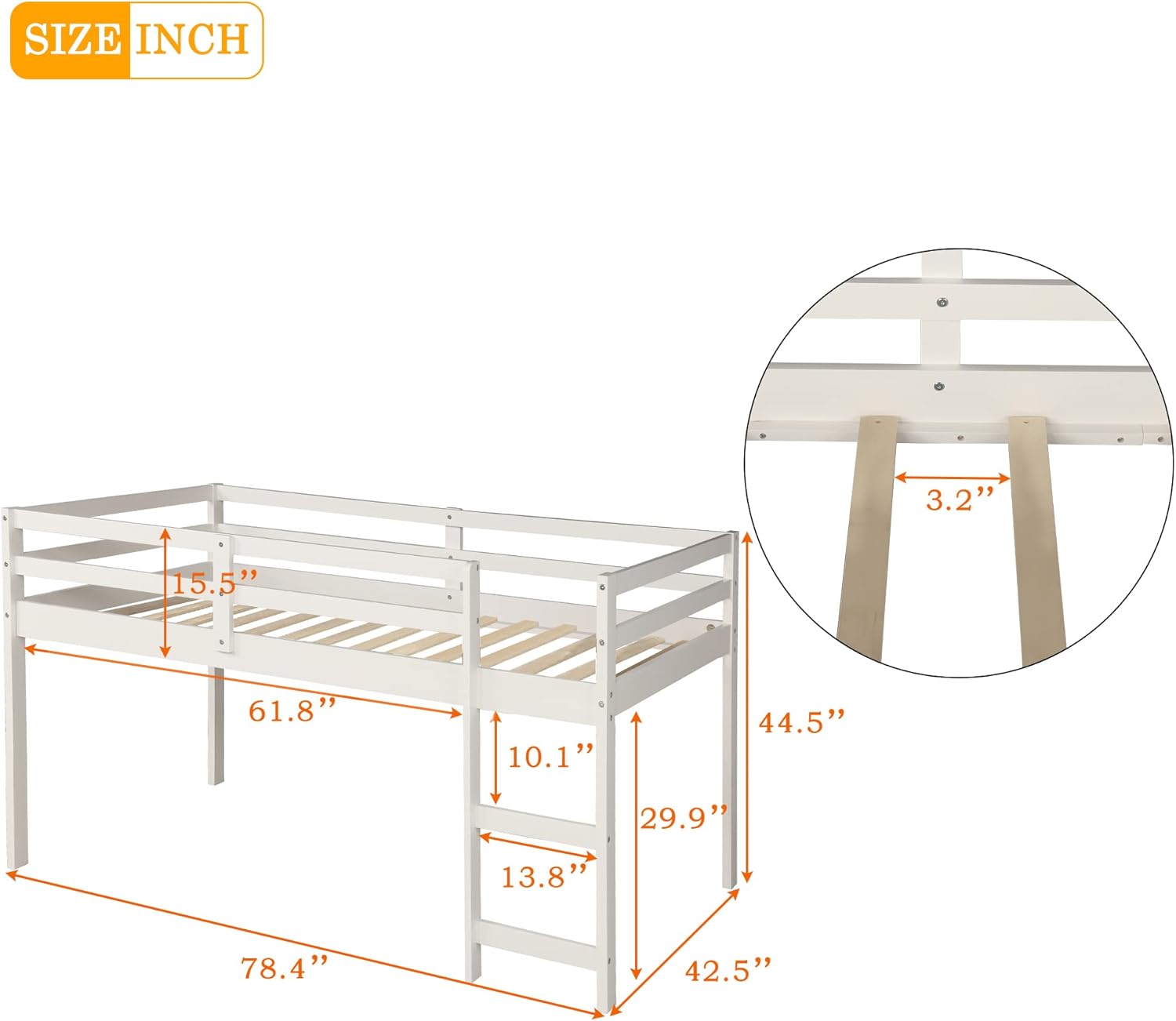
Figure 2: Detailed dimensions of the loft bed frame, including height, length, and width.
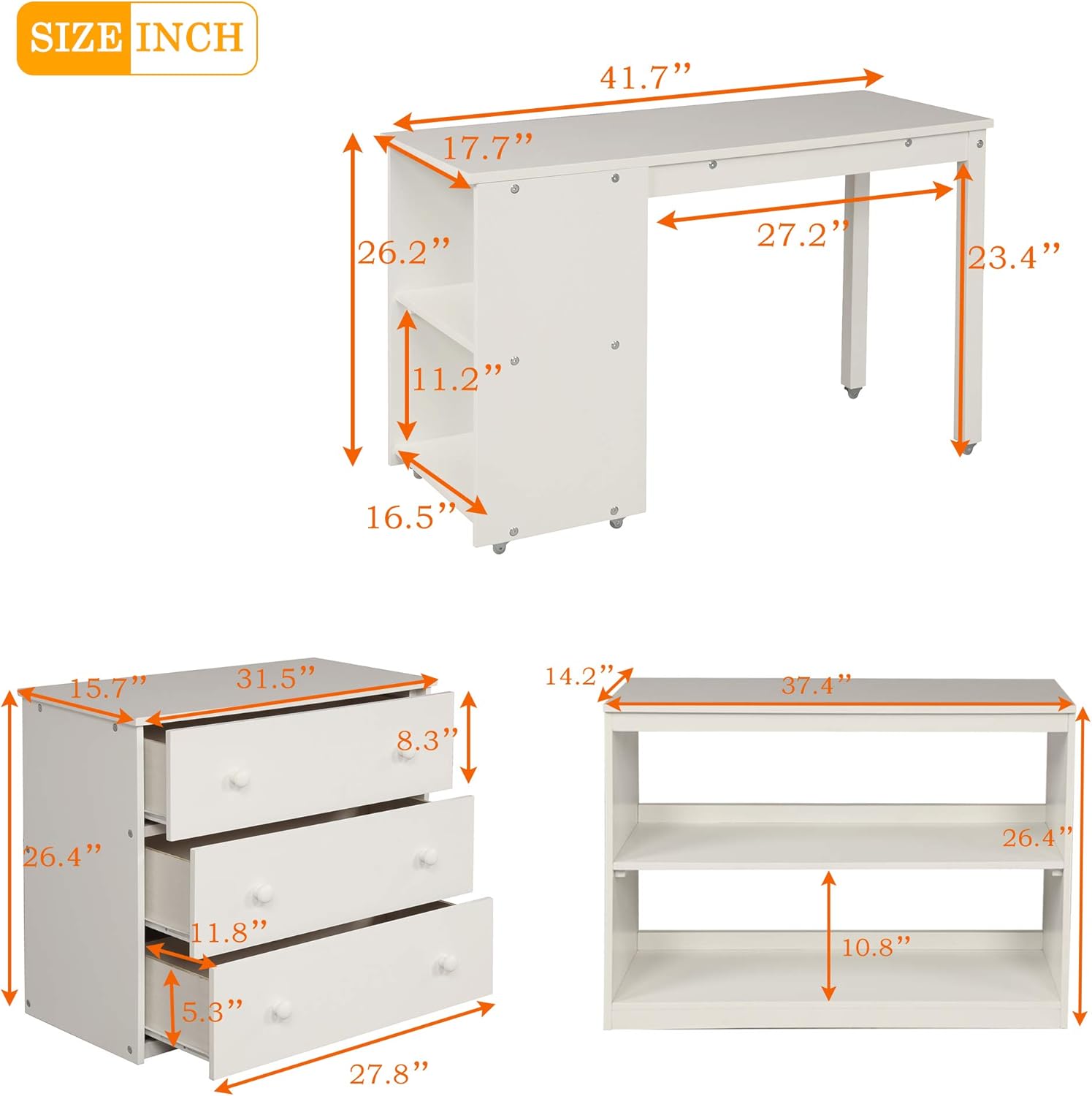
Figure 3: Dimensions for the portable desk, three-drawer storage cabinet, and two-shelf bookshelf.
Operating Instructions
Using the Loft Bed:
- Ensure a twin-size mattress is used. Mattress is not included.
- Always use the integrated ladder for safe access to and from the loft bed.
- The full-length guardrail is a safety feature; do not remove it.
Using the Desk and Storage:
- The portable desk can be rolled out for use and stored neatly under the bed when not needed.
- Utilize the storage cabinet drawers for organizing personal items.
- The bookshelf provides open storage for books, decor, or other essentials.
Maintenance and Care
- Cleaning: Wipe surfaces with a dry cloth only. Avoid harsh chemicals or abrasive cleaners.
- Hardware Check: Periodically inspect all bolts, screws, and connections to ensure they remain tight. Re-tighten as necessary to maintain structural integrity and safety.
- Weight Limits: Adhere strictly to the 250-pound weight limit for the loft bed. Overloading can compromise the bed's structure and safety.
- Moving the Bed: If relocating the bed, disassemble it partially or fully to prevent damage to joints and components. Do not drag the assembled bed.
Troubleshooting
| Problem | Possible Cause | Solution |
|---|---|---|
| Bed feels wobbly or unstable. | Loose hardware connections. | Check and tighten all bolts and screws. Ensure all components are properly seated. |
| Parts do not align during assembly. | Incorrect orientation of parts; misaligned holes. | Review the assembly diagrams carefully. Ensure parts are facing the correct direction. Do not force parts together. |
| Drawers do not slide smoothly. | Drawer rails are misaligned or damaged. | Check that drawer rails are installed correctly and are parallel. Ensure no debris is obstructing the tracks. Realign if necessary. |
| Missing or damaged parts. | Packaging error or transit damage. | Contact Harper & Bright Designs customer support with your purchase details and a description of the missing/damaged part. |
Product Specifications
| Feature | Detail |
|---|---|
| Model Name | Twin Loft Bed with Desk, Storage Cabinet and Rolling Portable Desk |
| Brand | Harper & Bright Designs |
| Color | White |
| Size | Twin |
| Product Dimensions (L x W x H) | 78.3" x 42.5" x 44.5" |
| Item Weight | 175 pounds |
| Material | Solid Pine Wood |
| Finish Type | Painted |
| Included Components | Loft Bed Frame, Rolling Desk, Storage Cabinet, Bookshelf, Guardrails, Slats |
| Assembly Required | Yes |
| UPC | 195358227305 |
| ASIN | B08SJC8L4Z |
Warranty and Support
Warranty Information:
Specific warranty details for this product are typically provided at the point of purchase or within the product packaging. Please refer to any enclosed warranty cards or contact the retailer for precise terms and conditions.
Customer Support:
For assistance with assembly, missing parts, or any other product-related inquiries, please contact Harper & Bright Designs customer service. Contact information can usually be found on the product packaging or the brand's official website.
Note: As per the provided data, specific contact details or warranty periods are not available. Please refer to your purchase documentation.


