1. Introduction
Thank you for purchasing the Mikado MD-221BT 2.1 Channel 40W Bluetooth Speaker System. This manual provides essential information for the proper setup, operation, and maintenance of your new speaker system. Please read this manual thoroughly before use and retain it for future reference.
2. Important Safety Information
- Do not expose the device to rain, moisture, or extreme temperatures.
- Do not open the speaker casing. Refer all servicing to qualified personnel.
- Ensure proper ventilation around the speaker system.
- Keep the device away from direct sunlight, heat sources, and strong magnetic fields.
- Use only the power adapter supplied with the device.
- Avoid placing heavy objects on the speaker system.
3. Package Contents
Please check the package for the following items:
- 1 x Mikado MD-221BT Main Subwoofer Unit
- 2 x Satellite Speakers
- 1 x Remote Control
- 1 x User Manual (this document)

4. Product Overview
Familiarize yourself with the components and controls of your Mikado MD-221BT speaker system.
4.1 Main Unit (Subwoofer)
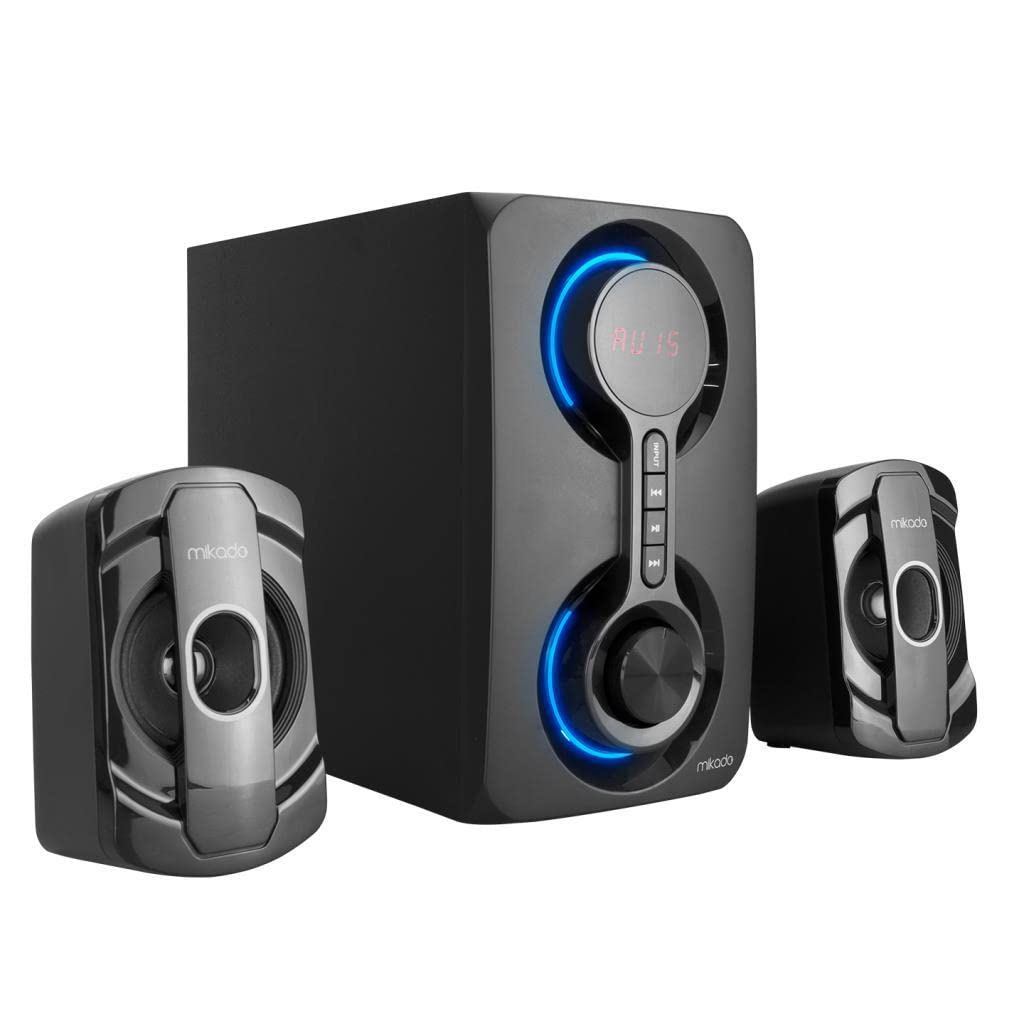
The main unit houses the subwoofer, control panel, and connectivity ports. The front panel features a digital display, touch-sensitive control buttons, and illuminated rings indicating status.
- Digital Display: Shows current mode, volume level, track information, or FM frequency.
- Input Button: Cycles through input modes (Bluetooth, USB, TF, FM).
- Play/Pause Button: Controls media playback.
- Previous/Next Track Buttons: Navigates through tracks or FM stations.
- Volume Knob: Adjusts the master volume.
4.2 Side/Rear Panel Connections

- USB Port: For connecting USB flash drives for audio playback.
- TF Card Slot: For inserting TF (MicroSD) cards for audio playback.
- Satellite Speaker Outputs: Connect the two satellite speakers here.
- Power Input: Connect the power cable.
4.3 Satellite Speakers

The two satellite speakers provide stereo sound and connect to the main subwoofer unit.
5. Setup Instructions
- Placement: Place the main subwoofer unit on a stable, flat surface. Position the two satellite speakers to the left and right of the main unit for optimal stereo separation. Ensure adequate space for ventilation.
- Connect Satellite Speakers: Connect the cables from the two satellite speakers to the corresponding output ports on the rear of the main subwoofer unit. Ensure a secure connection.
- Power Connection: Connect the power cable to the power input port on the main unit, then plug the other end into a standard electrical outlet.
- Power On: Press the power button on the main unit or the remote control to turn on the speaker system. The digital display will light up.
6. Operating Modes
The Mikado MD-221BT supports multiple audio input modes. Use the "Input" button on the main unit or the remote control to cycle through modes.
6.1 Bluetooth Mode
- Switch the speaker system to Bluetooth mode. The display will show "BT" and an indicator will flash, indicating it's ready for pairing.
- On your Bluetooth-enabled device (e.g., smartphone, tablet, computer), enable Bluetooth and search for available devices.
- Select "MD-221BT" from the list of found devices.
- Once paired, the speaker will emit a confirmation sound, and the Bluetooth indicator will stop flashing. You can now play audio from your device.
6.2 USB/TF Card Mode
- Insert a USB flash drive into the USB port or a TF (MicroSD) card into the TF card slot on the main unit.
- The speaker system will automatically switch to USB or TF mode and begin playing audio files (MP3, WMA, etc.) from the inserted media. If it does not switch automatically, press the "Input" button to select the correct mode.
- Use the Play/Pause, Previous, and Next buttons to control playback.
6.3 FM Radio Mode
- Switch the speaker system to FM radio mode. The display will show the current FM frequency.
- Auto Scan: Press and hold the Play/Pause button to initiate an automatic scan for available FM stations. The system will scan and save all strong stations.
- Manual Tuning/Station Selection: Use the Previous/Next buttons to navigate through the saved stations or to manually tune the frequency.
7. Controls
The MD-221BT can be controlled via the touch-sensitive buttons on the main unit or the included remote control.
| Function | Main Unit Control | Remote Control |
|---|---|---|
| Power On/Off | Power button (if available) | Power button |
| Mode Selection | "Input" button | "Mode" button |
| Volume Up/Down | Volume knob | Volume +/- buttons |
| Play/Pause | Play/Pause button | Play/Pause button |
| Previous Track/Station | Previous button | Previous button |
| Next Track/Station | Next button | Next button |
8. Maintenance and Care
- Cleaning: Use a soft, dry cloth to clean the surfaces of the speaker system. Do not use liquid cleaners or abrasive materials.
- Storage: When not in use for extended periods, store the speaker system in a cool, dry place, away from dust and direct sunlight.
- Avoid Liquids: Do not expose the speaker system to water or other liquids.
9. Troubleshooting
| Problem | Possible Solution |
|---|---|
| No power |
|
| No sound |
|
| Bluetooth pairing fails |
|
| USB/TF card not playing |
|
10. Specifications
| Brand | Mikado |
| Model Name | MD-221BT |
| Speaker Type | 2.1 Channel Speaker System |
| Maximum Output Power | 40 Watts |
| Connectivity Technology | Bluetooth, USB, TF Card, FM Radio |
| Wireless Communication Technology | Bluetooth |
| Control Method | Touch, Remote Control |
| Compatible Devices | Desktop Computer, Bluetooth-enabled devices |
11. Warranty and Support
Mikado products are designed and manufactured to the highest quality standards. For detailed warranty information, please refer to the warranty card included with your product or visit the official Mikado website. For technical support or service inquiries, please contact Mikado customer service through their official channels.


