
1. Product Overview
The Road Top Wireless Carplay Android Auto Module Receiver Box is a retrofit kit designed to integrate advanced smartphone connectivity into compatible Audi vehicles. This module acts as a decoder box, allowing your original car screen to display and control Apple CarPlay and Android Auto functionalities without replacing the factory head unit. It enhances your driving experience by providing access to navigation, music, messaging, and voice control features directly through your car's display.
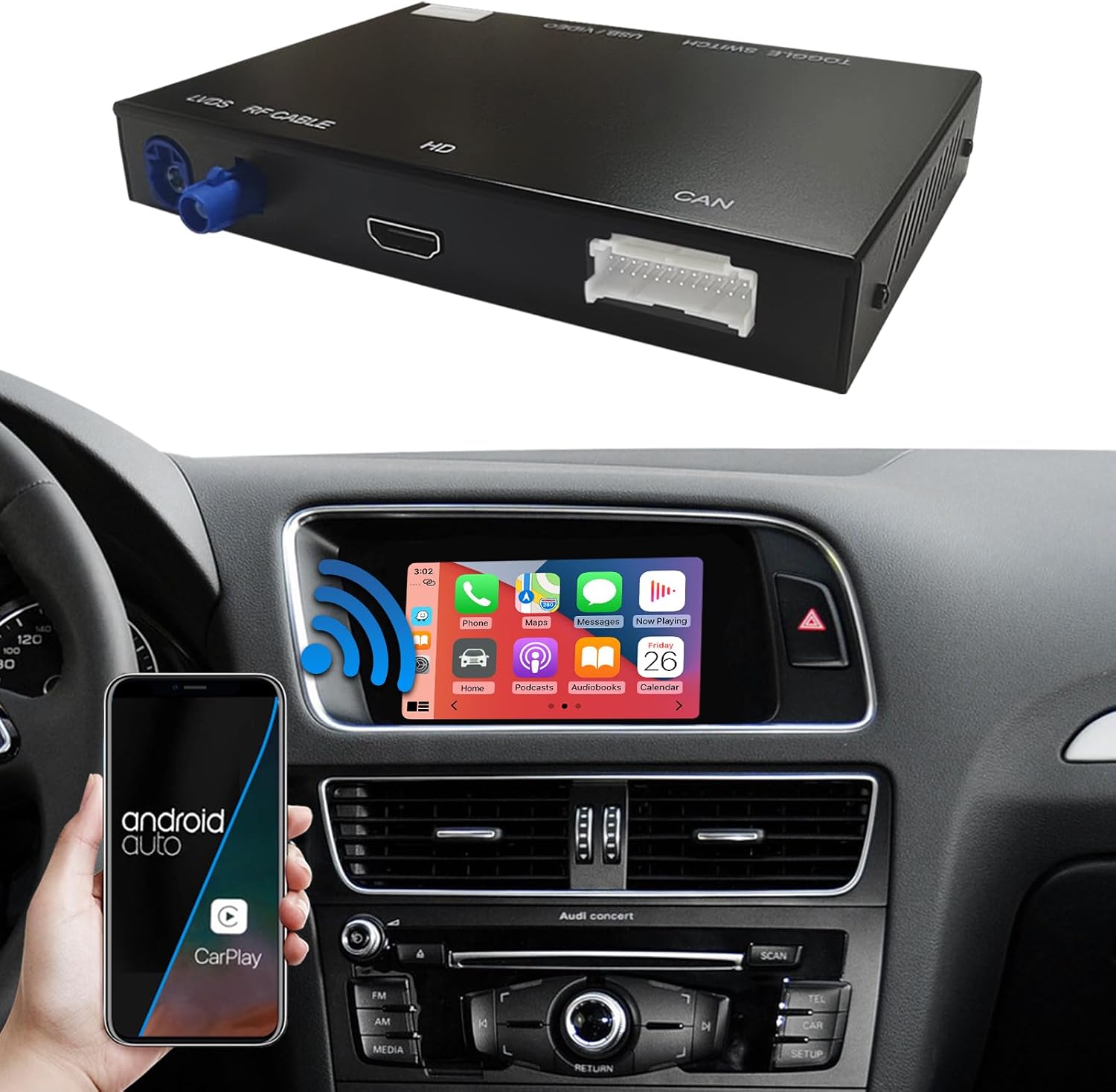
Image: The Road Top Wireless Carplay Android Auto Module shown alongside a car interior displaying the integrated CarPlay interface. A smartphone with Android Auto is also visible, illustrating the system's capabilities.
2. Compatibility
This wireless CarPlay and Android Auto retrofit kit is specifically designed for select Audi models with the 2G MMI system and Concert or Symphony radio. Please verify your car's radio type and control knob position to ensure compatibility before installation.
- Audi S4, S5, A4, A5: 2009-2015 model years with 2G MMI system.
- Audi Q5: 2009-2017 model years with 2G MMI system.
- Radio Type: Compatible only with Concert or Symphony radio. If your car has a radio control knob between the LCD screen and climate control panel, and "Concert" or "Symphony Radio" is displayed on top of the radio, then this unit is suitable for your vehicle.

Image: A visual guide demonstrating how to confirm compatibility by checking the car's radio control knob position and the radio type (Concert or Symphony) displayed on the unit. Examples of compatible and incompatible setups are shown.
3. Package Contents
The following components are typically included in your Road Top Wireless Carplay Android Auto Module Retrofit Kit:
- Road Top Wireless Carplay Android Auto Module (Decoder Box)
- Power Cable
- LVDS Cables (2 pieces)
- RCA/USB Cable
- Wi-Fi Antenna
- AMI Cable
- Mic Extension Cable
- External Mic
- PCB Board

Image: A visual representation of the main module and all included cables and accessories, such as the power cable, LVDS cables, RCA/USB cable, Wi-Fi antenna, AMI cable, mic extension cable, external mic, and PCB board.
4. Installation Guide
Installation of the Road Top module requires careful attention and may involve removing parts of your car's dashboard to access the original CD host device for wiring. It is recommended that installation be performed by a professional if you are not experienced with car electronics.
General Installation Steps:
- Preparation: Ensure your vehicle is turned off and the battery is disconnected before beginning.
- Dashboard Disassembly: Carefully remove the necessary dashboard components to gain access to the original CD host unit. This typically includes the air conditioner unit, central vent, radio, and potentially the glove box and AMI module.
- Wiring Connection: Connect the provided wires from the Road Top module to the original CD host device. Follow the specific wiring diagram provided with your kit. Ensure all connections are secure to prevent issues.
- Module Placement: Securely place the Road Top module in a suitable location within the dashboard, ensuring it does not interfere with other components.
- Testing: Before reassembling the dashboard, reconnect the car battery and test all functions of the Road Top module, including CarPlay, Android Auto, MirrorLink, camera inputs, and control methods.
- Reassembly: Once all functions are confirmed to be working correctly, carefully reassemble the dashboard components.
Important Note: Most installation problems arise from incorrect cable connections and settings. If you encounter issues, double-check all wiring and configurations. Professional installation is highly recommended for optimal performance and to avoid potential damage.
Video: A detailed demonstration of the installation process for the Road Top Wireless Carplay Module in an Audi car, including steps for connecting the module and testing its functionalities.
5. Operating Instructions
Switching Between Systems:
To switch between your original car radio system and the CarPlay/Android Auto system, simply long-press the "NAV" or "MEDIA" button on your MMI controller. This allows for seamless transition between the factory interface and the smart connectivity features.

Image: A visual guide illustrating the process of switching between the OEM car system, Wireless CarPlay, and Android Auto by long-pressing the "NAV" or "MEDIA" button on the MMI controller.
CarPlay & Android Auto Features:
- Wireless/Wired Connectivity: Supports both wireless and wired connections for Apple CarPlay and Android Auto.
- Navigation: Utilize your preferred navigation apps (e.g., Apple Maps, Google Maps, Waze) directly on your car screen.
- Music & Media: Stream music from apps like Spotify, Pandora, or Apple Music. Watch videos, TV news, and view photos (ensure video in motion is enabled for video playback).
- Communication: Make and receive calls, send and receive messages through voice commands or the car's controls.
- Voice Control: Supports Siri and Google Assistant voice control, allowing hands-free operation for safer driving.

Image: Demonstrates CarPlay features including voice commands for navigation (e.g., "Hey Siri, show me the map," "Navigate to XX Station," "Go to a nearby gas station," "Navigate to XX Airport"), and displays third-party map and mobile music interfaces.
MirrorLink Function:
The module supports MirrorLink, allowing you to mirror your smartphone's screen directly onto your car's display. This includes AirPlay for iPhone and AutoLink for Android devices, enabling you to view content from your phone on a larger screen.

Image: Shows the MirrorLink function in action, with a smartphone screen mirrored onto the car's display, demonstrating AirPlay for iPhone and AutoLink for Android.
Camera Functions:
The Road Top module offers comprehensive camera support:
- Supports factory original reverse camera and parking radar.
- Compatible with aftermarket reverse cameras and 360-degree camera systems.
- Supports front view camera DVR (CVBS input).
Original Car Knob and Steering Wheel Control:
The module integrates with your car's existing controls for a familiar user experience:
- Steering Wheel Controls: Supports the voice control button, Tel button, and voice buttons on the steering wheel. Other steering wheel buttons may not be supported.
- Car Knob Operation: The original car knob can be used to navigate and select options within the CarPlay/Android Auto interface.

Image: Displays the car's screen showing a reverse camera view, and close-ups of the original car knob and steering wheel controls, highlighting the supported buttons for module operation.
6. Maintenance
To ensure the longevity and optimal performance of your Road Top Wireless Carplay Android Auto Module, follow these maintenance guidelines:
- Software Updates: Periodically check the manufacturer's website for any available firmware or software updates. Updates can improve performance, add new features, or fix bugs.
- Cleaning: Keep the car's screen and controls clean using a soft, dry, anti-static cloth. Avoid abrasive cleaners or solvents that could damage the surfaces.
- Cable Integrity: Ensure all connected cables remain securely plugged in and are not pinched or damaged. Loose connections can lead to intermittent functionality.
- Environmental Conditions: Avoid exposing the module to extreme temperatures or excessive moisture, as this can affect its electronic components.
7. Troubleshooting
If you encounter issues with your Road Top module, refer to the following common problems and their potential solutions:
| Problem | Possible Cause | Solution |
|---|---|---|
| No display or intermittent display after installation. | Incorrect cable connection or loose connections. | Verify all wiring connections, especially the LVDS cables, are secure and correctly installed according to the diagram. |
| CarPlay/Android Auto not launching or connecting wirelessly. | Wi-Fi/Bluetooth interference, incorrect phone settings, or module not properly initialized. | Ensure your phone's Wi-Fi and Bluetooth are enabled. Restart both the phone and the car's infotainment system. Check module settings for proper wireless configuration. |
| Audio issues (no sound, distorted sound). | Incorrect audio source selection in the car's MMI or loose audio cables. | Ensure "External Audio" is selected in your car's MMI settings. Check RCA/USB audio connections. |
| Original car MMI buttons not fully functional with the module. | Only specific buttons are supported for module control. | The module supports steering wheel voice control, Tel button, and voice buttons. Other MMI buttons may not be integrated for module control. This is expected behavior. |
| Voice commands (Siri/Google Assistant) not working. | Microphone not connected or configured correctly. | Ensure the external microphone is properly connected. The system is designed to use the OEM internal microphone if available. Verify microphone settings within the module. |
8. Specifications
| Feature | Detail |
|---|---|
| Brand | Road Top |
| Model Number | 763684289917 |
| Item Weight | 2.53 pounds |
| Package Dimensions | 8.66 x 6.73 x 4.21 inches |
| Connectivity Technology | Bluetooth, Wi-Fi (Wireless/Wired CarPlay/Android Auto) |
| Special Features | Spotify, Touchscreen (via car's original screen if supported), MirrorLink, Camera Input |
| Compatible Devices | Smartphone, Speaker |
| Audio Output Mode | Surround |
| Surround Sound Channel Configuration | 5.1 |
| Video Encoding | MP4 |
9. Warranty and Support
For warranty information and technical support, please refer to the documentation included with your product or contact Road Top customer service directly. Details regarding specific warranty periods and support channels are provided by the manufacturer.