
1. Introduction
This manual provides detailed instructions for the Knup KP-TM009 Semi-Mechanical RGB Gaming Keyboard. Please read this guide thoroughly to ensure proper installation, operation, and maintenance of your device. This keyboard is designed for an enhanced gaming and typing experience with its semi-mechanical switches and customizable RGB lighting.
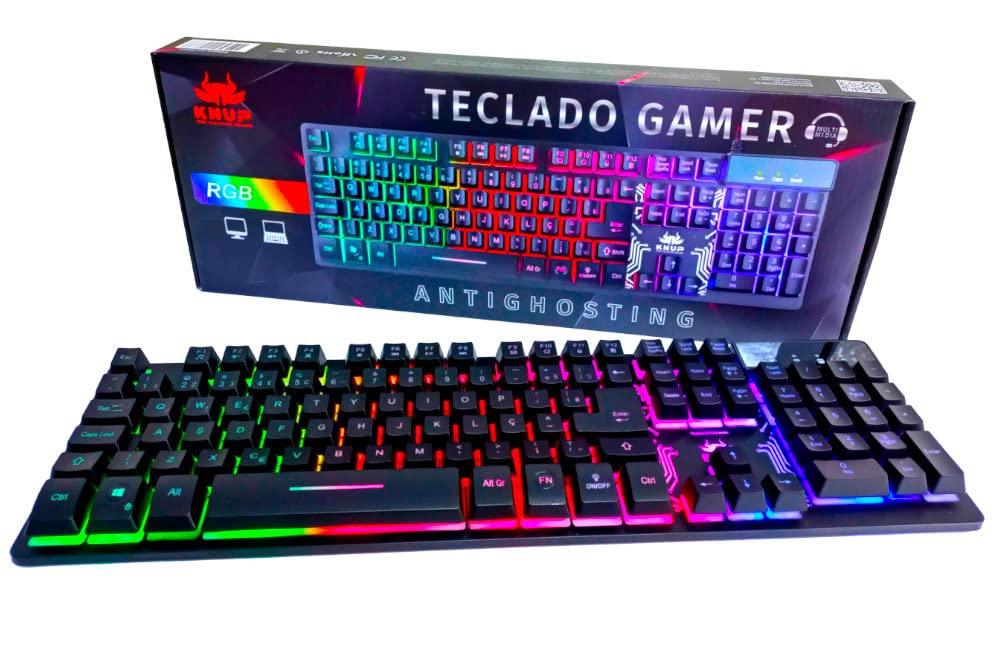
Figure 1: Knup KP-TM009 Semi-Mechanical RGB Gaming Keyboard
The image displays the Knup KP-TM009 keyboard from a top-down perspective, highlighting its full-size layout, including the numeric keypad. The keys are illuminated with a vibrant RGB backlight, showcasing a spectrum of colors across different key zones. The keyboard features a standard ABNT2 layout with function keys (F1-F12) and dedicated multimedia shortcuts. Indicator lights for Num Lock, Caps Lock, and Scroll Lock are visible in the upper right corner.
2. Product Features
The Knup KP-TM009 keyboard offers a range of features designed for performance and user comfort:
- Anti-Ghosting Technology: Ensures accurate registration of multiple simultaneous key presses, crucial for gaming.
- 12 Multimedia Shortcut Keys: Provides quick access to media controls and other functions.
- Comfortable Keycap Design: Ergonomically designed keycaps for extended use.
- Laser-Engraved Keys: Durable key legends that resist fading.
- LED Backlighting System: Customizable RGB illumination for enhanced aesthetics and visibility.
- Winlock Function: Disables the Windows key during gameplay to prevent accidental interruptions.
- Soft, Silent, and Precise Keys: Offers a comfortable typing experience with accurate actuation.
- Dedicated LED ON/OFF Keys: Allows for easy control of the keyboard's backlighting.
- Plug and Play Installation: No drivers required for basic functionality.
- Durable Braided Nylon Cable: Enhanced cable longevity and resistance to tangling.

Figure 2: Keycap Design and Semi-Mechanical Switch
This image provides a close-up, angled view of the keyboard's keys, emphasizing the profile of the keycaps and the semi-mechanical switch mechanism. The green backlighting is visible beneath the keys, highlighting the individual key structures. A detached keycap is shown in the foreground, illustrating its design and the stem that connects to the switch.
3. Setup
Setting up your Knup KP-TM009 keyboard is a straightforward process:
- Unpack the Keyboard: Carefully remove the keyboard from its packaging.
- Connect to a USB Port: Plug the USB connector of the keyboard into an available USB port on your computer.
- Automatic Installation: The keyboard is Plug and Play. Your operating system (Windows XP/Vista/7/8/10) will automatically detect and install the necessary drivers. This process may take a few moments.
- Verify Functionality: Once installed, the keyboard should be ready for use. Test by typing and observing the RGB lighting.
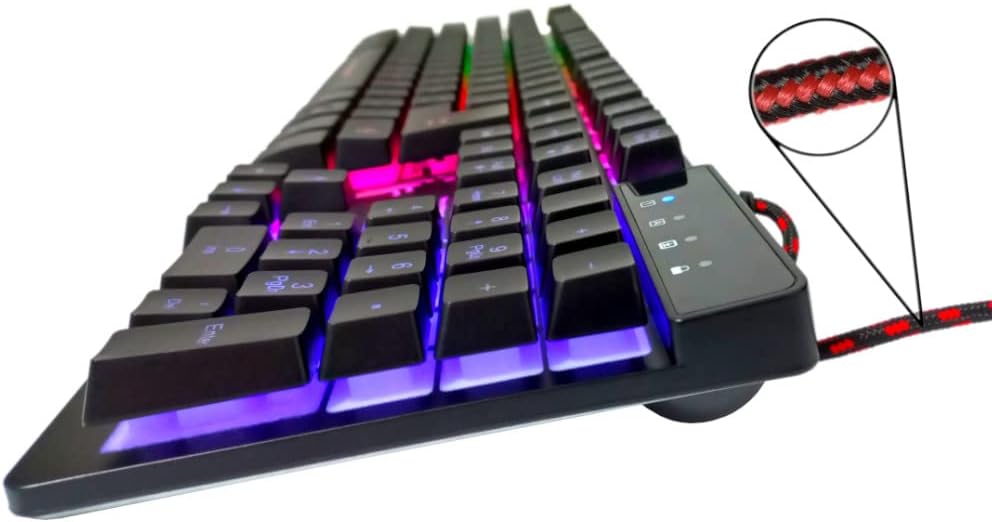
Figure 3: Braided USB Cable and Indicator Lights
This image shows a side profile of the Knup KP-TM009 keyboard, focusing on the durable braided nylon USB cable extending from the top right. A magnified inset highlights the red and black braided pattern of the cable. The indicator lights for Num Lock, Caps Lock, and Scroll Lock are visible on the upper right panel of the keyboard, illuminated in blue.
4. Operating Instructions
4.1 Basic Keyboard Functions
The keyboard functions as a standard ABNT2 layout keyboard. Simply type as you would with any other keyboard. The anti-ghosting technology ensures that even complex key combinations are registered accurately.
4.2 Multimedia Keys
The keyboard features 12 multimedia shortcut keys, accessible by pressing the Fn key in combination with the F1-F12 keys. Refer to the keycap legends for specific functions:
- Fn + F1: Media Player
- Fn + F2: Volume Down
- Fn + F3: Volume Up
- Fn + F4: Mute
- Fn + F5: Stop
- Fn + F6: Previous Track
- Fn + F7: Play/Pause
- Fn + F8: Next Track
- Fn + F9: Email
- Fn + F10: Web Browser
- Fn + F11: My Computer
- Fn + F12: Calculator
4.3 RGB Lighting Control
The keyboard features dynamic RGB backlighting. To control the lighting:
- LED ON/OFF Key: Press the dedicated ON/OFF key (located near the right Alt key) to toggle the LED backlighting on or off.
- Brightness Adjustment: Use Fn + Page Up to increase brightness and Fn + Page Down to decrease brightness.
- Lighting Mode Change: Use Fn + Scroll Lock to cycle through different RGB lighting modes and effects.
4.4 Winlock Function
The Winlock function prevents accidental presses of the Windows key during intense gaming sessions. To activate or deactivate:
- Win Lock Key: Press the Win Lock key (located next to the right Ctrl key) to disable or enable the Windows key. An indicator light may illuminate when the Windows key is locked.
5. Maintenance
To ensure the longevity and optimal performance of your Knup KP-TM009 keyboard, follow these maintenance guidelines:
- Regular Cleaning: Use a soft, dry cloth to wipe down the surface of the keyboard. For dust and debris between keys, use compressed air.
- Deep Cleaning (Optional): If necessary, carefully remove keycaps using a keycap puller (not included) to clean underneath. Ensure the keyboard is disconnected before doing so.
- Avoid Liquids: Do not spill liquids on the keyboard. If a spill occurs, immediately disconnect the keyboard and allow it to dry completely before reconnecting.
- Storage: Store the keyboard in a cool, dry place away from direct sunlight and extreme temperatures.
6. Troubleshooting
If you encounter issues with your Knup KP-TM009 keyboard, refer to the following common solutions:
| Problem | Possible Cause | Solution |
|---|---|---|
| Keyboard not responding | Loose USB connection, faulty USB port, driver issue. |
|
| RGB lighting not working | Lighting turned off, brightness set to minimum. |
|
| Windows key not working | Winlock function is active. |
|
| Keys are sticky or unresponsive | Dirt or debris under keycaps. |
|
7. Specifications
Below are the technical specifications for the Knup KP-TM009 Semi-Mechanical RGB Gaming Keyboard:
- Model: KP-TM009
- Compatibility: Windows XP / Vista / 7 / 8 / 10
- Keyboard Layout: ABNT2
- Dimensions (L x W x H): 441mm x 136mm x 40mm
- Cable Length: 1.50 meters
- Number of Keys: 107
- Connection Type: USB
- Backlighting: RGB LED
- Power Supply: 5Vdc (via USB port)
- Special Features: Anti-ghosting, Multimedia keys, Winlock function, Braided cable
- Weight: Approximately 1 Kilogram

Figure 4: Product Label on Keyboard Bottom
This image shows the underside of the Knup KP-TM009 keyboard. A product label is centrally placed, displaying the model number "KP-TM009", brand "KNUP", and various certifications (CE, FC). The label also indicates "TECLADO GAMER" (Gaming Keyboard) and "Fabricado na China" (Made in China). Rubber feet are visible at the top and bottom edges, providing stability.
8. Warranty and Support
For warranty information and technical support, please refer to the documentation provided with your purchase or contact Knup customer service directly. Keep your proof of purchase for warranty claims.
For further assistance, visit the official Knup website or contact their support channels.