
1. Introduction
Thank you for choosing the Hama BB/CATV Amplifier 00205234. This device is designed to amplify antenna signals for both cable television (CATV) and satellite antenna systems, ensuring a clear and stable signal reception. With its adjustable gain of up to 25 dB, you can fine-tune the signal strength to suit your specific needs. Please read this manual carefully before installation and use to ensure proper operation and safety.
2. Safety Instructions
- This device is intended for indoor use only. Do not expose it to moisture, rain, or extreme temperatures.
- Do not open the device casing. Servicing should only be performed by qualified personnel.
- Ensure the power outlet is easily accessible and properly grounded.
- Disconnect the device from the power supply before cleaning or if it will not be used for an extended period.
- Avoid placing the device near heat sources or in direct sunlight.
3. Package Contents
Please check that all items are present and in good condition:
- Hama BB/CATV Amplifier 00205234 (Main Unit)
4. Product Overview
Familiarize yourself with the components of your Hama BB/CATV Amplifier:
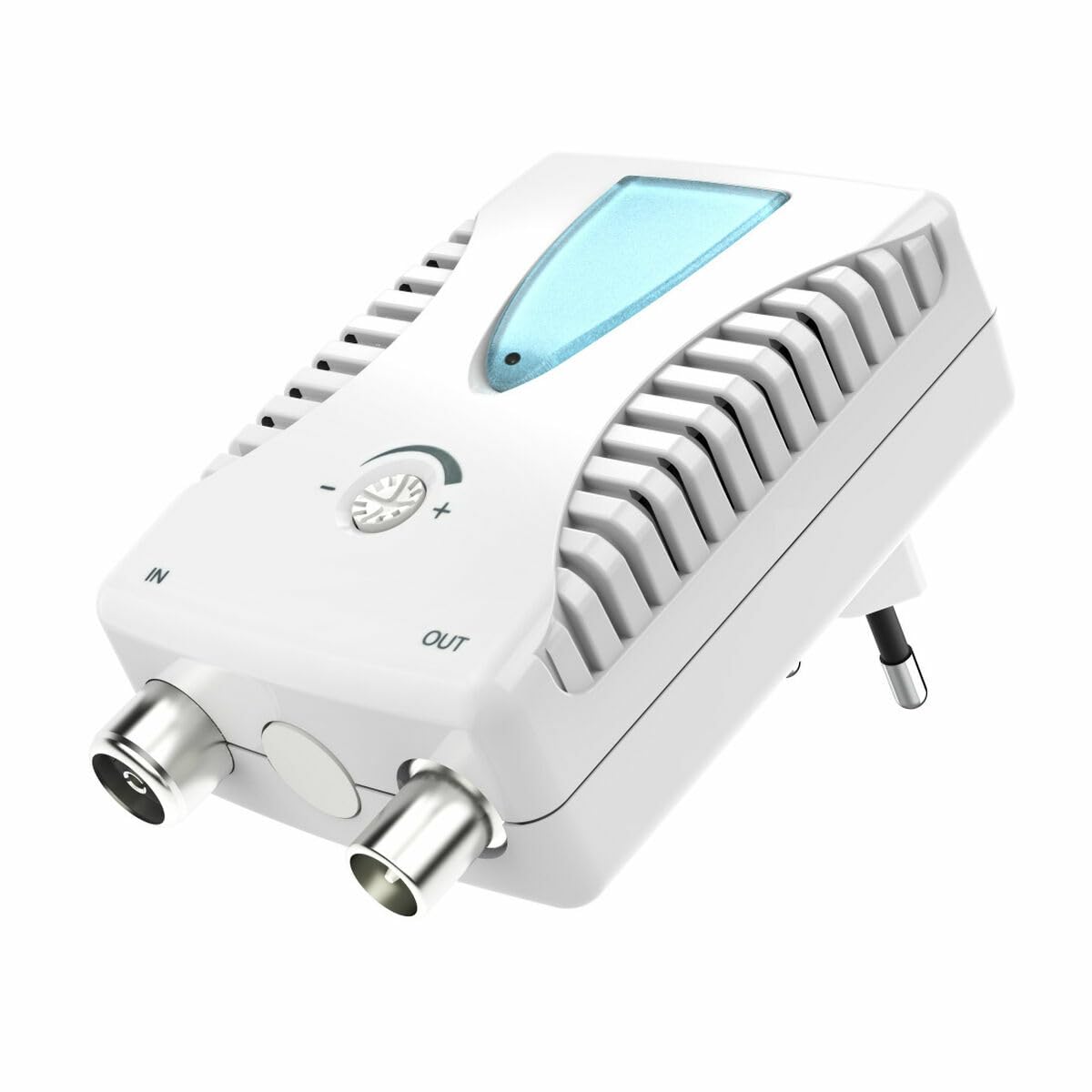
Figure 1: Front view of the Hama BB/CATV Amplifier 00205234. It features an "IN" port for the incoming antenna signal, an "OUT" port for the amplified signal to your television or receiver, a rotary knob for signal gain adjustment, a blue LED indicator, and an integrated power plug.
- IN Port: Connects to the incoming antenna cable (from wall outlet or satellite dish).
- OUT Port: Connects to your television, receiver, or distribution system.
- Adjustment Knob: Used to control the amplification level (gain).
- LED Indicator: Illuminates when the device is powered on.
- Integrated Power Plug: For connecting to a standard electrical outlet.
5. Setup and Installation
Follow these steps to install your Hama BB/CATV Amplifier:
- Identify Connection Points: Locate the antenna cable coming from your wall outlet or satellite dish (this will be your input signal) and the input port on your television or receiver (this will be your output destination).
- Connect Input Cable: Connect the incoming antenna cable to the IN port on the Hama amplifier. Ensure the connection is secure.
- Connect Output Cable: Use a suitable coaxial cable (not included) to connect the OUT port of the Hama amplifier to the antenna input on your television or receiver. Ensure the connection is secure.
- Power Connection: Plug the integrated power plug of the amplifier into a standard electrical wall outlet. The blue LED indicator on the amplifier should illuminate, indicating that the device is powered on.
- Initial Adjustment: Turn the adjustment knob to its minimum setting (usually fully counter-clockwise) before turning on your television.
Note: For optimal performance, ensure all coaxial cable connections are tight and free from damage.
6. Operating the Amplifier
The Hama BB/CATV Amplifier features an adjustable gain control to optimize your signal strength.
- Power On: Ensure the amplifier is plugged into a power outlet and the blue LED is lit.
- Turn on TV/Receiver: Switch on your television or receiver and select the appropriate input source (e.g., "Antenna" or "Cable").
- Adjust Gain: Slowly turn the adjustment knob clockwise to increase the amplification. Observe your television screen for signal quality.
- If the picture is pixelated or distorted, the signal might be too weak or too strong.
- Adjust the knob until you achieve the clearest possible picture and sound.
- Over-amplification can lead to signal distortion, so avoid setting the gain higher than necessary.
- Scan Channels (if necessary): After adjusting the gain, you may need to perform a channel scan on your television or receiver to detect new or improved channels. Refer to your TV's manual for instructions on how to perform a channel scan.
7. Maintenance and Care
- Cleaning: Disconnect the amplifier from the power outlet before cleaning. Use a soft, dry, lint-free cloth to wipe the exterior. Do not use liquid cleaners or abrasive materials.
- Storage: If storing the device for an extended period, unplug it and keep it in a cool, dry place away from direct sunlight and moisture.
- Cable Connections: Periodically check all cable connections to ensure they are secure and free from corrosion or damage.
8. Troubleshooting
| Problem | Possible Cause | Solution |
|---|---|---|
| No picture or poor signal quality. |
|
|
| Blue LED not illuminated. |
|
|
| Picture is distorted or over-saturated. |
|
|
9. Technical Specifications
| Model Number: | 00205234 |
| Brand: | Hama |
| Amplification (Gain): | Up to 25 dB (adjustable) |
| Frequency Range: | 862 MHz |
| Connector Type: | Auxiliary (Coaxial F-type) |
| Compatible Devices: | Satellite Antenna, Television |
| Usage Environment: | Indoor |
| Item Weight: | 0.19 Kilograms |
10. Warranty and Support
Hama products are subject to strict quality controls. Should you nevertheless experience a problem with this product, please contact your retailer or the Hama service department. Please retain your proof of purchase for any warranty claims. For detailed warranty terms and conditions, please refer to the official Hama website or contact their customer support.

