Audiobank P3001 Monoblock Car Audio Amplifier Instruction Manual
Model: P3001
Introduction
This manual provides detailed instructions for the installation, operation, and maintenance of your Audiobank P3001 Monoblock Car Audio Amplifier. Please read this manual thoroughly before attempting installation or operation to ensure proper use and to prevent damage to the unit or your vehicle's audio system.
The Audiobank P3001 is a high-performance monoblock amplifier designed for car audio systems, featuring Class A-B operation, a heavy-duty aluminum alloy heatsink, and various control options for optimal sound customization.
Important Safety Information
Always disconnect the vehicle's negative battery terminal before starting any installation.
Ensure all wiring is properly routed and secured to prevent pinching or damage.
Use appropriate gauge wiring for power and ground connections to prevent overheating.
Mount the amplifier securely in a location that allows for adequate ventilation.
Avoid installing the amplifier in areas exposed to moisture or excessive heat.
If you are unsure about any part of the installation process, consult a professional car audio installer.
Package Contents
Verify that all items are present in the package:
1 x Audiobank P3001 Monoblock Amplifier
1 x Remote Bass Control
1 x User Manual (this document)
Product Overview
Figure 1: The Audiobank P3001 Monoblock Amplifier shown with its included remote bass control unit. This image displays the overall design and compact form factor of the amplifier.
Figure 2: Rear panel of the P3001 amplifier, detailing the power input terminals (GND, REM, +12V), fuse holders, and speaker output terminals. These connections are crucial for supplying power and connecting to your subwoofer.
Figure 3: Front panel of the P3001 amplifier, showcasing the remote bass control port, Low Pass Filter (LPF) switch, Sub Sonic filter, Phase switch, Bass Boost control, Gain control, RCA input/output, and power/protection indicators. These controls allow for fine-tuning of the audio output.
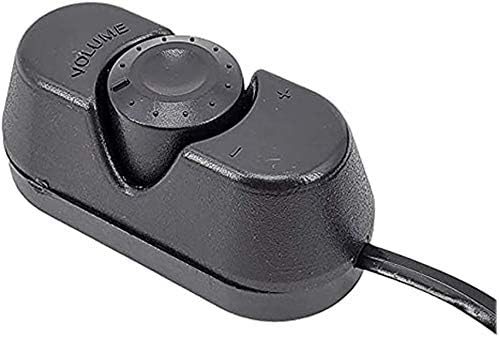
Figure 4: Close-up view of the wired remote bass control unit. This unit allows for convenient adjustment of the subwoofer level from the driver's seat.
Installation and Setup
1. Mounting the Amplifier
Select a secure mounting location that provides adequate ventilation for the amplifier. Avoid mounting in enclosed spaces or directly on carpet, which can restrict airflow. Ensure the mounting surface is solid and can support the amplifier's weight. Use appropriate screws to secure the amplifier.
2. Power Connections
Ground (GND): Connect a heavy-gauge wire (e.g., 4-gauge) from the amplifier's GND terminal to a clean, unpainted metal surface on the vehicle's chassis. Ensure a solid electrical connection.
Remote (REM): Connect a smaller gauge wire (e.g., 18-gauge) from the amplifier's REM terminal to the remote turn-on output of your head unit. This wire signals the amplifier to turn on and off with your car's audio system.
+12V (Power): Connect a heavy-gauge wire (e.g., 4-gauge) from the amplifier's +12V terminal directly to the positive terminal of your vehicle's battery. Install an appropriate fuse holder (e.g., 60A for 2x25A fuses) within 18 inches (45 cm) of the battery.
Note: The P3001 uses two 25A fuses internally. Ensure your external fuse is rated appropriately for the total current draw.
3. Speaker Output Connections
Connect your subwoofer(s) to the speaker output terminals on the amplifier's rear panel. The P3001 is a monoblock amplifier, designed for a single channel output. Ensure correct polarity (+ to + and - to -) for optimal performance. The amplifier is 2 Ohm stable.
4. Input Connections (RCA or Speaker Level)
RCA Inputs: If your head unit has RCA pre-outs, connect RCA cables from the head unit's subwoofer output to the amplifier's RCA input terminals.
Speaker Level Inputs: If your head unit does not have RCA pre-outs, you can use the speaker level inputs. Connect the speaker wires from your head unit's rear speaker outputs to the amplifier's speaker level input terminals.
5. Remote Bass Control Connection
Connect the included remote bass control unit to the "REMOTE" port on the amplifier's front panel. Route the cable to a convenient location near the driver's seat for easy access.
Operating Instructions
1. Initial Power-Up
After all connections are made and verified, reconnect the vehicle's negative battery terminal. Turn on your car's ignition and head unit. The "PWR" (Power) indicator on the amplifier's front panel should illuminate green, indicating normal operation.
2. Adjusting Controls
Gain Control (MIN/MAX): This control matches the amplifier's input sensitivity to the output level of your head unit. Start with the gain at minimum, then slowly increase it until you hear distortion, then back off slightly. Do not use the gain control as a volume knob.
Low Pass Crossover (LPF): 50Hz ~ 250Hz: This filter allows only frequencies below the set point to pass through to the subwoofer. Adjust this to blend the subwoofer's output seamlessly with your main speakers. A common starting point is 80Hz.
Sub Sonic Filter (15Hz ~ 50Hz): This filter removes extremely low frequencies that are inaudible and can cause your subwoofer to over-excurt, potentially damaging it. Set this slightly below your subwoofer's resonant frequency or around 20-30Hz.
Phase (0°/180°): This switch helps to align the subwoofer's output with the main speakers. Listen to your system with music and switch between 0° and 180° to find the setting that provides the most impactful and coherent bass.
Bass Boost (0 to +12dB): This control provides an adjustable boost at a specific low frequency. Use sparingly to enhance bass impact. Excessive bass boost can lead to distortion and potential damage.
Remote Bass Control: This knob allows you to adjust the subwoofer output level conveniently from your listening position.
Maintenance
Cleaning: Periodically wipe the amplifier's exterior with a soft, dry cloth. Do not use harsh chemicals or abrasive cleaners.
Ventilation: Ensure that the amplifier's heatsink fins remain clear of dust and debris to maintain proper cooling.
Connections: Occasionally check all power, ground, and speaker connections to ensure they are secure and free from corrosion.
Troubleshooting
Problem
Possible Cause
Solution
No sound from subwoofer
No power to amplifier (PWR LED off)
Remote turn-on wire not connected
RCA or speaker level inputs not connected
Speaker wires disconnected or shorted
Amplifier in protection mode (PRO LED on)
Check power (+12V), ground (GND), and fuse connections.
Verify remote wire connection to head unit.
Ensure input cables are securely connected.
Check speaker wiring for shorts or disconnections.
Refer to "Protection Mode" section.
Amplifier goes into protection mode (PRO LED illuminates red)
Overheating
Speaker short circuit
Low impedance load
DC offset
Ensure adequate ventilation. Allow amplifier to cool.
Check speaker wires for shorts to chassis or each other.
Verify speaker impedance is 2 Ohms or higher.
Consult a professional if problem persists.
Distorted sound
Gain set too high
Bass Boost set too high
Poor input signal
Reduce gain setting.
Reduce Bass Boost level.
Check head unit output and input cable quality.
Remote bass knob not working
Cable disconnected or damaged
Faulty remote unit
Check the connection of the remote cable to the amplifier and the remote unit.
If connections are secure, the remote unit may be faulty and require replacement.
Technical Specifications
Maximum Output Power
3000W
Power MAX (2 Ohms)
3000W x 1
Power RMS (4 Ohms)
550W x 1
S/N Ratio
90dB
Low Pass Crossover (Variable)
50 ~ 250Hz
Bass Boost (Variable)
0 - +12dB
Tri-mode Operation
Yes
Inputs
Line Level & Speaker Level
Remote Subwoofer Control
Yes
Frequency Response
20Hz ~ 22kHz
THD (at RMS Output)
0.01%
Channel Separation
90dB
Damping Factor
125+
Fuse Rating
25A x 2
Dimensions (W x H x D)
8 x 2 x 12.85 inches
Warranty and Support
For warranty information or technical support regarding your Audiobank P3001 amplifier, please refer to the warranty card included with your product or visit the official Audiobank website. Keep your purchase receipt as proof of purchase for any warranty claims.
For further assistance, you may contact Audiobank customer service through their official channels.
Nailor Industries Single Duct Terminal Units & HVAC Accessories | Technical Specifications Explore Nailor Industries' comprehensive range of Single Duct Terminal Units (SDTUs) and accessories, including sound attenuators, multi-outlet attenuators, and units with digital controls, electric reheat, and hot water coils. View detailed specifications, model numbers, and features for HVAC applications.