

Introduction and Overview
The Roland RP701 is an 88-key digital home piano designed to provide an authentic piano experience for players of all levels. It features Roland's acclaimed SuperNATURAL Piano technology for rich, expressive sound and a highly responsive PHA-4 Standard keyboard with Progressive Damper Action pedals, mimicking the feel of an acoustic piano.
This instrument is equipped with intuitive controls, Bluetooth connectivity for audio streaming and app integration, and Headphones 3D Ambience for an immersive private practice experience. Its classic design with elegant front legs and sophisticated curves makes it a refined addition to any home environment.
What's in the Box
- Owner's Manual
- Leaflet "USING THE UNIT SAFELY"
- AC adaptor
- Power cord
- Headphone hook
Setup
Assembly
The Roland RP701 requires minimal assembly. Carefully follow the instructions provided in the Owner's Manual for safe and correct setup. Ensure all components are present before beginning assembly. The main piano unit is designed to be securely attached to the stand, which includes the integrated pedal unit.

Figure 2: Product dimensions of the Roland RP701 Digital Home Piano. The piano measures 58 inches in depth, 27 inches in width, and 24 inches in height.
Connections
Connect the AC adaptor to the DC In jack on the rear panel of the piano and plug the power cord into a suitable electrical outlet. For private practice, connect headphones to the Stereo miniature phone type jack. USB Type A and USB Type B ports are available for connecting to external devices or computers.
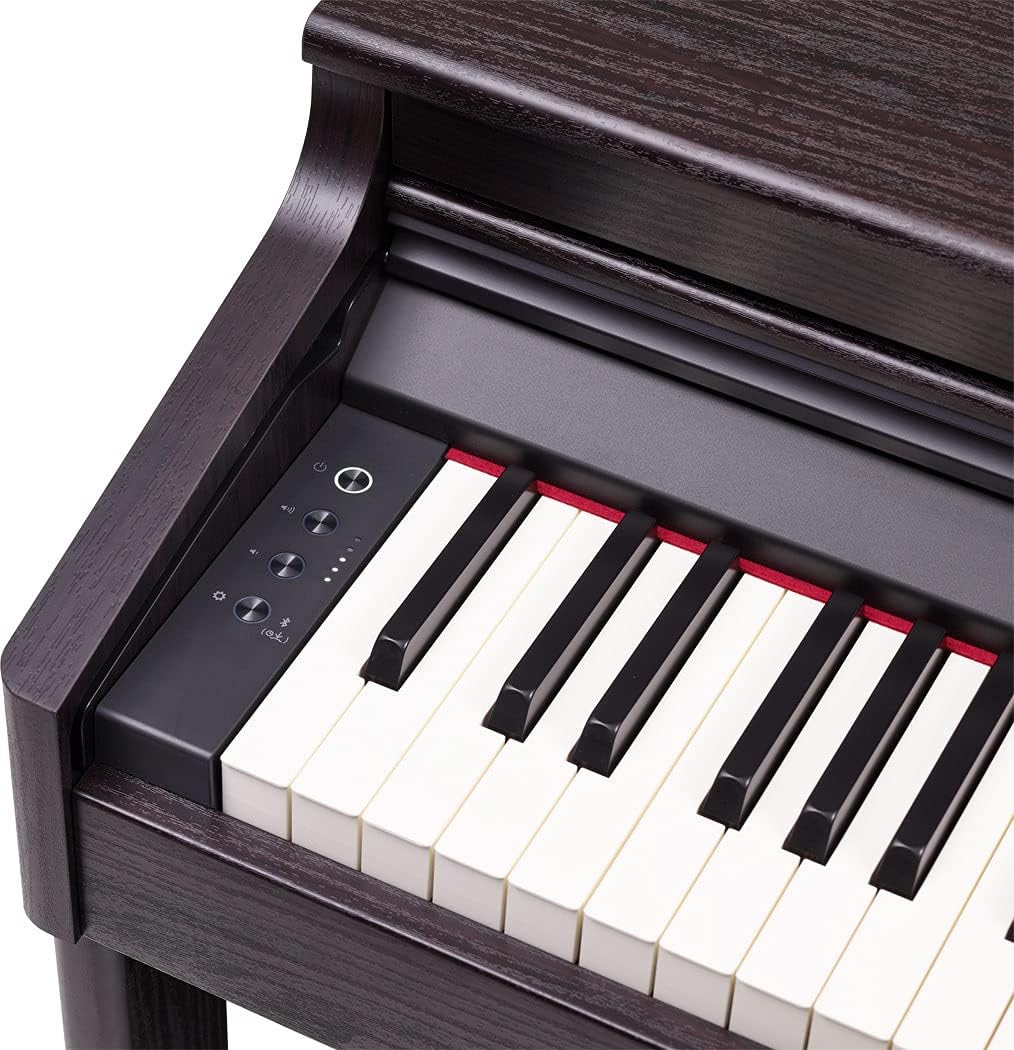
Figure 3: Rear view of the Roland RP701 Digital Home Piano, highlighting the DC In jack, Stereo miniature phone type jack, USB Type A, and USB Type B ports for various connections.
Operating the Piano
Basic Controls
The RP701 features an intuitive display with easy-to-use icons. The front panel includes controls for power, volume, and sound selection. Press the dedicated buttons to switch between different instrument sounds such as Piano, Electric Piano, Strings, and other tones. The display provides visual feedback on selected settings.

Figure 4: Close-up of the Roland RP701's control panel, showing the power button, volume knob, and various sound selection buttons with illuminated icons.
Pedals
The piano is equipped with three Progressive Damper Action pedals, providing the nuanced control expected from an acoustic piano. These pedals allow for expressive playing, including half-pedal techniques.

Figure 5: Close-up view of the three Progressive Damper Action pedals on the Roland RP701 Digital Home Piano.
Metronome
Utilize the built-in metronome for practicing with precise timing. The tempo can be adjusted to suit your practice needs.
Headphones 3D Ambience
When practicing with headphones, the Headphones 3D Ambience feature creates an immersive and realistic sound experience, making it feel as if the sound is coming from the piano itself rather than directly into your ears.
Bluetooth Connectivity
Connect your smartphone or tablet via Bluetooth to stream music through the piano's speakers and play along with your favorite songs. Bluetooth MIDI functionality also allows for interaction with music apps.
Piano Every Day App
The RP701 is compatible with Roland's Piano Every Day app, which offers features to encourage regular practice and enhance the learning experience for pianists.
Maintenance
To ensure the longevity and optimal performance of your Roland RP701, follow these general maintenance guidelines:
- Cleaning: Use a soft, dry cloth to wipe the surface of the piano. Avoid abrasive cleaners or solvents that could damage the finish.
- Dust Protection: When not in use, consider covering the keyboard with a dust cover to prevent dust accumulation.
- Environmental Conditions: Keep the piano away from direct sunlight, extreme temperatures, and high humidity to prevent damage to internal components and the wooden cabinet.
- Key Care: Avoid placing heavy objects on the keys or applying excessive force, which could affect their action and responsiveness.
Troubleshooting
If you encounter any issues with your Roland RP701, please refer to the detailed troubleshooting section in the Owner's Manual. Below are some common issues and potential solutions:
- No Sound: Ensure the power cord is securely connected and the piano is turned on. Check the volume level and ensure headphones are not plugged in if you intend to use the internal speakers.
- Hidden Control Panel: If the main control panel (sometimes referred to as "Operating Center #2") appears hidden or inaccessible, gently lift and push back the keyboard cover further. Some designs integrate the panel discreetly, requiring a specific motion to fully reveal it.
- Bluetooth Connectivity Issues: Ensure Bluetooth is enabled on both the piano and your external device. Try restarting both devices and re-pairing them.
- Keys Not Responding: Check for any obstructions on or between the keys. If the issue persists, consult the Owner's Manual or contact customer support.
Specifications
| Feature | Specification |
|---|---|
| Number of Keys | 88 |
| Keyboard Type | PHA-4 Standard keyboard with Progressive Damper Action pedals |
| Sound Engine | SuperNATURAL Piano Technology |
| Dimensions (D x W x H) | 58"D x 27"W x 24"H |
| Item Weight | 101 Pounds |
| Connectivity | Bluetooth, DC In jack, Stereo miniature phone type, USB Type A, USB Type B |
| Output Wattage | 12 Watts |
| Color | Dark Rosewood |
Warranty and Support
For detailed warranty information and customer support, please refer to the documentation included with your Roland RP701 Digital Home Piano, specifically the "USING THE UNIT SAFELY" leaflet and the Owner's Manual. You may also visit the official Roland website for the most up-to-date support resources and contact information.