
1. Introduction
This user manual provides comprehensive instructions for the setup, operation, and maintenance of your ILIFE A10 Robot Vacuum and Mop Combo. Please read this manual thoroughly before using the appliance to ensure safe and efficient operation.

Figure 1: ILIFE A10 Robot Vacuum and Mop Combo, showing its top view, underside with brushes and mop, and a smartphone displaying the connected app interface.
2. Safety Instructions
To reduce the risk of injury or damage, read these safety instructions carefully and keep them handy for future reference.
- Ensure the robot is fully charged before first use.
- Do not operate the robot in wet environments or near water.
- Keep loose clothing, hair, and body parts away from openings and moving parts.
- Do not use the robot to pick up large or sharp objects, or burning/smoking materials.
- Supervise children and pets when the robot is operating.
- Use only the manufacturer-specified power adapter and charging base.
- Regularly clean the brushes and filter to maintain optimal performance.
3. Product Overview
3.1. Components Included
The ILIFE A10 package includes the following items:
- 1 x A10 Mopping Robot Vacuum (Vacuum and Mop)
- 1 x Water Tank (packed in a smaller box within the main package)
- 1 x Mop Cloth
- 1 x Dustbin
- 1 x Charging Stand
- 1 x Charging Mat
- 1 x Remote Control
- 2 x AAA Batteries
- 1 x Power Adapter (length 1.5 meters)
- 1 x Cleaning Tool
- 1 x Roller Brush
- 4 x Side Brushes
- 1 x High-Efficiency Filter
- 1 x Water Tank Usage Guide
- 1 x User Manual (this document)
- 1 x Quick Start Guide

Figure 2: Illustration showing the water tank is packaged separately within a smaller box inside the main product package.
3.2. Key Features
- Smart Laser Navigation: The A10 Mop utilizes Lidar Navigation for precise mapping of your home environment.
- 2-in-1 Vacuuming and Mopping: Equipped with a 450ml cellular dustbin and an intelligent 300ml water tank, allowing for both dry vacuuming and wet mopping. Water output is adjustable.
- Powerful Suction: Delivers up to 2000Pa suction for effective cleaning on hard floors and low-to-medium pile carpets.
- Self-Recharge and Resume: The robot automatically returns to its charging base when the battery is low and resumes cleaning from where it left off once recharged.
- 2-in-1 Floating Roller Brush: Designed to maintain close contact with the floor and adapt to uneven surfaces for thorough debris collection.
4. Setup
- Unpacking: Carefully remove all components from the packaging. Ensure all listed items in Section 3.1 are present.
- Charging Base Placement: Place the charging stand against a wall in an open, uncluttered area. Ensure there are no obstacles within 1 meter (3 feet) to the front and 0.5 meters (1.5 feet) to the sides of the charging stand. Connect the power adapter to the charging stand and a power outlet.
- Initial Charge: Place the robot onto the charging stand. Ensure the charging contacts on the robot align with those on the stand. Allow the robot to fully charge before its first use. The indicator light will change when fully charged.
- App Connection:
- Download the "ILIFEHOME" App from your smartphone's app store.
- Register an account and log in.
- Follow the in-app instructions to connect your ILIFE A10 robot to your Wi-Fi network. Note: The robot only supports 2.4G Wi-Fi networks, not 5G.
5. Operating Instructions
5.1. Starting a Cleaning Cycle
You can start a cleaning cycle using the robot's button, the remote control, or the ILIFEHOME App.
- Robot Button: Press the power button on the robot once to start automatic cleaning.
- Remote Control: Press the "Clean" button on the remote control.
- ILIFEHOME App: Open the app, select your robot, and tap the "Start" button.
5.2. Cleaning Modes
The ILIFE A10 offers various cleaning modes to suit different needs:
- Path Mode: The robot cleans in an efficient S-shaped path, covering the entire area systematically.
- Edge Mode: The robot cleans along walls and furniture edges.
- Spot Mode: The robot focuses on a specific dirty area, cleaning in a spiral pattern.
- Max Mode: Increases suction power for deeper cleaning.

Figure 3: Visual representation of Path mode, Edge mode, Spot mode (2000PA), and Max mode (1500PA) cleaning patterns.
5.3. Advanced Mapping and Control (via ILIFEHOME App)
Leverage the ILIFEHOME App for advanced control and customization:
- Custom Area Cleaning: Define specific areas on the map for the robot to clean.
- Carpet Area Recognition: The robot can identify carpeted areas for optimized cleaning.
- To-Go Zone: Designate specific areas for the robot to clean.
- No-Go Zone: Set virtual boundaries to prevent the robot from entering certain areas.
- Schedule Cleaning: Program the robot to clean at specific times and days.
- Multiple-Floor Mapping: The robot can store maps for different floors of your home.

Figure 4: The ILIFE A10 robot using smart laser navigation to map a room, with a digital map overlay showing different zones.
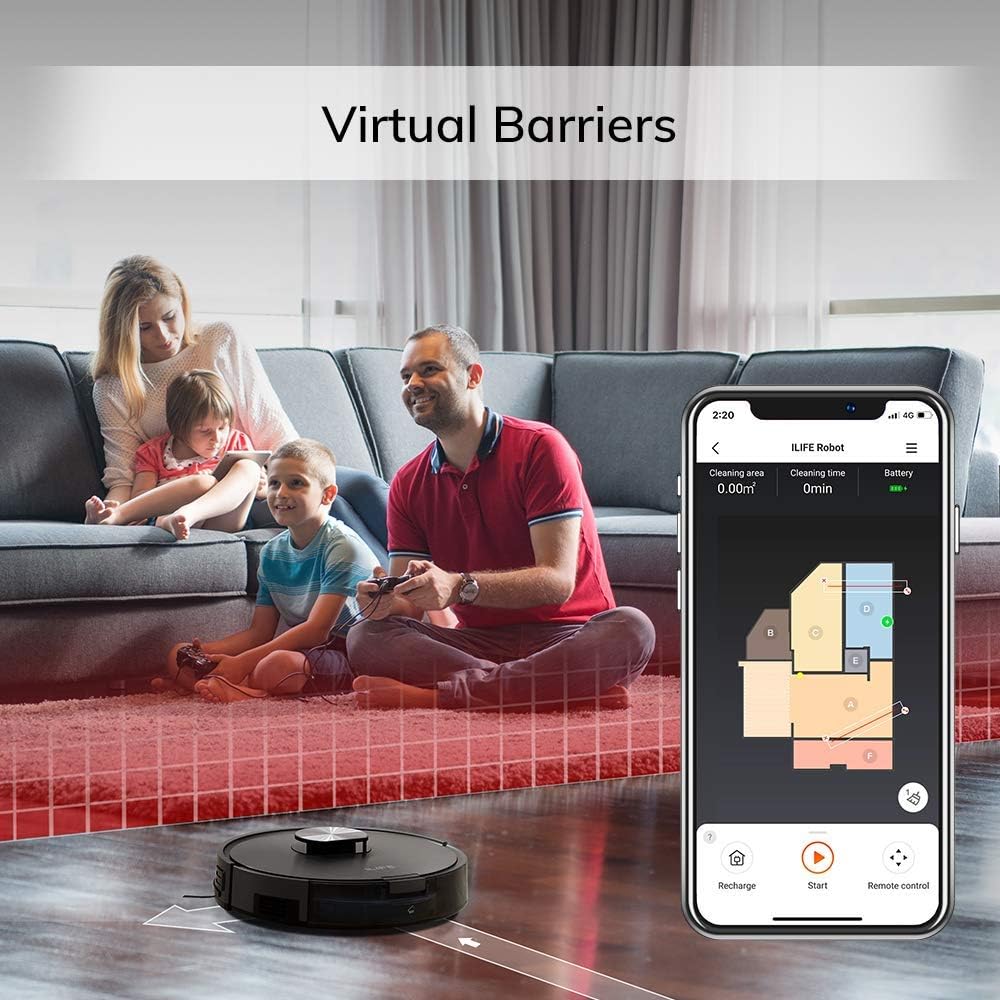
Figure 5: A family relaxing in a living room, with the ILIFE A10 robot vacuuming. A smartphone screen shows the app interface with virtual barriers (red shaded area) set to restrict the robot's movement.

Figure 6: The ILIFE A10 robot vacuuming a floor, illustrating a "No-go zone" (red shaded area) and a "To-go zone" (blue shaded area) for customized cleaning.

Figure 7: A 3D cutaway view of a two-story house, demonstrating the ILIFE A10's capability for multiple-floor mapping, with separate floor plans shown below.
5.4. Voice Control
The ILIFE A10 Mop is compatible with Amazon Alexa, allowing for convenient voice commands.
- Enable the ILIFE skill in the Alexa app.
- Use commands such as "Alexa, turn on ILIFE robot" to start cleaning.

Figure 8: The ILIFE A10 robot near its charging dock, with an Amazon Echo device nearby, illustrating voice control functionality with the command "Alexa, turn on ILIFE robot."
6. Maintenance
Regular maintenance is crucial for the optimal performance and longevity of your ILIFE A10 robot vacuum.
| Component | Maintenance Frequency | Instructions |
|---|---|---|
| Dustbin | After each use | Empty the dustbin and clean any debris. |
| High-Efficiency Filter | Weekly (or as needed) | Tap out loose debris. Rinse with water if necessary and air dry completely before reinserting. |
| Main Roller Brush | Weekly | Remove hair and debris tangled around the brush using the provided cleaning tool. |
| Side Brushes | Monthly (or as needed) | Remove and clean any tangled hair or debris. Replace if worn or damaged. |
| Water Tank & Mop Cloth | After each mopping use | Empty remaining water from the tank. Remove and wash the mop cloth. Allow both to air dry. |
| Charging Contacts & Sensors | Monthly | Wipe with a dry cloth to remove dust and debris. |
7. Troubleshooting
If you encounter issues with your ILIFE A10, refer to the following common problems and solutions:
- Robot not turning on: Ensure the robot is fully charged and properly seated on the charging base. Check the power adapter connection.
- Robot not charging: Verify that the charging contacts on both the robot and the charging base are clean and free of debris. Ensure the power adapter is securely plugged in.
- Robot getting stuck frequently: Clear obstacles from the cleaning path. Use the "No-Go Zone" feature in the app to restrict access to problematic areas. Clean the wheels and sensors.
- Poor cleaning performance: Empty the dustbin. Clean or replace the filter. Clean the main roller brush and side brushes. Ensure the suction setting is appropriate for the surface.
- App connection issues: Ensure your Wi-Fi network is 2.4G. Restart your router and the robot. Re-attempt the app connection process.
- Mopping not effective: Ensure the water tank is filled and properly installed. Check if the mop cloth is clean and wet. Adjust water output in the app if available.
For persistent issues not covered here, please contact ILIFE customer support.
8. Specifications
| Attribute | Value |
|---|---|
| Brand | ILIFE |
| Model Name | A10 Mop |
| Product Dimensions | 21.1"L x 16.6"W x 7"H |
| Item Weight | 5.83 pounds |
| Filter Type | HEPA |
| Battery Life | 1 year (estimated) |
| Voltage | 14.8 Volts |
| Dustbin Capacity | 0.45 Liters |
| Water Tank Capacity | 0.3 Liters |
| Power Source | Battery Powered |
| Control Method | Remote, App |
| Compatible Devices | Amazon Echo (Alexa) |
9. Warranty and Support
Your ILIFE A10 Mopping Robot Vacuum comes with a worry-free 12-month warranty from the date of purchase. For warranty claims, technical support, or any questions regarding your product, please contact ILIFE customer service through their official website or the contact information provided in your product packaging.