
Spider Farmer Spider Farmer SE5000
Spider Farmer SE5000 480W LED Grow Light
Instruction Manual
1. Introduction
This manual provides detailed instructions for the safe and efficient operation of your Spider Farmer SE5000 480W LED Grow Light. The SE5000 is designed for indoor plant cultivation, featuring high-efficiency Samsung LM301H EVO diodes, full-spectrum lighting, and advanced remote app control capabilities. It is engineered to provide uniform light coverage for 4x4ft cultivation areas and supports daisy-chaining for larger setups, ensuring optimal growth from seedling to harvest.

2. Safety Information
Please read all safety warnings and instructions carefully before installing or operating the SE5000 LED Grow Light. Failure to follow these instructions may result in electric shock, fire, or serious injury.
- Always disconnect power before installation, maintenance, or moving the light.
- Do not operate the light in wet or damp conditions. Ensure the environment is dry and well-ventilated.
- Do not look directly at the LED diodes when the light is on. This can cause eye damage.
- Ensure the light is securely mounted to prevent falling.
- Keep the light away from flammable materials.
- Only use the power cord and accessories provided by Spider Farmer.
- This product is for indoor use only.
3. Package Contents
Verify that all components are present and undamaged upon opening the package. If any items are missing or damaged, please contact Spider Farmer customer support.

- Spider Farmer SE5000 LED Grow Light Unit
- User Manual
- RJ12 Cable (for daisy-chaining)
- YOYO Hangers (for mounting)
- Power Cord
4. Specifications
| Feature | Specification |
|---|---|
| Model | Spider Farmer SE5000 |
| Power Consumption | 480W |
| Efficacy | 3.14 µmol/J (with Samsung LM301H EVO Diodes) |
| PPF Output | 1420 µmol/s |
| Coverage Area | 4x4 ft (120x120 cm) |
| Light Source | LED (Samsung LM301H EVO Diodes) |
| Spectrum | Full Spectrum (2800-3000K, 4800-5000K, 660-665nm) |
| Dimming | Digital Display, 0-100% Dimmable |
| Daisy Chain Capacity | Up to 50 lights |
| Material | Aluminum (Powder Coated) |
| Product Dimensions | 33.65"L x 33.57"W x 3.04"H (85.46 x 85.27 x 7.72 cm) |
| Item Weight | 18.96 pounds |
| Voltage | 120 Volts |
| Certifications | ETL Listed |

5. Setup and Installation
Follow these steps to properly set up your Spider Farmer SE5000 LED Grow Light:
5.1 Mounting the Light
- Attach the provided YOYO hangers to the designated mounting points on the light fixture.
- Hang the light securely from a sturdy support structure within your grow tent or cultivation area. Ensure the light is level and stable.
- Adjust the height of the light using the YOYO hangers to achieve the desired distance from your plants. Refer to the 'Growing Tips' section for recommended hanging heights.

5.2 Power Connection
- Connect the power cord to the light fixture's power input.
- Plug the power cord into a grounded electrical outlet.
5.3 Daisy Chain Connection (Optional)
For larger cultivation areas, multiple SE5000 lights can be daisy-chained together and controlled by a single master light.
- Using the provided RJ12 cable, connect the 'OUT' port of the master light to the 'IN' port of the next light in the chain.
- Repeat this process for additional lights, connecting the 'OUT' port of one light to the 'IN' port of the next. Up to 50 lights can be connected.

6. Operating Instructions
6.1 Manual Dimming
The SE5000 features a digital display and a dimming knob for precise brightness control.
- Turn the dimming knob clockwise to increase brightness and counter-clockwise to decrease brightness.
- The digital display will show the current brightness percentage (0-100%).

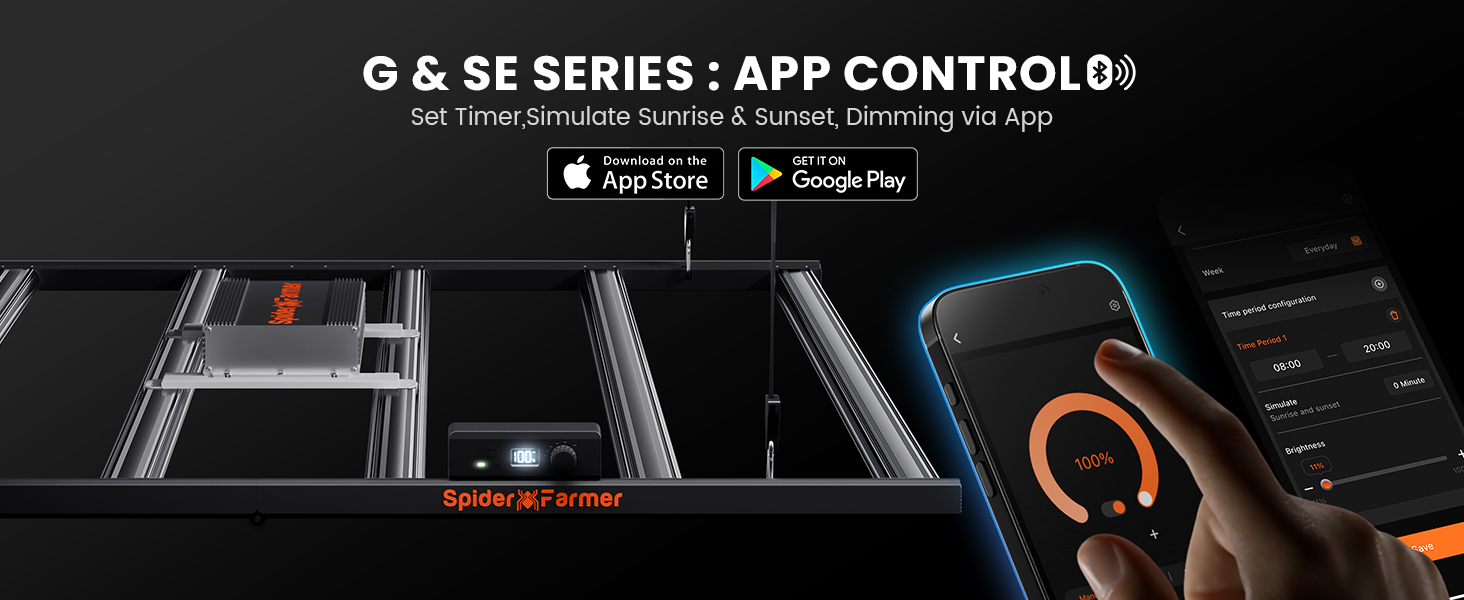
6.2 App Remote Control
Take full control of your grow light anytime, anywhere using the Spider Farmer App.
- Download the 'Spider Farmer' app from the Apple App Store or Google Play Store.
- Follow the in-app instructions to pair your SE5000 light with your device.
- Once connected, you can set custom light schedules, simulate sunrise and sunset, and adjust brightness remotely.

6.3 Full Spectrum Lighting
The SE5000 provides a full spectrum of light, including 2800-3000K, 4800-5000K, and 660-665nm, which is suitable for all stages of plant growth.
7. Growing Tips
The following table provides general recommendations for light settings based on plant growth stages. These are reference values and should be adjusted according to the specific needs of your plants and environmental conditions.
| Growth Stage | Light Cycle | Distance from Canopy | Dimming Level |
|---|---|---|---|
| Seedling | 18H ON | 16" (40cm) | 20% - 25% |
| Vegetative | 18H ON | 16" (40cm) | 45% - 50% |
| Flowering | 12H ON | 16" (40cm) | 85% - 100% |


8. Maintenance
Regular maintenance ensures the longevity and optimal performance of your SE5000 LED Grow Light.
- Cleaning: Periodically wipe the light fixture and LED bars with a soft, dry cloth to remove dust and debris. Ensure the light is unplugged and cool before cleaning. Do not use abrasive cleaners or solvents.
- Inspection: Regularly inspect the power cord, RJ12 cables, and hangers for any signs of wear or damage. Replace any damaged components immediately.
- Ventilation: Ensure adequate airflow around the light to facilitate efficient heat dissipation. The SE5000 features efficient aluminum fins for cooling.

9. Troubleshooting
If you encounter issues with your SE5000 LED Grow Light, refer to the following common troubleshooting steps:
- Light Not Turning On:
- Check if the power cord is securely plugged into both the light fixture and the electrical outlet.
- Verify that the electrical outlet is functional by plugging in another device.
- Ensure the dimming knob is not set to 0%.
- App Connectivity Issues:
- Ensure your smartphone's Bluetooth or Wi-Fi is enabled and within range of the light.
- Restart the Spider Farmer app.
- Try resetting the light's control unit (refer to the app or light's specific instructions for reset procedure).
- Uneven Light Distribution:
- Ensure the light is hung level and centered over your cultivation area.
- Adjust the hanging height to optimize coverage.
If the issue persists after attempting these steps, please contact Spider Farmer customer support for further assistance.
10. Warranty and Support
Spider Farmer provides a 5-year coverage for the SE series grow lights. This warranty covers manufacturing defects and ensures that any problems within this period can be repaired at authorized local repair centers in the USA, Canada, UK, and Germany.
For product issues, technical support, or warranty claims, please contact Spider Farmer customer service through their official website or the contact information provided in your purchase documentation. Please have your model number (Spider Farmer SE5000) and proof of purchase ready when contacting support.
Ask a question about this manual
Ask about setup, troubleshooting, compatibility, parts, safety, or missing instructions. Manuals+ will review the question and use this page’s manual context to help answer it.