
Introduction
This manual provides detailed instructions for the zelotes Wireless Vertical Mouse, Model F-17. Designed with ergonomics in mind, this mouse aims to reduce wrist strain and provide a comfortable user experience during prolonged computer use. Please read this manual thoroughly before using the product.
Package Contents
- Wireless Vertical Mouse
- USB Receiver
- Instruction Manual
Product Overview
The zelotes F-17 Vertical Mouse features a unique ergonomic design to promote a natural hand posture. It includes multiple buttons for enhanced functionality and adjustable sensitivity.
Button Layout

This diagram illustrates the key buttons on the zelotes Wireless Vertical Mouse, including the forward and backward navigation buttons.
| Button | Function |
|---|---|
| Left Button | Primary click function. |
| Right Button | Secondary click function (context menu). |
| Middle Button (Scroll Wheel) | Scrolls content vertically; clickable for middle-click actions. |
| Forward Button | Navigates forward in web browsers or file explorers. |
| Back Button | Navigates backward in web browsers or file explorers. |
| DPI Adjustment Button | Cycles through different cursor sensitivity (DPI) levels. |
Ergonomic Design Principle

The vertical design of this mouse promotes a natural handshake position, which can help alleviate wrist fatigue and prevent muscle strain often associated with traditional horizontal mice.
Setup
Battery Installation
The zelotes Wireless Vertical Mouse requires one (1) AA battery (not included).
- Open the battery compartment located on the bottom of the mouse.
- Insert one AA battery, ensuring correct polarity.
- Close the battery compartment.
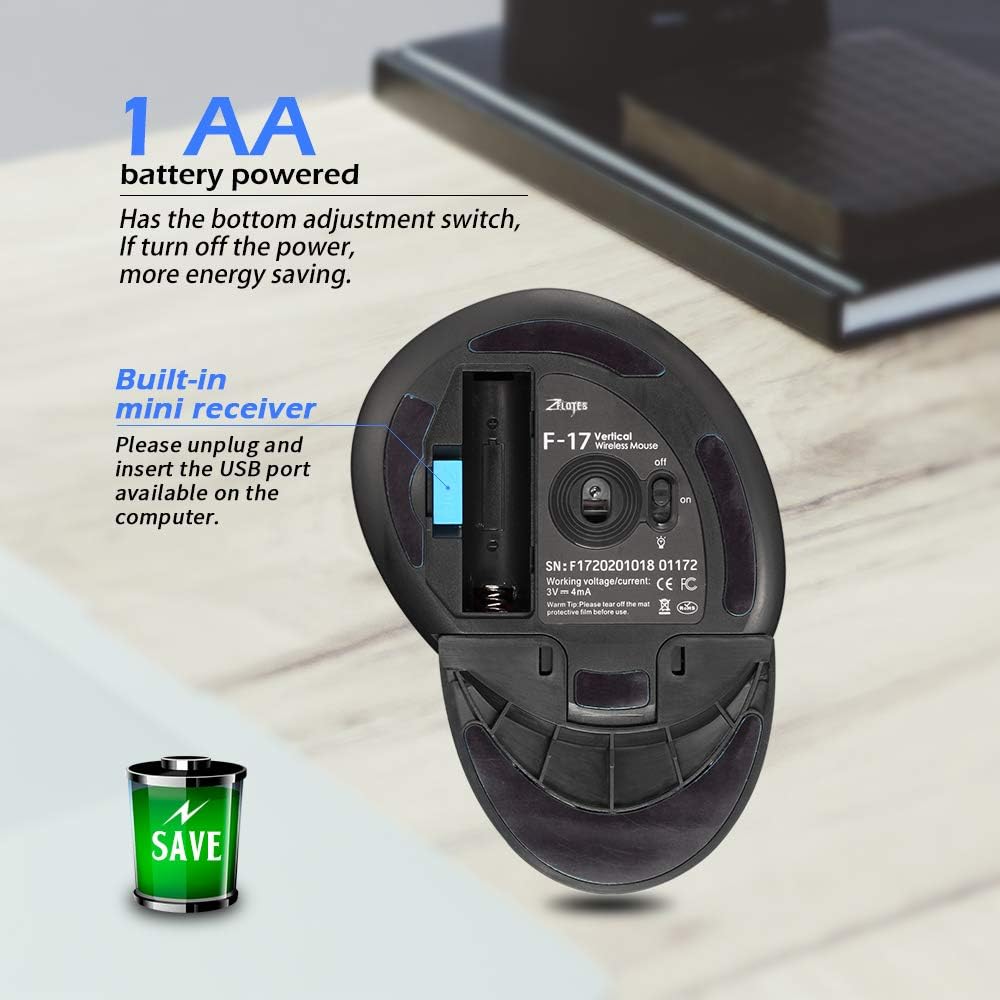
The USB receiver is conveniently stored inside the battery compartment.
Connecting the USB Receiver
The USB receiver is located within the battery compartment.
- Remove the USB receiver from its storage slot.
- Plug the USB receiver into an available USB port on your computer.
- The mouse should automatically connect.
Initial Use Preparation
Before first use, please peel off the transparent protective film from the bottom of the mouse.
Operating Instructions
DPI Adjustment
The mouse features adjustable DPI (Dots Per Inch) settings to control cursor sensitivity. Press the DPI adjustment button (usually located near the scroll wheel or thumb area) to cycle through available DPI levels (1000/1600/2400 DPI).
Forward and Back Buttons
Utilize the dedicated forward and back buttons, conveniently located near the thumb rest, for quick navigation in web browsers and file explorers.
Wireless Performance
This mouse operates on 2.4GHz wireless technology, providing a stable connection and a transmission distance of up to 10 meters.

Enjoy reliable wireless connectivity up to 10 meters from your computer.
Detachable Stock
The mouse includes a detachable stock (palm rest) that can be installed or removed based on personal preference and comfort.

The detachable stock provides additional support and can be adjusted for optimal comfort.
Maintenance
Cleaning
To clean the mouse, gently wipe its surface with a soft, dry cloth. Avoid using abrasive cleaners or solvents, which may damage the finish or internal components.
Battery Replacement
Replace the AA battery when the mouse's performance degrades or it stops responding. Follow the battery installation steps outlined in the Setup section.
Troubleshooting
Mouse Not Responding
- Ensure the USB receiver is securely plugged into a working USB port on your computer.
- Check if the battery is correctly installed and has sufficient charge. Replace if necessary.
- Turn the mouse off and on using the power switch located on the bottom.
- Try plugging the USB receiver into a different USB port on your computer.
Cursor Movement is Erratic
- Clean the optical sensor on the bottom of the mouse with a soft, lint-free cloth.
- Ensure you are using the mouse on a suitable surface (non-reflective, non-transparent).
- Adjust the DPI setting to a lower sensitivity if the cursor is too fast or jumpy.
Specifications
| Feature | Detail |
|---|---|
| Model | F-17 |
| Connectivity | 2.4GHz Wireless USB |
| DPI Settings | 1000/1600/2400 DPI |
| Buttons | 6 (Left, Right, Middle, Forward, Back, DPI) |
| Power Source | 1 x AA Battery (not included) |
| Dimensions | 5.28 x 3.27 x 0.04 inches (134 x 83 x 1 mm) |
| Weight | 3.53 ounces (100 grams) |
| Movement Detection | Optical |
| Special Feature | Ergonomic Design, Detachable Stock |
Compatibility
This device is compatible with:
- IBM or compatible computers
- Windows: 2000/ME/XP (x64) / Vista / 7 / 8 / 10
- Mac OS X (over V10.4)
- Requires an available USB port.
Warranty and Support
For warranty information and technical support, please refer to the manufacturer's official website or contact your retailer.
Manufacturer: ZELOTES MASTER
E-mail: it@zelotes.cn
Website: http://www.zelotes.cn
EU Representative: EUREP GmbH, Unterlettenweg 1a, 85051 Ingolstadt, Germany.
EU Representative Tel: +49 841 8869 7744
EU Representative E-mail: eurep@eurep-gmbh.com


