
Introduction
This manual provides essential instructions for the safe assembly, operation, maintenance, and troubleshooting of your ANCHEER Hydraulic Rowing Machine, Model 5768G. Please read this manual thoroughly before using the equipment to ensure proper function and to maximize your workout experience. Retain this manual for future reference.
Important Safety Information
- Consult a physician before starting any exercise program.
- Read all instructions in this manual before using the rowing machine.
- Keep children and pets away from the equipment during use.
- Place the rowing machine on a flat, stable surface with adequate clearance around it.
- Inspect the equipment for loose parts or damage before each use. Do not use if damaged.
- Wear appropriate exercise attire and footwear.
- The maximum user weight capacity for this machine is 220 lbs (approximately 100 kg). Do not exceed this limit.
- Stop exercising immediately if you feel faint, dizzy, or experience pain.
- Ensure all bolts and nuts are securely tightened before use.
Setup and Assembly
The ANCHEER Hydraulic Rowing Machine is designed for straightforward assembly. Follow these steps carefully:
- Unpack all components and verify against the parts list (not provided in this manual, refer to packaging).
- Place the main frame on a clear, level surface.
- Attach the hydraulic cylinders to the main frame and rowing arms as instructed in the included assembly guide.
- Secure the footrests and seat to their respective positions.
- Ensure all connections are tight and stable before proceeding.

Figure 1: Product Overview with 12-Level Hydraulic Resistance Adjustment. This image illustrates the overall structure of the rowing machine and highlights the adjustable hydraulic resistance mechanism.
Operating Instructions
Resistance Adjustment
Your rowing machine features 12 levels of hydraulic resistance. To adjust the resistance, locate the adjustment knob on each hydraulic cylinder. Rotate the knob to increase or decrease the resistance level from 1 (lowest) to 12 (highest). Adjust both cylinders to the same level for balanced resistance.

Figure 2: User in Rowing Position with Key Features. This image demonstrates proper user positioning and highlights features such as slope adjustment, anti-slip foot pads, and the 220 lbs weight capacity.
Using the LCD Monitor
The integrated LCD monitor tracks your workout data. It typically displays:
- TIME: Duration of your current workout.
- COUNT: Number of rowing strokes performed.
- DISTANCE: Estimated distance covered.
- CALORIES: Estimated calories burned.
Refer to the monitor's specific buttons (e.g., MODE, RESET) for navigating display modes and resetting values. The monitor is typically powered by batteries (not AC adapter as sometimes listed in general specifications).
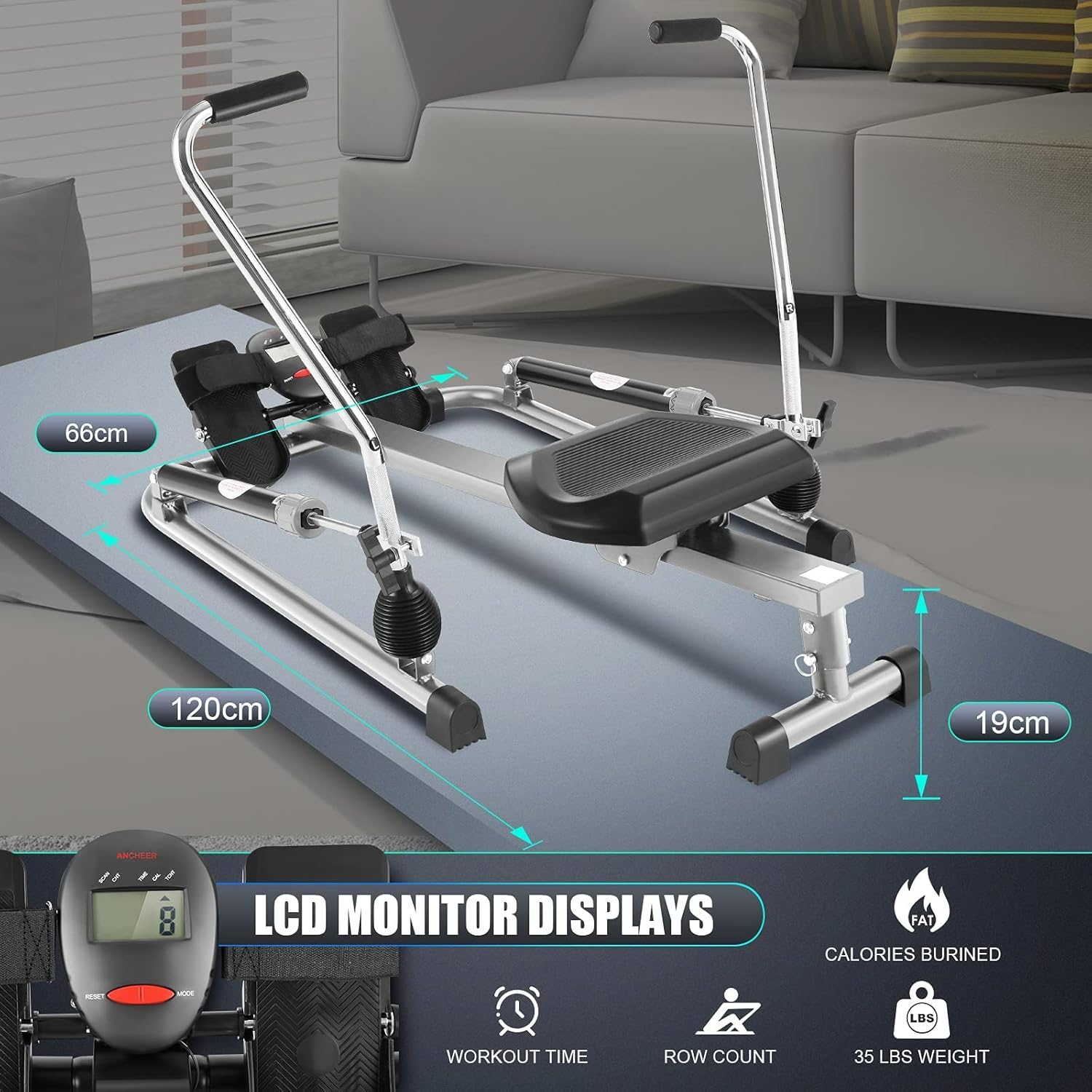
Figure 3: Product Dimensions and LCD Monitor Display Functions. This image provides an overview of the rowing machine's dimensions and details the functions displayed on the LCD monitor.
Proper Rowing Technique
For an effective and safe workout, maintain proper form:
- Sit on the comfortable seat with your feet securely strapped into the footrests.
- Grasp the padded handlebars with an overhand grip.
- Begin the stroke by pushing off with your legs, then lean back slightly, and finally pull the handlebars towards your abdomen.
- Reverse the motion smoothly: extend arms, lean forward, then bend knees to return to the starting position.
- Engage your core muscles throughout the exercise.
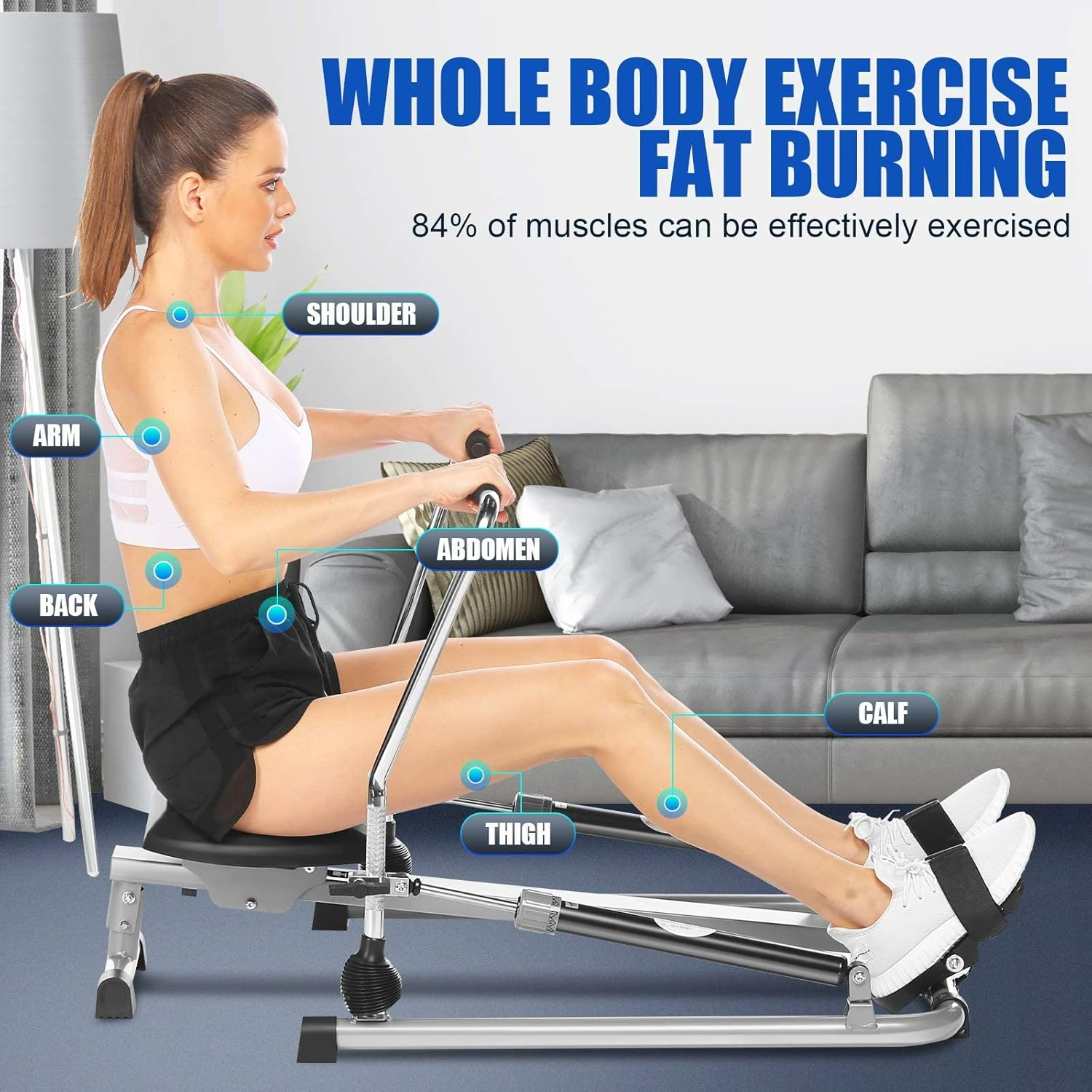
Figure 4: Whole Body Exercise Diagram Highlighting Muscle Engagement. This diagram illustrates the various muscle groups (shoulder, arm, back, abdomen, thigh, calf) effectively exercised during a rowing workout.
Storage
The rowing machine features a flat design for convenient storage. When not in use, the metal rods can be lowered, reducing its height to approximately 15-20 cm. This allows for storage under a bed or in other compact spaces.

Figure 5: Ergonomic Design Details. This image showcases the reliable ergonomic construction, including the easy-to-grip extra padded handlebar and the slip-resistant, adjustable footrests.

Figure 6: Detailed View of the PU Wear-Resistant Seat Dimensions. This image provides a close-up of the large PU wear-resistant seat, highlighting its dimensions (12" x 14.5") for maximum comfort and performance.
Maintenance
Regular maintenance ensures the longevity and safe operation of your rowing machine:
- Cleaning: Wipe down the machine with a damp cloth after each use to remove sweat and dust. Avoid abrasive cleaners.
- Inspection: Periodically check all bolts, nuts, and moving parts for tightness and wear. Tighten any loose fasteners.
- Hydraulic Cylinders: The hydraulic cylinders are sealed units and generally do not require user maintenance. If you notice a significant change in resistance or leakage, contact customer support.
- Seat Rail: Keep the aluminum seat rail clean and free of debris to ensure smooth gliding of the seat.
Troubleshooting
If you encounter issues with your ANCHEER Hydraulic Rowing Machine, refer to the following common problems and solutions:
- No Resistance or Uneven Resistance:
Ensure both hydraulic cylinders are properly attached and the resistance knobs are set to the same level. If the issue persists, the hydraulic cylinders may need replacement. - Squeaking or Grinding Noises:
Check all bolted connections and tighten if loose. Lubricate moving parts if necessary, using a silicone-based lubricant. Ensure the seat rail is clean. - LCD Monitor Not Displaying:
Check the battery compartment for proper battery installation and replace batteries if needed. Ensure all connections to the monitor are secure. - Machine Feels Unstable:
Verify that the machine is placed on a flat, level surface. Check all frame connections for tightness.
For problems not listed here or if solutions do not resolve the issue, contact customer support.
Product Specifications
| Feature | Specification |
|---|---|
| Brand | ANCHEER |
| Model Number | 5768G |
| Model Name | B-168 |
| Resistance Mechanism | Hydraulic |
| Resistance Levels | 1-12 |
| Display Type | LCD |
| Displayed Metrics | Time, Count, Distance, Calories |
| Maximum User Weight | 220 lbs (approx. 100 kg) |
| Product Dimensions (L x W x H) | 120 x 66 x 19 cm |
| Item Weight | 16 Kilograms |
| Frame Material | Aluminum, Alloy Steel |
| UPC | 194349005236 |
Warranty Information
ANCHEER products are manufactured to high-quality standards. For specific warranty terms and conditions, please refer to the warranty card included with your product or visit the official ANCHEER website. Keep your proof of purchase for warranty claims.
Customer Support
If you have any questions, require assistance with assembly, or need troubleshooting support, please contact ANCHEER customer service. Contact details can typically be found on the product packaging or the official ANCHEER website.
Website: www.ancheer.com (Example, please verify official website)


