
1. Product Overview
The Godox AD100Pro is a compact and portable round head flash designed for professional photographers. It features a powerful 100Ws output, 2.4G wireless system, and a high-capacity lithium battery, making it suitable for various shooting environments.

Figure 1.1: Godox AD100Pro Round Head Flash and included accessories.
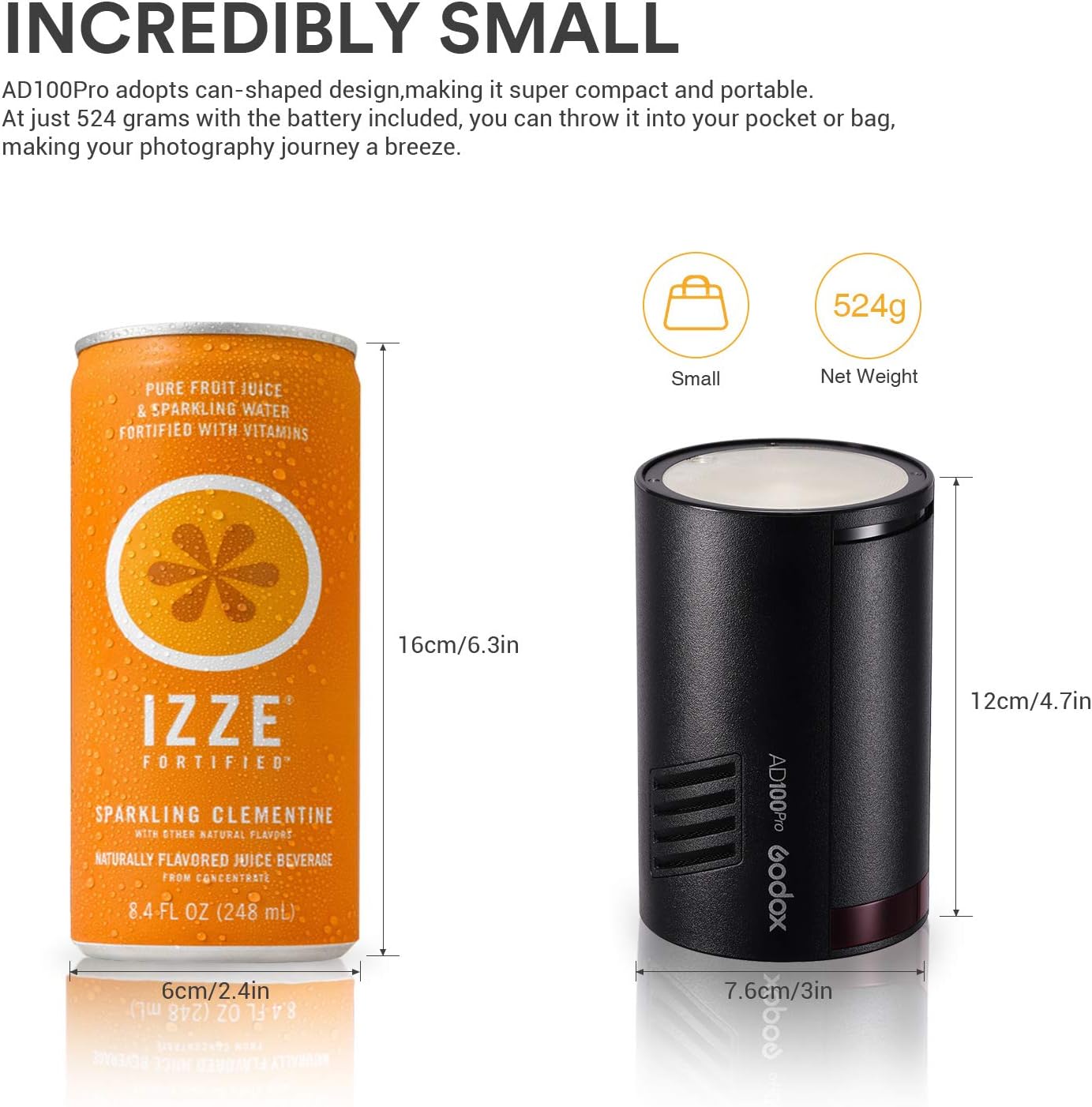
Figure 1.2: Size comparison of the Godox AD100Pro, highlighting its compact design.
2. Package Contents
Please verify that all items listed below are included in your package:
- 1 x Godox AD100Pro Flash Unit
- 1 x USB Cable
- 1 x AD-E2 Bracket
- 1 x Charger
- 1 x Portable Bag
- 1 x Instruction Manual (this document)
- 1 x Lithium Battery (included)

Figure 2.1: All components included in the Godox AD100Pro package.
3. Setup
3.1 Battery Installation
The Godox AD100Pro uses a high-capacity lithium battery. To install or replace the battery:
- Locate the battery compartment on the side of the flash unit.
- Insert the lithium battery into the compartment, ensuring correct orientation.
- Close the battery compartment cover securely.

Figure 3.1: Proper insertion of the lithium battery into the AD100Pro.
3.2 Mounting the Flash
The AD100Pro features two mounting slots for versatile positioning:
- Attach the flash to the included AD-E2 bracket for use with light stands or umbrellas.
- The two slots allow adjustment of the flash position for optimal balance and light distribution.

Figure 3.2: The two mounting slots on the base of the AD100Pro for secure attachment.
4. Operating Instructions
4.1 Power On/Off and Display
To power on the unit, press the On/Off key. The high-resolution OLED display will illuminate, showing current settings. Roll the Select Dial to unlock the controls.
Video 4.1: Demonstrates powering on the AD100Pro and unlocking the controls.
4.2 Flash Modes
The AD100Pro supports various flash modes:
- TTL Auto Flash Mode: Automatically adjusts flash output for correct exposure.
- M Manual Flash Mode: Allows manual control over flash power output.
- Multi Flash Mode: Fires a series of rapid flashes to capture multiple movements in a single image.
Use the MODE button to cycle through these options. Rotate the dial to set the power output, flash times, and frequency of the strobe in Multi mode.
Video 4.2: Demonstrates switching between TTL, Manual, and Multi flash modes and adjusting settings.
4.3 Wireless Control
The AD100Pro features a built-in 2.4G wireless X system, allowing wireless control via Godox triggers like X1, X2, Xpro, or other Godox on-camera Speedlites.
To set up wireless control:
- Press the GR/CH button to cycle through groups A-E.
- Long press the GR/CH button for 2 seconds to enter communication channel setting.
- Roll the SET dial to select the channel from 1 to 32.
- Press the SET button to confirm.
Ensure the channel, group, and ID value of the trigger are set to be the same as that of the Godox AD100Pro for proper communication.

Figure 4.1: Godox AD100Pro with compatible wireless triggers for remote operation.
Video 4.3: Demonstrates setting up group and channel for wireless control.
4.4 High-Speed Sync (HSS) and Zoom
The AD100Pro supports High-Speed Sync (HSS) up to 1/8000s, allowing you to sync with faster shutter speeds. You can also adjust the flash's focal length (zoom) to control light spread.
- Short press the "ZOOM" button to choose from 5 focal lengths.
- Long press the "ZOOM" button to enter the HSS mode.
Video 4.4: Demonstrates adjusting zoom and activating HSS mode.
4.5 Custom Functions (C.Fn)
The Custom Menu allows you to configure various settings for personalized operation:
- Beeper: Turn the audible beep on or off.
- Optic S1/S2 Unit Setting: Configure S1 or S2 optical slave modes.
- Automatic Shutdown: Set the auto-shutdown timer (30/60/90 minutes).
- Delay Flash Function: Set a delay for flash firing (0.1-30s).
- Wireless Settings: Turn wireless communication on/off.
- ID Setting: Set the wireless ID (01-99).
Video 4.5: Demonstrates navigating and adjusting various custom functions (C.Fn).
4.6 Test Button and Reset
- Test Button: Press the test button to fire a test flash.
- Reset: To reset all settings to factory defaults, press the MENU and Modeling Light button simultaneously.
Video 4.6: Demonstrates using the test button and performing a factory reset.
4.7 LED Modeling Lamp
The AD100Pro includes a 1.8W LED modeling lamp to assist with focusing and previewing light effects.
- Short press the Modeling Light button to turn the LED modeling light on/off.
- Long press the Modeling Light button to set the modeling light brightness level from 1 to 10.
Video 4.7: Demonstrates controlling the LED modeling lamp brightness.
5. Maintenance
To ensure the longevity and optimal performance of your Godox AD100Pro, follow these maintenance guidelines:
- Keep the device dry. Do not handle with wet hands or immerse in water.
- Clean the unit regularly with a soft, dry cloth. Avoid using harsh chemicals or abrasive materials.
- Store the flash in a cool, dry place, away from direct sunlight and extreme temperatures.
- Remove the battery if the unit will not be used for an extended period.
- Avoid strong impacts or dropping the unit, as this can damage internal components.
6. Troubleshooting
If you encounter issues with your Godox AD100Pro, refer to the following common problems and solutions:
| Problem | Possible Cause | Solution |
|---|---|---|
| Flash not firing. | Low battery; incorrect trigger settings; unit in standby mode. | Charge or replace battery; ensure trigger channel/group/ID match; wake unit from standby. |
| Inconsistent flash output. | Battery low; overheating; interference with wireless signal. | Ensure battery is fully charged; allow unit to cool down; check for wireless interference. |
| Display not working or dim. | Unit off; defective screen. | Ensure unit is powered on; if issue persists, contact customer support. |
| Unit not responding to trigger. | Incorrect channel/group/ID; trigger battery low; distance too far. | Verify all wireless settings match; replace trigger battery; reduce distance between flash and trigger. |
7. Specifications
| Feature | Detail |
|---|---|
| Product Dimensions | 4.72 x 2.99 x 2.99 inches |
| Item Weight | 2.59 pounds (battery included) |
| Item Model Number | InUS-S-0603087 |
| Batteries | 1 Lithium Ion battery required (included) |
| Brand | GODOX |
| Compatible Mountings | Tripod |
| Camera Flash Type | Slave |
| Flash Sync Speed | 1/8000s (HSS) |
| Full Power Flashes | Approx. 360 |
| Recycling Time | 0.01 - 1.5 seconds |
| Modeling Lamp Power | 1.8W (adjustable 1-10 levels) |
8. Warranty Information
GODOX products are manufactured to high quality standards and are warranted against manufacturing defects. For specific warranty terms and conditions, please refer to the official GODOX website or contact their customer support directly. Please retain your proof of purchase for warranty claims.
9. Support
For further assistance, technical support, or service inquiries, please contact GODOX customer support:
- Manufacturer: GODOX
- Seller: INSSTRO (via Amazon)
- Official Website: www.godox.com
- User Manual (PDF): Download PDF Manual
When contacting support, please have your product model number (InUS-S-0603087) and purchase details ready.