
Cambridge Soundworks Angle 3
Cambridge Soundworks OontZ Angle 3 Ultra Bluetooth Speaker User Manual
Model: Angle 3
Introduction
Thank you for choosing the Cambridge Soundworks OontZ Angle 3 Ultra Bluetooth Speaker. This manual provides detailed instructions for setting up, operating, maintaining, and troubleshooting your speaker to ensure optimal performance and longevity. Please read this manual thoroughly before using your speaker.

The OontZ Angle 3 Ultra Bluetooth Speaker with its included Official Carry Case.
Package Contents
Please verify that all items are present in your package:
- OontZ Angle 3 ULTRA (4th Gen) Bluetooth Speaker
- USB Type C Charging Cable
- 3.5mm Audio Cable
- Quick Start Guide
- Official OontZ Carry Case with Aluminum Carabiner
Product Overview
Familiarize yourself with the speaker's components and controls.
Dimensions

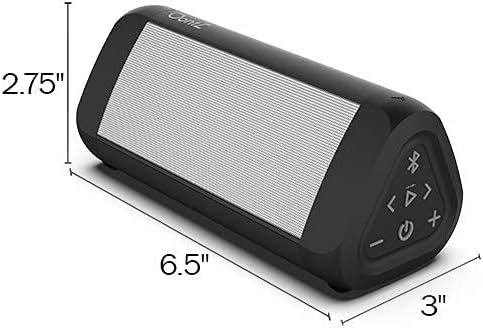
The OontZ Angle 3 Ultra speaker measures approximately 6.5 inches in length, 2.75 inches in height, and 3 inches in depth.
Internal Components

An exploded view illustrating the dual precision drivers, passive bass radiator, and battery that contribute to the speaker's sound quality and 20-hour playtime.
Charging the Speaker
The OontZ Angle 3 Ultra comes with a built-in rechargeable battery. For optimal performance, fully charge the speaker before first use.
- Connect the supplied USB Type C Charging Cable to the charging port on the speaker.
- Connect the other end of the USB cable to a USB wall charger (not included) or a computer USB port.
- The charging indicator light will illuminate during charging and turn off when fully charged.
A full charge provides up to 20 hours of playtime at 2/3 volume.
Bluetooth Pairing
Pair your OontZ Angle 3 Ultra with your Bluetooth-enabled device to enjoy wireless audio.
- Turn on the OontZ Angle 3 Ultra speaker. The Bluetooth indicator light will flash blue, indicating it's in pairing mode.
- On your device (smartphone, tablet, laptop), go to the Bluetooth settings.
- Select "OontZ Angle 3 Ultra" from the list of available devices.
- Once paired, the Bluetooth indicator light on the speaker will turn solid blue.
The speaker features Bluetooth 5.0 for a fast connection and an incredible wireless range of up to 100 unobstructed feet.
Connecting via 3.5mm Audio Cable
You can connect non-Bluetooth devices to your speaker using the included 3.5mm audio cable.
- Connect one end of the 3.5mm audio cable to the AUX IN port on the OontZ Angle 3 Ultra speaker.
- Connect the other end of the cable to the headphone jack or audio output port of your device.
- The speaker will automatically switch to AUX mode.
Wireless Dual Pairing
Enhance your audio experience by wirelessly connecting two OontZ Angle 3 Ultra speakers for true stereo separation or full stereo in different areas.

Example setup of two OontZ Angle 3 Ultra speakers for dual pairing, providing stereo sound across different rooms or areas.
- Ensure both OontZ Angle 3 Ultra speakers are charged and turned on.
- Pair one speaker to your Bluetooth device as the primary speaker.
- On the primary speaker, press and hold the Bluetooth button for 3 seconds until you hear a chime, indicating it's searching for a second speaker.
- On the second speaker, press the Bluetooth button once. It will connect to the primary speaker.
- Once connected, you will hear a confirmation tone, and the Bluetooth indicator lights on both speakers will turn solid blue.
You can place the speakers up to 100 unobstructed feet apart. For video audio, connect your TV or device to one of the speakers using the 3.5mm audio cable.
Waterproof Information
The OontZ Angle 3 Ultra is IPX7 Waterproof, making it ideal for outdoor and wet environments.
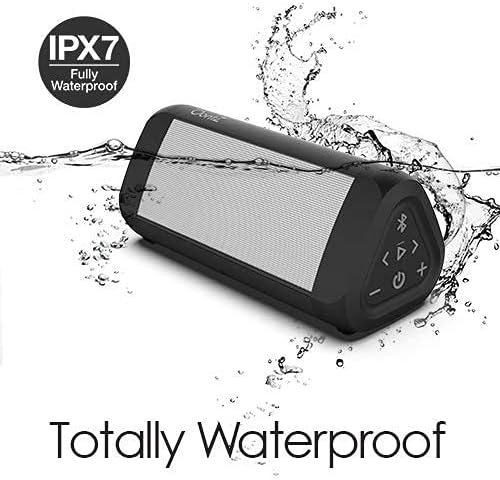
The OontZ Angle 3 Ultra is fully waterproof and can be submerged in water up to 1 meter deep for up to 30 minutes.
It can be submerged in water up to 1 meter (3.3 feet) for up to 30 minutes. This makes it perfect for use by the pool, at the beach, or in the shower. Ensure the charging port cover is securely closed before exposing the speaker to water.
Controls and Functions
The speaker features intuitive controls for easy operation:
- Power Button: Press and hold to turn on/off. Press once to play/pause music.
- Volume Up (+): Press to increase volume.
- Volume Down (-): Press to decrease volume.
- Bluetooth Button: Press to enter pairing mode. Press and hold for 3 seconds for Wireless Dual Pairing.
- Track Forward (>|): Press to skip to the next track.
- Track Back (|<<): Press to go to the previous track.
- Built-in Mic: For hands-free personal speakerphone calls.
Maintenance and Care
To ensure the longevity and performance of your OontZ Angle 3 Ultra speaker:
- Clean the speaker with a soft, damp cloth. Do not use abrasive cleaners or solvents.
- Ensure the charging port cover is sealed tightly when not charging, especially when near water.
- Store the speaker in a cool, dry place when not in use.
- Avoid exposing the speaker to extreme temperatures.
- The included carry case provides protection from scratches and dirt.
The Official OontZ Carry Case can be easily attached to bags for convenient portability.
Troubleshooting
If you encounter issues with your speaker, refer to the following common solutions:
- Speaker will not turn on: Ensure the battery is charged. Connect the speaker to a power source using the USB Type C cable.
- No sound or low volume: Check the volume levels on both the speaker and your connected device. Ensure the speaker is properly paired via Bluetooth or connected via the 3.5mm audio cable.
- Bluetooth pairing issues: Make sure the speaker is in pairing mode (flashing blue light). Turn off and on Bluetooth on your device. Move the speaker closer to your device. Clear previous Bluetooth connections on your device and try pairing again.
- Wireless Dual Pairing not working: Ensure both speakers are OontZ Angle 3 Ultra models. Follow the dual pairing instructions carefully. Ensure speakers are within 100 feet of each other without significant obstructions.
- Charging problems: Try a different USB wall charger or USB port. Ensure the USB Type C cable is securely connected to both the speaker and the power source.
- Poor sound quality/distortion: Ensure the speaker is not too far from your device. Reduce the volume if distortion occurs at maximum levels.
Specifications
| Feature | Specification |
|---|---|
| Model Name | Angle 3 |
| Speaker Type | Outdoor |
| Special Feature | Portable |
| Compatible Devices | Laptop, Smartphone, Tablet |
| Battery Life | 20 Hours |
| Included Components | Carabiner |
| Is Waterproof | TRUE (IPX7) |
| Maximum Wireless Range | 100 Feet |
| Control Method | Voice, Button |
| Wireless Communication Technology | Bluetooth 5.0 |
| Power Source | Battery Powered |
| Speaker Maximum Output Power | 14 Watts |
| Audio Output Mode | Stereo |
Warranty and Support
Cambridge Soundworks stands behind the quality of its products. For warranty information, technical support, or customer service inquiries, please visit the official Cambridge Soundworks website or contact their customer support directly. Keep your purchase receipt for warranty claims.
For the latest information and support, please visit: Cambridge Soundworks Store on Amazon
Related documentsAngle 3


Ask a question about this manual
Ask about setup, troubleshooting, compatibility, parts, safety, or missing instructions. Manuals+ will review the question and use this page’s manual context to help answer it.