
Candy ROW4964DWMCE/1-S
Candy RapidO' ROW4964DWMCE/1-S Washer Dryer User Manual
Brand: Candy | Model: ROW4964DWMCE/1-S
1. Introduction
Welcome to the user manual for your new Candy RapidO' ROW4964DWMCE/1-S Washer Dryer. This appliance combines washing and drying functions, offering convenience and efficiency for your laundry needs. Please read this manual carefully before using the appliance to ensure safe and correct operation, and to achieve the best possible results. Keep this manual for future reference.
2. Safety Information
For your safety and to prevent damage to the appliance, please observe the following precautions:
- Ensure the appliance is properly earthed and connected to a suitable power supply.
- Do not allow children to play with or operate the appliance.
- Keep pets away from the appliance.
- Never force the door open.
- Do not touch the appliance with wet hands or feet.
- Unplug the appliance before cleaning or performing any maintenance.
- Do not install the appliance in a damp environment or outdoors.
- Only use detergents and additives suitable for automatic washing machines.
- Do not wash or dry articles that have been cleaned in, washed in, soaked in, or spotted with combustible or explosive substances such as wax, oil, paint, gasoline, degreasers, dry-cleaning solvents, kerosene, etc.
- Always check pockets for foreign objects before loading laundry.
3. Product Overview
The Candy RapidO' ROW4964DWMCE/1-S is a front-loading washer dryer designed for efficiency and ease of use. It features smart connectivity and a range of programs to suit various fabric types.
3.1 Key Features
- Wi-Fi + BLE Connectivity: Connect to the Candy Simply-Fi app for remote control and additional functionalities.
- Rapid Cycles: Offers 7 rapid wash programs and 3 rapid dry programs for quick laundry solutions.
- Delayed Start: Program the appliance to start at a convenient time.
- Steam Function: Reduces wrinkles by up to 80%, simplifying ironing.
- Class A Energy Efficiency: Designed to reduce energy consumption by up to 50%.
3.2 Components and Controls
Familiarize yourself with the main parts of your washer dryer:

The appliance features a large front-loading door, a control panel with a program selector dial and digital display, and a detergent dispenser drawer.

The detergent dispenser has separate compartments for pre-wash, main wash, and fabric softener. Ensure you add detergents to the correct compartments.

The central dial allows you to select the desired washing or drying program. The digital display (Figure 4) will show the program details, including estimated time and default settings.
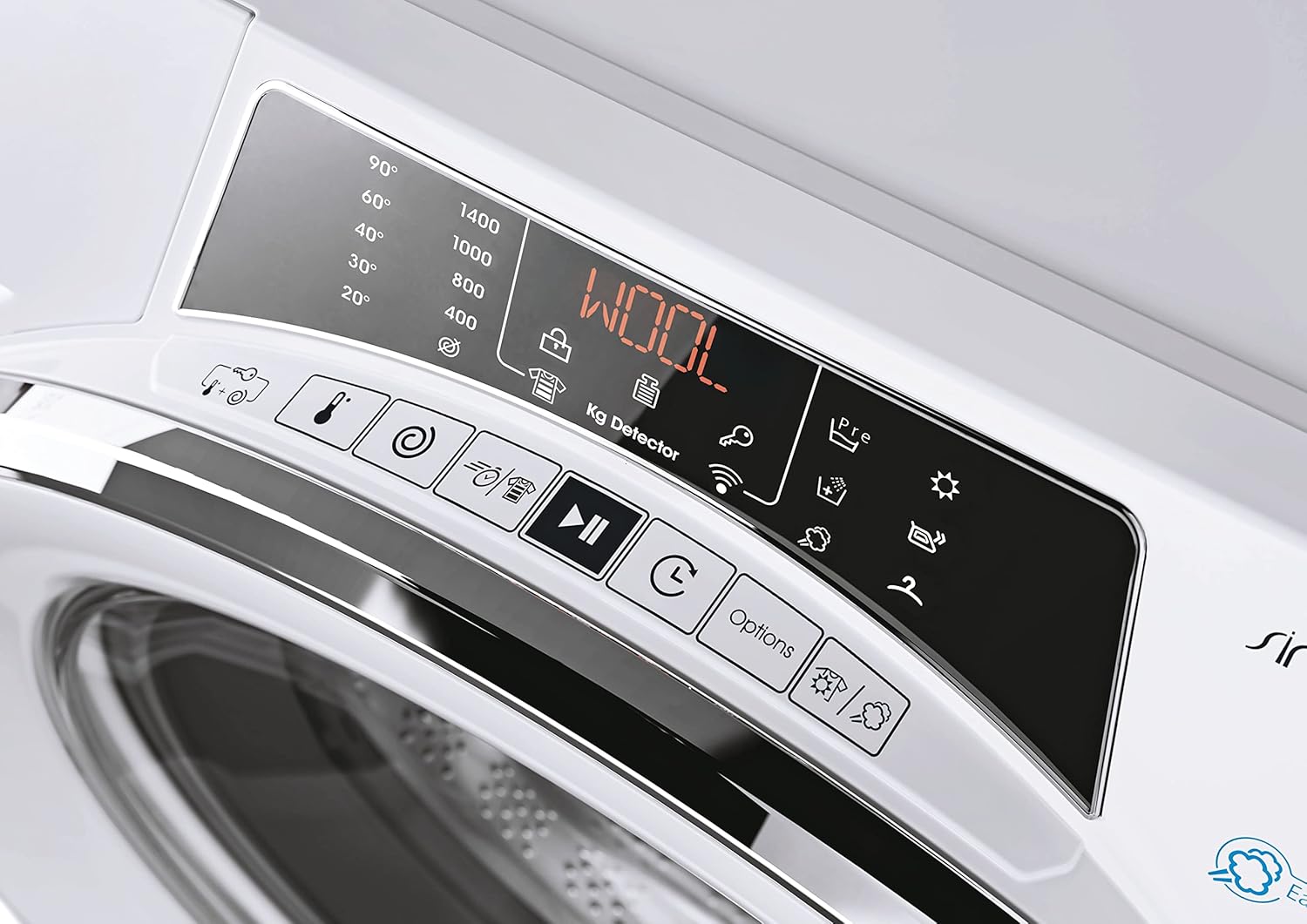
Adjacent to the display are touch-sensitive buttons for adjusting temperature, spin speed, delayed start, and other options. The "WOOL" indicator is visible on the display.
4. Setup and Installation
Proper installation is crucial for the performance and longevity of your appliance. It is recommended to have the appliance installed by a qualified technician.
4.1 Unpacking and Positioning
- Carefully remove all packaging materials, including the transport bolts at the rear of the machine. Keep these bolts for future transport.
- Place the washer dryer on a firm, level floor.
- Ensure there is adequate space around the appliance for ventilation and access.
4.2 Leveling the Appliance
Use a spirit level to ensure the appliance is perfectly level. Adjust the adjustable feet at the bottom of the machine until it is stable and does not wobble. Proper leveling prevents excessive vibration and noise during operation, especially during spin cycles.
4.3 Water and Drain Connections
- Connect the water inlet hose to a cold water tap with a 3/4" thread. Ensure the connection is tight to prevent leaks.
- Position the drain hose into a standpipe or over the edge of a sink, ensuring it is securely fixed to prevent displacement during draining.
4.4 Electrical Connection
- Plug the power cord into a properly earthed electrical socket.
- Ensure the voltage and frequency match the specifications on the appliance's rating plate.
4.5 Dimensions

The dimensions of the appliance are approximately 85 cm (Height) x 60 cm (Width) x 58 cm (Depth).
5. Operating Instructions
This section guides you through the daily operation of your Candy RapidO' washer dryer.
5.1 Preparing Laundry
- Sort laundry by fabric type, color, and degree of soiling.
- Check garment care labels for washing and drying instructions.
- Empty pockets and close zippers and fasteners.
- The maximum washing capacity is 9 kg, and the maximum drying capacity is 6 kg. Do not overload the machine to ensure optimal results and prevent damage.
5.2 Adding Detergent and Additives
Open the detergent dispenser drawer (Figure 2) and add the appropriate amount of detergent and fabric softener to the designated compartments:
- Compartment 1: Pre-wash detergent (if selected).
- Compartment 2: Main wash detergent.
- Compartment (often marked with a flower): Fabric softener.
Close the drawer gently after adding products.
5.3 Selecting a Program
Turn the program selector dial (Figure 3) to choose the desired wash or dry program. The digital display (Figure 4) will show the program details, including estimated time and default settings.
- Wash Programs: The appliance offers 16 wash cycles, including specific programs for cotton, synthetics, delicates, and wool.
- Rapid Cycles: Utilize the 7 rapid wash programs for quick washes when time is limited.
- Drying Programs: The appliance includes 3 rapid dry programs. For optimal drying, ensure the load size does not exceed 6 kg.
5.4 Adjusting Settings and Special Functions
After selecting a program, you can customize settings using the touch buttons:
- Temperature: Adjust the wash temperature according to fabric care labels.
- Spin Speed: Select the desired spin speed (up to 1400 RPM).
- Delayed Start: Press the delayed start button to set a delay time for the program to begin.
- Steam Function: Activate the steam function for certain programs to reduce wrinkles.
5.5 Smart Features (Wi-Fi + BLE)
Your Candy RapidO' washer dryer is equipped with Wi-Fi and Bluetooth Low Energy (BLE) connectivity, allowing you to control and monitor it remotely via the Candy Simply-Fi app.
- App Download: Download the Candy Simply-Fi app from your smartphone's app store.
- Pairing: Follow the in-app instructions to pair your appliance with your smartphone. This typically involves activating Wi-Fi on the machine and confirming the connection in the app.
- Remote Control: Once connected, you can start, pause, and monitor programs, download additional cycles, and receive maintenance alerts directly on your phone.
- Important Note: To use remote start, ensure the appliance is loaded and the door is closed before activating the remote control function via the app.
6. Maintenance and Care
Regular maintenance ensures the efficient operation and extends the lifespan of your washer dryer.
- Cleaning the Detergent Dispenser: Periodically remove and clean the detergent drawer under running water to prevent residue buildup.
- Cleaning the Drum: Run a maintenance wash cycle (e.g., a hot wash with no laundry and a descaling agent) monthly to keep the drum clean and fresh.
- Cleaning the Filter: Regularly check and clean the drain pump filter, usually located at the bottom front of the appliance, to remove lint and foreign objects.
- Cleaning the Exterior: Wipe the exterior surfaces with a soft, damp cloth. Do not use abrasive cleaners.
- Door Seal: Wipe the door seal after each wash to remove any trapped lint or moisture, preventing mold growth.
7. Troubleshooting
Before contacting customer service, please refer to the following common issues and solutions:
| Problem | Possible Cause | Solution |
|---|---|---|
| Appliance does not start. | No power, door not closed, program not selected. | Check power supply, ensure door is securely latched, select a program and press start. |
| Excessive vibration/noise during spin. | Appliance not level, transport bolts not removed, uneven load. | Ensure appliance is level by adjusting feet. Verify transport bolts are removed. Redistribute laundry evenly in the drum. |
| Water leaks from the machine. | Hoses loose, detergent drawer overflowing, drain filter blocked. | Check hose connections for tightness. Do not overfill detergent drawer. Clean the drain pump filter. |
| Poor washing results. | Overloading, incorrect detergent, wrong program. | Reduce load size. Use appropriate detergent for the fabric and water hardness. Select a suitable wash program. |
| Clothes not drying properly. | Overloading, lint filter blocked, incorrect drying program. | Ensure drying load does not exceed 6 kg. Clean the lint filter. Select an appropriate drying program. |
| Spin cycle not engaging. | Unbalanced load, drain pump issue, motor fault. | Redistribute laundry. Check and clean the drain pump filter. If the issue persists, contact service. |
8. Specifications
Detailed technical specifications for the Candy RapidO' ROW4964DWMCE/1-S Washer Dryer:
| Feature | Value |
|---|---|
| Brand | Candy |
| Model Number | 31010383 (ROW4964DWMCE/1-S) |
| Product Dimensions (WxDxH) | 60 x 58 x 85 cm |
| Item Weight | 66 Kilograms |
| Washing Capacity | 9 Kilograms |
| Drying Capacity | 6 Kilograms |
| Maximum Spin Speed | 1400 Revolutions per minute |
| Energy Efficiency Class (Wash) | A |
| Energy Efficiency Class (Wash & Dry) | D (based on new EU label) |
| Annual Energy Consumption (Wash & Dry) | 308 Kilowatt hours per year (for 100 cycles) |
| Annual Water Consumption (Wash & Dry) | 86 Liters per cycle (wash & dry) |
| Number of Wash Cycles | 16 |
| Number of Drying Cycles | 3 (Rapid Dry) |
| Control Type | Wi-Fi, Semi-automatic |
| Voltage | 220 Volt |
| Drum Material | Stainless Steel |
| Special Feature | Hygienic Steam |
| Color | Chrome Finish |
For detailed energy information, refer to the official EU energy label:

9. Warranty and Support
Your Candy RapidO' ROW4964DWMCE/1-S Washer Dryer is covered by a manufacturer's warranty and Amazon's return policy.
- Manufacturer's Warranty: Candy typically offers a standard 2-year warranty. Additionally, Candy provides the option to extend coverage for spare parts for an additional 8 years (total 10 years) after the initial 2-year warranty, with labor costs applying. This option usually needs to be activated separately after product delivery.
- Amazon Return Policy: If you wish to return a product within 30 days of receipt because you have changed your mind, please consult Amazon's help page on returns. For defective or damaged products, refer to Amazon's help page on product issues.
- Customer Support: For technical assistance, troubleshooting beyond this manual, or warranty claims, please contact Candy customer service or your retailer.
Related documentsROW4964DWMCE/1-S


Ask a question about this manual
Ask about setup, troubleshooting, compatibility, parts, safety, or missing instructions. Manuals+ will review the question and use this page’s manual context to help answer it.