
Introduction
Thank you for purchasing the ONE Light 67384/AN/W Anthracite PLAFO LED Luminaire. This manual provides essential information for the safe installation, operation, and maintenance of your new LED light fixture. Please read these instructions carefully before installation and retain them for future reference.
Safety Instructions
- Electrical Safety: Installation must be performed by a qualified electrician in accordance with all local and national electrical codes. Ensure the main power supply is switched off at the circuit breaker before commencing any installation or maintenance work.
- Voltage: This luminaire is designed for operation with a 100-240V AC power supply. Verify your supply voltage matches this requirement.
- Mounting: Ensure the mounting surface is structurally sound and capable of supporting the weight of the luminaire.
- IP54 Rating: This product is rated IP54, indicating protection against dust ingress and splashing water from any direction. It is suitable for both indoor and outdoor use, but not for submersion.
- LED Light Source: The LED lamps are built-in and cannot be changed. Do not attempt to open or modify the LED module.
- Heat: The luminaire may become warm during operation. Avoid touching the surface directly after extended use.
Package Contents
Please check that all components are present and undamaged before installation:
- ONE Light 67384/AN/W LED Luminaire (1 unit)
- Mounting hardware (screws, wall plugs)
- Instruction Manual (this document)
Setup and Installation
Follow these steps for safe and correct installation:
- Preparation: Switch off the main power supply at the circuit breaker. Ensure the installation area is clean and dry.
- Mounting Location: Select a suitable wall or ceiling location for the luminaire. Consider the desired light distribution and accessibility for future maintenance.
- Marking: Use the luminaire's mounting bracket as a template to mark the drilling points on the surface.
- Drilling: Drill holes at the marked points using an appropriate drill bit for your wall material. Insert wall plugs if necessary.
- Wiring: Connect the electrical wires from your power supply to the luminaire's terminal block. Ensure correct polarity (Live, Neutral, Earth) as indicated on the luminaire. Secure all connections tightly.
- Mounting the Luminaire: Secure the luminaire to the mounting surface using the provided screws. Ensure it is firmly attached and stable.
- Final Check: Double-check all connections and ensure the luminaire is securely mounted. Restore power at the circuit breaker.
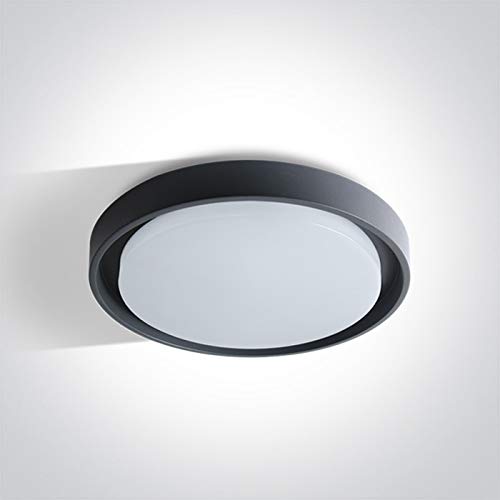
Image: The ONE Light 67384/AN/W Anthracite PLAFO LED Luminaire, showcasing its sleek, round design suitable for modern indoor and outdoor environments.

Image: Technical drawing illustrating the dimensions of the luminaire: 340mm diameter and 50mm height.
Operating Instructions
The ONE Light 67384/AN/W luminaire is designed for simple operation.
- Power On/Off: Control the luminaire using a standard wall switch (push button controller type). Flip the switch to turn the light on or off.
- Light Source: This luminaire features a built-in LED light source that provides warm white (WW) illumination. The LEDs are non-removable and designed for long-term use.
Maintenance
Regular maintenance ensures optimal performance and longevity of your luminaire.
- Cleaning: Before cleaning, ensure the power supply to the luminaire is switched off. Use a soft, damp cloth to wipe the exterior surface. Do not use abrasive cleaners, solvents, or harsh chemicals, as these can damage the finish or electrical components.
- Lamp Replacement: The LED lamps in this luminaire are built-in and cannot be replaced. If the LED light source fails, the entire luminaire must be replaced by a qualified professional.
- Inspection: Periodically inspect the luminaire for any signs of damage, loose connections, or wear. If any issues are found, switch off the power and consult a qualified electrician.

Image: EU Energy Label for the luminaire, indicating it contains built-in LED lamps that cannot be changed, in compliance with regulation 874/2012.
Troubleshooting
If you encounter issues with your luminaire, refer to the following common problems and solutions:
- Light does not turn on:
- Check if the main power supply is switched on.
- Verify that the wall switch is in the 'ON' position.
- Inspect electrical connections for looseness or damage (ensure power is off before inspection).
- Check the circuit breaker for a tripped fuse.
- Light flickers:
- Ensure all electrical connections are secure.
- Verify the power supply voltage is stable and within the specified range (100-240V).
- Reduced brightness:
- Clean the luminaire's surface to remove any dust or dirt accumulation.
- LEDs have a long lifespan, but gradual degradation can occur over many years.
If the problem persists after attempting these solutions, contact a qualified electrician or the retailer for assistance. Do not attempt to repair the luminaire yourself.
Specifications
| Brand | ONE Light |
| Model Number | 67384/AN/W |
| Material | Aluminium |
| Power Source | Corded Electric |
| Voltage | 100-240V |
| Light Source | Built-in LED (Non-removable) |
| Wattage | 30W |
| Light Color | Warm White (WW) |
| Ingress Protection (IP) Rating | IP54 (Dust protected, splash-proof) |
| Indoor/Outdoor Usage | Indoor, Outdoor |
| Controller Type | Push Button (via external switch) |
| Mounting Type | Wall Mount |
| Dimensions (Diameter x Height) | 340mm x 50mm |
Warranty and Support
For warranty information, please refer to the terms and conditions provided by your retailer at the time of purchase. Keep your proof of purchase for any warranty claims.
If you require technical support or have questions not covered in this manual, please contact the retailer where you purchased the product or visit the official ONE Light website for contact details.