
1. Introduction and Overview
Thank you for choosing the STANLEY SXA25 Digital Smart Battery Charger and Maintainer. This device is designed for charging and maintaining 6V and 12V lead-acid batteries, including AGM, Gel, VLRA, Wet, and Liquid types. Featuring an intelligent microprocessor-controlled 8-stage charging process, it ensures optimal battery health and extends battery life by preventing overcharging. Please read this manual thoroughly before use to ensure safe and efficient operation.
2. Safety Information
Always prioritize safety when working with batteries and electrical equipment. Failure to follow these instructions may result in electric shock, fire, or serious injury.
- Read all instructions before using the charger.
- Wear eye protection and protective clothing when working near batteries.
- Ensure adequate ventilation in the charging area.
- Do not smoke or allow sparks or flames near the battery or charger.
- Disconnect the AC power supply before connecting or disconnecting battery leads.
- Do not charge frozen batteries.
- Keep the charger away from moisture and extreme temperatures.
- This charger is for lead-acid batteries only. Do not use with other battery types.
3. Package Contents
Verify that all items are present in your package:
- STANLEY SXA25 Battery Charger Unit
- Battery Clamps (Red and Black)
- Ring Terminal Connectors (Red and Black)
- AC Power Cord (EU standard plug)
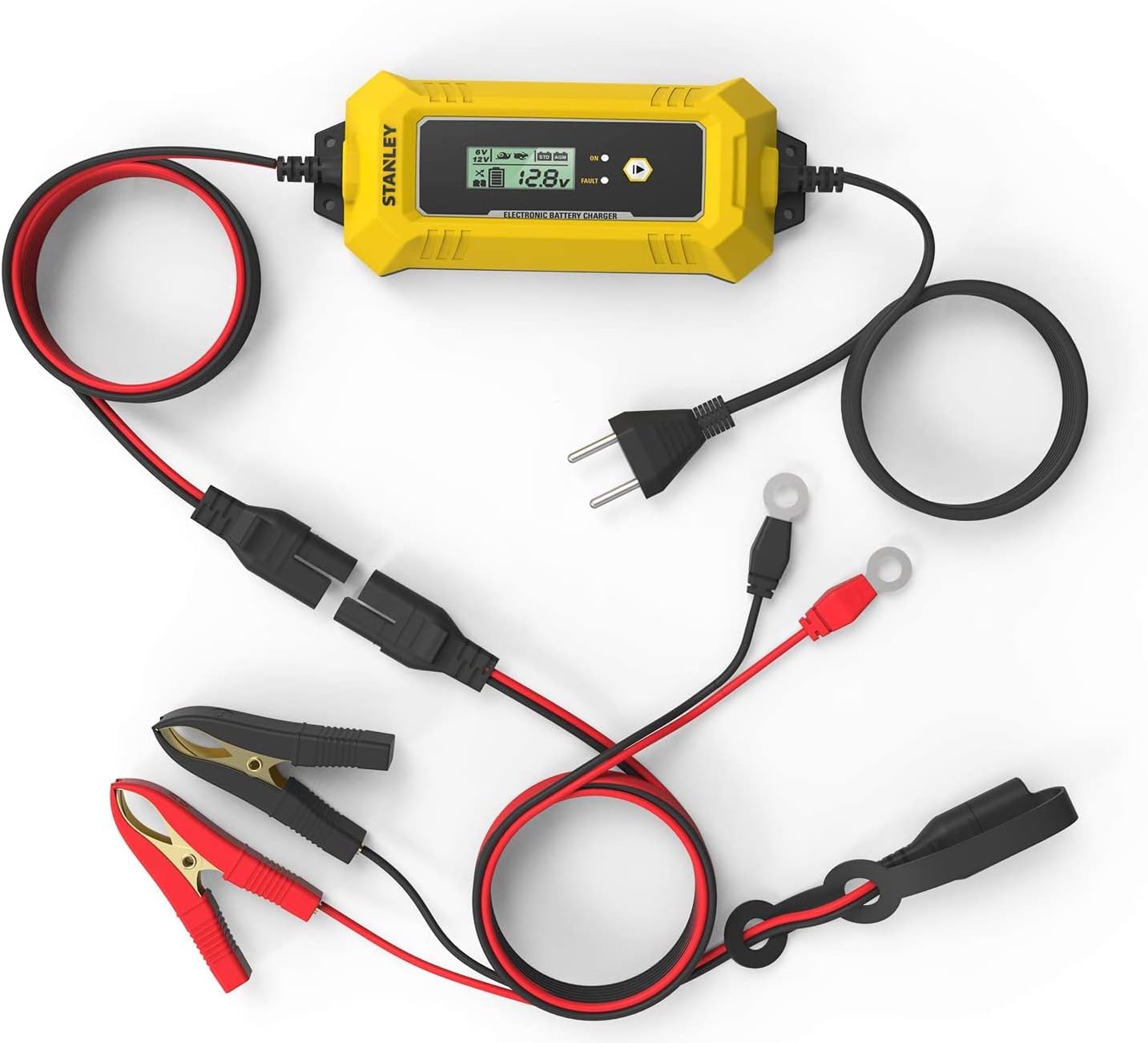
4. Product Features
The STANLEY SXA25 offers advanced features for efficient battery charging and maintenance:
- Automatic Microprocessor Control: Ensures optimal charging adapted to the battery's state.
- Versatile Compatibility: Suitable for 6V or 12V lead-acid batteries (AGM, Gel, VLRA, Wet, Liquid).
- Maximum Charge Current: 4 Amperes.
- Charging Capacity: Charges batteries from 4 Ah to 80 Ah.
- Maintenance Capacity: Maintains batteries from 4 Ah to 120 Ah.
- 8-Stage Intelligent Charging: Prevents overcharging and prolongs battery life.
- LCD Display: Shows charge status, selected features, and error messages.
- Selectable Modes: Allows selection of battery voltage (6V/12V), charge speed (fast/slow), and battery type (STD/AGM).
- Reconditioning Function: Designed to revitalize deeply discharged batteries.
- Power Input: Direct connection to 220-240V AC 50-60Hz standard EU outlet.
- Connection Options: Equipped with both battery clamps and ring terminals for flexible connection.
- Cable Length: 1.5m + 0.5m for connection accessories.
- IP65 Rating: Provides protection against dust and low-pressure water jets.

5. Setup
Follow these steps to set up your STANLEY SXA25 battery charger:
- Prepare the Battery: Ensure the battery terminals are clean and free of corrosion. If charging a wet cell battery, check the fluid levels and top up with distilled water if necessary.
- Choose Connection Method: Decide whether to use the battery clamps for temporary connection or the ring terminals for a more permanent installation.
- Connect to Battery:
- Connect the RED (+) charger lead to the POSITIVE (+) battery terminal.
- Connect the BLACK (-) charger lead to the NEGATIVE (-) battery terminal.
- For vehicle batteries, if connecting to the vehicle chassis, connect the BLACK (-) lead to a non-painted metal part of the chassis away from the battery and fuel line.
Ensure connections are secure. Do not allow the red and black clamps to touch each other once connected to the battery.
- Connect to AC Power: Plug the charger's AC power cord into a standard 220-240V AC 50-60Hz electrical outlet. The charger will power on and perform a self-test.

6. Operating Instructions
Once connected, the charger will automatically detect the battery voltage and begin the charging process. You can adjust settings using the mode button.
- Automatic Detection: The charger will automatically detect if a 6V or 12V battery is connected. The LCD display will show the detected voltage.
- Mode Selection: Press the 'MODE' button to cycle through available charging modes. The display will show options for:
- Voltage: 6V or 12V (usually auto-detected, but can be manually selected if needed).
- Charge Speed: Fast or Slow (indicated by an icon).
- Battery Type: STD (Standard) or AGM (Absorbed Glass Mat) / GEL.
- Reconditioning: A special mode for deeply discharged batteries.
- Monitoring the Display: The LCD screen provides real-time information:
- Battery Voltage: Displays the current battery voltage.
- Charge Status: Indicated by a battery icon with charging segments.
- Selected Mode: Icons for 6V/12V, charge speed, and battery type.
- Fault Indicator: A 'FAULT' light and icon will illuminate if an error occurs (e.g., reverse polarity, short circuit, faulty battery).
- Charging Process: The charger will proceed through its 8-stage charging cycle automatically. Once the battery is fully charged, the charger will switch to maintenance mode to prevent overcharging.
- Disconnecting: To disconnect the charger, first unplug the AC power cord from the wall outlet. Then, disconnect the BLACK (-) lead from the battery (or chassis), followed by the RED (+) lead from the battery.


7. Maintenance
Proper maintenance ensures the longevity and reliable operation of your charger:
- Cleaning: Disconnect the charger from all power sources before cleaning. Wipe the exterior with a soft, dry cloth. Do not use abrasive cleaners or solvents.
- Cable Inspection: Regularly inspect the AC power cord and battery leads for any signs of damage, cuts, or fraying. Replace damaged cables immediately.
- Connector Care: Keep the battery clamps and ring terminals clean and free of corrosion.
- Storage: Store the charger in a cool, dry place when not in use. Ensure cables are neatly coiled and not kinked.
8. Troubleshooting
If you encounter issues with your STANLEY SXA25 charger, refer to the following common problems and solutions:
| Problem | Possible Cause | Solution |
|---|---|---|
| Charger does not power on. | No AC power; faulty outlet. | Check AC power connection. Test outlet with another device. |
| 'FAULT' indicator is lit. | Reverse polarity; short circuit; faulty battery; incorrect voltage selection. | Disconnect and re-connect battery leads ensuring correct polarity. Check for short circuits. Test battery condition. Ensure correct 6V/12V mode is selected. |
| Battery not charging. | Poor connection; deeply discharged battery; battery fault. | Ensure secure connections. Try the reconditioning mode for deeply discharged batteries. If still no charge, the battery may be beyond recovery. |
| Charging takes too long. | Large battery capacity; slow charge mode selected; battery condition. | Charging time depends on battery size and discharge level. Ensure 'Fast' charge mode is selected if desired. A very old or damaged battery may take longer or not fully charge. |
9. Specifications
| Manufacturer | Stanley |
| Model Name | SXA25 |
| Product Number | 201870 |
| Input Voltage | 220-240V AC, 50-60Hz |
| Output Voltage | 6V / 12V |
| Maximum Charge Current | 4A |
| Compatible Battery Types | Lead-Acid (AGM, Gel, VLRA, Wet, Liquid) |
| Charging Capacity | 4 Ah to 80 Ah |
| Maintenance Capacity | 4 Ah to 120 Ah |
| Dimensions (D x W x H) | 5.5D x 6.5W x 32H cm |
| Color | Yellow |
| Certifications | CE |
| IP Rating | IP65 |
| First Available Date | January 4, 2021 |
10. Warranty and Support
Warranty Information: This STANLEY product is covered by a manufacturer's warranty. Please refer to the warranty card included with your purchase or visit the official Stanley website for detailed terms and conditions. Keep your proof of purchase for warranty claims.
Customer Support: For technical assistance, troubleshooting not covered in this manual, or warranty inquiries, please contact Stanley customer support. Contact information can typically be found on the product packaging, the official Stanley website, or your retailer's support channels.


