
wolf guard WM2T-300
Wolf Guard W4Q WiFi 4G Smart Alarm System User Manual
Model: WM2T-300 | Brand: Wolf Guard
1. Introduction
Thank you for choosing the Wolf Guard W4Q WiFi 4G Smart Alarm System. This comprehensive security solution is designed to provide peace of mind for your home or business. Featuring dual network backup (WiFi and 4G GSM), a 1080P HD camera, and a solar-powered outdoor siren, the system ensures continuous protection even during power outages or Wi-Fi disruptions. This manual will guide you through the setup, operation, and maintenance of your new alarm system.
Key features include:
- Dual Network Backup: WiFi and 4G GSM for reliable communication.
- Remote Monitoring: View your property anytime, anywhere via the Smartlife APP.
- DIY Customization: Flexible settings for arming/disarming schedules, delayed alarms, and expandable with up to 100 additional accessories.
- Multi-language Support: Available in 11 languages including English, German, Spanish, Italian, and French.
2. Product Overview
The Wolf Guard W4Q system comes with a complete set of components designed for robust security. Below is an overview of the main components included in your package:

Figure 2.1: An overview of the Wolf Guard W4Q Smart Alarm System components, including the main control panel, solar siren, HD camera, motion sensors, door/window contacts, remote controls, and RFID tags.

Figure 2.2: The Wolf Guard W4Q Smart Alarm System control panel displayed with various accessories, highlighting its WiFi+4G capabilities and integration with the Tuya Smartlife APP for remote control and monitoring.
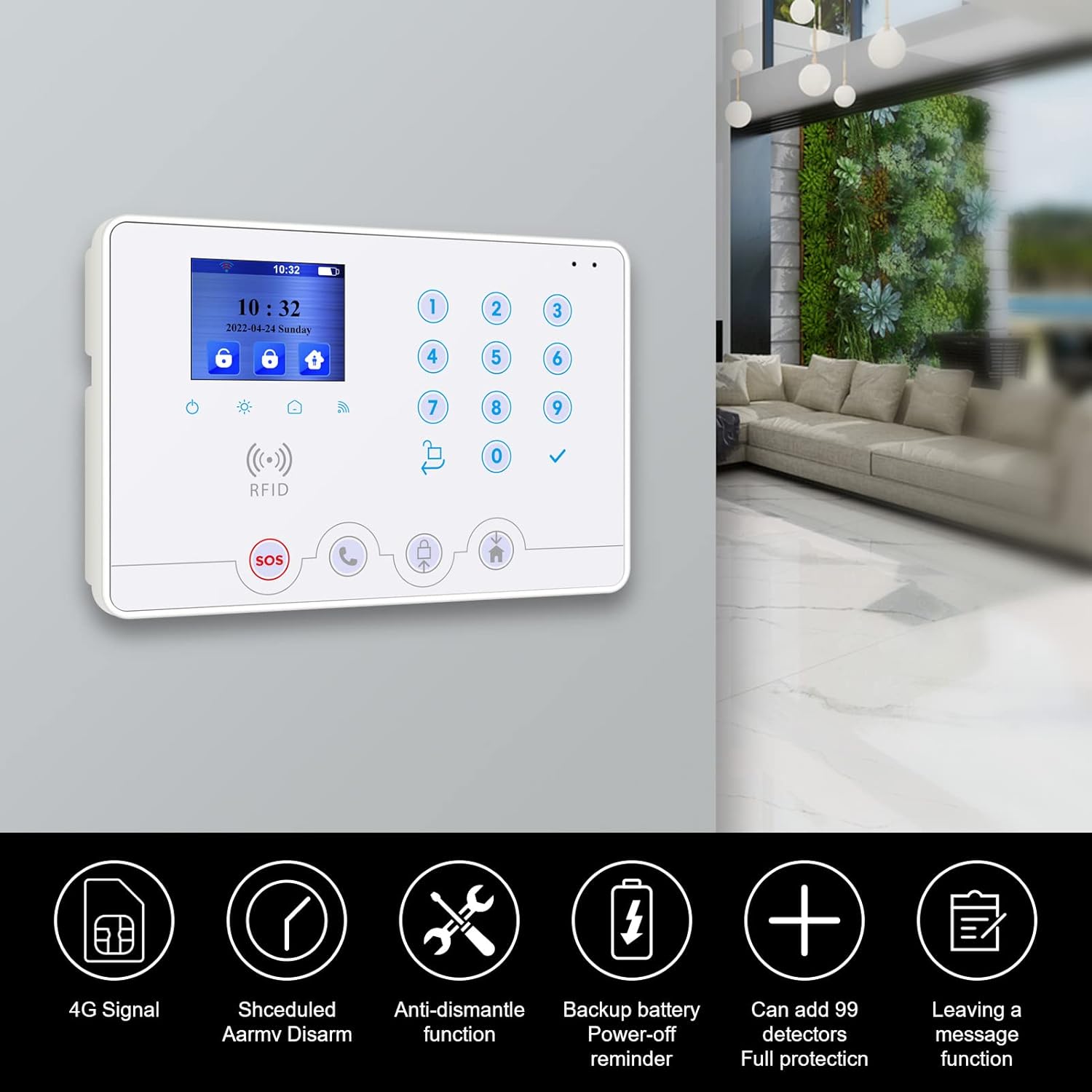
Figure 2.3: Close-up of the Wolf Guard W4Q control panel, illustrating key features such as 4G signal support, scheduled arm/disarm, anti-dismantle function, backup battery power-off reminder, expandability for up to 99 detectors, and a message leaving function.

Figure 2.4: The 1080P HD camera component of the system, demonstrating its 355-degree horizontal and 180-degree vertical rotation capabilities, and its integration with the 'Smartlife' mobile application for remote viewing.

Figure 2.5: The outdoor solar siren, shown with water droplets, indicating its waterproof design and suitability for outdoor installation. It features a solar panel for charging and a strobe light.

Figure 2.6: A close-up of the remote control, highlighting its functions: 'Leave away' (full arm), 'At home' (partial arm), and 'SOS' panic button for emergency situations.
Components List:
- 1 x GSM 2.4GHz + 2G Alarm Hub (Main Control Panel)
- 1 x 110dB Solar Outdoor Siren
- 3 x Motion Sensors (PIR Detectors)
- 5 x Door/Window Contacts
- 2 x Remote Controls
- 1 x 1080P WiFi Camera
- 2 x RFID Tags
3. Setup
3.1 Initial Setup
- Unpack: Carefully remove all components from the packaging.
- Power Connection: Connect the main control panel to a power outlet using the provided adapter. The panel has a backup battery for continuous operation during power outages.
- SIM Card Installation (Optional for 4G): If you plan to use the 4G GSM function, insert a valid SIM card into the designated slot on the main control panel. Ensure the SIM card is activated and has sufficient credit/data.
3.2 App Download and Registration
The Wolf Guard W4Q system integrates with the Tuya Smartlife APP for remote control and monitoring.
- Download App: Search for "Smartlife" in your smartphone's app store (Google Play Store for Android or Apple App Store for iOS) or scan the QR code provided in the quick start guide.
- Register Account: Open the Smartlife APP and register a new account using your email address or phone number.
- Add Device: Follow the in-app instructions to add your Wolf Guard W4Q alarm system. Typically, this involves selecting "Security & Sensor" or "Alarm" and following the pairing wizard. Ensure your phone is connected to a 2.4GHz Wi-Fi network during this process.
3.3 Pairing Sensors and Accessories
The system supports up to 100 additional accessories. Refer to the main panel's menu for specific pairing instructions for each type of sensor (motion, door/window, etc.) and remote controls.
3.4 Installation Guidelines
- Main Control Panel: Install in a central location within your home, away from direct sunlight and moisture. Ensure it's within Wi-Fi range and accessible for operation.
- Solar Outdoor Siren: Mount the siren outdoors in a location that receives ample sunlight for solar charging. Ensure it's securely fastened and within wireless range of the main panel (433MHz).

Figure 3.1: An illustration showing the solar siren and the main security panel working together wirelessly, indicating a 433MHz communication frequency for reliable signal transmission between components.
- Motion Sensors: Install PIR motion sensors in corners of rooms, approximately 2-2.5 meters (6.5-8 feet) high, ensuring a clear line of sight for detection. Avoid placing them near heat sources or direct sunlight.
- Door/Window Contacts: Mount the two parts of the contact sensor on the door/window frame and the moving part, ensuring they are aligned and within 1-2 cm when the door/window is closed.
- Camera: Place the camera in a strategic location for optimal viewing coverage. Ensure it has a stable Wi-Fi connection.
4. Operating the System
4.1 Arming and Disarming
You can arm or disarm your system using the control panel, remote controls, or the Smartlife APP.
- Full Arm (Leave Away): Activates all sensors. Use when leaving the property.
- Partial Arm (At Home): Activates perimeter sensors (e.g., door/window contacts) while allowing movement inside.
- Disarm: Deactivates all sensors.
Figure 4.1: A close-up of the remote control, highlighting its functions: 'Leave away' (full arm), 'At home' (partial arm), and 'SOS' panic button for emergency situations.
4.2 Scheduling Arm/Disarm Times
The system allows you to program up to four sets of timing for automatic arming and disarming, aligning with your daily routine.

Figure 4.2: The main control panel and a smartphone screen, illustrating the smart app's remote control capabilities and the ability to program up to four sets of timing for arming and disarming the system based on daily routines.
4.3 Camera Operation
Access the 1080P HD camera through the Smartlife APP. You can view live footage, record, and control the camera's pan (355°) and tilt (180°) movements remotely.
4.4 Notifications and Alerts
In case of an alarm trigger, the system will activate the siren and send notifications via the Smartlife APP. If a SIM card is installed, it can also send SMS alerts to pre-configured numbers.
4.5 Voice Control Integration
The Wolf Guard W4Q system supports voice control via Amazon Alexa and Google Assistant, allowing for convenient arming and disarming commands.
5. Maintenance
- Battery Backup: The main control panel has a built-in backup battery. Ensure it is fully charged to provide power during outages. The solar siren also charges via its solar panel.
- Cleaning: Periodically clean the control panel, sensors, and camera with a soft, dry cloth. Avoid using abrasive cleaners or solvents.
- Sensor Battery Check: Monitor the battery status of wireless sensors via the Smartlife APP or the control panel. Replace batteries (e.g., CR2032 for some components) as needed to ensure continuous operation.
- Firmware Updates: Check the Smartlife APP regularly for any available firmware updates for your alarm system to ensure optimal performance and security.
6. Troubleshooting
Common Issues and Solutions:
| Issue | Possible Cause | Solution |
|---|---|---|
| System not connecting to Wi-Fi | Incorrect Wi-Fi password, 5GHz network, weak signal. | Ensure correct 2.4GHz Wi-Fi network and password. Move panel closer to router. |
| Sensors not pairing | Sensor too far from panel, low battery, incorrect pairing mode. | Move sensor closer. Replace battery. Re-enter pairing mode on panel. |
| False alarms | Improper sensor placement, pets, strong air currents. | Adjust sensor sensitivity or placement. Ensure pets are accounted for (e.g., pet-immune sensors). |
| No SMS alerts | SIM card not active, insufficient credit, incorrect phone numbers. | Check SIM card status and balance. Verify configured phone numbers in settings. |
| Door/Window sensor reminder | A door or window is open when arming. | Close all monitored doors and windows before arming the system. Figure 6.1: Illustration of door/window sensors in action, showing reminders for unclosed doors via a smartphone app and the anti-dismantling alarm function of the main panel. |
| Anti-dismantle alarm | Tampering with the main panel or certain sensors. | This is a security feature. Ensure proper installation and avoid unauthorized access to the system components. |
7. Specifications
| Feature | Specification |
|---|---|
| Model Number | WM2T-300 (W4Q-W06-K2) |
| Connectivity Technology | Wireless (WiFi, 4G GSM, 433MHz) |
| Power Source | Battery Powered (with AC adapter for main panel) |
| Battery Type (Main Panel) | Lithium-polymer (backup) |
| Battery Type (Included) | 1 CR2032 (for some accessories) |
| Sound Level (Siren) | 110 dB |
| Max. Detectors Supported | 100 pieces |
| Camera Resolution | 1080P HD |
| Camera Rotation | Horizontal 355°, Vertical 180° |
8. Warranty and Support
Wolf Guard products are manufactured to high-quality standards. For specific warranty details, please refer to the warranty card included with your product or contact the retailer where you purchased the system.
If you encounter any issues or require technical assistance, please contact Wolf Guard customer support through the contact information provided on the official Wolf Guard website or through your purchase platform. Please have your model number (WM2T-300) and purchase details ready when contacting support.
Related documentsWM2T-300


Ask a question about this manual
Ask about setup, troubleshooting, compatibility, parts, safety, or missing instructions. Manuals+ will review the question and use this page’s manual context to help answer it.