
MARS HYDRO Mars- 4InlinefanCP
Contents
MARS HYDRO 4 Inch Inline Duct Fan with Temp Controller User Manual
Model: Mars- 4InlinefanCP
Introduction
This user manual provides comprehensive instructions for the installation, operation, and maintenance of your MARS HYDRO 4 Inch Inline Duct Fan with Temperature Controller. This powerful inline fan is designed to optimize air circulation, manage temperature and humidity, and prevent odors in various indoor environments, including grow tents and hydroponic setups.

Figure 1: MARS HYDRO 4 Inch Inline Duct Fan with Temperature Controller.
Product Overview
Key Components
- Inline Duct Fan Unit: The main fan body responsible for airflow.
- Intelligent Temperature & Humidity Controller: Digital display unit for monitoring and setting environmental parameters.
- Temperature/Humidity Probe: Sensor connected to the controller for accurate readings.
- Power Cable: For connecting the fan to a power source.
- Fan to Controller Cable: For connecting the fan unit to the intelligent controller.
- Mounting Straps: For securing the fan in place.

Figure 2: Illustration of the powerful and efficient EC motor and airflow.
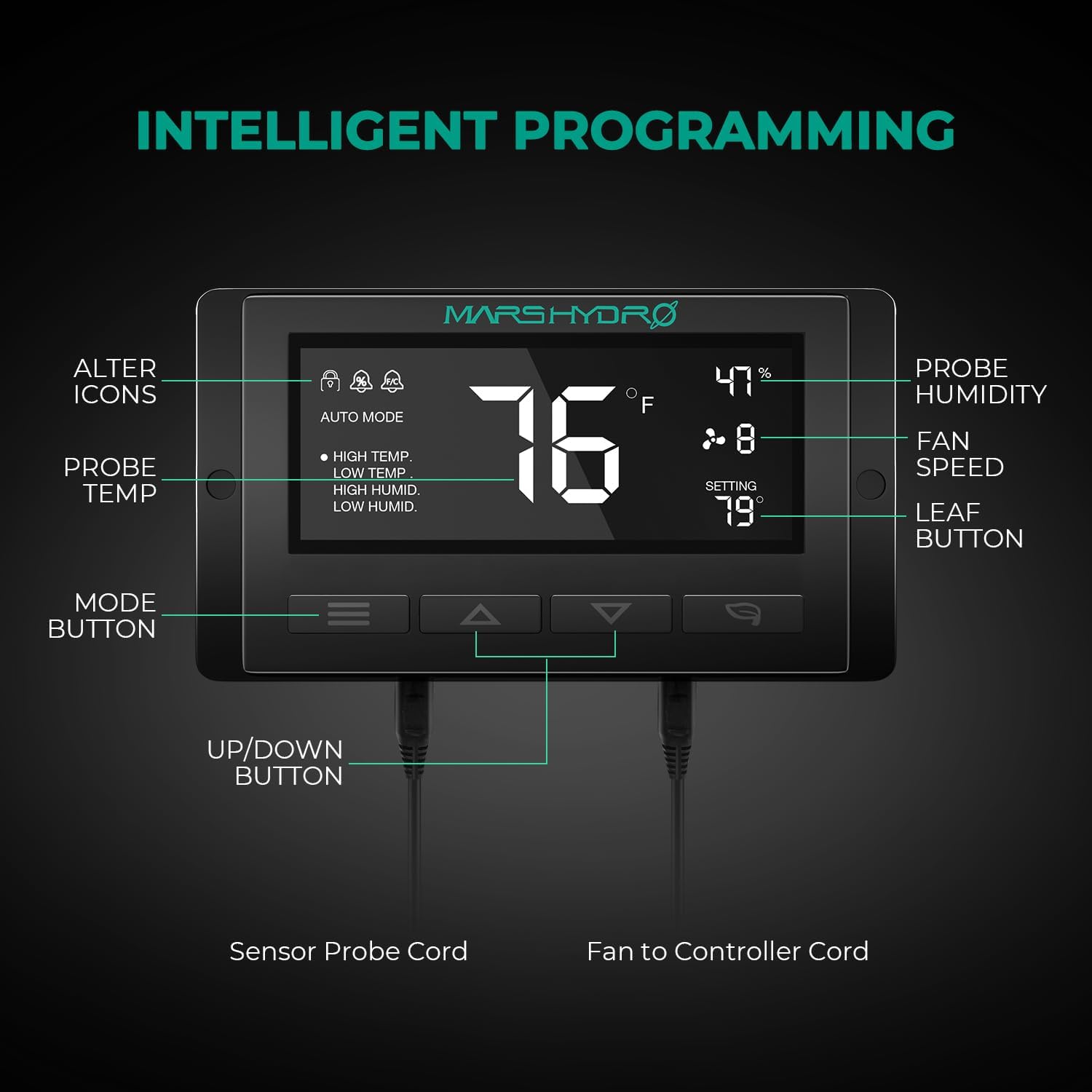
Figure 3: Detailed view of the intelligent temperature and humidity controller interface, highlighting buttons and display elements.
Setup & Installation
Unpacking the Product
Carefully remove all components from the packaging. Inspect for any damage during transit. Retain the packaging for future storage or transport.

Figure 4: Top view of the product packaging.

Figure 5: Front view of the product packaging with MARS HYDRO branding.

Figure 6: Side view of the product packaging.

Figure 7: Bottom view of the product packaging.

Figure 8: Product packaging displaying various handling symbols.
Mounting the Fan
The inline duct fan is designed for easy installation with removable duct ends and locking tabs. It can be mounted in various configurations within or outside your grow tent. Ensure the fan is securely suspended using the provided straps or other suitable mounting hardware.

Figure 9: Diagram illustrating the easy installation features and removable duct ends.

Figure 10: Example setup of the inline duct fan within a grow tent environment, showing ducting and controller placement.
Video 1: An overview of the MARS HYDRO Inline Fan Series, demonstrating various models and their applications.
Operating Instructions
Intelligent Controller Operation
The intelligent controller allows for precise management of your environment. Connect the temperature/humidity probe and the fan to the controller as shown in Figure 3.
- Mode Button: Cycles through different working modes (ON, OFF, Timer, Auto).
- UP/DOWN Buttons: Adjust setting numbers (e.g., fan speed, temperature/humidity thresholds).
- Leaf Button: Turns the screen on/off, locks/unlocks the controller, and rectifies temperature/humidity readings.
Video 2: Detailed instructions on how to operate the Thermostat Controller, including mode selection and setting adjustments.
Working Modes
- ON Mode: The fan operates continuously at a set speed (1-10). Use the UP/DOWN buttons to adjust the speed.
- OFF Mode: The fan remains off. In this mode, you can press UP/DOWN buttons simultaneously for 3 seconds to switch between Fahrenheit and Celsius.
- TIMER Mode: Set a specific duration for the fan to operate. The fan will run at the speed set in ON mode until the countdown finishes.
- AUTO Mode: This mode allows for intelligent automation based on temperature and humidity triggers. You can set up to four triggers: High Temperature, Low Temperature, High Humidity, and Low Humidity. The fan will automatically activate or adjust its speed when the detected environmental conditions exceed or fall below your set thresholds. You can also set an alarm for these triggers.
Maintenance
Regular maintenance ensures optimal performance and longevity of your inline duct fan.
- Cleaning: Periodically clean the fan blades and housing to prevent dust and debris buildup, which can reduce airflow and efficiency. Disconnect power before cleaning.
- Inspection: Check cables and connections regularly for any signs of wear or damage.
- Storage: If storing the fan for an extended period, ensure it is clean and dry. Store in a cool, dry place away from direct sunlight.
Troubleshooting
| Problem | Possible Cause | Solution |
|---|---|---|
| Fan not turning on. | No power, loose connection, controller in OFF mode. | Check power outlet, ensure all cables are securely connected, switch controller to ON or AUTO mode. |
| Fan making unusual noise. | Debris in fan blades, loose mounting, motor issue. | Disconnect power and inspect blades for obstructions. Ensure fan is securely mounted. If noise persists, contact support. |
| Controller display is blank. | Power issue, screen turned off (Leaf button). | Check power connection to controller. Press the Leaf button to turn the screen on. |
| Inaccurate temperature/humidity readings. | Probe misplacement, probe damage, calibration needed. | Ensure probe is placed correctly and not obstructed. Rectify probe readings using the Leaf button if necessary. If issues persist, contact support. |
Specifications

Figure 11: Technical dimensions and specifications of the inline duct fan and controller.
| Feature | Detail |
|---|---|
| Brand | MARS HYDRO |
| Model Name | Mars- 4InlinefanCP |
| Size | 4 inch with Temp Controller |
| Product Dimensions | 7.4"D x 8"W x 11.9"H |
| Item Weight | 3.99 pounds (1.81 Kilograms) |
| Air Flow Capacity | 205 CFM (Cubic Feet Per Minute) |
| Noise Level | 26.8 dB-A (as per feature bullets) / 28 dB (as per specifications) |
| Wattage | 30 watts |
| Voltage | 240 Volts |
| Power Source | AC |
| Control Method | Remote (Controller) |
| Blade Material | Plastic |
| Cable Length | 4.9 Feet |
| Bearings | Dual Ball |
Warranty & Support
MARS HYDRO offers dedicated customer support to assist with any questions or issues you may encounter with your product. Please refer to your purchase documentation for specific warranty details.
For assistance, MARS HYDRO offers 24-hour support.
You can visit the official MARS HYDRO store for more information and products: MARS HYDRO Store
Documents and downloads
Ask a question about this manual
Ask about setup, troubleshooting, compatibility, parts, safety, or missing instructions. Manuals+ will review the question and use this page’s manual context to help answer it.