
iGPSPORT iGS520
Contents
iGPSPORT iGS520 GPS Bike Computer Instruction Manual
Your Guide to Enhanced Cycling Performance
1. Introduction
The iGPSPORT iGS520 is a wireless GPS bike computer designed to provide cyclists with comprehensive data, navigation, and connectivity features. It offers precise positioning through GPS, Beidou, and Glonass, supports ANT+ and Bluetooth 5.0 for sensor and data transmission, and boasts an IPX7 waterproof rating. With a 40-hour battery life and customizable display, the iGS520 is built to enhance your cycling experience. This manual provides detailed instructions for setting up, operating, and maintaining your device.
2. Package Contents
Please verify that all items are present in your package:
- iGS520 GPS Bike Computer x 1
- Micro USB Cable x 1
- Standard Bike Mount x 1
- O-Ring Band x 2
- Bike MountPad x 1
- User Manual x 1
3. Device Overview
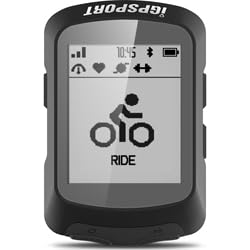
The iGS520 features a compact and durable design, ideal for various cycling conditions.
- Dimensions: 3.2 x 2.1 x 0.8 inches (81.3 x 53.3 x 20.3 mm)
- Weight: Approximately 65g
- Screen: 2.3-inch FSTN HD Dot-matrix screen, clearly visible in sunlight, with automatic backlight.
- Buttons: Typically includes navigation buttons (left/right arrows) and a power/menu button.
Basic Introduction to iGS320 (Similar to iGS520)
Video 1: This video provides a basic introduction to the iGS320, demonstrating its physical features and initial power-on sequence. While the model number differs, the fundamental operation and design are similar to the iGS520.
4. Setup
4.1 Initial Charging
Before first use, fully charge your iGS520 using the provided Micro USB cable. Connect the cable to the device's charging port and a standard USB power adapter (not included).
4.2 Mounting the Device
Attach the Standard Bike Mount to your bicycle's handlebars using the O-Ring Bands and Bike MountPad. Ensure the mount is secure and the device can be easily inserted and removed.
4.3 App Installation
Download the free iGPSPORT APP from your mobile device's app store:
- For Android: Search for "iGPSPORT" in the Google Play Store.
- For iPhone: Search for "iGPSPORT" in the Apple App Store.
4.4 Device Pairing and Personal Profile Setup
Pair your iGS520 with the iGPSPORT app via Bluetooth to unlock full functionality and personalize settings. Ensure Bluetooth is enabled on your smartphone.
Video 2: This video demonstrates the process of pairing the iGS320 (similar to iGS520) with the iGPSPORT app and setting up your personal profile, including gender, height, weight, heart rate zones, and power zones. It also shows how to link to Strava and TrainingPeaks.
4.5 Sensor Pairing (ANT+)
The iGS520 is compatible with ANT+ sensors such as heart rate monitors, speed sensors, cadence sensors, and power meters. Refer to the device's menu for specific sensor pairing instructions.
5. Operating the Device
5.1 GPS Acquisition
The iGS520 utilizes GPS, Beidou, and Glonass for fast and accurate positioning. Ensure you are in an open area for optimal satellite signal acquisition.
5.2 Starting and Stopping a Ride
The device supports automatic recording and pausing. Once motion is detected or sensors provide data after satellite positioning, the bike computer will automatically start recording. Recording will pause automatically when no motion or data is detected.
Video 3: This video illustrates the automatic functions of the iGS320 (similar to iGS520), including automatic pause, start recording, auto sleep, and automatic return to the home page. It also covers key tone settings and lap counting.
5.3 Display Customization
The 2.3-inch FSTN HD Dot-matrix screen can display over 80 items of data, with up to 8 items per page. All pages are highly customizable through the iGPSPORT app to show your preferred metrics.
5.4 Notifications
Receive call and SMS reminders directly on your iGS520. This feature requires the device to be connected to your mobile phone via Bluetooth and the iGPSPORT app running in the background.
5.5 Waypoint Navigation
The iGS520 supports waypoint navigation, allowing you to follow pre-loaded routes. Detailed instructions for loading and following routes can be found within the iGPSPORT app.
6. Data Management & Synchronization
6.1 Automatic Upload
When the 'Auto Upload' switch is enabled in the iGPSPORT app, your activity data will be automatically synchronized to the cloud every time the device connects to the app.
6.2 Manual Data Upload
You can manually upload individual ride data from your iGS520 to the iGPSPORT app for detailed analysis.
Video 4: This video demonstrates how to manage data on the iGS320 (similar to iGS520) using the iGPSPORT app, including manually uploading singular data to the cloud and checking cycling information after uploading.
6.3 Strava & TrainingPeaks Integration
The iGS520 seamlessly integrates with popular cycling platforms like Strava and TrainingPeaks. Authorize these apps within the iGPSPORT app to automatically upload your activities.
7. Maintenance
7.1 Battery Life and Charging
The iGS520 offers a durable battery life of up to 40 hours. The built-in lithium battery can be charged during operation using the Micro USB cable.
7.2 Waterproofing
With an IPX7 waterproof rating, the iGS520 is protected against immersion in water up to 1 meter for 30 minutes. This ensures reliable performance in various weather conditions.
7.3 Cleaning
Wipe the device with a soft, damp cloth. Avoid using harsh chemicals or abrasive cleaners that could damage the screen or casing.
8. Troubleshooting
- Device not pairing: Ensure Bluetooth is on, the iGPSPORT app is open, and the device is in pairing mode. Try restarting both the device and your phone.
- Data not syncing: Check your internet connection and ensure the 'Auto Upload' feature is enabled in the app. You can also try manual upload as shown in Video 4.
- GPS signal issues: Ensure you are in an open area away from tall buildings or dense foliage. Allow a few minutes for the device to acquire a stable signal.
- Firmware updates: Periodically check the iGPSPORT app for available firmware updates to ensure optimal performance and access to new features.
9. Specifications
| Feature | Specification |
|---|---|
| GPS | GPS+ Beidou+Glonass |
| Weight | 65g |
| Dimensions (LxWxH) | 3.2 x 2.1 x 0.8 inches (81.3 x 53.3 x 20.3 mm) |
| Wireless Connectivity | ANT+ & Bluetooth 5.0 |
| Battery Life | Up to 40 Hours |
| Waterproof Rating | IPX7 |
| Motion Detection | Yes |
| Screen Size | 2.3 Inches (FSTN HD Dot-matrix) |
| Notifications | Calls and SMS (via iGPSPORT APP) |
| Mounting Type | Handlebar Mount |
10. Warranty and Support
Your iGPSPORT iGS520 GPS Bike Computer comes with a standard manufacturer's warranty. For specific warranty terms and conditions, please refer to the documentation included with your purchase or visit the official iGPSPORT website.
For technical support, troubleshooting assistance, or to report any issues, please contact iGPSPORT customer service through the iGPSPORT APP or their official website. Regular firmware updates and support resources are available to ensure the best performance of your device.
Documents and downloads
Ask a question about this manual
Ask about setup, troubleshooting, compatibility, parts, safety, or missing instructions. Manuals+ will review the question and use this page’s manual context to help answer it.