1. Introduction
This manual provides detailed instructions for the safe and effective operation of your MESTEK IR02C-Y Infrared Thermometer. This device offers non-contact temperature measurement using infrared technology and also includes a K-Type thermocouple probe for contact measurements. It is designed for a wide range of applications, from industrial settings to household use.
Important Safety Note: This infrared thermometer is not intended for measuring human or animal body temperature.

Image: The MESTEK IR02C-Y thermometer shown with a clear warning that it is not for measuring human body temperature.
2. Safety Information
- Always exercise caution when using the laser pointer. Do not look directly into the laser beam or point it at people or animals.
- Keep the device away from children.
- Do not use the thermometer in environments with explosive gases, steam, or dust.
- Avoid exposing the device to extreme temperatures, humidity, or direct sunlight.
- If the device is damaged, do not attempt to repair it yourself. Contact customer support.
- Ensure batteries are inserted correctly and dispose of used batteries responsibly.
3. Product Overview
3.1 Package Contents
The MESTEK IR02C-Y package includes:
- 1 x MESTEK IR02C-Y Infrared Thermometer
- 1 x K-Type Thermocouple Probe
- 2 x AAA Batteries
- 1 x User Manual
- 1 x Carrying Bag

Image: MESTEK IR02C-Y Infrared Thermometer, K-Type probe, two AAA batteries, and a black carrying case.

Image: Contents of the MESTEK IR02C-Y product package, showing the thermometer, K-Type probe, batteries, user manual, and carrying bag.
3.2 Device Components
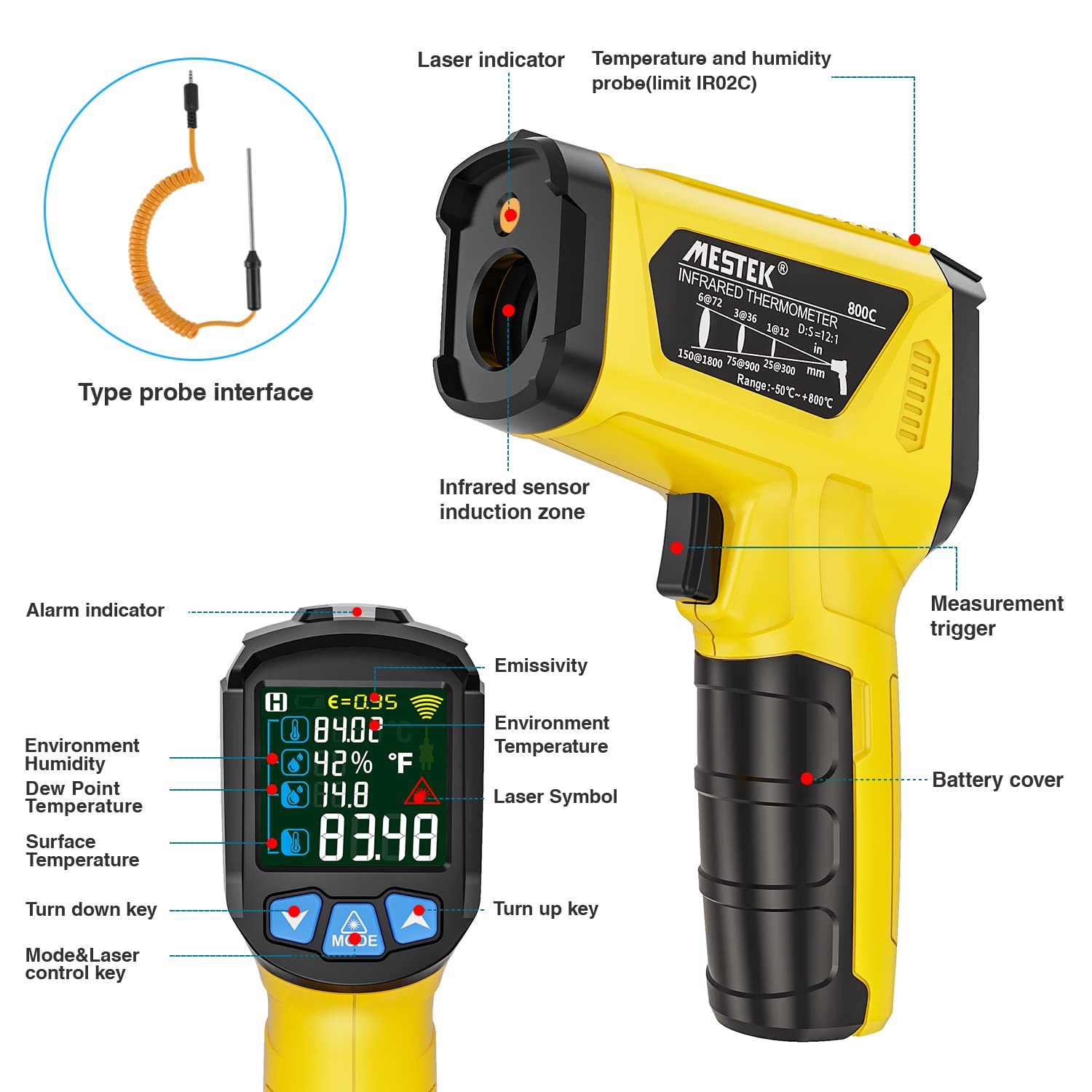
Image: Detailed diagram illustrating the various components of the MESTEK IR02C-Y thermometer, including the laser indicator, infrared sensor, measurement trigger, battery cover, K-Type probe interface, and the LCD display with indicators for emissivity, environment temperature, humidity, dew point, surface temperature, laser symbol, and control keys.
- Laser Indicator: Emits a laser dot for targeting the measurement area.
- Infrared Sensor Zone: Detects infrared radiation for non-contact temperature measurement.
- Measurement Trigger: Press to initiate a measurement.
- Battery Cover: Access for battery installation.
- K-Type Probe Interface: Port for connecting the K-Type thermocouple probe.
- LCD Display: Shows temperature readings, humidity, dew point, emissivity, and other indicators.
- Mode Button: Cycles through display modes and settings.
- Up/Down Buttons: Adjust settings like emissivity or alarm thresholds.
3.3 Key Features
- Dual Measurement Modes:
- Infrared (Non-Contact): -50°C to 800°C (-58°F to 1472°F)
- K-Type Probe (Contact): -10°C to 500°C (14°F to 932°F)
- Environmental Sensors: Measures ambient temperature, humidity, and calculates dew point.
- Adjustable Emissivity: Range from 0.1 to 1.0, allowing for accurate measurements on various surfaces.
- High/Low Temperature Alarm: User-configurable alarm thresholds.
- Fast Response Time: Measurements in ≤0.5 seconds.
- Distance to Spot Ratio (D:S): 12:1, enabling accurate measurement of distant targets.
- LCD Color Screen: Backlit display for clear readability.
- Data Functions: MAX/HOLD data retention.
- Unit Conversion: Easily switch between Celsius (°C) and Fahrenheit (°F).
- Power Management: Low battery indication and automatic power-off after 30 seconds of inactivity.

Image: Overview of the MESTEK IR02C-Y's key features, including adjustable emissivity, K-Type probe, temperature alarm, low battery indicator, 12-point laser, unit conversion, backlit color screen, humidity measurement, data retention, and quick measurement.
4. Setup
4.1 Battery Installation
- Locate the battery cover on the handle of the thermometer.
- Open the battery cover.
- Insert the two AAA batteries, ensuring correct polarity (+/-).
- Close the battery cover securely.
4.2 Connecting the K-Type Probe (Optional)
If contact temperature measurement is required, connect the K-Type thermocouple probe:
- Locate the K-Type probe interface on the side of the thermometer.
- Insert the K-Type probe's jack firmly into the interface.

Image: The MESTEK IR02C-Y thermometer with its K-Type thermocouple probe connected and immersed in a glass of water to measure its temperature.
5. Operating Instructions
5.1 Powering On/Off
- To power on, press the measurement trigger. The device will automatically power off after 30 seconds of inactivity to conserve battery life.
5.2 Basic Infrared Measurement
- Point the infrared sensor towards the target object.
- Press and hold the measurement trigger. The laser pointer will activate to indicate the measurement area.
- The temperature reading will appear on the LCD screen.
- Release the trigger to hold the measurement (HOLD function).

Image: The MESTEK IR02C-Y thermometer highlighting its high precision sensor and laser guidance, showing a red laser dot targeting a surface for measurement.

Image: The MESTEK IR02C-Y thermometer demonstrating its 12-point laser positioning system, which helps in accurately defining the measurement area.
5.3 K-Type Probe Measurement
With the K-Type probe connected:
- Press the "MODE" button twice to activate the K-Type probe function.
- Insert the metal tip of the probe into the substance or onto the surface you wish to measure.
- The temperature reading from the probe will be displayed on the screen.
5.4 Adjusting Emissivity
Emissivity (ε) is the efficiency with which an object emits thermal energy. Different materials have different emissivities. For accurate non-contact measurements, adjust the emissivity setting to match the target material.
- Press the "MODE" button three times to enter emissivity adjustment mode.
- Use the Up (▲) and Down (▼) buttons to adjust the emissivity value from 0.1 to 1.0.
- Refer to common emissivity tables for typical values of various materials.
- Press the measurement trigger to save the setting and return to measurement mode.

Image: The MESTEK IR02C-Y thermometer demonstrating its adjustable emissivity feature, showing different emissivity settings for measuring temperatures of diverse materials such as ice, grilled meat, fried foods, and wood.
5.5 Temperature Alarms (High/Low)
The device can be set to alert you if the measured temperature exceeds or falls below a specified threshold.
- Consult the full user manual for detailed instructions on setting high and low temperature alarms.
5.6 Unit Conversion (°C / °F)
To switch between Celsius and Fahrenheit:
- Press the "MODE" button four times to access the unit conversion setting.
- Use the Up (▲) or Down (▼) buttons to select your desired unit.
- Press the measurement trigger to confirm.

Image: The MESTEK IR02C-Y thermometer's display illustrating the conversion function between Celsius (°C) and Fahrenheit (°F) temperature units.
5.7 Humidity and Dew Point Measurement
The device can measure ambient humidity and calculate the dew point, which helps in assessing the risk of condensation or mold formation.
- These values are displayed on the LCD screen during normal operation.

Image: The MESTEK IR02C-Y thermometer being used to measure the temperature of moldy bread, with the display indicating "Spoilage temperature," demonstrating its utility in assessing conditions related to spoilage.
5.8 Button Functions

Image: A diagram illustrating the functions of the MESTEK IR02C-Y's buttons: a single short press for environment surface temperature, two presses for the temperature probe function, three presses for adjustable emissivity, and four presses to switch between Fahrenheit and Celsius.
6. Applications
The MESTEK IR02C-Y Infrared Thermometer is suitable for a wide range of applications, including but not limited to:
- Cooking and Food Preparation: Ovens, grills, frozen foods, frying.
- Automotive Maintenance: Engine components, cooling systems.
- Household Use: HVAC systems, insulation checks, appliance temperature monitoring.
- Industrial Applications: Electrical circuits, factory equipment, fire monitoring.
- Horticulture: Soil temperature, environmental monitoring for plant growth.
- Viticulture: Monitoring temperatures in winemaking processes.
- Water Temperature: Non-contact measurement of liquid surfaces.

Image: A collage of four images demonstrating various applications of the MESTEK IR02C-Y thermometer: measuring the temperature of baking bread, checking an automobile engine, monitoring grilled food, and assessing radiator heat.

Image: Two application examples: using the K-Type thermocouple to measure the internal temperature of a roasted chicken, and using the infrared function for automotive electrical repair or maintenance.

Image: A collage showing the MESTEK IR02C-Y thermometer in use for air conditioning maintenance, checking pizza oven temperature, assisting with DIY baking, and measuring the temperature of a pet toy.

Image: The MESTEK IR02C-Y thermometer being used to measure the temperature of soil near a plant, demonstrating its application in environmental monitoring.
7. Maintenance
- Cleaning: Use a soft, damp cloth to clean the device casing. Do not use abrasive cleaners or immerse the device in water.
- Lens Care: The infrared lens is delicate. Clean it gently with a soft cloth or cotton swab and rubbing alcohol.
- Storage: Store the thermometer in its carrying bag in a cool, dry place when not in use. Remove batteries if storing for extended periods.
- Battery Replacement: Replace batteries when the low battery indicator appears on the display.
Note: The device is not washable.
8. Troubleshooting
| Problem | Possible Cause | Solution |
|---|---|---|
| Device does not power on. | Dead or incorrectly inserted batteries. | Replace batteries or check polarity. |
| Inaccurate readings. | Incorrect emissivity setting; dirty lens; target too far or too small. | Adjust emissivity; clean lens; ensure target fills the measurement spot (D:S ratio 12:1). |
| Laser not visible. | Laser function turned off or obstructed. | Check settings to ensure laser is enabled. |
| K-Type probe not working. | Probe not fully inserted; incorrect mode selected. | Ensure probe is securely connected; press MODE button twice to select K-Type probe function. |
9. Specifications
| Parameter | Value |
|---|---|
| Infrared Temperature Range | -50°C to 800°C (-58°F to 1472°F) |
| K-Type Probe Temperature Range | -10°C to 500°C (14°F to 932°F) |
| Accuracy (IR) | ±1.5% of reading or ±2°C/4°F (whichever is greater) |
| Response Time | ≤0.5 seconds |
| Distance to Spot Ratio (D:S) | 12:1 |
| Emissivity | Adjustable 0.1 - 1.0 |
| Display | LCD Color Screen with Backlight |
| Power Source | 2 x AAA Batteries (included) |
| Auto Power-Off | 30 seconds (approx.) |
| Product Dimensions (L x W x H) | 13.99 x 9.39 x 3.2 cm |
| Product Weight | 310 grams |
| Certifications | CE, FCC, EMC, RoHS, EN61010-1, EN60825 |
| Special Features | Ultra-clear screen, low battery indicator, alarm, high precision, auto power-off, humidity measurement, dew point calculation. |
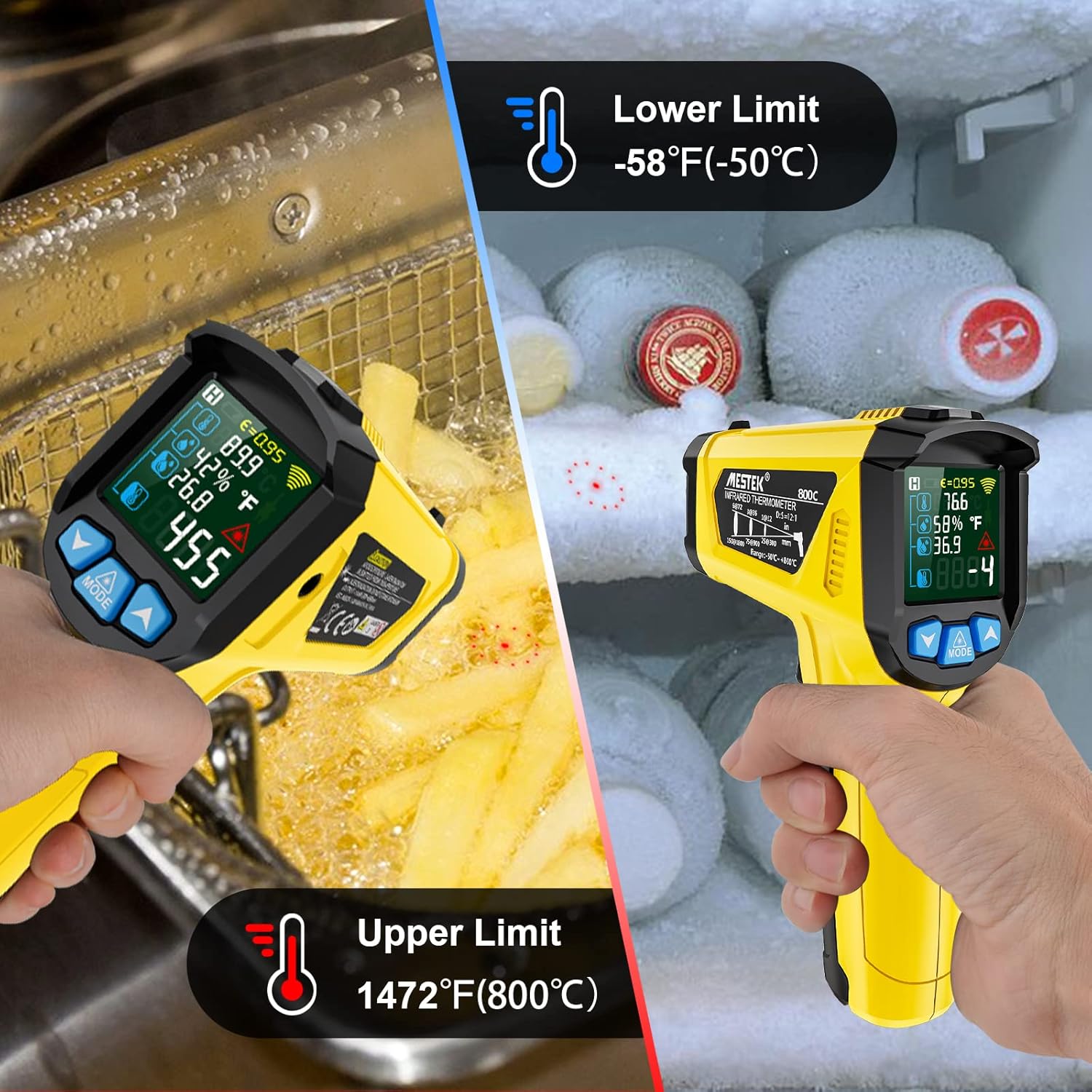
Image: The MESTEK IR02C-Y thermometer illustrating its wide temperature range, showing a measurement at the lower limit in a freezer (-50°C) and at the upper limit for frying (800°C).

Image: A diagram explaining the Distance to Spot (D:S) ratio of 12:1, which indicates that the measurement spot diameter is 1/12th of the distance to the target.
10. Warranty and Support
MESTEK provides a lifetime warranty for this product. For any issues, questions, or support needs, please contact MESTEK customer service. Our professional engineers are available to assist you.
Contact information can typically be found on the MESTEK official website or through your purchase platform.


