Introduction
This manual provides detailed instructions for the proper use, care, and maintenance of your Timex Men's Essex Avenue Day-Date 44mm Quartz Watch. Please read this manual thoroughly to ensure optimal performance and longevity of your timepiece.

Figure 1: Timex Men's Essex Avenue Day-Date 44mm Quartz Watch (Front View)
Product Features
- Silver-tone 22mm stainless steel bracelet fits up to 8-inch wrist circumference.
- Black dial with full markers.
- Day & date window at 3 o'clock.
- Silver-tone octagonal 44mm low lead brass case with mineral glass crystal.
- Water resistant to 50m (165 ft): Suitable for short periods of recreational swimming, but not diving or snorkeling.
Setup
Setting Time and Date
- Pull the Crown: Gently pull the crown (the small knob on the side of the watch case) out to position 2 for setting the date and day, or position 3 for setting the time.
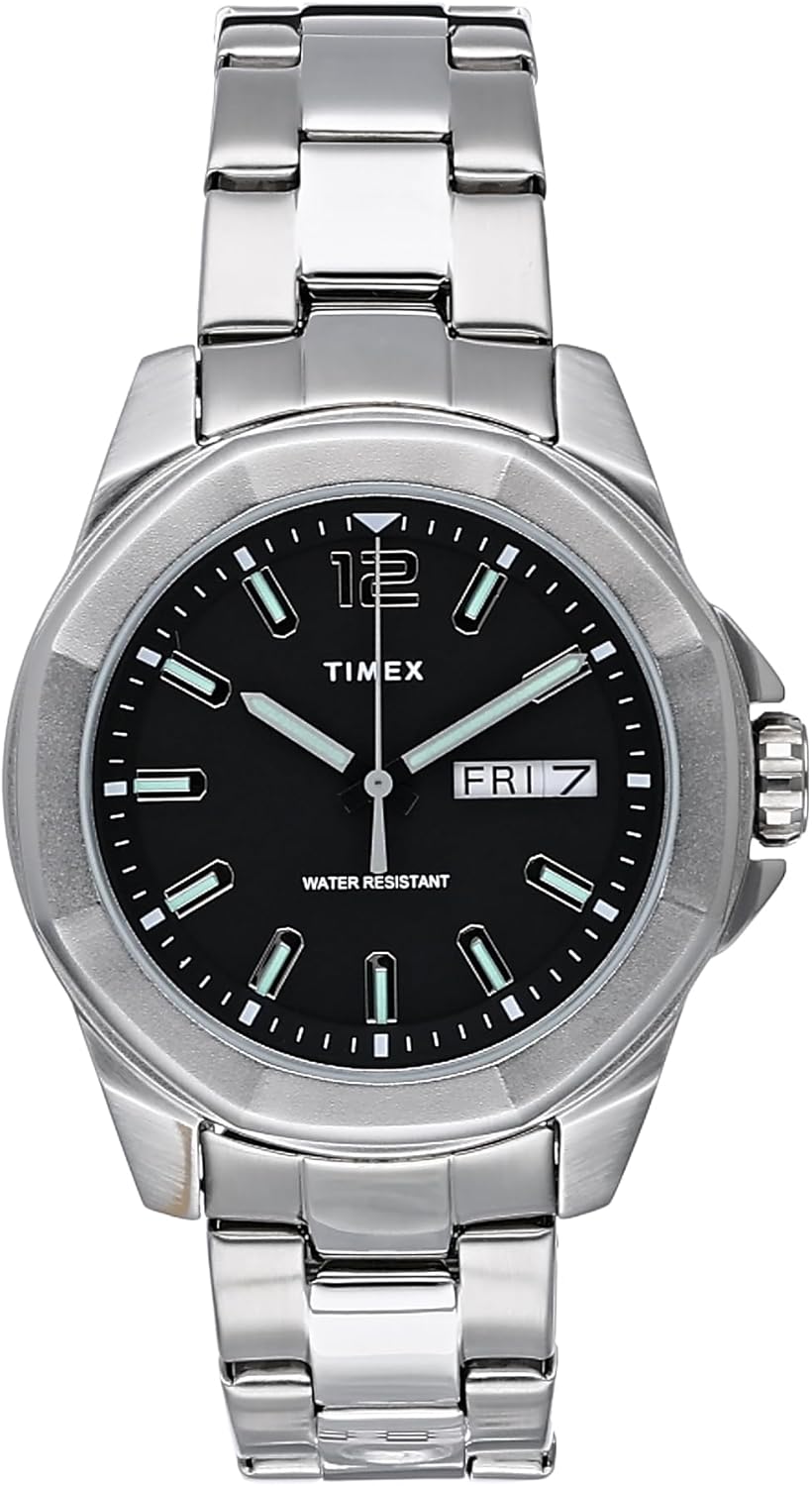
Figure 2: Watch Crown (Side View)
- Setting the Date and Day: In position 2, rotate the crown clockwise or counter-clockwise to adjust the day and date. Avoid setting the date between 9 PM and 3 AM, as this can interfere with the automatic date change mechanism.
- Setting the Time: In position 3, rotate the crown to move the hour and minute hands. Set the time a few minutes ahead, then push the crown back to position 1 (normal operating position) to start the watch.
- Push the Crown Back: Once the time and date are set, push the crown fully back into position 1 against the watch case to ensure water resistance and to start the watch movement.
Adjusting the Bracelet
The stainless steel bracelet may require adjustment for a comfortable fit. This typically involves removing or adding links. It is recommended to have this procedure performed by a qualified jeweler or watch repair professional to prevent damage to the bracelet or watch.

Figure 3: Watch on Wrist (Fit Example)
Operating Instructions
Your Timex Essex Avenue watch is a quartz movement timepiece, powered by a battery. It operates continuously once the crown is pushed in. The day and date will automatically advance at midnight.
Water Resistance
This watch is water resistant to 50 meters (165 feet). This rating means the watch is suitable for short periods of recreational swimming. It is not suitable for diving, snorkeling, or high-impact water sports. Avoid operating the crown or pushers when the watch is wet to prevent water ingress.
Maintenance
- Cleaning: Wipe the watch case and bracelet regularly with a soft, dry cloth to remove dirt and perspiration. For the stainless steel bracelet, a slightly damp cloth can be used, followed by a dry cloth.
- Battery Replacement: The quartz movement is powered by a battery. When the watch stops or the second hand begins to jump erratically (indicating low battery), have the battery replaced by a qualified watch technician. This ensures proper sealing for water resistance.
- Avoid Extreme Temperatures: Do not expose your watch to extreme temperatures (above 60°C / 140°F or below 0°C / 32°F) or sudden temperature changes, as this can affect the movement and battery life.
- Avoid Chemicals: Keep the watch away from solvents, detergents, perfumes, and cosmetic sprays, as these can damage the case, gasket, or bracelet.
- Magnetic Fields: Avoid exposing the watch to strong magnetic fields, which can temporarily affect the accuracy of the quartz movement.

Figure 4: Watch Component Cleaning

Figure 5: Watch Component Inspection
Troubleshooting
| Problem | Possible Cause | Solution |
|---|---|---|
| Watch not running or running intermittently. | Dead battery; Crown not pushed in; Exposure to strong magnetic fields. | Replace battery; Push crown fully in; Move watch away from magnetic sources. If problem persists, consult a technician. |
| Date/Day not changing or changing at wrong time. | Incorrect time setting (AM/PM); Date set during restricted hours. | Advance time by 12 hours if date changes at noon. Avoid setting date between 9 PM and 3 AM. |
| Condensation inside the watch. | Exposure to extreme temperature changes; Compromised water resistance. | Immediately take the watch to a qualified technician for inspection and repair to prevent internal damage. |
Specifications
| Feature | Detail |
|---|---|
| Model Number | TW2U14700 |
| Case Diameter | 44mm |
| Case Material | Low Lead Brass |
| Crystal Material | Mineral Glass |
| Movement Type | Quartz |
| Water Resistance | 50 meters (165 feet) |
| Band Material | Stainless Steel |
| Band Width | 22mm |
| Weight | 6.08 ounces (approx.) |
Warranty and Support
Timex watches are manufactured to high quality standards and are covered by a limited warranty against manufacturing defects. For specific warranty terms and conditions, please refer to the warranty card included with your purchase or visit the official Timex website.
For technical support, service, or parts, please contact Timex Customer Service. Contact information can typically be found on the Timex website or on the product packaging.
Note: Unauthorized repair or modification of the watch may void the warranty.