1. Introduction
Thank you for choosing the MEIKEE FLC060 Rechargeable LED Work Light. This manual provides essential information for the safe and efficient operation of your device. Please read it thoroughly before use and retain it for future reference.

Image 1: MEIKEE FLC060 Rechargeable LED Work Light, front view with light on.
2. Safety Instructions
- Do not look directly into the LED light when it is on, as this may cause eye damage.
- Keep the device away from water and extreme temperatures.
- Do not attempt to disassemble or modify the device. Repairs should only be performed by qualified personnel.
- Ensure the charging port is clean and dry before connecting any charging cables.
- Keep out of reach of children.
3. Product Features
The MEIKEE FLC060 LED Work Light offers versatile illumination and power solutions:
- Multiple Lighting Modes: Features 4 distinct lighting modes: Cool White (6000K), Natural White (4000K), Warm White (2700K), and an SOS flashing mode (red and blue).
- Adjustable Brightness: Offers 5 levels of brightness (100%, 75%, 50%, 25%, 10%) for various lighting needs.
- High Capacity Power Bank: Equipped with a 10000mAh battery, it can serve as an emergency power source for charging mobile phones and other USB devices via its 5V/2A USB output.
- Dual Charging Options: Supports both USB (5V/2A) and solar charging for flexibility.
- Constant Current Solution: Maintains consistent brightness throughout the battery discharge cycle.
- Versatile Mounting: Includes a 180° adjustable handle with integrated magnets for attachment to metallic surfaces and a 1/4-inch screw hole for tripod mounting.
- Compact and Portable: Designed for easy transport and storage.
4. Setup
4.1 Initial Charging
Before first use, fully charge the work light using the provided USB cable.
- Connect the USB charging cable to the Type-C input port on the work light.
- Connect the other end of the USB cable to a 5V/2A USB power adapter (not included) or a computer USB port.
- The battery indicator lights will illuminate to show charging progress. All lights will be solid when fully charged.
Note: Solar charging is available for emergency situations but is slower than USB charging. For regular use, USB charging is recommended.

Image 2: Illustration of USB and solar charging options for the work light.

Image 3: Detailed view of the work light's dimensions and port locations (USB-Output, Type-C Input, USB-Dust Plug).
4.2 Handle Adjustment and Mounting
The integrated handle can be adjusted 180 degrees to position the light as needed or to serve as a stand.
- Adjusting the Handle: Rotate the handle to the desired angle. It will hold its position firmly.
- Magnetic Attachment: The handle contains strong magnets. Attach the light to any metallic surface for hands-free operation.
- Tripod Mounting: A 1/4-inch screw hole is located at the bottom of the unit for mounting on a standard tripod (tripod not included).
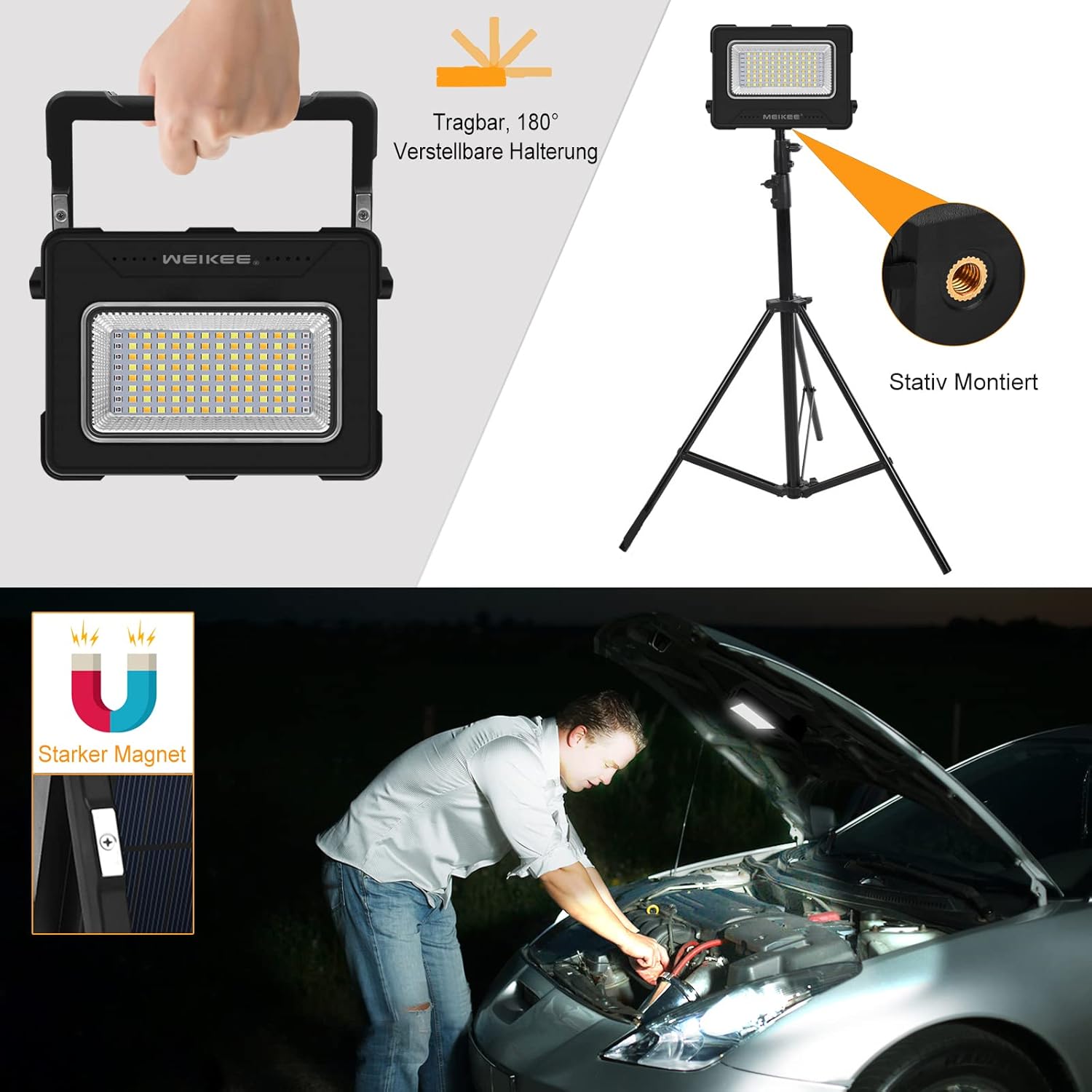
Image 4: Demonstrates the adjustable handle, magnetic function, and tripod mounting option.
5. Operating Instructions
5.1 Power On/Off and Mode Selection
The work light features a multi-function button for controlling power and lighting modes.
- Power On: Press the 'M' button once to turn on the light. It will start in the last used mode.
- Change Lighting Mode: While the light is on, press the 'M' button repeatedly to cycle through the 4 lighting modes: Cool White (6000K) → Natural White (4000K) → Warm White (2700K) → SOS Flashing (Red and Blue).
- Power Off: Press and hold the 'M' button for approximately 2 seconds to turn off the light.

Image 5: Visual representation of the four available lighting modes: Cool White, Natural White, Warm White, and Red/Blue SOS flashing.
5.2 Brightness Adjustment
The work light offers 5 levels of brightness adjustment.
- While the light is on, press the brightness adjustment button (often indicated by a sun icon or similar) to cycle through the 5 brightness levels (100%, 75%, 50%, 25%, 10%).
- Select the desired brightness level for your task.

Image 6: Depicts the five adjustable brightness levels from 100% to 10% illumination.
5.3 Using as a Power Bank
The MEIKEE FLC060 can charge other devices in emergency situations.
- Open the protective cover for the USB ports.
- Connect your device's charging cable to the USB output port (5V/2A) on the work light.
- The work light will begin charging your device.
- Monitor the battery indicator on the work light to check its remaining power.

Image 7: A user charging a mobile phone using the work light's 10000mAh power bank function.
6. Maintenance
- Cleaning: Wipe the device with a soft, dry cloth. Do not use abrasive cleaners or solvents.
- Storage: Store the work light in a cool, dry place when not in use. If storing for extended periods, charge the battery every 3-6 months to maintain battery health.
- Battery Care: Avoid fully discharging the battery frequently. Recharge promptly when the battery indicator shows low power.
7. Troubleshooting
| Problem | Possible Cause | Solution |
|---|---|---|
| Light does not turn on. | Battery is depleted. | Charge the work light using the USB cable. |
| Light is dim or flickers. | Low battery level. | Recharge the work light. |
| Device not charging from power bank function. | Work light battery is low or cable is faulty. | Ensure the work light is sufficiently charged. Try a different USB cable. |
| Solar charging is slow. | Solar charging is inherently slower than USB. Insufficient sunlight. | This is normal. For faster charging, use the USB port. Ensure the solar panel is exposed to direct sunlight. |
8. Specifications
| Brand | MEIKEE |
| Model Number | FLC060 |
| Dimensions (L x W x H) | 15.4 x 3.2 x 11.4 cm (6.06 x 1.25 x 4.49 inches) |
| Weight | 180 g |
| Material | Plastic, Metal |
| Battery Capacity | 10000mAh |
| Max Wattage | 60 Watts |
| Voltage | 5 Volts |
| Light Source Type | LED (Light Emitting Diode) |
| Color Temperature Modes | Cool White (6000K), Natural White (4000K), Warm White (2700K), SOS (Red & Blue) |
| Brightness Levels | 5 (100%, 75%, 50%, 25%, 10%) |
| USB Output | 5V/2A |
| Charging Input | USB Type-C (5V/2A), Solar Panel |
| Special Features | Magnetic base, 180° adjustable handle, Tripod mountable (1/4-inch screw hole), Power bank function, Constant current output. |

Image 8: Energy efficiency label for the MEIKEE FLC060, rated 'F'. For more details, visit EPREL Database.
9. Warranty Information
MEIKEE products are designed and manufactured to the highest quality standards. This product is covered by a standard manufacturer's warranty against defects in materials and workmanship from the date of purchase. Please refer to your purchase documentation for specific warranty terms and duration. The warranty does not cover damage caused by misuse, accident, unauthorized modification, or normal wear and tear.
10. Customer Support
If you encounter any issues or have questions regarding your MEIKEE FLC060 Rechargeable LED Work Light, please contact our customer support team. For the most up-to-date contact information, please visit the official MEIKEE website or refer to your purchase platform's support section.
You can also visit the MEIKEE brand store for additional product information and support: MEIKEE Brand Store


