
1. Introduction and Overview
The Xllent Hand Massager is designed to provide comprehensive hand care through advanced acupressure therapy, compression, and gentle heat. It features four strategically placed airbags that compress and stimulate key pressure points on the wrist, palm, and fingers. This process aims to enhance blood circulation, relieve hand fatigue, and promote deep relaxation. It is particularly beneficial for individuals experiencing discomfort from arthritis, carpal tunnel, or general daily hand stress. The device is built with high-quality, practical components to support a healthier lifestyle.

2. Safety Information
Please read the user manual for detailed instructions and precautions before use. This product is intended for personal relaxation and pain relief. Consult a healthcare professional if you have pre-existing medical conditions, especially related to circulation, nerve damage, or skin sensitivities. Do not use on broken or irritated skin. Keep out of reach of children. The device is equipped with a 15-minute auto shut-off function to ensure safety and prevent overheating.
Statements regarding dietary supplements have not been evaluated by the FDA and are not intended to diagnose, treat, cure, or prevent any disease or health condition.
3. Setup
Before first use, ensure the device is fully charged. The Xllent hand massager is built with a 2200mAh rechargeable battery and provides 60-90 minutes of use per charge via the included USB cable. To charge, connect the provided USB cable to the Type-C interface on the device and a suitable power source.

To use the hand massager, place your hand comfortably inside the device. Ensure your hand is positioned correctly to allow the airbags to compress the wrist, palm, and fingers effectively. Check the product size before purchasing to ensure a perfect fit.
4. Operating Instructions
The device features an intuitive control panel for easy operation:
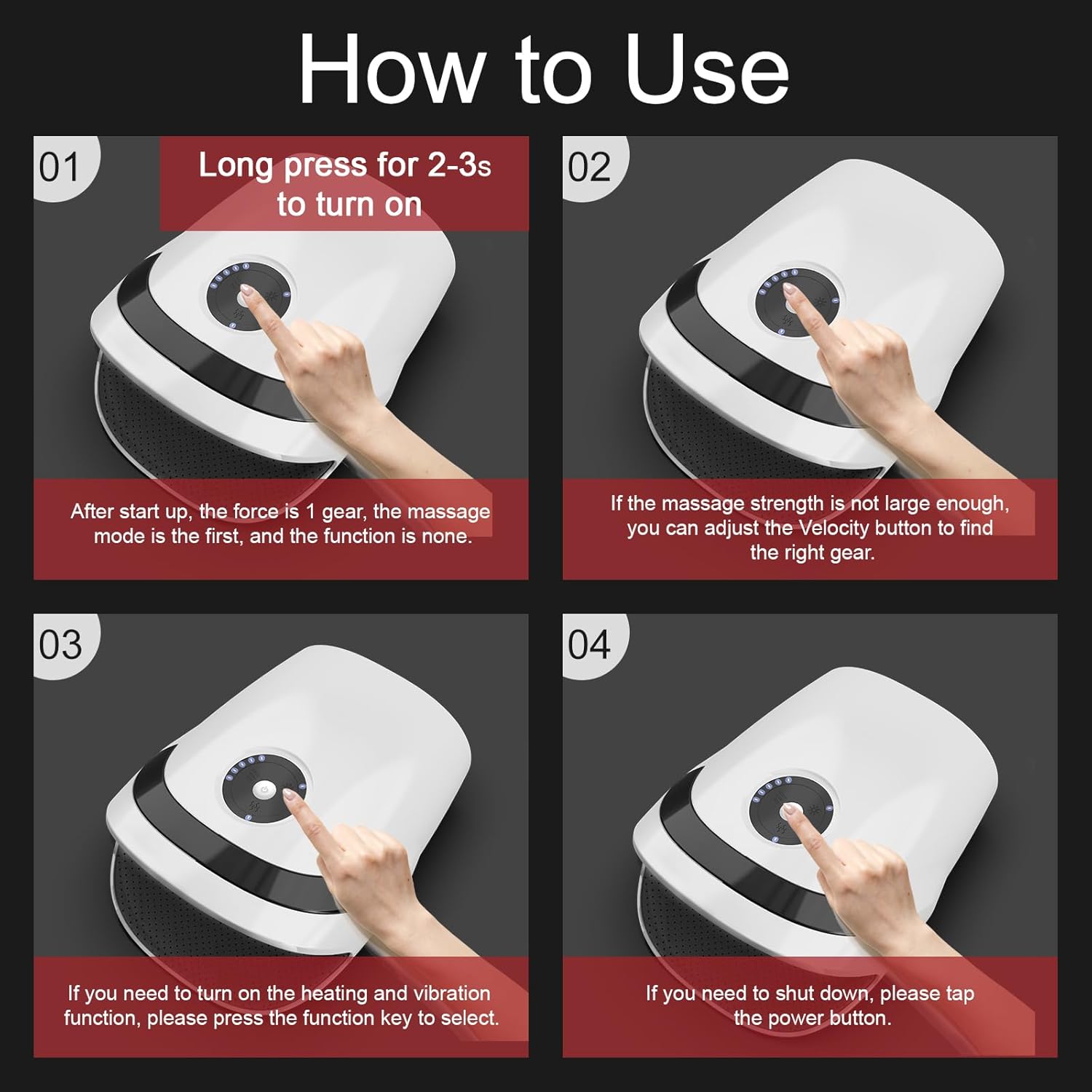
- Power On/Off: Long press the power button (gray button in the center) for 2-3 seconds to turn the device on. The default setting is usually the first massage mode with a moderate force. To shut down, tap the power button.
- Adjust Massage Force (Velocity Key): If the massage strength is not sufficient, use the Velocity Key (indicated by arrows) to adjust through 5 gears. The force can be cycled from bottom to top.
- Activate Heating/Vibration (Function Key): To turn on the heating and vibration functions, press the Function Key (indicated by wavy lines for heat and wavy arrows for vibration) to select your preferred mode. The device offers 5 heat levels and multiple vibration frequencies.
- Auto Shut-off: The massager is equipped with a 15-minute auto shut-off function for safety.

5. Features and Modes
The Xllent Hand Massager offers a customizable experience with various features:
- Acupressure & Compression: Utilizes 4 airbags to compress and stimulate key pressure points, enhancing blood circulation and relieving hand fatigue.
- Heat Therapy: Features gentle heat compression to keep hands warm, prevent dryness, and ease muscle soreness, numbness, and cold fingers. Offers 5 adjustable heat levels.
- Adjustable Pressure Modes: Provides 5 adjustable pressure modes to customize the massage intensity.
- Vibration: Multiple vibration frequencies are available to further enhance relaxation.
- Portable Design: Lightweight and ergonomic, allowing for use at home, in the office, or on the go.


6. Maintenance
To ensure the longevity and optimal performance of your Xllent Hand Massager, follow these maintenance guidelines:
- Cleaning: Wipe the exterior of the device with a soft, damp cloth. Do not use abrasive cleaners or immerse the device in water.
- Storage: Store the massager in a cool, dry place away from direct sunlight and extreme temperatures.
- Battery Care: Charge the device regularly, even if not in frequent use, to maintain battery health. Avoid completely draining the battery before recharging.
- Inspection: Periodically check the device and charging cable for any signs of damage. If any damage is found, discontinue use and contact customer support.
7. Troubleshooting
If you encounter any issues with your Xllent Hand Massager, please refer to the following common troubleshooting tips:
- Device Not Turning On: Ensure the device is fully charged. Long press the power button for 2-3 seconds.
- Weak Massage Force: Adjust the massage force using the Velocity Key. Ensure your hand is properly positioned inside the device.
- No Heat/Vibration: Press the Function Key to activate or adjust the heat and vibration settings.
- Device Shuts Off Unexpectedly: The device has a 15-minute auto shut-off feature. If it shuts off before 15 minutes, ensure the battery is charged.
- Charging Issues: Ensure the USB cable is securely connected to both the device and the power source. Try a different USB port or adapter if necessary.
If problems persist, please contact customer support for further assistance.
8. Specifications
| Brand | Xllent |
| Model Number | NX-S168 |
| Product Dimensions | 6.69 x 5 x 10 inches |
| Item Weight | 1.59 Pounds (720 Grams) |
| Power Source | Battery Powered (1 Lithium Ion battery required) |
| Material | Plastic |
| Auto Shut-off | 15 minutes |
9. Warranty and Support
For any reason, if this heated hand massager does not meet your expectations, a free return is available within 30 days of purchase. Please refer to your purchase platform for specific return policies and procedures.
Legal Disclaimer: Statements regarding dietary supplements have not been evaluated by the FDA and are not intended to diagnose, treat, cure, or prevent any disease or health condition.