
Introduction
This manual provides detailed instructions for the installation, operation, and maintenance of your Itomoro Baby Car Camera. This device is designed to offer a clear view of your rear-facing infant while driving, enhancing safety and peace of mind. Please read this manual thoroughly before using the product.

Overview of the Itomoro Baby Car Camera system in use.
Package Contents
Verify that all items are present in the package:
- Display Monitor
- Camera Unit
- Fixing Strap (for camera)
- Power Cable (for monitor)
- User Manual (this document)

Illustration of the components included in the Itomoro Baby Car Camera package.
Setup and Installation
Follow these steps for proper installation of your baby car camera system:
- Attach Camera: Securely attach the camera unit to the headrest of the seat where your baby's car seat is located using the provided fixing strap. Ensure the camera has a clear, unobstructed view of your baby.
- Connect Cables: Connect the camera cable to the display monitor. Route the cable carefully to avoid interference with vehicle operation or passenger movement.
- Power On: Plug the power cable into your vehicle's 12V power outlet (cigarette lighter socket). The monitor should power on automatically when the vehicle starts.
- Place Screen: Mount the display monitor on your dashboard or windshield using the suction cup bracket. Adjust the monitor's position to ensure it does not obstruct your view of the road. The 3M adhesive on the bracket provides upgraded stability.
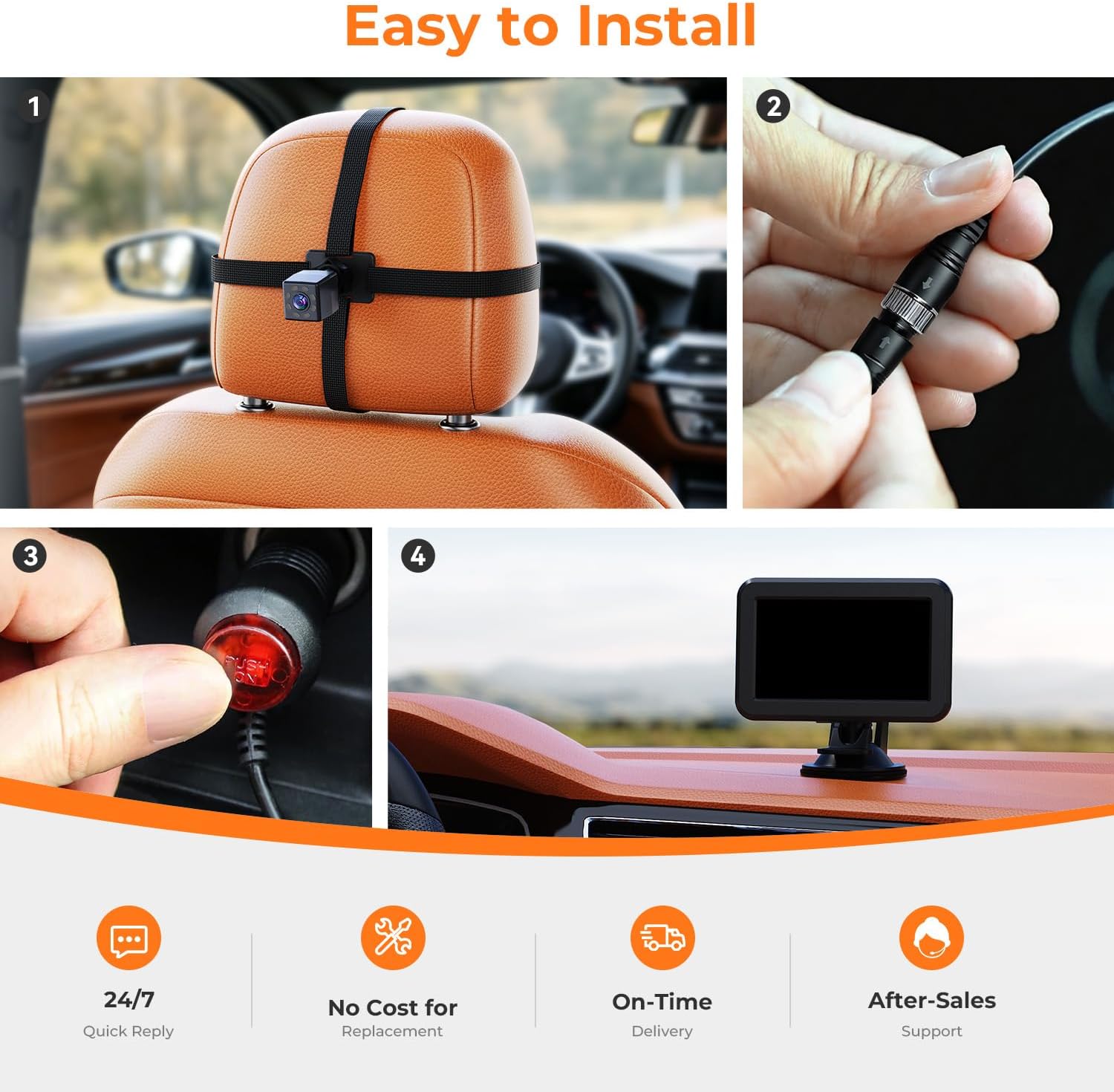
Step-by-step installation guide for the Itomoro Baby Car Camera.
Operating Instructions
Once installed, the Itomoro Baby Car Camera operates automatically when your vehicle is powered on. The monitor provides a continuous live feed of your baby.
1080P HD Display
The 1080P HD display features 3x anti-glare technology, ensuring a clear view of your baby even in bright sunlight. The high resolution allows for detailed monitoring of your child's expressions and movements.

The 1080P HD display provides a clear, anti-glare view.
IR Night Vision
The camera is equipped with upgraded IR night vision. This technology provides a clear image in low-light conditions without emitting a visible red glow, which could disturb your baby's sleep. This ensures continuous monitoring day and night.

Invisible IR night vision for clear monitoring without disturbing your baby.
Wide View and Rotation
The camera features a 150° ultra-wide lens and 360° rotation capability. This allows you to adjust the camera to capture a full view of your baby, from head to toe, without needing to reposition the monitor or take your eyes off the road.

The 150° wide view and 360° rotation provide comprehensive coverage.
Maintenance
To ensure the longevity and optimal performance of your Itomoro Baby Car Camera, follow these maintenance guidelines:
- Cleaning: Use a soft, dry cloth to clean the monitor screen and camera lens. For stubborn smudges, a slightly damp cloth with a mild, non-abrasive cleaner can be used, followed by drying with a clean, soft cloth. Avoid harsh chemicals or abrasive materials.
- Cable Management: Periodically check the power and camera cables for any signs of wear or damage. Ensure they are securely routed and not pinched or tangled, which could affect performance or pose a safety risk.
- Mounting Stability: Verify that the camera strap and monitor suction cup/adhesive mount remain secure. Re-adjust or re-apply if necessary to maintain stability, especially after extreme temperature changes or prolonged use.
Troubleshooting
If you encounter issues with your Itomoro Baby Car Camera, refer to the following common solutions:
- No Image on Monitor:
- Ensure the power cable is securely plugged into the vehicle's 12V outlet and the vehicle is running.
- Check that the power outlet is functional (test with another device if possible).
- Verify that the camera cable is firmly connected to the monitor.
- Blurry or Unclear Image:
- Clean the camera lens and monitor screen with a soft cloth.
- Ensure the camera is positioned correctly and not obstructed.
- Check for excessive glare on the monitor; adjust its position or angle if needed.
- Monitor Not Stable:
- Re-secure the suction cup mount to a clean, smooth surface on the dashboard or windshield. Ensure the surface is free of dust or oils.
- If using the adhesive mount, ensure the surface is clean and dry before application.
- Night Vision Not Working:
- Ensure the camera lens is clean and free from obstructions.
- The night vision activates automatically in low light conditions. If it's still too bright, it may not engage.
Product Specifications
| Feature | Specification |
|---|---|
| Brand | Itomoro |
| Model Number | 1 |
| Compatible Devices | Monitor |
| Installation Type | Suction Cup Bracket |
| Voltage | 12 volts DC |
| Optical Sensor Technology | CMOS |
| Lens Type | Wide Angle, Fixed |
| Real Angle of View | 360 degrees |
| Connector Type | RCA |
| Optical Sensor Size | 1/3 inch |
| Field Of View | 360 degrees |
| Display Technology | LCD |
| Effective Still Resolution | 1080 pixels |
| Video Capture Resolution | 1080p |
| GTIN / UPC | 763914866390 |
Warranty and Support
Itomoro is committed to customer satisfaction. This product comes with a 3-YEAR Support period. During this time, if you encounter any issues or have questions, please contact Itomoro customer support. We aim to provide quick responses and effective solutions to ensure your complete peace of mind.
For support, please refer to the contact information provided on the product packaging or the official Itomoro website.