
FEELWORLD LIVEPRO L1 V1
Contents
FEELWORLD LIVEPRO L1 V1 Multi Camera Video Mixer Switcher User Manual
Model: LIVEPRO L1 V1
Introduction
The FEELWORLD LIVEPRO L1 V1 is a versatile and compact multi-camera video mixer and switcher, engineered for efficient real-time production and live streaming. This device simplifies complex setups, allowing users to switch between up to four high-quality HDMI video inputs with ease. Its integrated 2-inch LCD display provides essential monitoring capabilities, while the USB 3.0 output ensures broad compatibility with various streaming software and platforms. Designed for both professional and amateur users, the LIVEPRO L1 V1 enhances live broadcasts with its rich special effects and user-friendly interface.

Figure 1: The FEELWORLD LIVEPRO L1 V1 Multi Camera Video Mixer Switcher.
Setup
Setting up your LIVEPRO L1 V1 is straightforward, enabling multi-camera live production and seamless integration with social media platforms. The device features 4 HDMI inputs and 1 HDMI output, all supporting 1080p resolution. For live streaming, connect via the USB 3.0 interface, which makes the unit appear as a built-in webcam to your computer.
Initial Connections
- Connect up to four HDMI sources (cameras, computers, gaming consoles) to the HDMI IN ports.
- Connect the HDMI OUT port to a monitor for program output or multi-view display.
- Connect the USB 3.0 port to your computer for live streaming.
- Ensure the device is powered using the provided 1.5A adaptor.

Figure 2: Connecting the LIVEPRO L1 V1 to a laptop and external monitor for live streaming.
The USB 3.0 output allows the LIVEPRO L1 V1 to function as a webcam, making it compatible with popular streaming software and social media platforms. This enables you to set up multiple camera angles for dynamic live productions.

Figure 3: The LIVEPRO L1 V1 supports multi-application scenarios, providing better quality images for various setups.
Setup Video Guide
Video 1: FEELWORLD LIVEPRO L1 V1 Multi-Camera Live Streaming Setup. This video demonstrates the process of setting up the LIVEPRO L1 V1 for multi-camera live streaming.
Operating Instructions
The LIVEPRO L1 V1 is designed for intuitive operation, allowing for flexible switching and the addition of exciting video effects. The 2-inch TFT screen provides real-time monitoring of PGM, PST, and all 4 HDMI input signals.
Basic Switching and Effects
- Use the T-Bar to smoothly transition between video inputs. The T-Bar supports 14 transition effects.
- Press the SW button to select desired transition effects.
- The device allows for real-time switching, ensuring a seamless production flow.

Figure 4: Detailed view of the LIVEPRO L1 V1 control panel, highlighting the T-Bar, SW button, and 2-inch TFT display.
Remote Operation
For enhanced control, the LIVEPRO L1 V1 supports remote operation. By connecting the LAN port to a computer, you can use the XPOSE software to control the switcher. No additional software installation is required on the computer, as XPOSE is embedded.

Figure 5: Remote control of the LIVEPRO L1 V1 via the XPOSE application on a laptop.
Operating Video Guides
Video 2: FEELWORLD LIVEPRO L1 V1 Operating Multi Camera Video Mixer. This video provides a comprehensive guide on operating the multi-camera video mixer.
Video 3: Beginners guide to live streaming with OBS on LIVEPRO L1 V1. Learn how to integrate and use the LIVEPRO L1 V1 with OBS for live streaming.
Video 4: How to Set Up Live Stream Overlays LIVEPRO L1 V1 Switcher. This video demonstrates setting up live stream overlays using the LIVEPRO L1 V1.
Video 5: FEELWORLD LIVEPRO L1 V1 Multi Format Video Mixer Switcher. A quick overview of the multi-format video mixer switcher's capabilities.
Maintenance
To ensure the longevity and optimal performance of your FEELWORLD LIVEPRO L1 V1, follow these general maintenance guidelines:
- Cleaning: Use a soft, dry cloth to clean the exterior of the device. Avoid using liquid cleaners or aerosols, as they may damage the internal components.
- Ventilation: Ensure proper ventilation around the unit. Do not block the ventilation openings. Some users have noted the device can run warm; placing it in a well-ventilated area or on a cooling pad can help manage thermals and extend lifespan.
- Storage: When not in use for extended periods, store the device in a cool, dry place, away from direct sunlight and extreme temperatures.
- Cable Management: Keep cables organized and free from kinks or excessive bending to prevent damage to the connectors and wires.
Troubleshooting
This section addresses common issues you might encounter with your LIVEPRO L1 V1. If you experience problems not listed here, please refer to the support section.
Common Issues and Solutions
- Device Runs Hot:
The LIVEPRO L1 V1 may generate heat during operation. This is normal. Ensure the device is placed in a well-ventilated area. Avoid stacking other equipment on top of it or placing it in enclosed spaces. If operating in a warm environment, consider using a laptop cooler or similar cooling solution to maintain optimal operating temperature. - No Video Output/Input Signal:
- Verify all HDMI cables are securely connected to both the source devices and the LIVEPRO L1 V1.
- Ensure the input sources are powered on and outputting a signal.
- Check the resolution settings of your input devices. While the LIVEPRO L1 V1 supports 1080p, ensure compatibility with your specific setup.
- Confirm the correct input is selected on the LIVEPRO L1 V1.
- Remote App (XPOSE) Loses Connection:
- Ensure your computer's LAN connection to the LIVEPRO L1 V1 is stable.
- If the app loses connection, try closing and reopening the XPOSE application.
- Verify that no firewall or network settings on your computer are blocking communication with the device.
- Restarting both the LIVEPRO L1 V1 and the computer may resolve temporary connection issues.
- Audio Sync Issues:
The analog audio input may sometimes have a slight delay. For critical applications, it is recommended to send audio through one of the selectable camera audio inputs if possible, or use an external audio delay device to synchronize audio with video. - Difficulty with Advanced Features/Limited Documentation:
While the basic features are intuitive, some advanced functionalities may require experimentation due to limited detailed documentation. Refer to online community forums or official FEELWORLD support channels for user-contributed insights or updated guides.
Specifications
| Feature | Detail |
|---|---|
| Product Dimensions | 4.33 x 7.48 x 1.97 inches |
| Item Weight | 1.1 pounds |
| Item Model Number | LIVEPRO L1 V1 |
| Color | black |
| Connector Type | HDMI |
| Compatible Devices | Camera |
| Cable Type | USB, HDMI |
| Visible Screen Diagonal | 2" / 6 cm |
Warranty and Support
For detailed warranty information and customer support, please refer to the official FEELWORLD resources.
Included Accessories
The FEELWORLD LIVEPRO L1 V1 package includes the following items:
- 1 x 1.5A Adaptor
- 1 x USB 3.0 Cable
- 1 x User Manual
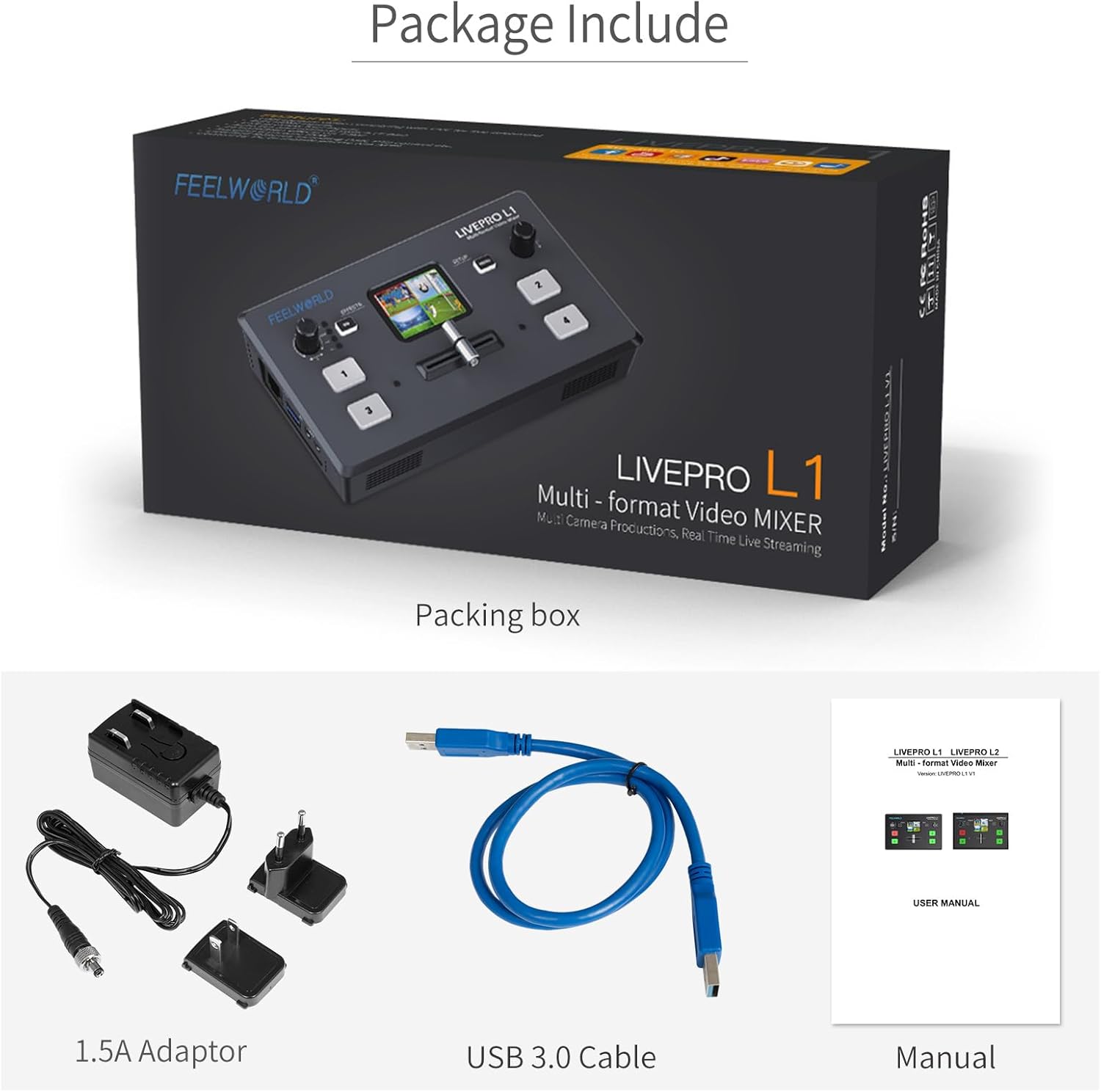
Figure 6: The complete package contents of the FEELWORLD LIVEPRO L1 V1.
Additional Resources
- Official User Manual (PDF): For a comprehensive guide, download the official PDF manual: Download User Manual
- FEELWORLD Official Store: Visit the FEELWORLD brand store for product updates, accessories, and direct support: FEELWORLD Store
Ask a question about this manual
Ask about setup, troubleshooting, compatibility, parts, safety, or missing instructions. Manuals+ will review the question and use this page’s manual context to help answer it.