Introduction
The Camco 51520 CAM-750 Portable Refrigerator/Freezer is designed to keep your food and drinks cold or frozen while on the go. This versatile unit is suitable for various applications, including road trips, RVing, camping, boating, and tailgating. It offers dual power options (AC 120V and DC 12V) and features dual zone cooling, allowing independent temperature control for two internal compartments.
Key features include an adjustable temperature range from -4°F to 68°F, ECO and MAX cooling modes, an LED control panel, interior LED lights, smartphone compatibility via a mobile app with Bluetooth, durable polymer construction with reinforced corners, wheels, and an extendable aluminum handle for portability. It also includes a 3-mode low voltage protection feature for 12V DC outlets to safeguard vehicle batteries.
Package Contents
Verify that all items are present in the package:
- Camco 51520 CAM-750 Portable Refrigerator/Freezer Unit
- 1 x 7-foot A/C Adapter (for 120V AC outlets)
- 1 x 11-foot 12/24V Cigarette Lighter Plug Adapter (for 12V DC vehicle outlets)
- Removable Wire Baskets (2)

Figure 1: Included accessories: wire baskets, AC adapter, and DC adapter.
Setup
Initial Placement and Power Connection
- Upon receiving the unit, allow it to stand upright for at least 6 hours before initial use. This allows the refrigerant to settle.
- Choose a stable, well-ventilated location for the refrigerator. Ensure adequate clearance around the vents for proper airflow.
- For AC Power (Home/Shore Power): Connect the 7-foot A/C adapter to the unit's AC input port, then plug the adapter into a standard 120V AC outlet.
- For DC Power (Vehicle/RV): Connect the 11-foot 12/24V cigarette lighter plug adapter to the unit's DC input port, then plug the adapter into your vehicle's 12V DC outlet.
Video 1: Official Camco overview of portable refrigerators, demonstrating features and power options.
Operating Instructions
Control Panel Overview
The unit features an LED control panel for easy temperature and mode adjustments. The digital display provides clear readings of current settings.

Figure 2: LED control panel and smartphone app interface for the Camco 51520 CAM-750.
Temperature Adjustment (Dual Zone)
The CAM-750 offers dual zone cooling, allowing you to set independent temperatures for each internal compartment. Use the control panel buttons to adjust the desired temperature for each zone between -4°F and 68°F.
Cooling Modes
Select between two cooling modes:
- ECO Mode: Energy-saving mode for extended operation.
- MAX Mode: Provides rapid cooling for quick temperature reduction.
Battery Protection Settings
The unit includes a 3-mode low voltage protection feature for 12V DC outlets to prevent draining your car battery. Adjust the protection level (Low, Medium, High) based on your vehicle's battery type and usage to ensure your battery is not excessively discharged.
Smartphone App Control
The Camco 51520 CAM-750 is smartphone compatible, allowing remote access and control via a mobile app. Utilize Bluetooth capabilities to connect your smartphone to the unit and adjust settings, monitor temperatures, and manage cooling modes from a distance.

Figure 3: The mobile application interface for controlling the refrigerator's settings.
Usage & Features
Capacity and Storage
The 75-liter storage capacity can accommodate up to 114 cans. Removable wire baskets are provided to help organize and maximize storage space for food and beverages within the dual compartments.

Figure 4: The Camco 51520 CAM-750 with both lids open, revealing the dual compartments and wire baskets.
Portability
Equipped with two wheels and an extendable aluminum handle, the cooler can be easily rolled for convenient transport. This design enhances portability, especially when the unit is fully loaded.

Figure 5: The portable refrigerator with its extendable handle and wheels for easy transport.
Interior LED Lights
Interior LED lights are integrated into the compartments, allowing you to easily view the contents of your cooler even in low-light conditions or at night.
Drainage
Two drain plugs, one in each compartment, facilitate easy removal of excess water for cleaning or defrosting.
Maintenance
Cleaning
To clean the interior, ensure the unit is unplugged and empty. Use the integrated drain plugs to release any accumulated water. Wipe down the interior with a damp cloth and mild detergent. Avoid abrasive cleaners or harsh chemicals. Ensure the interior is dry before closing the lids or reconnecting power.
Troubleshooting
If you encounter issues with your Camco 51520 CAM-750, please review the following common troubleshooting steps:
- Unit Not Powering On: Ensure the power cable is securely connected to both the unit and the power source (AC outlet or DC vehicle outlet). Verify the power source is active.
- Insufficient Cooling: Check that the temperature settings are appropriate for your needs. Ensure the unit's vents are not obstructed and there is adequate airflow. Avoid placing hot items directly into the cooler.
- Battery Protection Activating Frequently: Adjust the battery protection level to a lower setting (e.g., from High to Medium or Low) if the unit frequently shuts off due to low voltage, especially when connected to a vehicle battery.
- App Connectivity Issues: Ensure Bluetooth is enabled on your smartphone and the unit. Try restarting both the app and the refrigerator.
For persistent issues, refer to the detailed troubleshooting section in the full user manual or contact Camco customer support.
Specifications
| Feature | Specification |
|---|---|
| Brand | Camco |
| Model Number | 51520 |
| Capacity | 75 Liters |
| Power Input | AC 120V, DC 12V/24V |
| Temperature Range | -4°F to 68°F (-20°C to 20°C) |
| Cooling Modes | ECO, MAX |
| Battery Protection | 3-mode low voltage protection |
| Connectivity | Smartphone App (Bluetooth) |
| Dimensions (W x D x H) | 32.5 inches x 21.125 inches x 18.21875 inches |
| Weight | 54 lb |
| Refrigerant | 36 g |
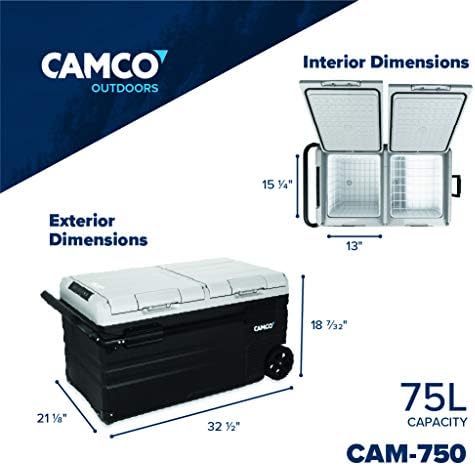
Figure 6: Dimensional specifications of the Camco 51520 CAM-750.
Warranty & Support
Limited Warranty
This product is covered by a 3-year limited warranty. Please retain your proof of purchase for warranty claims.
Customer Support
For further assistance, technical support, or warranty inquiries, please visit the official Camco website or contact their customer service department directly. Refer to the product packaging or the full user manual for specific contact information.


