
Introduction
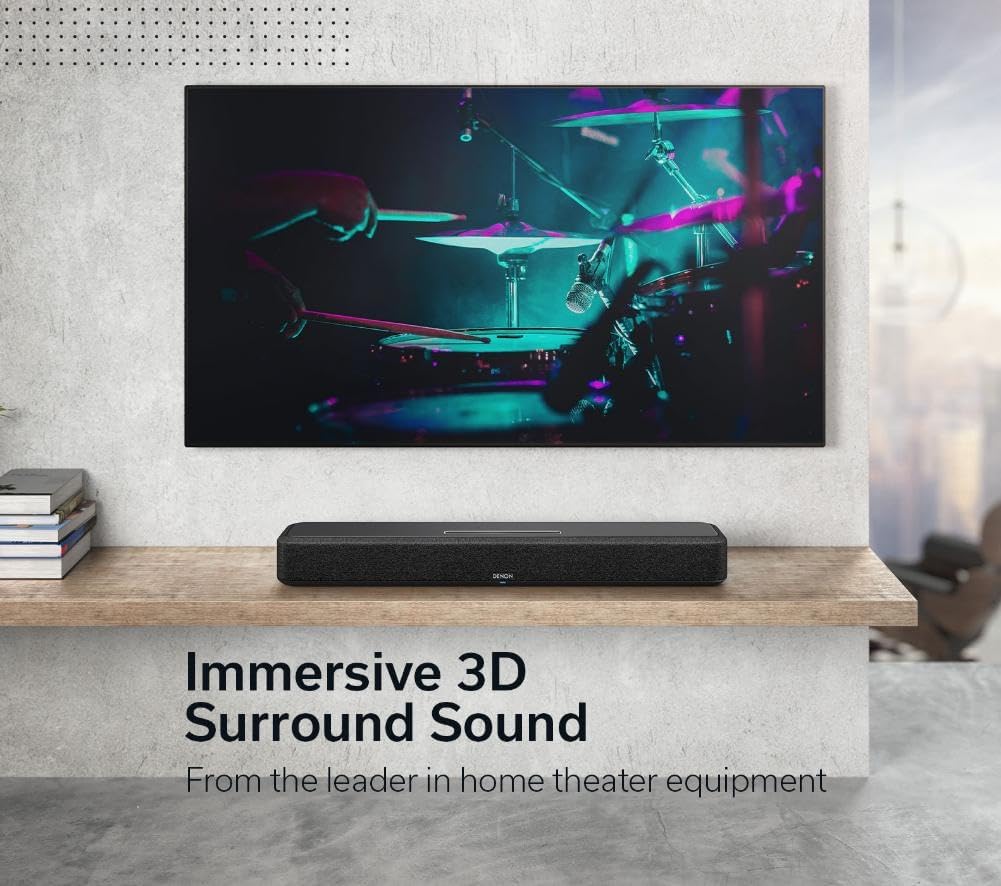
The Denon Home 550 Wireless Smart Soundbar delivers immersive 3D audio with Dolby Atmos and DTS:X, enhancing your television and music experience. This compact soundbar integrates seamlessly into your home audio system with Wi-Fi, Bluetooth, and HEOS Built-in capabilities, offering versatile connectivity and control options.
What's in the Box
Verify that all items listed below are included in your package:
- Denon Home 550 Soundbar
- Power Cord
- HDMI Cable (4K compatible)
- Optical Digital Cable
- Wall Mount Assembly Kit
Product Overview
Key Features
- Powerful Audio: 4.0 channel configuration in a compact 26-inch design.
- 3D Surround Sound: Supports Dolby Atmos and DTS:X with 0.75-inch soft dome tweeters, 2.15-inch full-range drivers, and 2.15-inch x 3.5-inch passive radiators.
- 4K Video Support: Compatible with 4K HD TVs, HDR10, and Dolby Vision for enhanced visuals.
- Wireless Whole Home Audio: HEOS Built-in for streaming from popular services and multi-room audio with other Denon Home speakers.
- Voice Control: Integrated Alexa for hands-free operation.
- Expandable System: Pair with Denon Home 150, 250, or 350 speakers and Denon Home Subwoofer for a complete surround sound setup.
Controls and Indicators
The soundbar features proximity-sensing control buttons on its top panel, which illuminate when your hand approaches. These include power, input selection, volume up/down, and microphone mute.

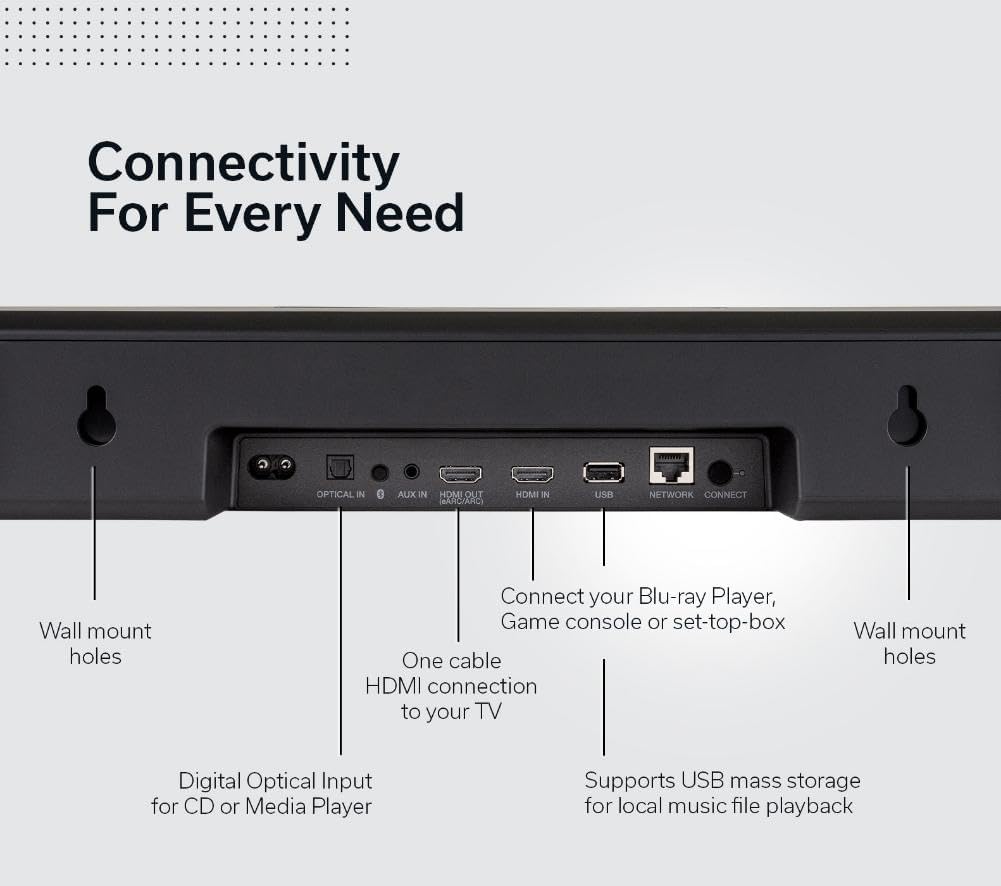
Rear Panel Connections
The rear panel provides various ports for connecting your soundbar to other devices:
- AC IN: Power input.
- IR: Infrared input for external IR receiver.
- HDMI eARC: Connects to your TV's HDMI eARC/ARC port for audio return channel functionality.
- HDMI IN: Connects to a Blu-ray player, game console, or set-top box.
- OPTICAL IN: Digital optical input for audio from a TV or other device.
- SUB OUT: RCA output for connecting an optional wired subwoofer.
- USB-C: For service or firmware updates.
- NETWORK (Ethernet): For wired network connection.
- PAIR: Button for pairing with Denon Home wireless speakers or subwoofer.
Product Dimensions
- Depth: 4.72 inches (12 cm)
- Width: 25.95 inches (65.9 cm)
- Height: 2.95 inches (7.5 cm)
- Weight: 7.3 pounds (3.3 kg)

Official Product Videos
Video: An overview of the Denon Home Sound Bar 550, showcasing its design and features.
Video: Demonstrates the connectivity options of Denon devices, including the soundbar.
Video: Highlights three key features of the Denon Home Sound Bar 550.
Setup
Placement
Place the soundbar centrally below your television. Ensure there are no obstructions in front of the soundbar to allow for optimal sound dispersion, especially for Dolby Atmos effects.

Connecting to Your TV
- Connect one end of the supplied HDMI cable to the HDMI eARC port on the soundbar.
- Connect the other end of the HDMI cable to your TV's HDMI eARC/ARC port.
- If your TV does not have an HDMI eARC/ARC port, use the supplied optical digital cable to connect the soundbar's OPTICAL IN port to your TV's optical digital output port.
Power Connection
Connect the supplied power cord to the AC IN port on the soundbar, then plug the other end into a wall outlet.
Initial Setup with HEOS App
Download the HEOS app on your smartphone or tablet to complete the initial setup, connect to your Wi-Fi network, and configure additional settings.
Wall Mounting
The soundbar can be wall-mounted using the included wall mount assembly kit. Refer to the detailed instructions provided in the kit for proper installation.
Operating Instructions
Power On/Off
Press the power button on the soundbar's top panel or use the remote control to turn the unit on or off.
Input Selection
Press the input selection button on the soundbar or remote control to cycle through available inputs (HDMI, Optical, Bluetooth, Wi-Fi).
Volume Control
Use the volume up (+) and volume down (-) buttons on the soundbar or remote control to adjust the audio level.
Sound Modes
The soundbar offers various sound modes to optimize your listening experience:
- Movie Mode: Enhances cinematic audio with immersive 3D effects.
- Music Mode: Optimized for music playback, providing balanced and clear audio.
- Night Mode: Reduces dynamic range for late-night listening, ensuring clear dialogue without disturbing others.
- Dialogue Enhancer: Adjusts dialogue clarity for improved speech intelligibility.
Voice Control (Alexa)
With built-in Alexa, you can control the soundbar using voice commands. Use phrases like "Alexa, turn up the volume" or "Alexa, switch to Bluetooth."
Multi-Room Audio with HEOS
Utilize the HEOS app to group your Denon Home 550 Soundbar with other HEOS Built-in devices for a synchronized multi-room audio experience.

Maintenance
To maintain the performance and appearance of your Denon Home 550 Soundbar, follow these guidelines:
- Cleaning: Wipe the exterior surfaces with a soft, dry cloth. Avoid using abrasive cleaners or solvents.
- Ventilation: Ensure proper ventilation around the soundbar to prevent overheating. Do not block any ventilation openings.
- Environment: Keep the soundbar away from direct sunlight, heat sources, and excessive moisture.
Troubleshooting
If you encounter issues with your Denon Home 550 Soundbar, try the following solutions:
- No Sound:
- Check all cable connections (HDMI, Optical, Power).
- Ensure the correct input source is selected on the soundbar.
- Verify the TV's audio output settings are configured to send audio to the soundbar.
- Increase the volume on both the soundbar and the TV.
- Bluetooth Connectivity Issues:
- Ensure the soundbar is in Bluetooth pairing mode.
- Delete the soundbar from your device's Bluetooth list and attempt to pair again.
- Move your device closer to the soundbar.
- HEOS App Issues:
- Ensure your soundbar and smart device are connected to the same Wi-Fi network.
- Restart the HEOS app and the soundbar.
Specifications
| Feature | Detail |
|---|---|
| Model Name | DENONHOMESB550 |
| Speaker Type | Soundbar |
| Special Features | Dolby Atmos & DTS:X, Simple Setup, HEOS, Alexa |
| Surround Sound Channel Configuration | 3D |
| Connectivity Technology | Auxiliary, HDMI, Optical, USB, Airplay, Bluetooth, Wi-Fi |
| Control Method | Voice |
| Product Dimensions | 4.72"D x 25.95"W x 2.95"H |
| Item Weight | 7.3 Pounds |
| Manufacturer | Denon |
| UPC | 883795005470 |
Warranty and Support
The Denon Home 550 Wireless Smart Soundbar comes with a Limited Warranty. For detailed warranty information, product support, or service inquiries, please visit the official Denon website or contact Denon customer support.
For further assistance, please visit the Denon Support Page.


