
FoMaKo FMK20UH NDI
FoMaKo NDI PTZ Camera FMK20UH NDI User Manual
Model: FMK20UH NDI | Brand: FoMaKo
1. Introduction
This manual provides comprehensive instructions for the setup, operation, and maintenance of your FoMaKo NDI PTZ Camera FMK20UH NDI. This AI auto-tracking PTZ camera is designed for professional video production and live streaming, offering high-quality video output and versatile connectivity options.

Figure 1: FoMaKo NDI PTZ Camera FMK20UH NDI, showcasing the camera unit, remote control, and included mounting brackets.
2. What's in the Box
Verify that all components are present in the packaging:
- FoMaKo AI Tracking NDI PTZ Camera (20x optical zoom)
- IR Remote Controller
- Wall Mount, Ceiling Bracket
- USB Cable
- Power Adapter 12V 2A
- User Manual (this document)
3. Product Features
The FoMaKo NDI PTZ Camera FMK20UH NDI is equipped with advanced features for versatile use:
- AI Auto Tracking Gen 3: Advanced algorithms for customized tracking, including real-time and regional tracking.
- Official NDI 6 & NDI HX3 Certified: Ensures stable and high-quality video transmission over network, compatible with major streaming software like vMix, OBS, Zoom.
- 20x Optical Zoom: Provides clear, detailed images even from a distance.
- Multiple Video Output Interfaces: Simultaneous HDMI, LAN/Ethernet, USB3.0, and NDI Live Streaming. Supports SRT, RTMP, VISCA protocols.
- PoE Support: Power over Ethernet simplifies setup with a single cable for power, control, and video/audio.
- H.264/H.265 Encoding: Ensures fluid motion video under low bandwidth conditions.
- High SNR CMOS: Combined with 2D & 3D noise reduction for high performance in low light.
- Leading Auto-Focus (AF) Technology: Fast, accurate, and stable auto-focus with Auto/Manual/One Push Focus modes.
- Remote Control & Presets: IR remote control with up to 255 presets (10 via remote).
- Easy to Use: Web browser control (default password 'admin'), built-in Gravity Sensor for auto-flip, adjustable Pan/Tilt/Zoom speed.

Figure 2: Visual representation of key product features.
4. Setup
4.1 Initial Connection
Connect the camera to your network and power source using the provided cables. For PoE (Power over Ethernet) functionality, ensure your network switch supports 802.3AF 48V PoE. The camera can be controlled via a web browser by entering its IP address (default password is 'admin').
4.2 Mounting Options
The camera supports various installation methods:
- Desktop: Place the camera on a flat, stable surface.
- Tripod Mounting: Attach the camera to a standard tripod using the integrated mounting screw hole.
- Wall Mounting: Use the provided wall mount bracket to secure the camera to a vertical surface.
- Ceiling Mounting: Use the provided ceiling bracket for inverted installation. The built-in gravity sensor supports auto-flip function for correct image orientation.

Figure 3: Depiction of the three primary installation methods for the camera.
5. Operating Instructions
5.1 AI Auto-Tracking
The camera's third-generation AI tracking allows for precise subject following. You can adjust tracking modes, sensitivity, figure size, character position, and lost target actions. Real-time tracking and regional tracking are available.
- To turn on automatic tracking, simply press F2 on the remote control.
- To switch tracking targets, press F4.
Video 1: Demonstration of the FoMaKo NDI PTZ camera's AI auto-tracking capabilities, showing the camera following a moving subject smoothly.

Figure 4: The camera's AI auto-tracking feature in action, highlighting its ability to follow subjects.
5.2 Remote Control
The included IR remote controller allows for quick adjustments to the camera's movement speed, including pan/tilt speed, preset speed, and zoom speed, providing seamless control and flexibility. You can set and recall up to 255 presets, with 10 directly accessible via the remote.

Figure 5: The camera's remote control, detailing its various function buttons for precise adjustments.
5.3 NDI Connection with OBS
The FoMaKo NDI PTZ Camera is NDI 6 & NDI HX3 Certified, allowing for seamless integration with live streaming software like OBS Studio. This enables high-quality video transmission with low latency over your network.
- Ensure the NDI Tools and NDI plugin for OBS are installed on your PC.
- Open OBS Studio.
- In the 'Sources' panel, click the '+' icon.
- Select 'NDI™ Source' from the list. (If not present, ensure the NDI plugin is correctly installed).
- Create a new source and name it (e.g., "FOMAKO PTZ").
- In the properties window, select your camera's NDI stream from the 'Source name' dropdown.
- Adjust bandwidth and other settings as needed, then click 'OK'.
- Your camera's feed should now appear in OBS.
Video 2: Step-by-step guide on connecting the FoMaKo NDI PTZ camera to OBS Studio via NDI, demonstrating the process and live feed.

Figure 6: The camera's NDI output displayed within a live production software interface.
6. Application Scenarios
The FoMaKo NDI PTZ Camera is designed for a wide range of professional AV applications, including:
- Church worship live services
- Educational institutions (universities, training classrooms)
- Video conferencing
- Live streaming and broadcasting (e.g., sports, concerts, events)
- Studio production
- Large conferences and summits
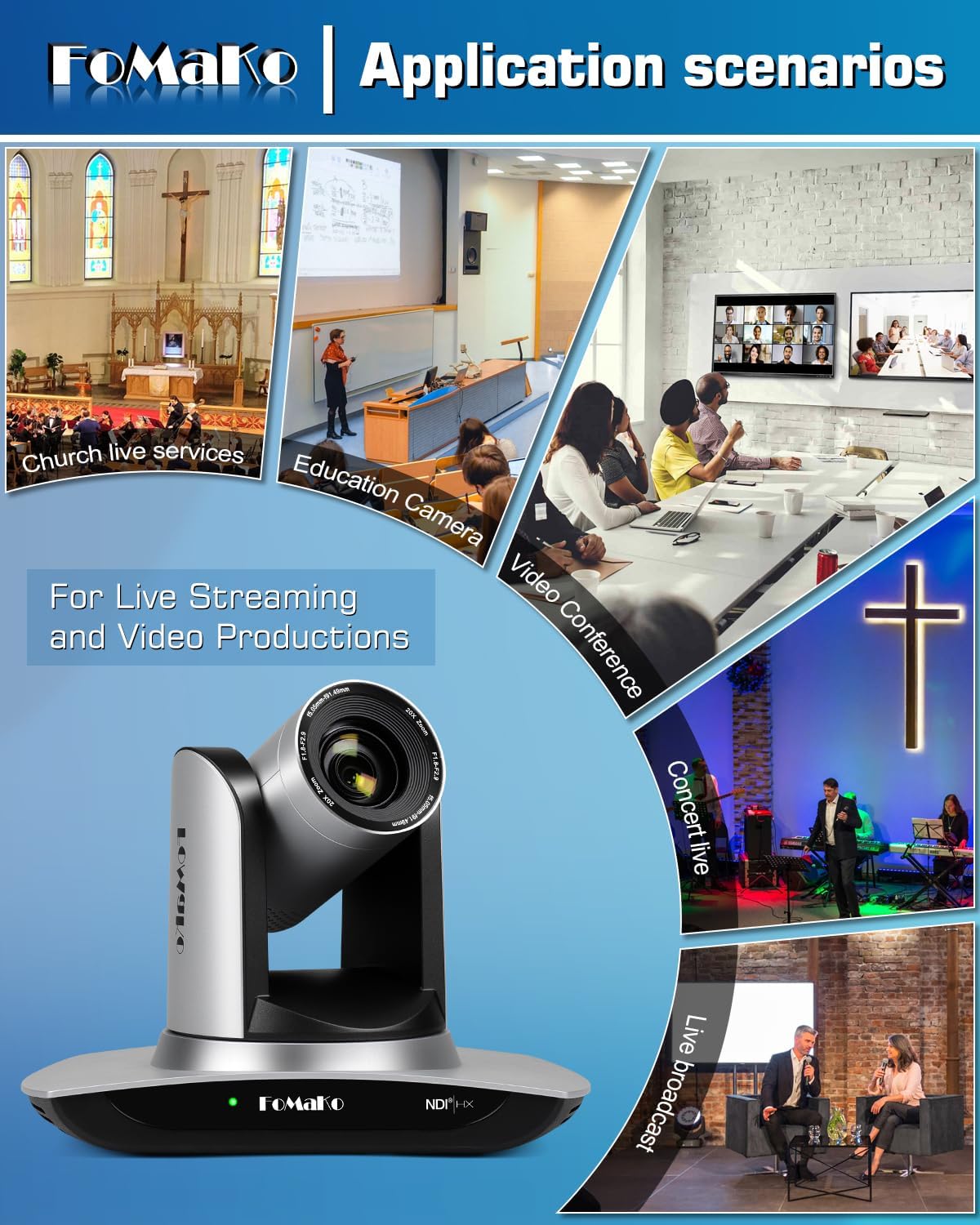
Figure 7: Diverse environments where the camera can be effectively utilized.
7. Maintenance
To ensure the longevity and optimal performance of your FoMaKo NDI PTZ Camera, follow these maintenance guidelines:
- Cleaning: Use a soft, dry cloth to clean the camera body. For the lens, use a specialized lens cleaning cloth and solution. Avoid abrasive cleaners or solvents.
- Storage: When not in use for extended periods, store the camera in a cool, dry place away from direct sunlight and excessive dust.
- Handling: Handle the camera with care to prevent physical damage. Avoid sudden impacts or dropping the unit.
- Firmware Updates: Periodically check the official FoMaKo website for firmware updates to ensure your camera has the latest features and performance improvements.

Figure 8: The camera lens, which requires careful cleaning.
8. Troubleshooting
If you encounter issues with your camera, refer to the following common troubleshooting steps:
- No Video Output:
- Check all cable connections (HDMI, USB, LAN) to ensure they are secure.
- Verify the power adapter is correctly connected and the camera is powered on.
- Ensure the correct input source is selected on your display or streaming software.
- Poor Image Quality:
- Check lighting conditions; ensure adequate and even illumination.
- Clean the camera lens with a soft, lint-free cloth.
- Verify focus settings (Auto/Manual) and adjust if necessary.
- For NDI streams, ensure sufficient network bandwidth.
- AI Tracking Issues:
- Ensure the subject is clearly visible and not obscured.
- Adjust tracking sensitivity and mode settings via the web interface.
- Avoid rapid, erratic movements that may exceed tracking capabilities.
- Remote Control Not Responding:
- Check the batteries in the remote control.
- Ensure there are no obstructions between the remote and the camera's IR receiver.
- Verify the camera is powered on.
For more detailed troubleshooting or persistent issues, please consult the full User Manual PDF available on the product's Amazon page or contact FoMaKo customer support.
9. Specifications
| Feature | Detail |
|---|---|
| Brand | FoMaKo |
| Model Number | FMK20UH NDI |
| Item Weight | 3.04 pounds |
| Product Dimensions | 5.67 x 9.98 x 6.65 inches |
| Color Name | Silvery |
| Special Features | AI tracking NDI PTZ Camera |
| Photo Sensor Technology | CMOS |
| Video Capture Resolution | 1080p |
| Maximum Focal Length | 91.49 Millimeters |
| Maximum Aperture | 2.9 f |
| Video Capture Format | MP4 |
| Supported Audio Format | AAC/MP3/G.711A |
| Screen Size | 1 Inches |
| Connectivity Technology | NDI, LAN/Ethernet, HDMI, 3G-SDI, USB3.0, PoE, Infrared |

Figure 9: Rear panel of the camera detailing its multiple video output interfaces.
10. Warranty & Support
FoMaKo is committed to providing excellent customer service and support for your product:
- 3-Year Limited Warranty: Your purchase is covered by a 3-year limited warranty.
- 30-Day Money-Back Guarantee: Enjoy a 30-day no-questions-asked money-back guarantee for a risk-free purchase.
- Free Online Training: Resources are available to help you get started easily.
- 24/7 Expert Assistance: Expect responses within 24 hours for any inquiries (please include your Order ID).
- Remote Assistance: Remote assistance can be provided for setup if necessary.
- Lifetime Technical Support: Benefit from lifetime customer technical support.
Your satisfaction is our priority. For support, please refer to the contact information provided in your product packaging or on the official FoMaKo website.

Figure 10: FoMaKo's commitment to customer satisfaction and support.
Related documentsFMK20UH NDI


Ask a question about this manual
Ask about setup, troubleshooting, compatibility, parts, safety, or missing instructions. Manuals+ will review the question and use this page’s manual context to help answer it.