
1. Introduction
The PWAY HDMI Extender allows you to extend HDMI audio and video signals over long distances using a single Cat5e/6/7 Ethernet cable. This device supports Full HD 1080P@60Hz resolution and is ideal for distributing video to multiple monitors via a Gigabit Ethernet switch. It provides a reliable solution for extending HDMI signals in various environments, including home entertainment, commercial displays, and educational facilities.
2. Package Contents
Please verify that all items listed below are included in your package:
- 1x Transmitter Unit
- 1x Receiver Unit
- 2x Power Adapters
- 1x User Manual

This image displays the complete contents included in the PWAY HDMI Extender package: one Transmitter unit, one Receiver unit, two power adapters for powering both units, and a user manual for installation and operation guidance.
3. Product Overview
The PWAY HDMI Extender system consists of two main units: a Transmitter (TX) and a Receiver (RX). The Transmitter unit connects to your HDMI source device, and the Receiver unit connects to your HDMI display. Both units communicate over a single Ethernet cable.

This image displays the PWAY HDMI Extender units. The unit on the left is the Transmitter, featuring HDMI input and output ports, power indicator (PWR), and status indicator (STA). The unit on the right is the Receiver, showing the DC power input and the UTP (Ethernet) port for connection.

This image illustrates the PWAY HDMI Extender's key features, emphasizing its plug-and-play functionality, support for one-to-many configurations over 150 meters, and 1080P@60Hz loop-out capability. It highlights the product as an HDMI IP Extender.
4. Setup and Installation
4.1 Pre-Installation Checks
Before proceeding with the installation, please perform the following checks:
- Set the output resolution of your signal source to not higher than 1920x1080P@60Hz.
- Connect your source and display devices directly (without the HDMI extender) to confirm they have image output.
- If setting up multiple displays, ensure you use a Gigabit Ethernet switch. The system distributes video via MAC addresses.
4.2 Basic Connection
For a simple point-to-point extension:
- Connect your HDMI source (e.g., PC, media player) to the HDMI IN port of the Transmitter unit using an HDMI cable.
- Connect an Ethernet cable (Cat5e/6/7) from the UTP port of the Transmitter unit to the UTP port of the Receiver unit.
- Connect your HDMI display (e.g., monitor, TV) to the HDMI OUT port of the Receiver unit using an HDMI cable.
- Connect the included power adapters to both the Transmitter and Receiver units and plug them into power outlets.
- The Transmitter unit also features an HDMI local output (loop-out) port, allowing you to connect a local monitor for monitoring the source signal.

This diagram demonstrates the local loop-out function of the PWAY HDMI Extender. A source device (laptop) connects to the Transmitter. The Transmitter provides a local HDMI output to a nearby monitor and extends the signal via an Ethernet cable (up to 150m/492ft) to the Receiver, which connects to a remote monitor.
4.3 Multi-Monitor Setup (One-to-Many)
The PWAY HDMI Extender supports distributing a single HDMI source to multiple displays using a Gigabit Ethernet switch. This setup is ideal for large installations requiring multiple screens.
- Connect your HDMI source to the HDMI IN port of the Transmitter unit.
- Connect the UTP port of the Transmitter unit to an available port on a Gigabit Ethernet switch.
- Connect multiple Receiver units to other available ports on the same Gigabit Ethernet switch.
- Connect each Receiver unit to its respective HDMI display.
- Ensure all Transmitter and Receiver units are powered.
Note: This system is designed to work with independent Gigabit Ethernet switches and is not recommended for use with your existing home network switch, as it distributes video via MAC addresses and may interfere with other network devices. It does not support 100 Mbit switches.

This illustration shows how the PWAY HDMI Extender can be used in a one-to-many configuration. A single Transmitter unit connects to a Gigabit Ethernet Switch, which then distributes the HDMI signal to multiple Receiver units. Each Receiver connects to a separate display, supporting up to 256 receivers for extensive video distribution.
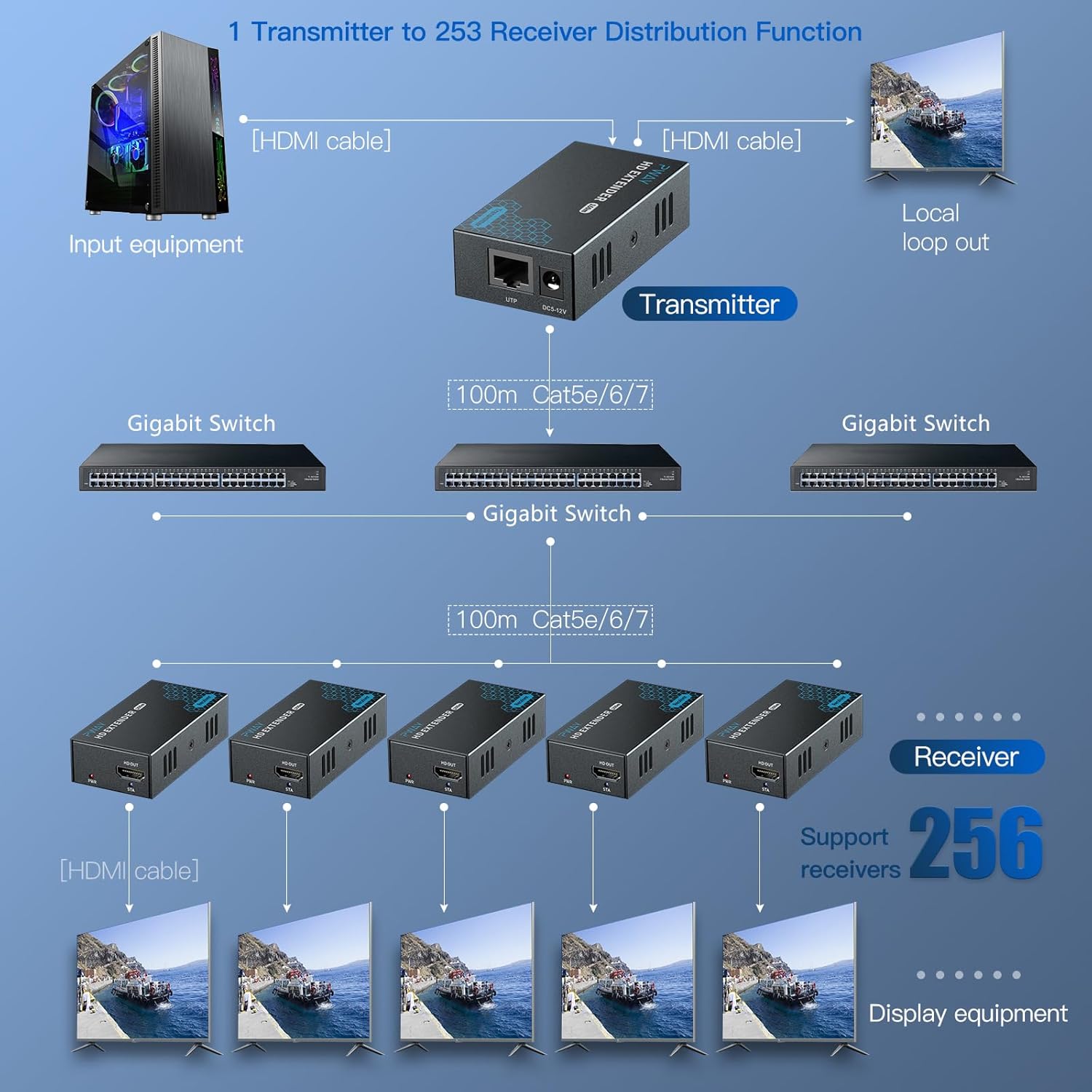
This diagram illustrates an advanced setup for the PWAY HDMI Extender, where a single Transmitter unit distributes the HDMI signal across multiple interconnected Gigabit Ethernet Switches. This allows for signal extension and distribution to numerous Receiver units and displays over a larger, more complex network infrastructure.
5. Operating Instructions
The PWAY HDMI Extender is designed for simple plug-and-play operation. Once all connections are made and power is supplied, the system should automatically detect the signal and display it on the connected monitors.
- Resolution Support: The extender supports a maximum input and output resolution of 1920x1080P@60Hz, including 3D. It is backward compatible with lower resolutions such as 1080p30, 1080i, 720p60, and 720p30.
- Local Loop-out: The Transmitter unit includes an HDMI loop-out port, allowing you to connect a local display to monitor the source signal without interruption to the extended signal.
- Ethernet Cable Length: For optimal performance, use Cat5e/6/7 cables up to 500ft (150m). Cat5 cables are supported up to 400ft.
6. Specifications
| Category | Specification |
|---|---|
| HDMI Cable (Recommended) | HDMI 1.3, within 15 feet |
| Max Input & Output Resolution | 1920x1080P@60Hz, 3D |
| Max Pixel Clock | 165MHz |
| Max Data Transfer Rate | 6.75Gbps |
| Ethernet Interface | RJ45 |
| Ethernet Crimping Method | 5680B (white orange, orange, white green, blue, white blue, green, white brown, brown) |
| Ethernet Cable Length (Cat5e/6/7) | Up to 500ft (150m) |
| Ethernet Cable Length (Cat5) | Up to 400ft |
| Multi-Video Support | Yes, through Gigabit switch |
| Max Working Voltage | 2A/5VDC |
| Operating Temperature Range | -5 to +70℃ |
| Dimensions (L x W x H) | 81 x 43 x 23 mm |
| Weight | 250g |
7. Troubleshooting
If you encounter issues with your PWAY HDMI Extender, please refer to the following common troubleshooting steps:
- No Image Output:
- Ensure all HDMI and Ethernet cables are securely connected.
- Verify that both the Transmitter and Receiver units are powered on and their power indicators are lit.
- Confirm that your source device's output resolution is set to 1080P@60Hz or lower.
- Test the source and display directly with an HDMI cable to ensure they function independently.
- Try restarting both the Transmitter and Receiver units by unplugging and re-plugging their power adapters.
- Network Interference (One-to-Many Setup):
- If other network devices lose connectivity when the extender is active, it indicates a conflict. The extender distributes video via MAC addresses and requires a dedicated Gigabit Ethernet switch.
- Do not connect the extender to your existing home network switch that is shared with other devices (e.g., internet router, computers, security cameras).
- Use a separate, independent Gigabit Ethernet switch solely for the HDMI extender system.
- Ensure all components (Transmitter and Receivers) connected to the switch are on the same switch or interconnected switches that are properly configured for this type of traffic.
- Signal Degradation over Distance:
- Ensure you are using high-quality Cat5e/6/7 Ethernet cables. Signal attenuation can occur with lower quality or excessively long cables.
- Adhere to the recommended maximum cable lengths: 500ft for Cat5e/6/7 and 400ft for Cat5.
8. Maintenance
To ensure the longevity and optimal performance of your PWAY HDMI Extender, follow these general maintenance guidelines:
- Keep the units in a cool, dry environment, away from direct sunlight, heat sources, and excessive moisture.
- Avoid placing heavy objects on the units or cables.
- Clean the units with a soft, dry cloth. Do not use liquid cleaners or aerosols.
- Ensure proper ventilation around the units to prevent overheating.
9. Warranty and Support
The PWAY HDMI Extender typically comes with a 1-year manufacturer's warranty from the date of purchase. Please retain your proof of purchase for warranty claims.
For technical support, troubleshooting assistance beyond this manual, or warranty inquiries, please contact PWAY customer service through the retailer where the product was purchased or refer to the contact information provided in the product packaging or on the official PWAY website.