
CubicFun MC270h
CubicFun 3D Puzzle St. Paul's Cathedral Model MC270h Instruction Manual
Model: MC270h | Brand: CubicFun
1. Introduction
This instruction manual guides you through the assembly and features of the CubicFun 3D Puzzle St. Paul's Cathedral Model MC270h. This detailed 643-piece model allows you to construct a replica of the iconic London landmark, featuring intricate details and an innovative opening design to reveal the interior.
2. Safety Information
- This product contains small parts. Keep out of reach of young children to prevent choking hazards.
- Recommended for ages 14 and up due to complexity and small components.
- Handle pieces with care to avoid damage.
3. Package Contents
The CubicFun 3D Puzzle St. Paul's Cathedral Model MC270h package includes:
- 643 puzzle pieces made from green paper foam board.
- Detailed instruction booklet with assembly diagrams.
Note: No glue or additional tools are required for assembly.
4. Setup and Assembly
Follow these steps to assemble your CubicFun St. Paul's Cathedral 3D puzzle:
- Unpack and Organize: Carefully remove all puzzle sheets from the box. Identify the different sections and lay them out in an organized manner.
- Review Instructions: Read through the entire instruction booklet before beginning assembly. Pay close attention to the diagrams and piece numbers.
- Punch Out Pieces: Gently punch out each puzzle piece from its foam board sheet. Use a tool like tweezers for very small or delicate pieces to avoid tearing.
- Assemble Base: Start by assembling the base structure of the cathedral as indicated in the instructions.
- Build Sections: Proceed to build the main sections of the cathedral, including the walls, columns, and interior elements. Ensure each piece is securely fitted into its corresponding slot.
- Install Interior Details: As you build, integrate the interior details such as the floor patterns, murals, and architectural features.
- Construct Dome and Towers: Assemble the iconic dome and the two front towers, carefully following the layered design.
- Final Assembly: Connect all major sections to form the complete cathedral model.
The assembly process is designed to be challenging and may take approximately 16+ hours to complete. Patience and careful attention to detail are key.

Figure 1: Visual guide showing the various stages of assembly, from individual sheets to the completed model.
Video 1: Official CubicFun video demonstrating the assembly process and key features of the St. Paul's Cathedral 3D Puzzle.
5. Features and Design
The CubicFun St. Paul's Cathedral model is designed with several unique features:
- Realistic Appearance: The model accurately replicates the architectural details of St. Paul's Cathedral.
- Moveable Wall Design: A creative push-pull design allows the model to open, revealing the intricately detailed interior of the church.
- Detailed Interior: The interior features include mosaics, elaborate stone carvings, and murals, providing a glimpse into the cathedral's historical artwork.
- Whispering Gallery: The model includes a representation of the famous Whispering Gallery, where a whisper can be heard across the dome.

Figure 2: A visual comparison highlighting the realistic details of the 3D model against the actual St. Paul's Cathedral.

Figure 3: Illustration of the model's unique push-pull opening mechanism, allowing access to the interior.

Figure 4: Close-up view of the interior, showcasing the intricate floor patterns and architectural elements.

Figure 5: View of the upper interior, highlighting the restored murals and detailed windows within the dome structure.
6. Maintenance
- Cleaning: Dust the model gently with a soft, dry cloth or a soft brush. Avoid using water or cleaning solutions, as they may damage the paper foam board material.
- Storage: Store the assembled model in a dry environment, away from direct sunlight and extreme temperatures, to prevent warping or fading.
- Handling: Handle the model carefully, especially when moving it, to avoid dislodging pieces or damaging delicate structures.
7. Troubleshooting
- Pieces Not Fitting: Ensure you are using the correct pieces for each step by cross-referencing with the instruction diagrams. Some pieces may require a gentle but firm push to fit securely.
- Torn Pieces: If a piece tears during removal or assembly, a small amount of craft glue can be used to repair it. Allow it to dry completely before continuing.
- Missing Pieces: Double-check all sheets and packaging. If a piece is genuinely missing, contact CubicFun customer support.
- Stability Issues: Ensure all connections are firm. If the model feels unstable, re-examine the connections in the recently assembled sections.
8. Specifications
| Product Dimensions (Assembled) | 18.58 x 11.18 x 11.73 inches (47.2 x 28.4 x 29.8 cm) |
| Item Weight | 3.5 pounds (1.59 kg) |
| Model Number | MC270h |
| Manufacturer | CubicFun |
| Recommended Age | 14+ years (This recommendation aligns with the product's complexity and 'brain teaser for adults' description, overriding a lower age range found elsewhere.) |
| Number of Pieces | 643 |
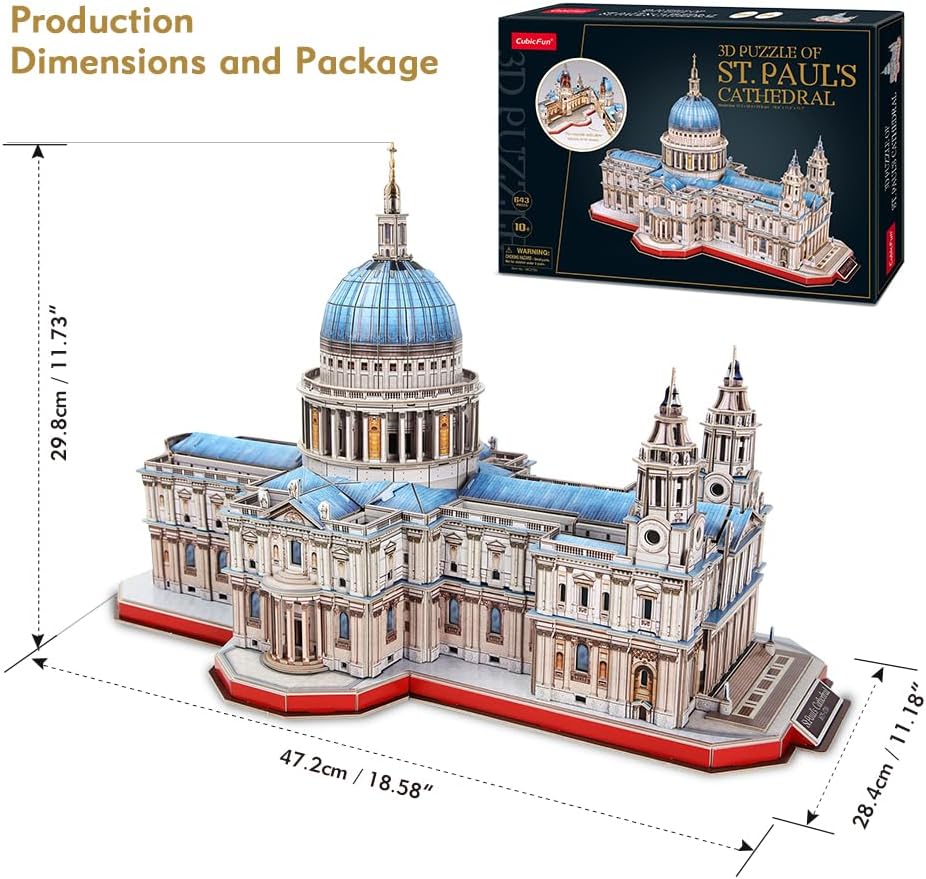
Figure 6: Image displaying the assembled model's dimensions and the product packaging.
9. Warranty Information
Specific warranty details for the CubicFun 3D Puzzle St. Paul's Cathedral Model MC270h are not provided in the product listing. For information regarding product warranty, please contact CubicFun directly through their official website or customer service channels.
10. Customer Support
For further assistance, questions, or to report missing/damaged parts, please contact CubicFun customer support. You can typically find their contact information on the product packaging or their official brand website.
Visit the CubicFun Store on Amazon for more products and information.
Related documentsMC270h

Ask a question about this manual
Ask about setup, troubleshooting, compatibility, parts, safety, or missing instructions. Manuals+ will review the question and use this page’s manual context to help answer it.