
1. Important Safety Warnings
Please read all instructions carefully before using this product. Failure to follow these instructions could result in injury or damage to the product.
- Do not use the device while charging. Always disconnect the USB charging cable before use.
- Consult a medical professional before using this device if you have certain medical conditions, severe gum disease, or have recently undergone oral surgery.
- This appliance is not intended for use by persons (including children) with reduced physical, sensory or mental capabilities, or lack of experience and knowledge, unless they have been given supervision or instruction concerning use of the appliance by a person responsible for their safety.
- Keep out of reach of children.
- Use only lukewarm water or a dentist-recommended mouthwash. Do not use harsh chemicals or abrasive cleaners.
- Do not immerse the main unit in water.
2. Product Overview
The Oclean W1 Air Flosser is designed for effective and gentle interdental cleaning, utilizing a unique air-water mixing technology.

Figure 2.1: Oclean W1 Air Flosser, showing the main unit, a smartphone displaying the Oclean app, and the portable travel case. This image illustrates the compact design and smart connectivity of the device.
2.1 Key Components
- Main Unit: Contains the motor, battery, and control buttons.
- Nozzle: The detachable tip that delivers the air-water mixture. It features a 360° rotatable design and a 45° curved tip for multi-angle deep cleaning, along with a food-grade silicone cushion for comfort.
- Water Tank: Integrated 30ml capacity for water or mouthwash.
- USB Charging Port: Located at the bottom of the device for convenient charging.

Figure 2.2: Detailed view of the Oclean W1 nozzle, highlighting its 360° rotatable and 45° curved design for effective multi-angle deep cleaning, along with the soft silicone cushion.
3. Setup and First Use
- Charge the Device: Before first use, fully charge the Oclean W1. Connect the USB charging cable to the charging port at the bottom of the device and plug it into a compatible USB power source. A full charge takes approximately 3 hours. The charging indicator light will provide feedback (refer to Section 5.1 for details).
- Attach the Nozzle: Gently insert the nozzle into the opening at the top of the main unit until it clicks securely into place.
- Fill the Water Tank: Open the water tank cap and fill the 30ml tank with lukewarm water or a dentist-recommended mouthwash. Close the cap firmly to prevent leaks.
4. Operating Instructions
The Oclean W1 Air Flosser offers three distinct cleaning modes to suit various oral care needs.

Figure 4.1: The control panel of the Oclean W1 Air Flosser, indicating the On/Off button, Mode Switch button, and the three default cleaning modes: Manual Deep Cleaning, Manual Standard Cleaning, and Automatic Cleaning.
4.1 Using the Flosser
- Select Mode: Press the 'Mode Switch' button to cycle through the available cleaning modes:
- Manual Deep Cleaning: For targeted, powerful cleaning.
- Manual Standard Cleaning: A balanced mode for daily use.
- Automatic Cleaning: Provides a consistent, automated cleaning cycle.
- Positioning: Lean over a sink. Place the tip of the nozzle on the interdental line, aiming it at a 90-degree angle to your teeth.
- Start Cleaning: Press the 'On/Off' button to start the device.
- Flossing Technique: Slowly guide the nozzle along your gum line, pausing briefly between each tooth to allow the air-water mixture to clean the interdental space. The device delivers approximately 160 pulses per full water tank, allowing for multiple rinses per interdental space.
- Finish: After cleaning all desired areas, press the 'On/Off' button again to turn off the device.
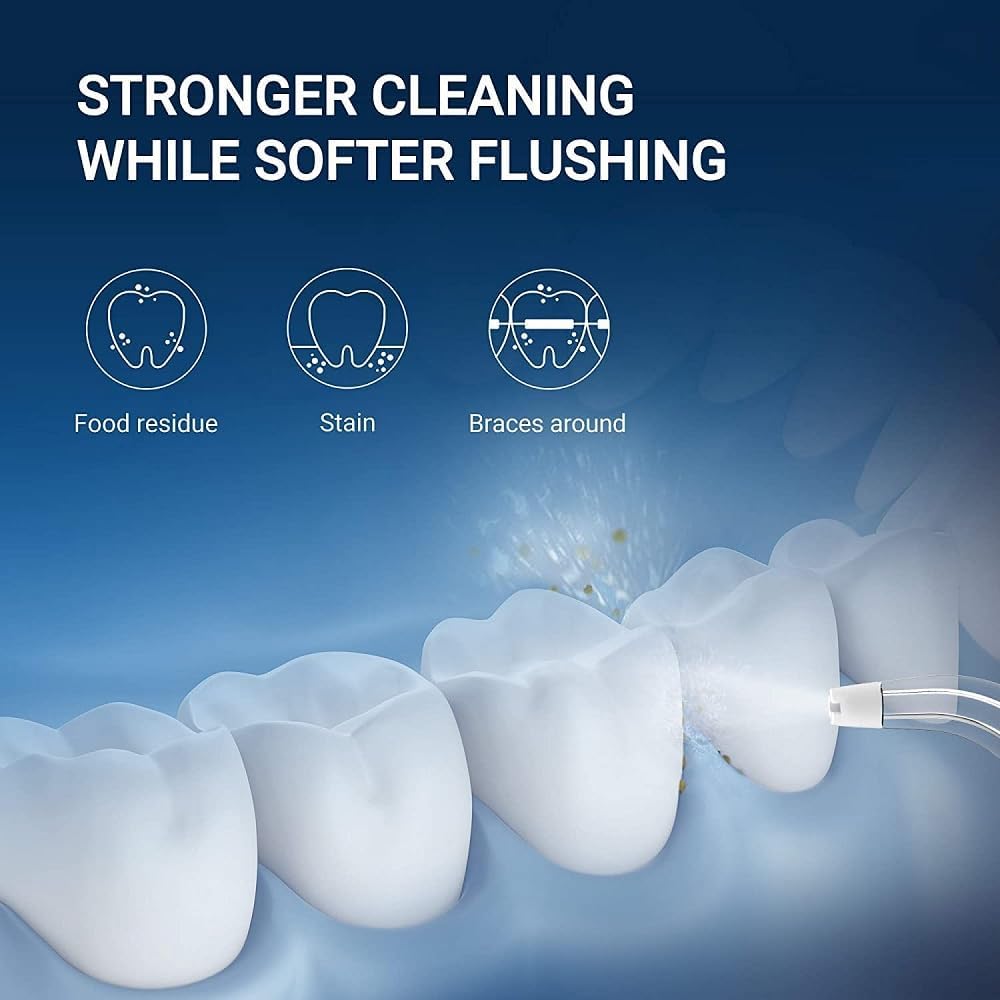
Figure 4.2: Visual representation of the Oclean W1's cleaning effectiveness, demonstrating its ability to remove food residue and stains, and clean effectively around braces, providing a softer yet stronger flush.
5. Maintenance
5.1 Charging the Battery
The Oclean W1 features a long-lasting battery, providing up to 30 days of use on a single 3-hour fast charge (when used once a day for 2 minutes under default mode).

Figure 5.1: The Oclean W1 Air Flosser connected to a USB charging cable, highlighting its impressive 30-day battery life from a 3-hour fast charge.
- When the battery is low, the indicator light will signal (refer to product specific light patterns).
- Connect the device to a compatible USB charger or a device with a USB port.
- The indicator light will show charging status and turn off or change color when fully charged.
5.2 Cleaning the Device
- After each use, empty any remaining water from the tank.
- Rinse the water tank and nozzle with clean water.
- Wipe the exterior of the main unit with a soft, damp cloth. Do not use abrasive cleaners or immerse the main unit in water.
- Allow all parts to air dry completely before storing.
- It is recommended to replace the nozzle every 3-6 months, or sooner if it shows signs of wear.
6. Troubleshooting
If you encounter issues with your Oclean W1 Air Flosser, please refer to the following common problems and solutions:
| Problem | Possible Cause | Solution |
|---|---|---|
| Device does not turn on. | Battery is depleted. | Charge the device fully. |
| No water or weak spray. | Water tank is empty or not properly filled. Nozzle is clogged. | Refill the water tank. Remove and rinse the nozzle under warm water to clear any blockages. |
| Device stops during use. | Battery is low. | Recharge the device. |
| Unusual noise during operation. | Air intake or nozzle partially blocked. | Check for any obstructions in the nozzle or water tank. Ensure the nozzle is securely attached. |
If the problem persists after trying these solutions, please contact Oclean customer support.
7. Specifications
| Feature | Detail |
|---|---|
| Product Name | Flosser for teeth |
| Model Name | W1 |
| Brand | Oclean |
| Dimensions (L x W x H) | 4.5 x 3.5 x 23.5 cm (1.77 x 1.38 x 9.25 inches) |
| Weight | 150 grams (0.33 lbs) |
| Power Source | Rechargeable Battery (1 Lithium-ion included) |
| Water Tank Capacity | 30 ml |
| Special Features | Portable, Rechargeable, 3 Flossing Modes, Air-Water Mixing Technology |
| Color | White |
8. Warranty and Support
For detailed warranty information, product registration, and customer support, please refer to the official Oclean website or the warranty card included in your product packaging.
If you require technical assistance or have questions not covered in this manual, please contact Oclean customer service through their official channels.


