1. Introduction
The Frizzlife PX500-A is a tankless reverse osmosis (RO) water filtration system designed to provide clean, great-tasting water directly from your tap. This system utilizes advanced filtration technology, including an alkaline remineralization stage, to remove a wide range of contaminants while adding beneficial minerals back into the water. Its compact, tankless design saves significant under-sink space and reduces the risk of secondary contamination.

Figure 1.1: Frizzlife PX500-A System with included faucet.
2. Key Features
- Superior Filtration Performance: Utilizes a 0.0001 micron RO membrane (ASR313-500g) to eliminate over 1000 types of contaminants (99.99%), including fluoride, chlorine, chloramine, TDS, lime, lead, and other heavy metals.
- Tankless Design: High capacity of 500 gallons per day (GPD) eliminates the need for a traditional storage tank, saving up to 70% under-counter space and preventing secondary contamination.
- Easy Installation: Pre-loaded filters and an integrated design allow for self-installation with minimal effort. All necessary components are included.
- Filter Life Monitor & Quick Change: Integrated monitor indicates when filter replacement is needed. Filters can be replaced in approximately 2 seconds with a simple twist mechanism.
- Remineralization & Alkalization: The post-alkaline filter (ASR313-A) adds essential minerals and increases water pH to over 7.5 for improved taste and health benefits.
- High Efficiency: Achieves a pure to drain ratio of 1.5:1, significantly reducing water waste compared to conventional RO systems.

Figure 2.1: Filtration stages of the Frizzlife PX500-A system, detailing the PPC, RO Membrane, and TC-A layers.

Figure 2.2: The compact, tankless design of the PX500-A system, saving up to 70% under-sink space.
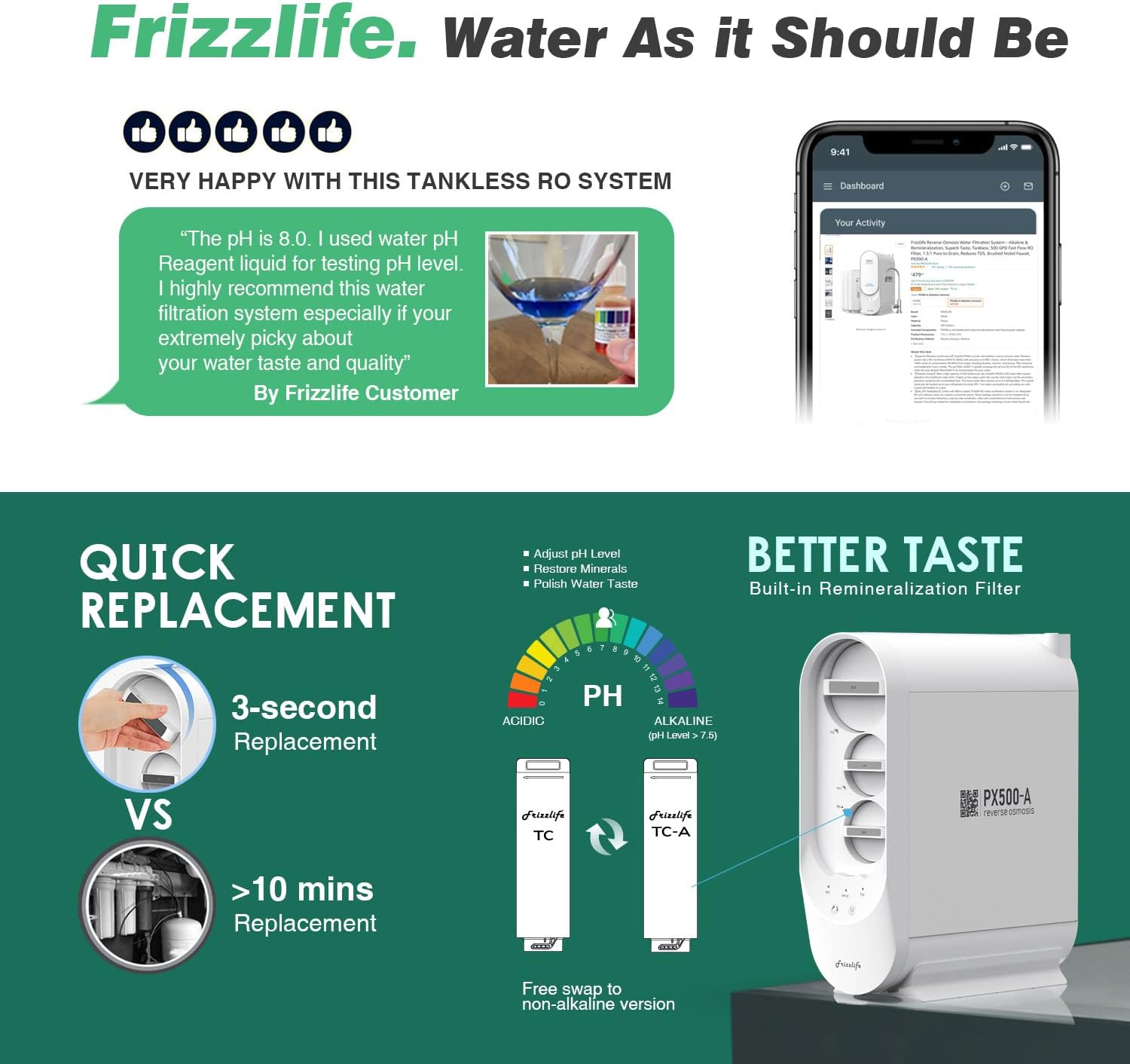
Figure 2.3: Demonstrates the quick 3-second filter replacement feature and the pH adjustment capability of the remineralization filter.

Figure 2.4: Explanation of why alkaline water is beneficial, including properties like optimal hydration and antioxidant effects.
3. Package Contents
Verify that all components listed below are present in your package before beginning installation.

Figure 3.1: All components included in the PX500-A RO system package.
- PX500-A RO System Unit (with 3 filters loaded)
- Delicate Faucet
- Drain Saddle
- Feed Water Valve
- Converter Set
- 1/4" White Tubing
- 1/4" Red Tubing
- 3/8" White Tubing
- Plumber Tape
- 1/4" Quick Fitting
- User Manual (this document)
4. Setup & Installation
The Frizzlife PX500-A system is designed for easy DIY installation. Follow these steps carefully. It is recommended to watch the official installation video for visual guidance.
4.1 Pre-Installation Checklist
- Ensure you have adequate space under your sink for the unit (Dimensions: 35.56 x 12.7 x 45.72 cm).
- Confirm all package contents are present.
- Gather necessary tools: adjustable wrench, drill (if drilling a new faucet hole), screwdriver, utility knife.
- Turn off the cold water supply to your sink.
4.2 Installation Steps
- Install the RO Faucet: If you don't have an existing hole, drill a 1-inch hole in your countertop or sink. Secure the new faucet using the provided hardware.
- Connect the Feed Water Adapter: Locate your cold water supply line under the sink. Install the feed water adapter (T-valve) to divert water to the RO system. Ensure a tight seal using plumber's tape.
- Install the Drain Saddle: Choose a suitable location on the drain pipe (above the P-trap). Drill a 1/4-inch hole and secure the drain saddle.
- Connect Tubing:
- Connect the red tubing from the feed water adapter to the "IN" port on the PX500-A unit.
- Connect the white tubing (1/4") from the "RO" port on the unit to the RO faucet.
- Connect the black tubing from the "DRAIN" port on the unit to the drain saddle.
- Place the PX500-A Unit: Position the unit upright under the sink.
- Connect Power: Plug the power adapter into a standard electrical outlet.
- Flush the System: Turn on the cold water supply. Open the RO faucet and let the water run for 15-30 minutes to flush the system and remove any carbon fines. Close the faucet.

Figure 4.1: Comprehensive diagram illustrating the connection points for the Frizzlife PX500-A system, including the RO faucet, kitchen faucet, drain saddle, feed water adapter, and power connection. Optional connections for an ice maker (IMC-1) and mini water tank (MWT3) are also shown.
For a detailed visual guide, please refer to the official Frizzlife installation video available on their website: www.frizzlife.com

Figure 4.2: Optional mini tank connection (MWT3, sold separately) to provide more stable water flow and eliminate initial lag.
5. Operation
5.1 Dispensing Water
To dispense purified water, simply open the dedicated RO faucet. The system will automatically activate and begin producing water. The flow rate is approximately 0.4 GPM (gallons per minute) at 60 psi.
5.2 Indicator Lights
The control panel on the front of the unit features indicator lights to provide system status and filter life information:
- Blue Light: Indicates normal operation and good filter status.
- Red Light: Indicates that a filter needs replacement. The system may also emit an audible beep.

Figure 5.1: The filter life monitor on the PX500-A unit, showing blue for good status and red for filter change required.
6. Maintenance
6.1 Filter Replacement Schedule
Regular filter replacement is crucial for maintaining optimal system performance and water quality. The system's filter life monitor will alert you when a filter change is necessary.
| Filter Stage | Filter Model | Replacement Frequency |
|---|---|---|
| 1st Stage (PPC) | ASR311 | Every 6 months |
| 2nd Stage (RO Membrane) | ASR313-500g | Every 2 years |
| 3rd Stage (Post-Alkaline) | ASR313-A | Every 1 year |
6.2 How to Replace Filters
Filter replacement is a quick and simple process:
- Turn off the water supply to the RO system at the feed water adapter.
- Unplug the power adapter from the electrical outlet.
- Locate the filter cartridge to be replaced.
- Twist the old filter cartridge counter-clockwise to unlock and remove it.
- Insert the new filter cartridge, aligning the arrows, and twist clockwise to lock it into place.
- Turn on the water supply and plug in the power adapter.
- Flush the new filter by running water from the RO faucet for a few minutes as per the filter's specific instructions.

Figure 6.1: Overview of the quick filter change process and estimated filter lifespans for ASR 311, ASR 312-500G, and ASR 313-A filters.
7. Troubleshooting
This section addresses common issues you might encounter with your Frizzlife PX500-A system. If the problem persists, please contact customer support.
| Problem | Possible Cause | Solution |
|---|---|---|
| No water flow or very slow flow |
|
|
| System beeping with red light | Filter replacement needed | Identify which filter light is red and replace the corresponding filter. |
| Water tastes bad or unusual |
|
|
| Leaking from connections | Loose fittings or improper installation | Turn off water supply, check all tubing connections and fittings for tightness. Ensure O-rings are properly seated. |
| Loud noise during operation |
|
|
8. Product Specifications
| Attribute | Detail |
|---|---|
| Model Number | PX500-A |
| Brand | FRIZZLIFE |
| Color | White |
| Dimensions (L x W x H) | 35.56 x 12.7 x 45.72 cm (14 x 5 x 18 inches) |
| Item Weight | 500 g (approx. 1.1 lbs) |
| Capacity | 500 Gallons Per Day (GPD) |
| Material | BPA-Free |
| Special Features | TDS Reduction, Tankless Design, Remineralization |
| Purification Method | Reverse Osmosis, Alkaline |
| Installation Type | Under Sink |
| Power Source | Electric Cord |
| Flow Rate | 0.4 GPM @ 60 psi |

Figure 8.1: Comparison of Frizzlife RO systems, highlighting the PX500-A's specifications.
9. Warranty and Support
Frizzlife is committed to providing high-quality products and customer satisfaction. For warranty information, technical support, or to purchase replacement filters, please visit the official Frizzlife website or contact their customer service team.
Website: www.frizzlife.com
Please have your model number (PX500-A) and purchase date ready when contacting support.


