
Venmar 0772371126268
Venmar Push Button Control User Manual
Model: 0772371126268
1. Introduction
This user manual provides detailed instructions for the installation, operation, and maintenance of your Venmar Push Button Control. This control is designed to provide intuitive management of your Venmar ventilation system, ensuring efficient air exchange and improved indoor air quality. Please read this manual thoroughly before installation and use to ensure proper function and safety.
2. Product Overview
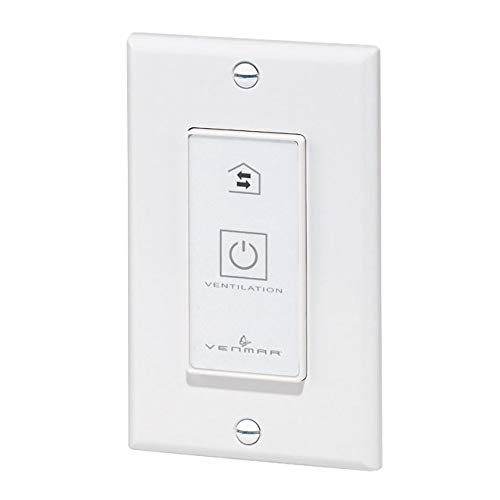
Figure 1: Venmar Push Button Control
The Venmar Push Button Control is a white, rectangular wall-mounted device designed to manage ventilation systems. It features a central push-button panel with symbols for ventilation control, including a power/ventilation cycle icon and a house with arrows indicating air exchange. The 'VENTILATION' text is printed below the power icon, and 'VENMAR' is printed at the bottom of the button panel. The unit is secured to the wall plate with two visible screws, one at the top and one at the bottom.
3. Setup and Installation
Important Safety Information: Installation should only be performed by a qualified electrician in accordance with all local and national electrical codes. Always disconnect power at the main circuit breaker before beginning any electrical work.
- Power Disconnection: Locate the circuit breaker controlling the ventilation system and turn off the power. Verify that power is off using a voltage tester.
- Prepare Wiring: Identify the wires from your ventilation unit and the power supply. The Venmar Push Button Control uses screw terminals for connection.
- Connect Wires: Connect the appropriate wires to the screw terminals on the back of the control. Ensure all connections are secure and properly insulated. Refer to your ventilation system's manual for specific wiring diagrams if necessary.
- Mounting: Secure the control to a standard electrical wall box using the provided screws. Ensure the control is level and flush with the wall surface.
- Restore Power: Once installation is complete and all connections are secure, restore power at the main circuit breaker.
- Test Functionality: Test the control to ensure it operates the ventilation system correctly.
4. Operating Instructions
The Venmar Push Button Control is designed for simple and effective management of your ventilation system.
- Power/Ventilation Cycle Button: The main button with the power symbol (⏻) and 'VENTILATION' text controls the primary operation of the unit. Pressing this button will typically cycle the ventilation system through its available modes (e.g., ON, OFF, Intermittent, Continuous).
- Air Exchange Mode Indicator: The icon depicting a house with two horizontal arrows (⇆) indicates the current air exchange mode or allows selection between different ventilation strategies (e.g., recirculation, fresh air intake, exhaust). Consult your ventilation system's manual for specific mode definitions.
- Activation: A single press of the main button will typically activate or change the mode of the ventilation system. Observe the system's response to confirm the selected mode.
5. Maintenance
The Venmar Push Button Control requires minimal maintenance to ensure long-term performance.
- Cleaning: To clean the surface of the control, gently wipe it with a soft, damp cloth. Do not use abrasive cleaners, solvents, or harsh chemicals, as these can damage the finish or internal components.
- Inspection: Periodically inspect the control for any signs of physical damage, loose connections, or unusual operation. If any issues are observed, disconnect power and consult a qualified technician.
- No User-Serviceable Parts: The control contains no user-serviceable parts. Do not attempt to open or repair the unit yourself.
6. Troubleshooting
If you experience issues with your Venmar Push Button Control, refer to the following common troubleshooting steps:
| Problem | Possible Cause | Solution |
|---|---|---|
| Control is unresponsive. | No power to the unit. | Check the circuit breaker and ensure power is restored. Verify wiring connections. |
| Ventilation system does not activate. | Incorrect wiring or system fault. | Review wiring connections against the ventilation system's manual. Consult a qualified technician if the issue persists. |
| Control feels loose on the wall. | Mounting screws are loose. | Carefully tighten the mounting screws. Do not overtighten. |
If these steps do not resolve the issue, contact a qualified electrician or the manufacturer's support.
7. Specifications
| Feature | Detail |
|---|---|
| Model Number | 0772371126268 |
| Manufacturer | Venmar |
| Operation Mode | ON-OFF |
| Contact Type | Normally Open |
| Connector Type | Screw Terminal |
| Switch Type | Push Button |
| Circuit Type | 1-way |
| Mounting Type | Wall Mount |
| Actuator Type | Push Button |
| Contact Material | Silver |
| Number of Positions | 1 |
| Parcel Dimensions | 12.9 x 9.2 x 3.8 cm |
| Item Weight | 80 g |
8. Warranty Information
This product is covered by a manufacturer's warranty. For specific details regarding warranty coverage, duration, and terms, please refer to the documentation included with your purchase or visit the official Venmar website. Keep your proof of purchase for warranty claims.
9. Customer Support
For technical assistance, troubleshooting beyond this manual, or inquiries about replacement parts, please contact Venmar customer support directly. Contact information can typically be found on the manufacturer's website or on the product packaging.
Related documents0772371126268


Ask a question about this manual
Ask about setup, troubleshooting, compatibility, parts, safety, or missing instructions. Manuals+ will review the question and use this page’s manual context to help answer it.