
1. Product Overview
The XtremepowerUS 19-inch Sand Filter Combo is designed for above-ground pools, offering a fully integrated sand filter, pump, pressure valve, and stand. This system provides a pumping capacity of 4,500 gallons per hour and a sand capacity of 175 pounds. It is engineered for optimal flow rates, promoting clean water quality with an energy-efficient motor and a 5-way multi-port valve for easy operation.

Figure 1.1: Complete XtremepowerUS 19-inch Sand Filter and Pump System.
Key Features:
- Integrated System: Pump and filter are engineered for optimum flow rates and clean water quality.
- Efficient Filtration: Maintains sand height for maximum surface exposure, ensuring optimal filtration and efficient back-washing.
- Low Noise Operation: Designed for quiet and energy-efficient performance.
- 5-Way Multi-Port Valve: Provides easy use and quick back-washing.
- Large Strainer Basket: Features an easy-open, quick-lock, transparent pump lid for reduced maintenance.
2. Important Safety Information
Read and understand all instructions before installing, operating, or maintaining this product. Failure to follow these instructions could result in serious injury or death.
- Always disconnect power to the pump before performing any service or maintenance.
- Ensure all electrical connections are made by a qualified electrician and comply with local codes.
- Do not operate the pump if the power cord is damaged.
- Keep children and unauthorized persons away from the pool equipment area.
- Never operate the filter system without water.
- Do not exceed the maximum operating pressure of the filter.
- This product is for above-ground pool use only.
3. Product Components
Familiarize yourself with the main components of your XtremepowerUS sand filter system:
- Sand Filter Tank
- Pool Pump with Strainer Basket
- 5-Way Multi-Port Valve
- Pressure Gauge
- System Tray/Base
- Hose Adapters
- Internal Lateral Assembly (for sand distribution)
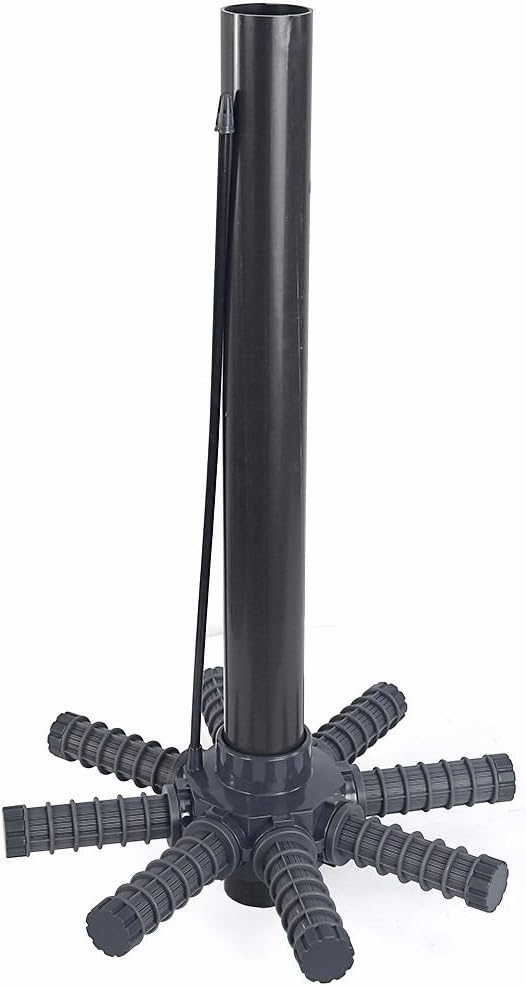
Figure 3.1: Internal lateral assembly, responsible for even water distribution within the sand media.

Figure 3.2: The 5-way multi-port valve and integrated pressure gauge, essential for system operation and monitoring.

Figure 3.3: Detailed view of the pressure gauge, indicating system pressure in PSI and Bar.
4. Setup and Installation
Follow these steps to properly set up your sand filter system:
- Choose Location: Place the system on a firm, level surface, as close to the pool as possible. Ensure adequate drainage and protection from direct weather if necessary.
- Assemble Base and Tank: Secure the filter tank onto the system tray/base.
- Install Lateral Assembly: Carefully place the internal lateral assembly inside the filter tank. Ensure it is centered and properly seated.
- Add Filter Media (Sand): Fill the tank with the recommended amount of filter sand (approximately 175 lbs). Ensure the standpipe is covered to prevent sand from entering it.
- Attach Multi-Port Valve: Secure the 5-way multi-port valve to the top of the filter tank. Ensure a tight seal.
- Connect Pump: Mount the pump to the system tray and connect it to the multi-port valve using the provided plumbing.
- Connect Hoses: Connect the pool's return line to the 'RETURN' port on the valve and the pool's skimmer/main drain line to the pump's suction inlet.
- Electrical Connection: Plug the pump into a grounded electrical outlet. Ensure the circuit is protected by a Ground Fault Circuit Interrupter (GFCI).
5. Operating Your Sand Filter System
The 5-way multi-port valve controls the flow of water through the filter system. Always turn off the pump before changing valve positions.
Multi-Port Valve Functions:
| Position | Description |
|---|---|
| FILTER | Normal filtering mode. Water flows through the sand, is cleaned, and returned to the pool. |
| BACKWASH | Reverses water flow to clean the filter sand. Water is discharged to waste. |
| RINSE | Used after backwashing to settle the sand and flush out any remaining dirt to waste. |
| WASTE | Bypasses the filter, sending water directly from the pool to waste (e.g., for vacuuming heavy debris). |
| CLOSED | Shuts off all flow to the filter and pump. Do not operate pump in this position. |
Initial Startup:
- Ensure the pool is filled to the proper level.
- Set the multi-port valve to the 'BACKWASH' position.
- Turn on the pump and backwash for 2-3 minutes or until the water in the sight glass (if present) runs clear.
- Turn off the pump.
- Set the valve to 'RINSE' and turn on the pump for 30-60 seconds.
- Turn off the pump.
- Set the valve to 'FILTER'. Turn on the pump. The system is now operating in normal filtration mode. Note the initial pressure gauge reading.
Routine Operation:
Operate the filter system daily for several hours to ensure proper water circulation and filtration. Monitor the pressure gauge. When the pressure rises 8-10 PSI above the initial clean pressure, it's time to backwash.
6. Maintenance
Cleaning the Strainer Basket:
The pump's strainer basket collects large debris before it reaches the filter. Check and clean it regularly, especially if water flow seems reduced.
- Turn off the pump and disconnect power.
- Close any necessary valves to prevent water flow from the pool.
- Unscrew the transparent lid of the strainer basket.
- Remove the basket and empty any debris. Rinse thoroughly.
- Inspect the O-ring on the lid for damage and ensure it is clean. Lubricate if necessary.
- Replace the basket and secure the lid tightly.
- Reopen valves and restore power to the pump.

Figure 6.1: The transparent lid of the pump's strainer basket, allowing visual inspection of debris.

Figure 6.2: The removable strainer basket inside the pump, designed to capture larger debris.
Backwashing the Filter:
Backwash when the pressure gauge reads 8-10 PSI above the clean operating pressure.
- Turn off the pump.
- Set the multi-port valve to 'BACKWASH'.
- Turn on the pump and backwash until the water in the sight glass runs clear (2-3 minutes).
- Turn off the pump.
- Set the valve to 'RINSE'.
- Turn on the pump and rinse for 30-60 seconds.
- Turn off the pump.
- Set the valve to 'FILTER'.
- Turn on the pump. The system is now back in normal filtration mode.
Winterization:
Before freezing temperatures, drain all water from the pump and filter. Disconnect hoses and store the pump and filter in a dry, protected area. Remove the pressure gauge and store it indoors.
7. Troubleshooting Guide
This section provides solutions to common issues you might encounter.
| Problem | Possible Cause | Solution |
|---|---|---|
| Pump not starting | No power; tripped breaker/GFCI; motor issue | Check power supply, reset breaker/GFCI; consult electrician if motor hums but doesn't start. |
| Low water flow | Clogged strainer basket; dirty filter sand; air leak in suction line; low pool water level | Clean strainer basket; backwash filter; check all connections for leaks; ensure adequate pool water level. |
| High pressure gauge reading | Dirty filter sand | Backwash the filter. If pressure remains high, consider replacing filter sand. |
| Water not clearing | Insufficient filtration time; improper chemical balance; dirty filter | Increase filtration time; test and adjust pool chemicals; backwash filter. |
| Water leaking from valve | Worn O-rings/gaskets; loose connections | Inspect and replace O-rings/gaskets; tighten connections. |
8. Technical Specifications
| Specification | Value |
|---|---|
| Type | Sand Filter System |
| Pool Type | Above Ground |
| Filtration Area Capacity | 18,000 Gallons |
| Drum Capacity (Sand) | Up to 175 lbs |
| Valve Function | Filter, Backwash, Closed, Rinse, Waste |
| Pump Power | 1.5 HP |
| Voltage | 115V/60Hz |
| Max Flow Rate | 4,500 GPH (75 Gallons Per Minute) |
| Inlet/Outlet Fitting | 1-1/2" NPT |
| Max Temperature | 122°F |
| Certification | UL Listed |
| Overall Dimensions (W x L x H) | 28-1/2" x 21-1/2" x 31-1/2" (approx. 72.4 x 54.6 x 80 cm) |
| Material | Metal, PE |
| Item Weight | 26.3 kg |
9. Warranty and Customer Support
XtremepowerUS products are manufactured to high-quality standards. For specific warranty details, including coverage period and terms, please refer to the warranty card included with your product or visit the official XtremepowerUS website.
If you encounter any issues or have questions regarding the installation, operation, or maintenance of your sand filter system, please contact XtremepowerUS customer support. Have your model number (75032-1) and purchase information ready when contacting support.
For the most up-to-date contact information, please visit the XtremepowerUS official website or refer to your product packaging.