
1. Introduction
This manual provides essential instructions for the safe and efficient installation, operation, and maintenance of your NBPOWER 3000W e-Bike Conversion Kit. Please read this manual thoroughly before attempting any installation or operation. Retain this manual for future reference.
Safety Precautions
- Always wear appropriate safety gear, including a helmet, when operating an e-bike.
- Ensure all connections are secure and waterproof where applicable.
- Do not modify the components of the kit. Unauthorized modifications can lead to malfunction and void the warranty.
- Keep children and pets away from the installation area.
- Disconnect the battery before performing any maintenance or adjustments.
2. Package Contents
Verify that all components listed below are present in your package. If any items are missing or damaged, please contact customer support.
- 3000W Brushless Gearless Motorized Rear Wheel (24-inch, 135mm dropout)
- 48V-72V Sine Wave 80Amp Smart Controller
- Controller Bag
- Pair of High-Quality Aluminum Alloy Brake Levers
- Full Twist Throttle
- PAS 8 Magnets High-Quality Pedal Assistant Sensor
- TFT UKC1 Color Display
- Single Speed Gears
- Alarm Lock
- Torque Arm

Image: All components of the NBPOWER 3000W e-Bike Conversion Kit as packaged.
3. Setup and Installation
3.1 Pre-installation Checklist
- Ensure your bicycle frame has a 135mm rear dropout for compatibility.
- Gather necessary tools: wrenches, screwdrivers, cable ties, and a bike stand.
- A 72V battery is required for operation (not included in this kit).
3.2 Motor Wheel Installation
Replace your existing rear wheel with the 3000W motorized wheel. Ensure the wheel is properly seated in the dropouts and the axle nuts are securely tightened. Install the provided torque arm to prevent axle rotation under high torque.

Image: Side view of the 24-inch rear wheel with integrated 3000W hub motor.
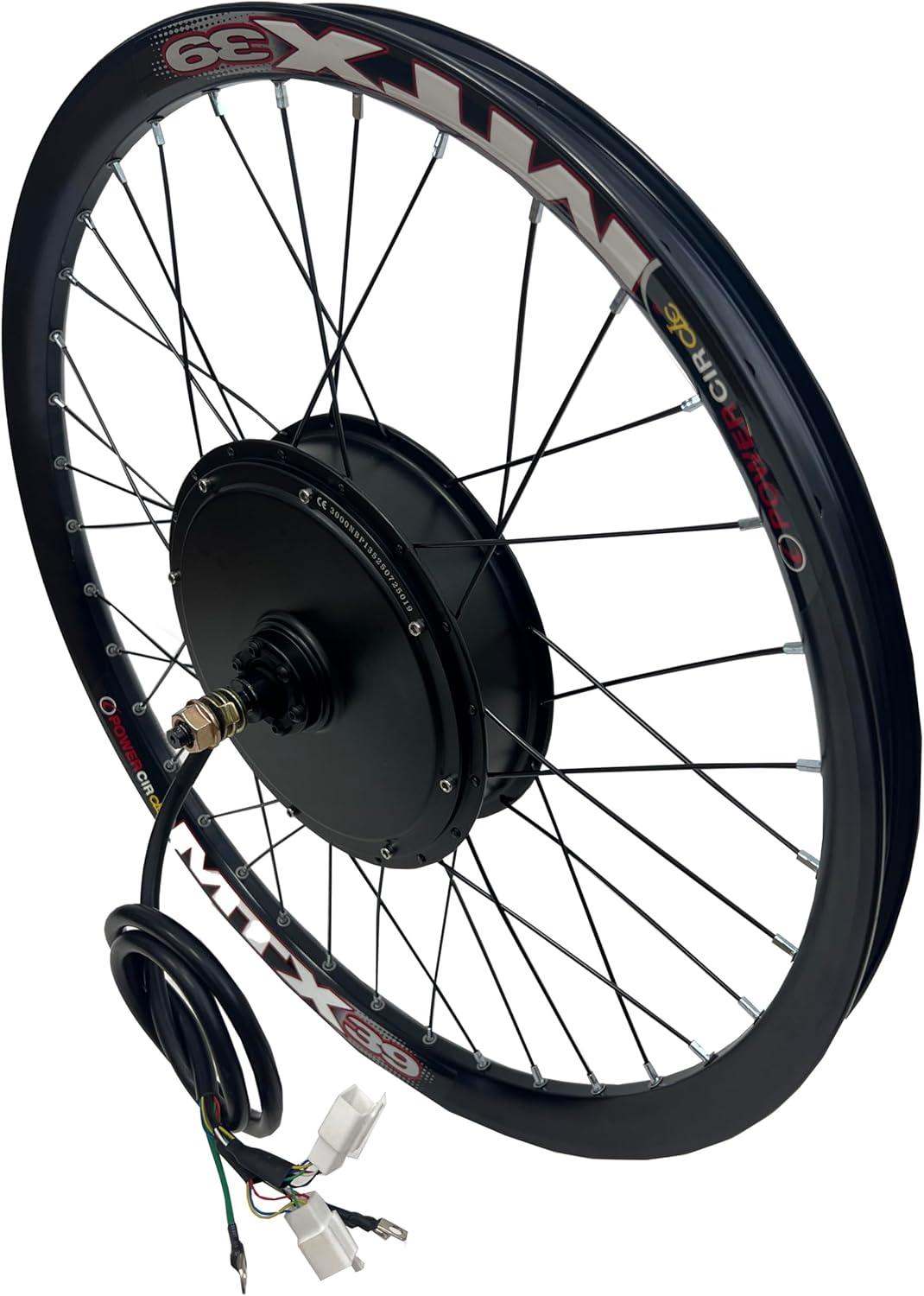
Image: Opposite side view of the 24-inch rear wheel with integrated 3000W hub motor.

Image: Close-up view of the 3000W hub motor, showing the single-speed gear.

Image: Technical drawing illustrating the dimensions of the hub motor and wheel assembly.
3.3 Controller and Component Wiring
Mount the controller in the provided bag, typically on the bike frame. Connect the various components to the controller according to the wiring diagram. Ensure all connectors are firmly seated. The main connections include:
- Motor Phase Lines (Yellow, Green, Blue)
- Hall Connector
- Battery Power (Red/Black)
- TFT UKC1 Display
- Full Twist Throttle
- PAS Sensor
- Brake Levers
- Alarm & Lock system

Image: Overview of the controller and various components with their respective wiring connections.
3.4 Battery Connection
Connect your 72V battery to the controller's main power input. This kit requires a 72V battery for proper operation. Incorrect voltage can damage the system. Ensure the battery is securely mounted on your bike.
Video: Demonstration of the 135mm dropout 3000W e-bike kit in a test setup, showing the motor and display functionality. This video illustrates the basic operation and speed capabilities of the kit.
4. Operating Instructions
4.1 TFT UKC1 Color Display
The TFT UKC1 Color Display provides real-time information about your e-bike's performance. It typically shows speed, battery level, assist level, and trip data. Refer to the separate UKC1 display manual for detailed navigation and settings adjustments.
4.2 Throttle and Pedal Assist (PAS)
- Throttle: The full twist throttle allows for immediate power delivery, independent of pedaling. Twist the throttle to accelerate.
- Pedal Assist (PAS): The 8-magnet PAS sensor detects your pedaling motion and provides motor assistance. The level of assistance can be adjusted via the display.
4.3 Alarm Lock
The included alarm lock system provides security for your e-bike. Consult the alarm lock's specific instructions for activation, deactivation, and remote control functions.
5. Maintenance
Regular maintenance ensures the longevity and optimal performance of your e-bike conversion kit.
- Motor Hub: Keep the motor hub clean and free from debris. Avoid submerging the motor in water.
- Controller: Ensure the controller is protected from moisture and physical damage. The controller bag helps with this.
- Wiring: Periodically check all electrical connections for tightness and signs of wear or damage. Secure loose cables with cable ties.
- Brakes: Regularly inspect brake levers and pads for wear. Ensure the brake cut-off sensors are functioning correctly.
- Battery: Follow the manufacturer's guidelines for charging and storing your 72V battery.
6. Troubleshooting
This section addresses common issues you might encounter.
- Error 07 on Display: This error typically indicates a motor or controller communication issue. Check all motor phase and Hall sensor connections. The dual-mode controller is designed to help resolve this error.
- No Power: Verify the battery is charged and properly connected. Check all power cables for secure connections. Ensure the display is turned on.
- Motor Not Engaging: Check throttle and PAS sensor connections. Ensure brake levers are not engaged, as they often have cut-off switches.
- Reduced Performance: Check battery charge level. Inspect motor and controller for any signs of overheating or damage.
If you encounter persistent issues not covered here, please contact NBPOWER customer support.
7. Specifications
| Feature | Specification |
|---|---|
| Motor Power | 3000W |
| Dropout Size | 135mm (Rear Fork) |
| Wheel Size | 24 Inches |
| Controller | 48V-72V Sine Wave 80Amp |
| Display | TFT UKC1 Color Display |
| Max Speed (Unloaded) | Up to 100km/h (62mph) |
| Gears | Single-speed |
| Frame Material | Aluminum (for compatible bikes) |
| Power Source | Battery (72 Volts recommended) |
| Included Components | Motorized Wheel, Controller, Controller Bag, Brake Levers, Throttle, PAS Sensor, Display, Alarm Lock, Torque Arm |
8. Warranty and Support
8.1 Warranty Information
NBPOWER products are covered by a manufacturer's warranty against defects in materials and workmanship. The specific terms and duration of the warranty may vary. Please retain your proof of purchase for warranty claims. For detailed warranty information, refer to the product packaging or contact NBPOWER customer support.
8.2 Customer Support
For technical assistance, troubleshooting, or warranty inquiries, please contact NBPOWER customer support:
- Email: sqma1001@hotmail.com
- WhatsApp: +86 13401536906