
Introduction
This manual provides detailed instructions for the installation, operation, and maintenance of your xmartO WB2024-W 2K 3MP WiFi Home Security Camera. This camera is designed as an add-on unit for existing xmartO expandable camera systems or xmartO NVRs. It is important to note that this camera does not function as a standalone device and requires a 5MP xmartO NVR to operate correctly. If your NVR operates at 960p or 1080p resolution, these 3MP cameras may have too high a resolution for compatibility.
The WB2024-W camera features 2K (2304*1296) HD resolution, a built-in microphone for audio capture, IR night vision, and an IP66 weatherproof rating for versatile indoor and outdoor use.
What's in the Box
- WB2024-W IP camera (2 units)
- 10ft 12V 1A DC power plug (2 units)
Key Features
- 2K 3MP HD Resolution: Delivers clear 2304*1296 resolution video.
- Built-in Microphone: Captures audio without the need for external microphones.
- RJ45 Ethernet Port: Allows for wired connection to the NVR or router for stable connectivity.
- Offline Operation: When connected to an xmartO NVR, the system can record and playback videos without internet access.
- IR Night Vision: Equipped with 3 professional IR LEDs for clear vision in complete darkness, up to 25 meters.
- IP66 Weatherproof: Durable metal casing suitable for both indoor and outdoor installation.
- Long WiFi Range: Offers extended wireless range when used with xmartO NVRs, up to 1300ft (400m) in open areas.
- Monitor/TV Display: View camera feeds on a monitor or TV via HDMI when connected to an xmartO NVR.
Setup
1. Powering the Camera
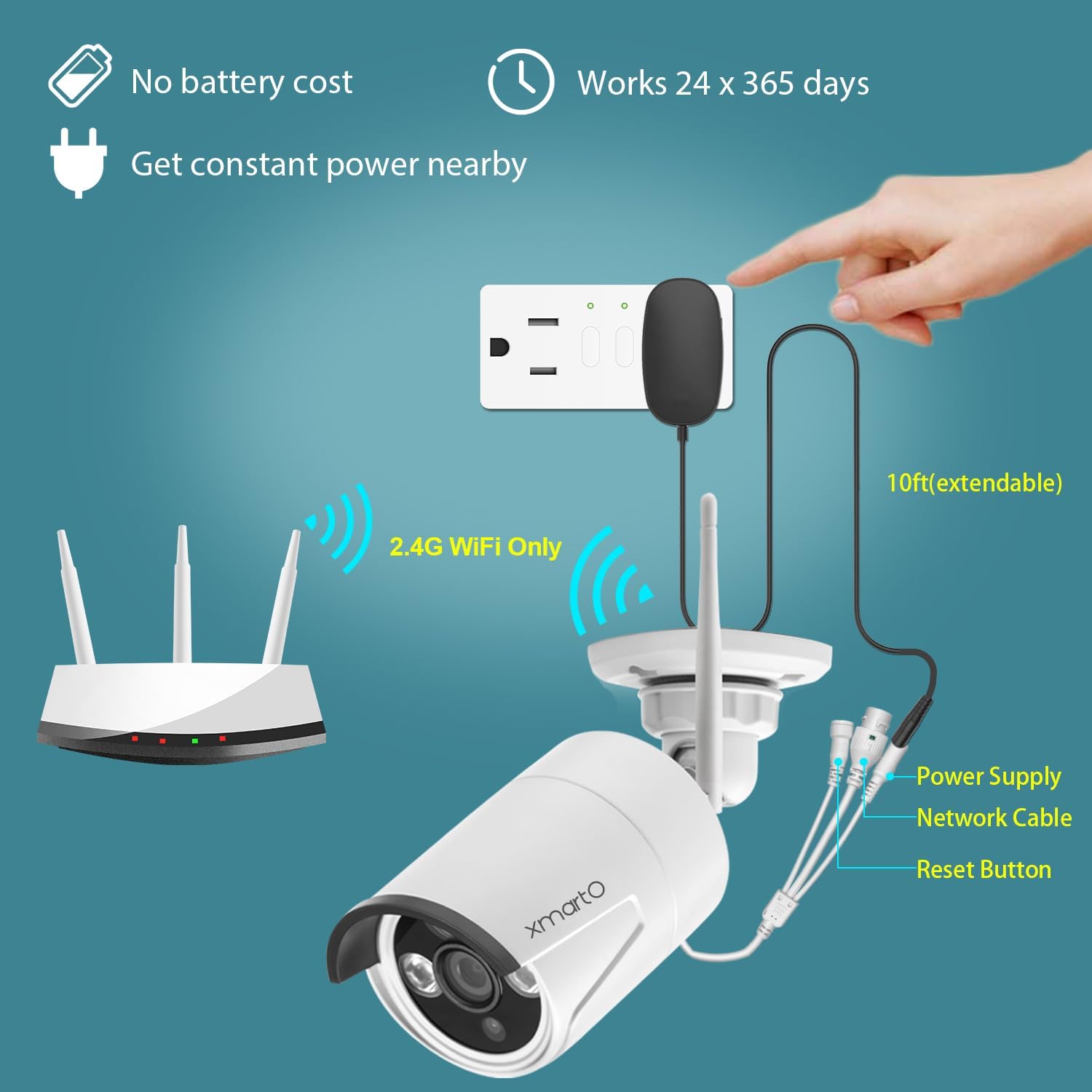
Connect the provided 10ft 12V 1A DC power plug to the camera and then to a power outlet. Ensure a constant power supply for continuous operation.
2. Pairing with xmartO NVR
The WB2024-W is an add-on camera designed to work with xmartO NVRs (Network Video Recorders). It requires a 5MP xmartO NVR for proper functionality.
- Wireless Pairing: The camera will automatically attempt to connect to a compatible xmartO NVR within range.
- Wired Pairing (RJ45 Port): If the WiFi signal is weak or for a more stable connection, use a CAT5 Ethernet cable to connect the camera directly to your router. Then, use the 'Add One' tool in the NVR's Camera Management interface to add the camera. Refer to the xmartO website or contact support for detailed instructions on wired pairing.
3. Mounting the Camera
The camera's IP66 weatherproof rating allows for flexible installation both indoors and outdoors. Choose a location that provides the desired viewing angle and is within range of your NVR's WiFi signal or accessible for a wired connection.


Operating the Camera
1. Live View and Playback
Once connected to your xmartO NVR, you can view live feeds and playback recorded footage directly on a monitor or TV connected to the NVR via HDMI. For remote access, download the xmartO app on your smartphone or tablet, or use the client software on your PC or laptop.

2. Audio Monitoring
The built-in microphone allows you to hear audio from the camera's vicinity. This feature is accessible through the NVR interface or the remote viewing application.

3. Night Vision
The camera automatically switches to IR night vision in low-light conditions, providing clear black and white footage. The night vision range is up to 25 meters.

4. Motion Detection
The camera supports motion detection, which can trigger recording and send alerts to your connected devices. Configure motion detection settings via your NVR or the xmartO application.

Maintenance
Regular maintenance ensures optimal performance and longevity of your security camera.
- Cleaning: Periodically clean the camera lens and housing with a soft, damp cloth. Avoid abrasive cleaners that could scratch the lens.
- Connection Check: Ensure all power and network cables are securely connected and free from damage.
- Firmware Updates: Check the xmartO official website for any available firmware updates for your NVR and cameras. Keeping firmware updated can improve performance and add new features.
- Environmental Inspection: For outdoor installations, periodically check the mounting for stability and ensure no obstructions are blocking the camera's view.
Troubleshooting
Camera Not Connecting to NVR
- NVR Compatibility: Confirm your NVR is a 5MP xmartO NVR. This camera is not compatible with 960p or 1080p NVRs.
- Power Supply: Ensure the camera is properly powered on and receiving stable power.
- WiFi Signal: Check the distance between the camera and the NVR. Obstacles can reduce WiFi range. Consider relocating the camera or using the RJ45 port for a wired connection.
- Reset Camera: Use the reset button on the camera (refer to the power and connectivity diagram) to reset it and attempt pairing again.
No Video Feed / Poor Image Quality
- Lens Cleanliness: Clean the camera lens to remove any dirt or smudges.
- Lighting Conditions: Ensure adequate lighting for optimal daytime performance. For night vision, confirm IR LEDs are functioning.
- Network Stability: A weak WiFi signal or network interference can affect video quality. Consider a wired connection via the RJ45 port if issues persist.
No Audio / Poor Audio Quality
- Microphone Obstruction: Ensure the built-in microphone is not obstructed.
- Volume Settings: Check audio settings on your NVR or viewing application.
- Environmental Noise: Excessive background noise can affect audio clarity.
For further assistance, please visit the xmartO website or contact their support team.
Specifications
| Feature | Specification |
|---|---|
| Model | WB2024-W |
| Video Capture Resolution | 2K (2304*1296) 3MP |
| Compatible Devices | Smartphone, xmartO 5MP NVR |
| Power Source | Corded Electric (12V DC, 1A) |
| Connectivity Protocol | Wi-Fi (2.4G), Wired (RJ45 Ethernet) |
| Mounting Type | Ceiling Mount, Wall-Mounted |
| Included Components | WB2024-W IP camera, 10ft 12V 1A DC power plug |
| Night Vision Range | 25 Meters |
| Material | Metal |
| International Protection Rating | IP66 |
| Item Dimensions (L x W x H) | 10 x 10 x 5 inches |
| Item Weight | 2.66 pounds |
| Recommended Uses | Home Security, Night Vision |
| Indoor/Outdoor Usage | Indoor, Outdoor |
Warranty and Support
xmartO is committed to providing reliable products and customer satisfaction.
- 30-Day Money Back Guarantee: If you are not satisfied with your purchase, you may return it within 30 days for a full refund.
- 1-Year Limited Warranty: The product is covered by a 1-year limited warranty against manufacturing defects.
- 24/7 Online Support: For any technical assistance or inquiries, xmartO offers 24/7 online support. Please visit the xmartO Store on Amazon or their official website for contact information.


