
1. Introduction
Thank you for choosing the CROWNFUL Ice Maker Machine. This manual provides important information regarding the setup, operation, maintenance, and troubleshooting of your new appliance. Please read it thoroughly before use to ensure safe and efficient operation.

Image: The CROWNFUL Ice Maker Machine in black, shown with an ice scoop and several bullet-shaped ice cubes.
2. Safety Information
Always follow basic safety precautions when using electrical appliances to reduce the risk of fire, electric shock, and injury to persons.
- Read all instructions before using the appliance.
- Do not touch cold surfaces during operation.
- Do not immerse cord, plug, or appliance in water or other liquid.
- Close supervision is necessary when any appliance is used by or near children.
- Unplug from outlet when not in use and before cleaning.
- Do not operate any appliance with a damaged cord or plug, or after the appliance malfunctions or has been damaged in any manner.
- Use only attachments recommended by the manufacturer.
- Do not use outdoors.
- Do not let cord hang over edge of table or counter or touch hot surfaces.
- Do not place on or near a hot gas or electric burner, or in a heated oven.
- Do not use appliance for other than intended use.
- The refrigerant is flammable. Do not use mechanical devices to defrost the refrigerator. Do not puncture the refrigerant tubing.
3. Product Features
The CROWNFUL Ice Maker Machine offers several convenient features:
- Quiet & Efficient: Produces up to 9 pieces of ice cubes in just 7 minutes. It can produce up to 26 pounds of ice per day. The countertop ice machine has a quiet cooling system that only requires low energy to cool.
- Two Ice Sizes: The ice machine can make two different size of ice cubes. Large ice cubes are not easy to melt and small ice cubes are ideal to cool drinks quickly.
- Easy Operation: This electric ice maker has infrared sensor technology. The "ADD WATER" indicator turns on when lack of water and the "ICE FULL" indicator turns on when the ice basket is full. Just a simple one-touch operation to enjoy your cool moment.
- Auto-Cleaning Function: The automatic cleaning function can deep clean all corners of the ice machine through water circulation.

Image: An infographic highlighting the ice maker's efficiency, capacity, basket size, compressor quality, low noise, and auto-cleaning feature.

Image: A visual representation of the two available ice cube sizes (Small and Large) with their respective dimensions and examples of beverages they are suitable for.
4. Product Components
Familiarize yourself with the main components of your CROWNFUL Ice Maker Machine:
- Ice Maker Unit (main body)
- Ice Basket
- Ice Scoop
- Control Panel with Indicator Lights
- Water Reservoir
- Drain Plug (located at the bottom)

Image: A detailed view of the ice maker's control panel, showing the ON/OFF and SELECT buttons, along with indicator lights for Power, Add Water, Ice Full, Small ice size (S), Large ice size (L), and Clean mode.

Image: A diagram illustrating the physical dimensions of the ice maker unit, along with the ice basket and scoop, providing a sense of scale and components.
5. Setup Instructions
Setting up your CROWNFUL Ice Maker is a simple three-step process:
- Step 1: Fill the Water Tank
Open the lid and fill the water tank with clean water. Ensure the water level is below the maximum water line indicated inside the reservoir. - Step 2: Select Ice Size and Start
Press the "ON/OFF" button to power on the machine. Then, press the "SELECT" button to choose your desired ice cube size (Small or Large). The machine will begin the ice-making process. - Step 3: Enjoy Your Ice Cubes
The ice maker will produce bullet-shaped ice cubes in approximately 7 minutes. Once the ice basket is full, the "ICE FULL" indicator will light up, and the machine will pause. Use the provided scoop to retrieve your ice.
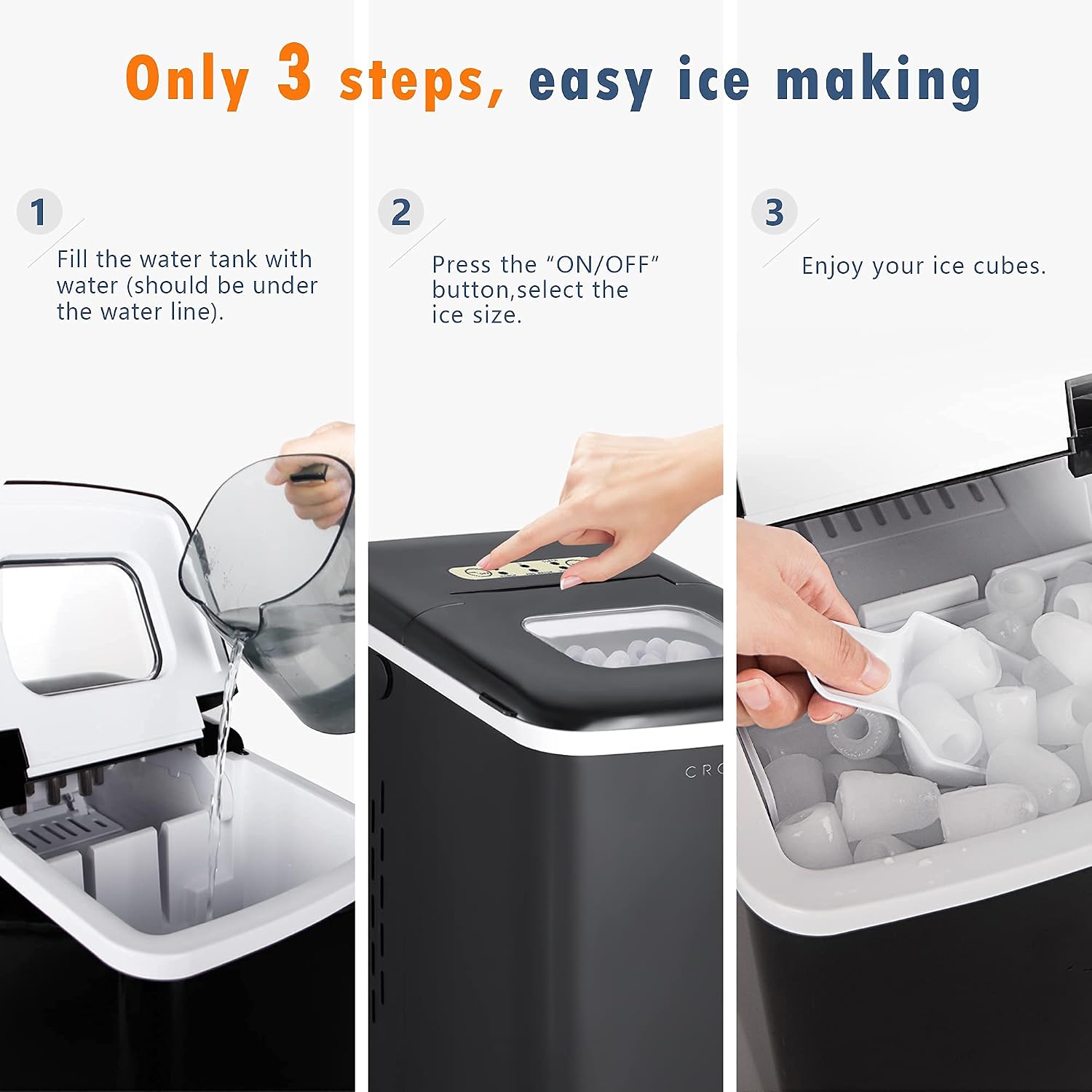
Image: A visual guide demonstrating the three easy steps to make ice: filling the water tank, operating the control panel, and scooping out the ice.
6. Operating Instructions
Your CROWNFUL Ice Maker is designed for user-friendly operation:
- Power On/Off: Press the ON/OFF button to turn the machine on or off.
- Ice Size Selection: Press the SELECT button to toggle between Small (S) and Large (L) ice cube sizes. The corresponding indicator light will illuminate.
- Water Level Indicator: If the water reservoir is low, the ADD WATER indicator will light up. Refill the tank to resume ice production.
- Ice Full Indicator: When the ice basket is full, the ICE FULL indicator will light up, and the machine will automatically pause. Remove ice to restart production.

Image: A close-up showing the internal infrared sensor and the ice basket, with indicators for "ICE FULL" and "ADD WATER" to guide operation.
7. Maintenance & Cleaning
Regular cleaning ensures optimal performance and fresh-tasting ice. The CROWNFUL Ice Maker features an auto-cleaning function:
- Auto-Cleaning Function: To activate, press the SELECT button repeatedly until the 'CLEAN' indicator flashes. Then, press the ON/OFF button to start the cleaning process. This function circulates water to deep clean internal components.
- Recommended Cleaning Frequency: To maintain hygiene and ice quality, it is recommended to clean your ice maker once a week.
- Manual Cleaning: After the auto-cleaning cycle, or for a more thorough clean, gently wipe the inside with a soft cloth and a mild, food-safe cleaning solution (e.g., vinegar and water). Rinse well and drain completely. Avoid using abrasive scrubbers that could scratch the plastic.
- Draining Water: The drain plug is located at the bottom of the unit. Ensure the unit is unplugged before draining.

Image: A visual representation of the ice maker's auto-cleaning function, showing water circulation within the unit.
8. Troubleshooting
If you encounter issues with your CROWNFUL Ice Maker, refer to the following common problems and solutions:
| Problem | Possible Cause | Solution |
|---|---|---|
| Machine not making ice. | No water in reservoir; "ADD WATER" indicator is on. | Fill the water tank to the maximum level. |
| Ice production is slow or ice cubes are small. | Room temperature is too high; water temperature is too high. | Ensure the machine is in a cool, well-ventilated area. Use cold water. |
| "ICE FULL" indicator is on, but basket is not full. | Ice cubes are stuck or blocking the sensor. | Rearrange ice cubes in the basket or remove some. |
| Unusual noise during operation. | Normal operation sounds (water pump, ice dropping) or machine not level. | Ensure the machine is on a flat, stable surface. If noise persists and is excessive, contact customer support. |
| Ice cubes stick together. | Ice basket is too full; ice has melted and refrozen. | Empty the ice basket regularly. Store ice in a freezer if not used immediately. |
For issues not covered here, please refer to the Warranty & Support section.
9. Specifications
Detailed specifications for the CROWNFUL Ice Maker Machine:
| Brand | CROWNFUL |
| Model Name | Ice Maker Machine for Countertop |
| Model Number | IM2100T-UL |
| Product Dimensions | 12.5"D x 9.05"W x 12.8"H |
| Capacity | 26 Pounds (daily ice production) |
| Wattage | 105 watts |
| Voltage | 120 Volts |
| Refrigerant | R600a |
| Material | Acrylonitrile Butadiene Styrene |
| Color | Black |
| Item Weight | 19.41 pounds |
| Installation Type | Countertop |
10. Warranty & Support
CROWNFUL is committed to providing excellent customer experience.
- Warranty: CROWNFUL offers a 12-month warranty for this product.
- Lifetime Support: Enjoy lifetime support from CROWNFUL's professional customer service team.
- Contact: If you have any problems or require assistance, please feel free to contact CROWNFUL customer service. Customer Satisfaction is Our TOP priority.