
Sharper Image PORTAL
Sharper Image PORTAL Window Fan Instruction Manual
Model: PORTAL (FA1-0135-43BB)
Introduction
This manual provides detailed instructions for the safe and efficient operation, installation, and maintenance of your Sharper Image PORTAL Window Fan. Please read this manual thoroughly before use and retain it for future reference.
Important Safety Information
- Always unplug the fan before cleaning or performing maintenance.
- Do not operate the fan with a damaged cord or plug.
- Keep fingers and other objects away from the fan blades during operation.
- This fan is designed for indoor use in windows only.
- Ensure the power source matches the fan's voltage requirements (120 Volts).
Package Contents
Verify that all items are present in the package:
- Sharper Image PORTAL Window Fan
- Modular Breeze Block System (Extension Panels)
- Owner's Guide (This manual)

Image: The Sharper Image PORTAL Window Fan, showing its compact design and control panel.
Setup and Installation
The Sharper Image PORTAL Window Fan is designed for seamless installation in single-hung and double-hung windows with an opening at least 8 inches tall. It fits windows 24 to 38 inches wide using the innovative modular block system.
- Measure Your Window: Ensure your window opening is between 24 and 38 inches wide and at least 8 inches tall.
- Prepare the Window: Open the window to the desired height. Window screen removal may be necessary depending on the depth of your window frame.
- Position the Fan: Place the fan unit horizontally into the window opening. The fan can only be installed in a horizontal position.
- Install Modular Blocks: Use the included modular breeze blocks to fill any gaps on either side of the fan. These blocks slide into place to create a secure and weather-resistant fit.
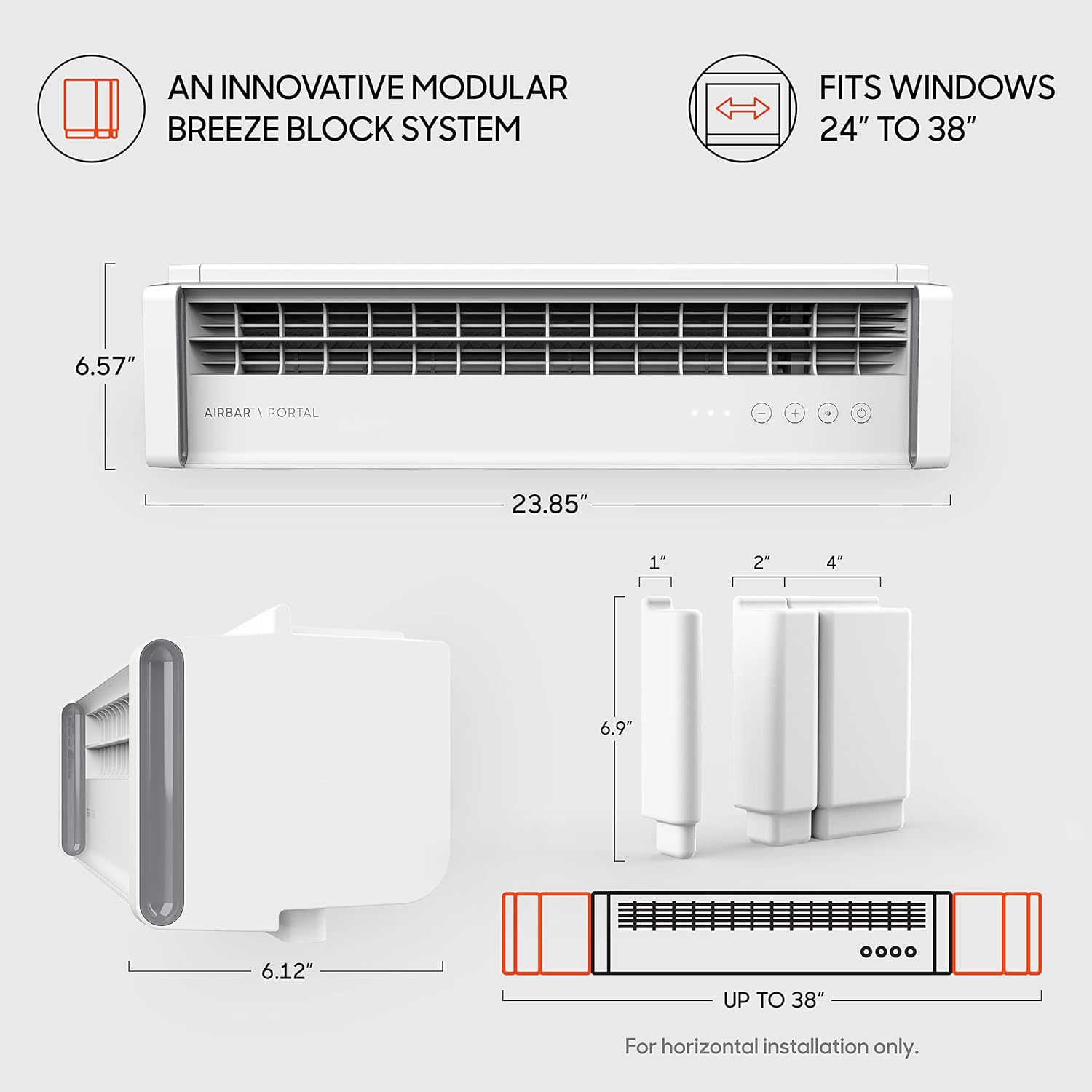
Image: Diagram illustrating the dimensions of the fan (6.57"H x 23.85"W x 6.12"D) and the modular breeze block system for fitting windows up to 38 inches wide.

Image: Close-up view of the modular breeze blocks, designed to extend the fan's width for a secure fit in various window sizes.

Image: The Sharper Image PORTAL Window Fan seamlessly installed in a bedroom window, demonstrating its low-profile design.
Operation
The Sharper Image PORTAL Window Fan features intuitive touch controls for power, speed, and airflow direction.

Image: Close-up of the fan's control panel, showing the power button, speed adjustment buttons (+/-), and the reversible exhaust mode button.
Power On/Off
Press the Power button ( ) to turn the fan on or off.
Adjusting Fan Speed
The fan has 3 speed settings. Use the Plus (+) and Minus (-) buttons to cycle through the available speeds. The LED indicators on the control panel will show the current speed setting.
Reversible Exhaust Mode
Press the Reversible Exhaust button ( ) to switch between drawing fresh air in and exhausting stale air out. This allows you to customize airflow for optimal comfort and air circulation.

Image: Visual representation of the fan's reversible airflow, demonstrating how it can pull fresh air into a room or exhaust stale air out.
Maintenance and Cleaning
Regular cleaning ensures optimal performance and longevity of your fan.
- Unplug the Fan: Always disconnect the fan from the power outlet before cleaning.
- Clean Exterior Surfaces: Wipe the exterior surfaces of the fan with a soft, damp cloth. Do not use abrasive cleaners or solvents.
- Clean Fan Blades: Carefully wipe the fan blades to remove dust and debris. A soft brush or vacuum cleaner attachment can be used for hard-to-reach areas.
- Storage: If storing the fan for an extended period, ensure it is clean and dry. Store it in its original packaging or a protective cover in a cool, dry place.

Image: The fan installed in a window, highlighting its weather-resistant design, which aids in maintenance and durability.
Troubleshooting
| Problem | Possible Cause | Solution |
|---|---|---|
| Fan does not turn on. | No power, loose plug, power outage. | Ensure the fan is securely plugged into a working outlet. Check circuit breaker. After a power outage, the fan may not automatically restart; press the power button. |
| Weak airflow. | Fan speed too low, obstruction, incorrect direction. | Increase fan speed. Remove any obstructions from the fan grilles. Ensure the fan is set to the desired airflow direction (in or out). |
| Fan is noisy or rattling. | Loose components, debris in blades, improper installation. | Check for secure installation in the window. Clean fan blades and grilles. If noise persists, contact customer support. |
| Reversible exhaust mode not working. | Internal mechanism issue. | Power cycle the fan (turn off, then on). If the issue persists, contact customer support. |
Specifications
| Feature | Detail |
|---|---|
| Brand | Sharper Image |
| Model Name | PORTAL |
| Model Number | FA1-0135-43BB |
| Electric Fan Design | Window Fan |
| Color | White |
| Product Dimensions (D x W x H) | 6.12" x 23.85" x 6.57" |
| Item Weight | 8 Pounds |
| Power Source | Corded Electric (dc) |
| Voltage | 120 Volts |
| Wattage | 33 watts |
| Number of Power Levels | 3 |
| Noise Level | 40.2 dB |
| Control Method | Touch |
| Special Feature | Reversible Exhaust Mode, Weather Resistant |
| Recommended Uses | Air Circulation |
| Window Fit | 24" to 38" wide, at least 8" tall |
Warranty and Support
The Sharper Image PORTAL Window Fan comes with a 2-year manufacturer's warranty.
For warranty claims, technical support, or any questions regarding your product, please refer to the contact information provided on the official Sharper Image website or your purchase documentation.
Important International Disclaimer: This item is built to meet U.S. voltage requirements and may not function properly when used in conjunction with external devices that alter or convert voltage or frequency of electricity. Improper use or shipping the product outside the U.S. will void all warranties.
Related documentsPORTAL


Ask a question about this manual
Ask about setup, troubleshooting, compatibility, parts, safety, or missing instructions. Manuals+ will review the question and use this page’s manual context to help answer it.