
1. Introduction
Thank you for choosing the MEIKEE Solar Garden Spotlight. This manual provides essential information for the safe and efficient operation, installation, and maintenance of your new solar lighting system. Please read this manual thoroughly before use and retain it for future reference.
2. Safety Information
- Ensure all connections are secure and waterproof to prevent electrical hazards.
- Do not attempt to modify or disassemble the product. Unauthorized modifications may void the warranty and pose safety risks.
- Keep the solar panel clean to ensure optimal charging performance.
- Avoid placing the solar panel in shaded areas, as this will reduce charging efficiency.
- This product is designed for outdoor use and is IP66 waterproof. However, avoid submerging the unit in water.
- Handle the product with care to prevent damage to the solar panel or LED lights.
3. Package Contents
Please verify that all components are present in your package:
- 1 x Solar Panel with Ground Stake
- 4 x LED Spotlights with Ground Stakes
- 1 x Control Box
- 1 x Remote Control
- Mounting Hardware (screws, wall anchors)
- 1 x User Manual
4. Product Overview
The MEIKEE Solar Garden Spotlight system consists of a solar panel, a control box, four LED spotlights, and a remote control. It is designed to provide efficient and versatile outdoor lighting.
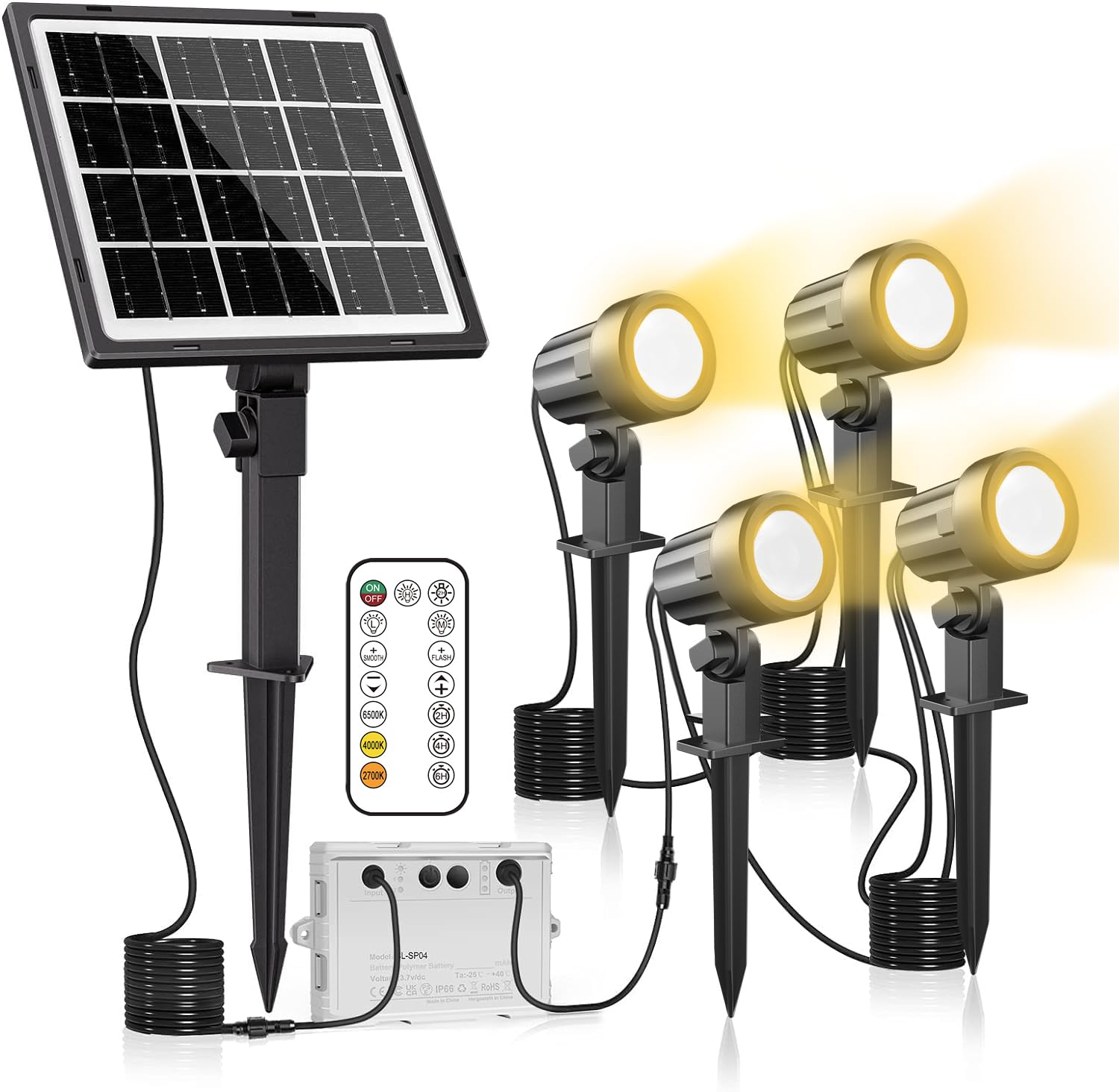
Image: Overview of the MEIKEE Solar Garden Spotlight system, showing the solar panel, control box, four spotlights, and remote control.
Key Features:
- Solar Powered: Environmentally friendly and energy-saving, with automatic charging during the day.
- Auto On/Off: Integrated light sensor automatically turns lights on at dusk and off at dawn.
- IP66 Waterproof: Designed to withstand various outdoor weather conditions, including rain and snow.
- Adjustable Color Temperature: Offers 3 color options (3000K Warm White, 4000K Neutral White, 6500K Daylight White) to suit different preferences and environments.
- High Brightness: Each spotlight provides up to 800 lumens of illumination.
- Separable Design: Allows flexible placement of the solar panel and spotlights.
- 2-Way Installation: Can be installed using ground stakes or wall-mounted.

Image: Demonstrates the three available color temperatures (Warm White, Daylight White, Cool White) and highlights the waterproof solar panel and connectors.

Image: Illustrates the focused light projection of the MEIKEE spotlight, offering a projection distance of 5-6 meters, compared to other scattered light types.
5. Setup and Installation
5.1 Solar Panel Placement
Choose a location for the solar panel that receives direct sunlight for at least 6-8 hours daily. Avoid areas shaded by trees, buildings, or other obstructions. The solar panel can be mounted using its ground stake or attached to a wall.
5.2 Spotlight Placement
Position the four spotlights in desired locations to illuminate pathways, garden features, or security areas. Each spotlight comes with a ground stake for easy insertion into soft ground. They can also be wall-mounted using the provided hardware.

Image: Shows the two installation methods: wall-mounted and ground stake installation for the spotlights.
5.3 Connecting the System
- Connect the solar panel cable to the designated input port on the control box.
- Connect each of the four spotlight cables to the output ports on the control box. Ensure all connections are firm and the waterproof caps are securely fastened.
- The maximum movable distance for the spotlights from the control box is approximately 14 meters, allowing for flexible arrangement.

Image: Illustrates the wiring connections between the solar panel, control box, and spotlights, along with the automatic charging during the day and lighting at night.
6. Operating Instructions
6.1 Initial Use
Before first use, ensure the solar panel is exposed to direct sunlight for a full day (8-10 hours) to fully charge the internal battery. The system will automatically activate at dusk once charged.
6.2 Automatic Operation
The MEIKEE Solar Garden Spotlight features an integrated light sensor. It will automatically turn on when it detects low light conditions (dusk) and turn off when it detects sufficient light (dawn), while simultaneously charging the battery.
6.3 Remote Control Functions
Use the provided remote control to adjust settings:
- Power Button: Turns the lights On or Off manually.
- Brightness Adjustment: Select between High Brightness Mode (approx. 6 hours continuous illumination) or Low Brightness Mode (approx. 12 hours continuous illumination).
- Color Temperature Selection: Cycle through 3000K (Warm White), 4000K (Neutral White), and 6500K (Daylight White) options.
- Timer Function: Set the lights to turn off after a specific duration (e.g., 2H, 4H, 6H).

Image: Displays the high and low brightness modes, indicating approximate illumination durations, and highlights the IP66 waterproof rating and operating temperature range (-25°C to 40°C).
7. Maintenance
- Solar Panel Cleaning: Regularly wipe the solar panel with a soft, damp cloth to remove dust, dirt, or debris. A clean panel ensures maximum charging efficiency.
- Connection Check: Periodically inspect all cables and connections for any signs of wear or damage. Ensure waterproof caps are always securely in place.
- Battery Replacement: The internal battery is replaceable. If the lights' performance significantly degrades over time, consult the manufacturer for guidance on battery replacement.
8. Troubleshooting
| Problem | Possible Cause | Solution |
|---|---|---|
| Lights do not turn on at night. | Insufficient solar charge. Solar panel is in a shaded area. Connections are loose. | Ensure solar panel receives 6-8 hours of direct sunlight daily. Relocate panel if necessary. Check all cable connections. |
| Lights are dim or only stay on for a short period. | Insufficient solar charge. Dirty solar panel. Battery capacity reduced. | Clean the solar panel surface. Ensure adequate sunlight exposure. If battery is old, consider replacement. |
| Remote control not working. | Remote battery depleted. Obstruction between remote and control box. | Replace remote control battery. Ensure clear line of sight to the control box. |
9. Specifications
| Feature | Detail |
|---|---|
| Brand | MEIKEE |
| Model Number | 62000007.WW20.BK |
| Light Source Type | LED |
| Number of Lights | 4 |
| Luminous Flux | 800 Lumen |
| Color Temperature | 3000K, 4000K, 6500K (Adjustable) |
| Power Source | Solar Powered |
| Voltage | 4 Volts |
| Material | Acrylonitrile Butadiene Styrene, Aluminium, Silicone |
| Waterproof Rating | IP66 |
| Indoor/Outdoor Usage | Outdoor |
| Installation Type | Ground Stake / Wall Mount |
| Operating Temperature | -25°C to 40°C |
| Batteries Included | Yes (Rechargeable) |
| Item Weight | 1 kg 390 g |
10. Warranty and Support
MEIKEE products are designed for durability and performance. This product typically comes with a standard manufacturer's warranty. For specific warranty details, including duration and coverage, please refer to the product packaging or contact MEIKEE customer support directly.
If you encounter any issues or have questions regarding your MEIKEE Solar Garden Spotlight, please contact our customer support team. Contact information can usually be found on the product packaging or the official MEIKEE website.