1. Product Overview
The CarlinKit 3.0 U2W Plus is a wireless CarPlay adapter designed to convert your car's existing wired Apple CarPlay system into a wireless one. This device eliminates the need for cumbersome data cables, allowing you to connect your iPhone to CarPlay wirelessly. It is ideal for short trips and provides a seamless integration with your vehicle's infotainment system.

Image: The CarlinKit 3.0 U2W Plus Wireless CarPlay Adapter, a compact black device with a green indicator light.
Key features include a 5G processing chip, heat dissipation, and support for various CarPlay functionalities such as GPS navigation, voice control (Siri), online music, phone calls, and message access. It supports online updates to ensure you always have the latest features for a safe and comfortable driving experience.

Image: The CarlinKit 3.0 Wireless CarPlay Adapter shown with its dimensions (80mm length, 45mm width, 12mm thickness) and indicating Bluetooth 5.0 connectivity.
2. Setup Guide
Before setting up, ensure your car's system is equipped with wired Apple CarPlay. This is a prerequisite for using the CarlinKit 3.0 U2W Plus adapter.
Step 1: Connect the Adapter
Plug the CarlinKit 3.0 U2W Plus adapter into the USB port of your car that supports Apple CarPlay. Use the provided USB-A to USB-C cable if necessary.

Image: A diagram illustrating the first step of setup, showing the CarlinKit adapter being plugged into a car's USB port, with the car's display showing the CarPlay interface.
Step 2: Connect via Bluetooth
On your iPhone, go to Settings and turn on Wi-Fi and Bluetooth. Search for and connect to the Bluetooth name of your car's infotainment system (e.g., "Audi-4625").
Step 3: Confirm CarPlay Connection
After successfully pairing your iPhone via Bluetooth, a prompt will appear on your car's display asking to "Use CarPlay with [Car's Bluetooth Name]". Confirm this prompt to establish the wireless CarPlay connection.

Image: A multi-panel diagram showing the second and third steps of setup. The top panel shows the iPhone's Bluetooth settings screen, prompting to connect to the car's Bluetooth. The bottom panel shows the car's display with a pop-up asking to confirm "Use CarPlay" with the connected device.
3. Operating Instructions
Once connected, your iPhone will automatically link to your car's CarPlay system wirelessly each time you start the vehicle. You can now enjoy all the features of Apple CarPlay without a wired connection.
- Navigation: Use your preferred GPS navigation apps (e.g., Apple Maps, Google Maps, Waze) directly on your car's display for real-time navigation.
- Voice Control (Siri): Activate Siri using your car's controls or by saying "Hey Siri" to make calls, send messages, get directions, and control music hands-free.
- Music & Audio: Stream music from Apple Music, Spotify, Podcasts, and other audio apps.
- Phone Calls & Messages: Make and receive calls, and send/receive messages safely through the CarPlay interface.
- Split Screen Functionality: For iOS 13 and above, you can utilize the split-screen feature to view multiple apps simultaneously on your car's display.

Image: A car's infotainment screen displaying the Apple CarPlay interface with navigation and media playback, alongside an iPhone showing its home screen, illustrating the wireless connectivity.
4. Maintenance
To ensure the longevity and optimal performance of your CarlinKit 3.0 U2W Plus adapter, follow these simple maintenance guidelines:
- Keep the device clean and free from dust and debris. Use a soft, dry cloth for cleaning.
- Avoid exposing the device to extreme temperatures, direct sunlight, or moisture.
- Do not attempt to disassemble or repair the device yourself. Refer to professional support if issues arise.
- Store the adapter in a cool, dry place when not in use.
5. Troubleshooting
If you encounter issues with your CarlinKit 3.0 U2W Plus adapter, please refer to the following common solutions:
- Device Not Connecting Automatically: If the device does not connect automatically upon entering the car, try unplugging and re-plugging the adapter into the car's USB port. Ensure your iPhone's Bluetooth and Wi-Fi are enabled.
- Update Issues: If you experience network errors during online updates, ensure your internet connection is stable. Try updating in an area with strong Wi-Fi signal.
- Compatibility Concerns: The adapter requires your car to have factory-wired Apple CarPlay. If you are unsure about your car's compatibility, please contact CarlinKit support with your car's brand, model, and year.
- Intermittent Connection: Ensure there are no obstructions between your iPhone and the adapter. Try restarting both your iPhone and the car's infotainment system.
For further assistance, please contact CarlinKit customer support.
6. Specifications
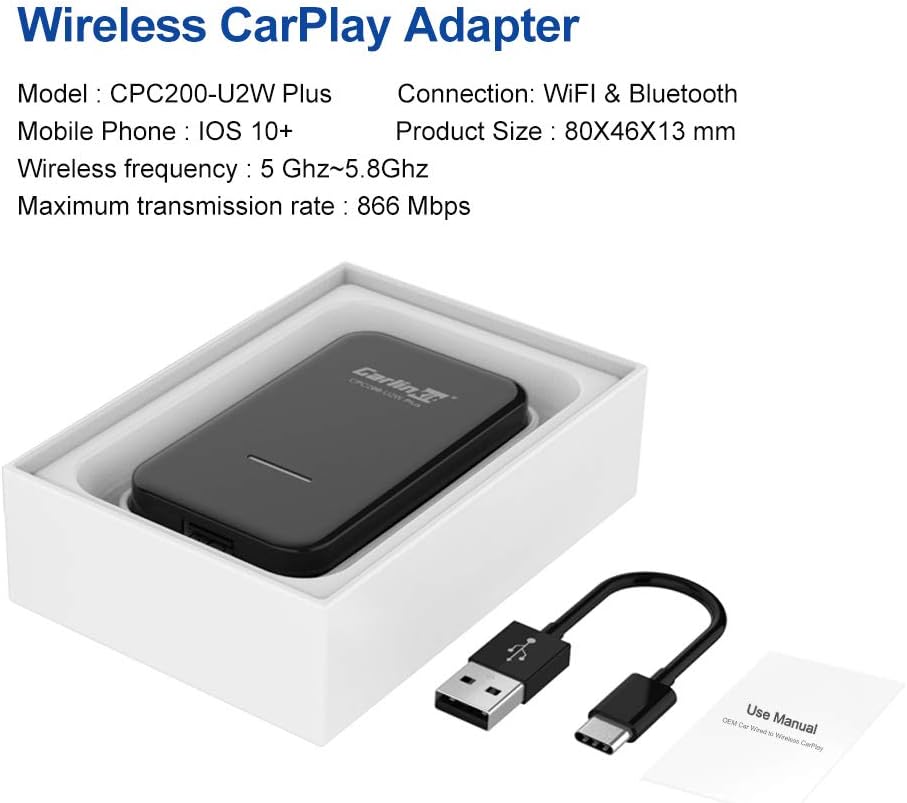
Image: The CarlinKit Wireless CarPlay Adapter shown in its retail packaging, alongside its USB cable and a small user manual. Text overlays provide key specifications.
| Feature | Detail |
|---|---|
| Model | CPC200-U2W Plus (U2W) |
| Brand | Carlinkit |
| Connections | Bluetooth, Wi-Fi |
| Compatible Devices | Mobile Phones (iOS 10+ required for iPhone) |
| Product Dimensions | 80mm x 46mm x 13mm (approx. 3.15 x 1.81 x 0.51 inches) |
| Wireless Frequency | 5 GHz ~ 5.8 GHz |
| Max Transmission Rate | 866 Mbps |
| Item Weight | 170 Grams (approx. 0.37 lbs) |
| Input Voltage | 5 Volts |
7. Warranty and Support
CarlinKit provides quality assurance for this product. The device undergoes strict checks before shipment and comes with a one-year warranty.
For any questions regarding product usage, technical support, or compatibility inquiries, please do not hesitate to contact CarlinKit customer support via Amazon. When inquiring about compatibility, please provide your car's brand, model, and year for a prompt response within 24 hours.
Thank you for your trust and support in CarlinKit.


