1. Introduction
The Godox AD100Pro is a compact and powerful 100Ws 2.4G flash strobe designed for professional photographers. It offers advanced features such as 1/8000s High-Speed Sync (HSS), rapid 0.01-1.5s recycling time, and the capability for 360 full power flashes on a single charge of its 2600mAh lithium battery. Supporting TTL, Manual, and Multi-flash functions, this lightweight and portable monolight features an intuitive OLED panel for easy operation, making it an ideal solution for both on-location and studio photography.

Figure 1: Godox AD100Pro Monolight, a compact and powerful flash strobe.
2. What's in the Box
Upon unpacking your Godox AD100Pro Monolight, please ensure all the following components are present:
- 1x Godox AD100 Pro Pocket Flash
- 1x Battery (2600mAh Lithium Ion)
- 1x AD-E2 Bracket
- 1x Battery charger
- 1x Charger cable
- 1x USB Cable
- 1x Portable bag
- 1x Pergear Cloth
- 1x Instruction Manual

Figure 2: All components included with the Godox AD100Pro Monolight.
3. Product Features
The Godox AD100Pro Monolight is engineered with several key features to enhance your photography experience:
- Compact and Lightweight Design: Weighing only 2.9 pounds and measuring 9.06 x 7.09 x 5.51 inches, it is highly portable.
- Powerful Output: 100Ws flash output for versatile lighting.
- Advanced Wireless System: Integrated 2.4G wireless X system for seamless control with Godox X1, X2, or Xpro triggers.
- High-Speed Sync (HSS): Achieve shutter speeds up to 1/8000s for freezing action and controlling ambient light.
- Fast Recycling: Quick recycling time of 0.01-1.5 seconds ensures you don't miss a shot.
- Long Battery Life: The 2600mAh lithium-ion battery provides approximately 360 full power flashes.
- Multiple Flash Modes: Supports TTL (Through-The-Lens) auto flash, Manual (M), and Multi-flash (Stroboscopic) modes.
- OLED Panel: High-resolution OLED display for clear and easy navigation of settings.
- Magnetic Flash Head: Round flash head compatible with magnetic AK-R1 accessories kit (Dome Diffuser, Barndoor, Honeycomb, Gels).
- Bowens Mount Compatibility: Works with the optional Godox S2 bracket to install various Bowens-mount modifiers.

Figure 3: Visual representation of key features including 100Ws, HSS, fast recycling, and TTL auto.

Figure 4: The large capacity lithium battery and various compatible accessories.
4. Setup
4.1 Battery Installation
- Ensure the monolight is powered off.
- Locate the battery compartment on the side of the unit.
- Insert the 2600mAh lithium-ion battery, ensuring proper orientation.
- Close the battery compartment securely.
Video 1: This video demonstrates the physical setup of the Godox AD100Pro, including battery insertion and attachment to a light stand. It also shows the use of the AK-R1 accessories kit and the Godox S2 Bracket for attaching Bowens-mount modifiers.
4.2 Attaching to a Light Stand
The AD100Pro features two slots at the bottom for adjusting the stand screwing-in position, allowing for flexible mounting.
- Attach the AD-E2 bracket to the bottom of the monolight.
- Mount the bracket onto a compatible light stand.
- Secure the monolight by tightening the bracket's locking mechanism.

Figure 5: The AD100Pro mounted on a light stand, showcasing its compact size and adjustable mounting options.
4.3 Attaching Accessories
The round flash head is magnetic and compatible with the Godox AK-R1 accessories kit (sold separately), which includes a Dome Diffuser, Barndoor, Honeycomb, and Gels. For Bowens-mount modifiers, use the Godox S2 Bracket (sold separately).
5. Operating Instructions
The Godox AD100Pro features an intuitive OLED panel and control buttons for easy operation. Refer to the control panel diagram below for button identification.

Figure 6: Detailed view of the Godox AD100Pro control panel with labeled buttons and dial.
5.1 Power On/Off
- To power on, press the Power Switch button.
- To power off, press and hold the Power Switch button.
- The unit features an automatic shutdown function after 30/60/90 minutes of idle operation, configurable in the Custom Menu.
5.2 Flash Modes (TTL, M, Multi)
Press the MODE button to cycle through the available flash modes:
- TTL Auto Flash Mode: Automatically adjusts flash output for correct exposure.
- Manual Flash Mode (M): Allows manual control over flash power output (1/256 to 1/1). Rotate the SET Button & Control Dial to adjust.
- Multi Flash Mode (Stroboscopic): Fires a series of rapid flashes. Adjust flash times and frequency using the SET Button & Control Dial.
5.3 Wireless Control
The AD100Pro integrates with the Godox 2.4G wireless X system. To control the monolight wirelessly using a Godox X1, X2, or Xpro trigger, ensure the channel, group, and ID values on both the trigger and the AD100Pro are identical.
- Setting Group: Short press the GR/CH Button to cycle through groups A-E.
- Setting Channel: Long press the GR/CH Button for 2 seconds to enter channel setting. Rotate the SET Button & Control Dial to select channels 1-32, then press SET to confirm.
- ID Setting: Access ID settings via the Custom Menu (C.Fn) to set ID from 01-99 or OFF.
Video 2: This video provides a detailed demonstration of the Godox AD100Pro's user interface, including setting flash modes (TTL, M, Multi), adjusting power output, configuring wireless control (group, channel, ID), and utilizing custom functions like modeling lamp brightness and delay flash.
5.4 LED Modeling Lamp
- Short press the Modeling Light Button to turn the LED modeling light on or off.
- Long press the Modeling Light Button to adjust the brightness level from 1 to 10.
5.5 Zoom Function
- Short press the ZOOM Button to cycle through 5 focal lengths (e.g., 28mm, 35mm, 50mm, 70mm, 85mm).
- Long press the ZOOM Button to enter High-Speed Sync (HSS) mode.
5.6 Custom Functions (C.Fn)
Press the MENU button to access custom functions. Use the SET Button & Control Dial to navigate and adjust settings:
- BEEP: Turn the beep sound on/off.
- PHOTOC (S1/S2): Set optical S1/S2 unit.
- STBY: Configure automatic shutdown time (30/60/90 minutes).
- DELAY: Set delay flash function (0.1-30 seconds).
- WL (Wireless Settings): Turn wireless function on/off.
- ID: Set wireless ID (01-99 or OFF).
5.7 Test Flash and Reset
- Test Flash: Press the TEST Button to fire a test flash.
- Reset Settings: To reset all settings to factory defaults, press the MENU and Modeling Light Button simultaneously.
6. Specifications
Below are the detailed technical specifications for the Godox AD100Pro Monolight:
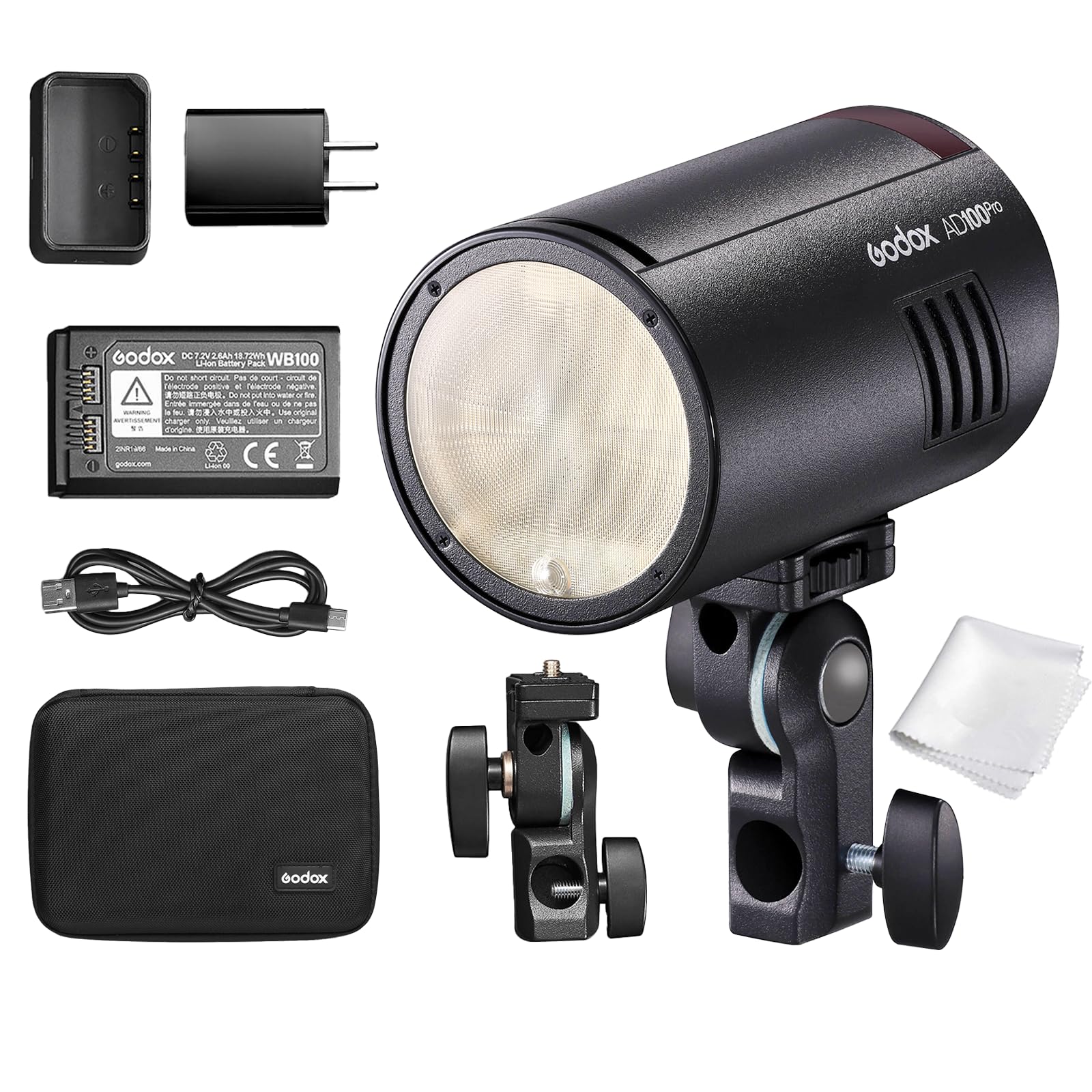
Figure 7: Comprehensive specifications for the Godox AD100Pro Monolight.
| Feature | Specification |
|---|---|
| Model | AD100Pro |
| Wireless Receiver Unit Mode | Radio transmission mode (compatible with Nikon & Canon & Sony & Fujifilm & Olympus & Panasonic & Pentax) |
| Flash Mode | Wireless off: M/Multi; Receiver unit of radio transmission: TTL/M/Multi |
| Compatible Cameras | Nikon cameras (X1T-N, X2T-N, XProN as trigger), Canon EOS cameras (X1T-C, X2T-C, XProC as trigger), Sony cameras (X1T-S, X2T-S, XProS as trigger), Fujifilm cameras (X1T-F, X2T-F, XProF as trigger), Olympus cameras (X1T-O, X2T-O, XProO as trigger), Pentax cameras (X2T-P, XProP as trigger) |
| Power Output | 9 steps: 1/256~1/1 |
| Stroboscopic Flash | Provided (Up to 90 times, 99Hz) |
| Flash Exposure Compensation (FEC) | Adjust the parameters in the 2.4G remote control |
| Sync mode | High-speed sync (up to 1/8000 seconds), first-curtain sync, and second-curtain sync |
| Delay Flash | 0.01~30 seconds |
| Beeper | Yes |
| Modeling Lamp (LED) | 1.8W; Light brightness: 1 to 10 levels |
| Optic Receiver Flash | S1/S2 |
| Wireless Flash (2.4G transmission) | Receiver, Off |
| Controllable Receiver groups | 5 (A, B, C, D, E) |
| Transmission range (approx.) | 100m |
| Channels | 32 (1~32) |
| ID | 01~99 |
| Power Supply | Lithium battery pack (7.2V/2600mAh compatible with V1) |
| Full Power Flashes | Approx. 360 |
| Recycle time | Approx. 0.01-1.5s |
| Battery Indicator | Yes |
| Power Indication | Power off automatically after approx. 30 minutes of idle operation. |
| Sync Triggering Mode | 3.5mm Sync cable, Wireless control port |
| Color Temperature | 5800±200K |
| Dimensions | 120×76×76 mm (4.72 x 2.99 x 2.99 inches) |
| Net Weight | 524g (battery included) |

Figure 8: Dimensions and weight of the Godox AD100Pro Monolight.
7. Troubleshooting
If you encounter issues with your Godox AD100Pro Monolight, please refer to the following common troubleshooting steps:
- Unit does not power on:
- Ensure the battery is fully charged and correctly inserted.
- Check if the battery contacts are clean and free from debris.
- Flash does not fire:
- Verify the monolight is powered on and not in standby mode.
- Check the flash mode (TTL, M, Multi) and power settings.
- For wireless control, confirm that the trigger (X1, X2, Xpro) and monolight have matching channel, group, and ID settings.
- Ensure the camera's hot shoe connection is secure and clean.
- Test the flash using the TEST Button on the monolight.
- OLED display is blank or not working:
- Power cycle the unit (turn off and on).
- Ensure the battery has sufficient charge.
- If the issue persists, perform a factory reset (press MENU and Modeling Light Button simultaneously).
- Inconsistent flash output:
- Check battery level; low battery can affect consistency.
- Ensure no obstructions are blocking the flash or receiver.
- Verify that the flash mode and power settings are appropriate for your shooting conditions.
If these steps do not resolve the issue, please contact Godox customer support for further assistance.
8. Maintenance
Proper maintenance will ensure the longevity and optimal performance of your Godox AD100Pro Monolight:
- Cleaning:
- Use a soft, dry cloth to clean the exterior of the monolight.
- For the OLED screen, use a microfiber cloth specifically designed for electronics.
- Avoid using harsh chemicals, solvents, or abrasive cleaners.
- Storage:
- Store the monolight in a cool, dry place away from direct sunlight and extreme temperatures.
- When storing for extended periods, remove the battery.
- Use the provided portable bag for protection during transport and storage.
- Battery Care:
- Charge the battery fully before first use and periodically if stored for long durations.
- Avoid overcharging or completely draining the battery.
- Do not expose the battery to high temperatures or puncture it.
- General Handling:
- Handle the unit with care to prevent drops or impacts.
- Avoid exposing the monolight to water or high humidity.
9. Warranty & Support
The Godox AD100Pro Monolight comes with a manufacturer's warranty. For detailed information regarding warranty coverage, terms, and conditions, please refer to the warranty card included in your product packaging or visit the official GODOX website. For technical support, service, or inquiries, please contact GODOX customer service through their official channels. Keep your purchase receipt as proof of purchase for any warranty claims.


