
Introduction
This manual provides essential information for the safe and effective use of your PKPOWER 9V 1A AC DC Power Adapter. This adapter is designed to provide a stable 9V 1A power output, suitable for various electronic devices requiring a 5.5mm outer diameter, 2.5mm inner diameter straight barrel connector. The 2-meter cable offers flexibility in device placement, and built-in safety features protect your equipment.

The PKPOWER 9V 1A AC DC Power Adapter with its attached 2-meter cable and 5.5/2.5mm barrel connector.
Product Overview
Key Features
- Reliable Power Output: Delivers a steady 9V 1A for consistent device performance.
- Universal Compatibility: Equipped with a 5.5mm outer, 2.5mm inner diameter straight connector.
- Extended Cable Length: A 2-meter (6.6 feet) cable provides flexible placement options.
- Advanced Safety: Incorporates over-voltage, over-current, and short-circuit protection.
- Compact Design: Lightweight and space-efficient for easy portability and use.
Connector Detail

Detailed view of the 5.5mm outer diameter, 2.5mm inner diameter barrel connector, highlighting its compatibility with various electronic devices.
Dimensions

Dimensions of the PKPOWER power adapter, showing its compact size: 2.8 inches long, 1.6 inches wide, and 1.2 inches high, with a total cable length of 6.6 feet (2 meters).
Specifications
| Model Number | ANU-09010A |
| Input Voltage | 100-240V AC, 50/60Hz |
| Output Voltage | 9V DC |
| Output Current | 1A |
| Wattage | 9 Watts |
| Connector Type | 5.5mm Outer Diameter, 2.5mm Inner Diameter, Straight Barrel |
| Cable Length | 2 meters (6.6 feet) |
| Item Weight | 2.89 ounces |
| Package Dimensions | 3.98 x 3.39 x 1.81 inches |
| Special Feature | Charging Indicator |
Safety Information
To ensure safe operation and prevent damage to the adapter or connected devices, please observe the following safety guidelines:
- This adapter is designed for indoor use only. Do not expose it to rain, moisture, or extreme temperatures.
- Ensure the voltage and current requirements of your device match the adapter's output (9V 1A).
- Verify the connector size (5.5mm x 2.5mm) is compatible with your device's power input port.
- Do not disassemble or modify the adapter.
- Keep out of reach of children.
- Unplug the adapter from the wall outlet when not in use for extended periods.
Built-in Safety Protections
The PKPOWER adapter includes multiple safety features to protect your devices:
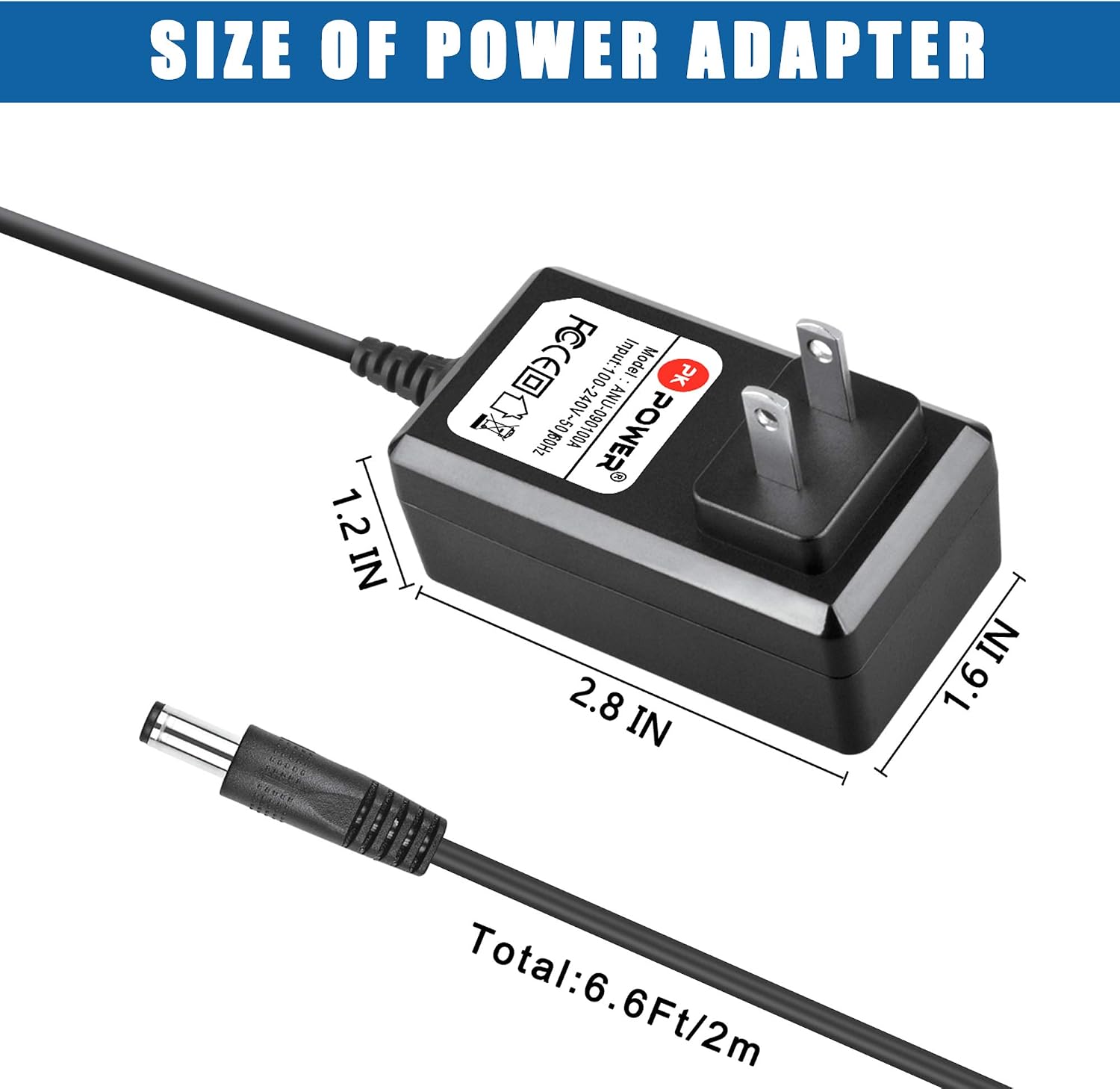
Diagram illustrating the five built-in safety protections of the PKPOWER adapter: Over Charge, Over Voltage, Short-circuit, Over Current, and Over Temperature Protection.
- Over Charge Protection: Prevents damage from excessive charging.
- Over Voltage Protection: Safeguards against voltage surges.
- Short-circuit Protection: Automatically cuts power in case of a short circuit.
- Over Current Protection: Protects against excessive current flow.
- Over Temperature Protection: Prevents overheating of the adapter.
Setup
Follow these steps to set up your PKPOWER AC DC Power Adapter:
- Verify Device Compatibility: Confirm that your electronic device requires a 9V DC input with a 1A current rating and has a 5.5mm x 2.5mm barrel connector.
- Connect to Device: Insert the barrel connector of the PKPOWER adapter firmly into the power input port of your electronic device.
- Plug into Outlet: Insert the AC plug of the adapter into a standard 100-240V AC wall outlet.
The adapter is now ready to supply power to your device.

Example of the PKPOWER adapter connected to a Swiffer Sweeper Vac, demonstrating its use with compatible devices.
Operating Instructions
Once properly connected, the PKPOWER adapter will automatically provide power to your device. If your device has a charging indicator, it should activate to show that power is being supplied.
- Ensure the adapter is securely plugged into both the device and the wall outlet.
- Monitor your device for proper function and charging status.
Maintenance
Proper maintenance helps extend the life of your power adapter:
- Cleaning: Use a dry, soft cloth to clean the adapter. Do not use liquid cleaners or solvents.
- Storage: Store the adapter in a cool, dry place when not in use. Avoid wrapping the cable too tightly around the adapter.
- Inspection: Periodically inspect the cable and connector for any signs of damage, such as fraying, cuts, or bent pins. Discontinue use if damage is found.
Troubleshooting
If you encounter issues with your PKPOWER adapter, refer to the following common solutions:
- No Power to Device:
- Check if the adapter is securely plugged into both the wall outlet and your device.
- Test the wall outlet with another device to ensure it is functional.
- Confirm that your device's power requirements (voltage and current) match the adapter's specifications.
- Ensure the connector size (5.5mm x 2.5mm) is correct for your device.
- Adapter Overheating:
- Immediately unplug the adapter from the wall and the device.
- Ensure the adapter is not covered or placed in an area with poor ventilation.
- Verify that the device's power consumption does not exceed the adapter's 1A output.
- Loose Connection:
- Ensure the barrel connector is fully inserted into the device's port.
- Inspect the connector for any physical damage or debris.
Warranty and Support
For warranty information or technical support, please contact PKPOWER customer service through their official website or the retailer where the product was purchased. Keep your purchase receipt as proof of purchase.