
1. Introduction
This manual provides essential information for setting up, operating, and maintaining your Amazon Renewed Guitar Hero II Bundle for Xbox 360. This bundle includes the Guitar Hero II game disc and a wired X-Plorer style guitar controller, along with a guitar strap and decals. Please read these instructions carefully to ensure proper use and enjoyment of your product.
2. Setup
2.1 Unpacking the Bundle
Carefully remove all components from the packaging. Verify that you have the Guitar Hero II game disc, the wired X-Plorer style guitar controller, a guitar strap, and decals.
2.2 Connecting the Guitar Controller
- Locate an available USB port on your Xbox 360 console.
- Plug the USB connector of the wired X-Plorer guitar controller into the Xbox 360 USB port. The controller should automatically be recognized by the console.
2.3 Inserting the Game Disc
- Ensure your Xbox 360 console is powered off or on the dashboard.
- Gently insert the Guitar Hero II game disc into the disc tray of your Xbox 360 console with the label facing up.
- Close the disc tray. The console should automatically detect the game.
2.4 Powering On and Starting the Game
- Power on your Xbox 360 console.
- From the Xbox 360 dashboard, select the Guitar Hero II game to begin playing.
3. Operating Instructions
3.1 Basic Gameplay
Guitar Hero II is a rhythm game where you simulate playing a guitar by matching notes displayed on screen. The guitar controller features fret buttons, a strum bar, and a whammy bar.
- Fret Buttons: Press the corresponding colored fret buttons on the guitar neck as notes scroll down the screen.
- Strum Bar: Strum the bar up or down while holding the correct fret button to hit a note.
- Whammy Bar: Use the whammy bar on sustained notes to increase your score and activate Star Power.
- Star Power: Accumulate Star Power by hitting special star-shaped notes. Activate it by tilting the guitar controller vertically or pressing the 'Back' button to boost your score multiplier.

Image: Gameplay showing notes on the fretboard and a character playing guitar.
3.2 Game Modes
Guitar Hero II offers various modes for single-player and multiplayer experiences.
- Career Mode: Progress through venues, unlock songs, and earn money to customize your band.
- Quick Play: Jump directly into any unlocked song.
- Multiplayer Modes:
- Local Co-op: Play together with a friend, one on lead guitar and one on bass or rhythm guitar.
- Pro Face-off: Compete head-to-head with another player on full lead guitar tracks.
- Face-off: The classic versus mode where players compete for the highest score.
- Practice Mode: Select any song and practice specific sections, or slow down the tempo to master difficult parts.
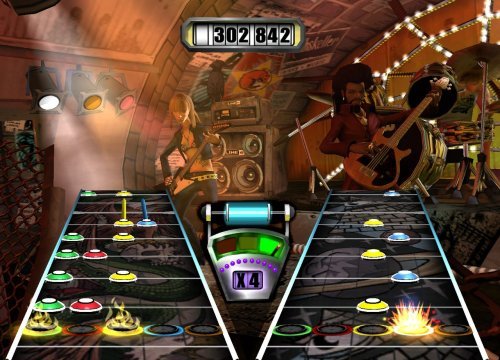
Image: Two players engaged in a multiplayer session.
3.3 Character Selection
The game features a cast of characters, including new additions like Eddie Knox, Casey Lynch, and Lars Umlaut. You can select and customize your character before starting a performance.
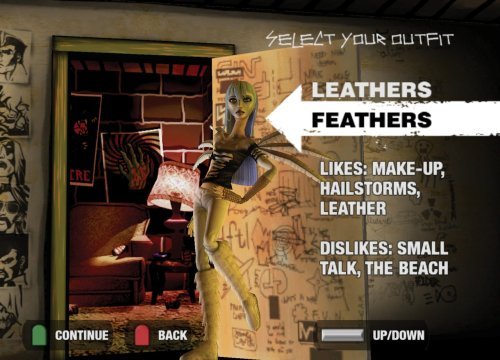
Image: Character selection interface.
4. Maintenance
4.1 Guitar Controller Care
- Keep the controller clean by wiping it with a soft, dry cloth. Avoid using harsh chemicals or abrasive cleaners.
- Store the controller in a dry place, away from direct sunlight and extreme temperatures.
- Avoid dropping the controller or subjecting it to strong impacts, as this can damage internal components.
4.2 Game Disc Care
- Always handle the game disc by its edges to prevent fingerprints and scratches.
- Store the disc in its case when not in use.
- If the disc becomes dirty, gently wipe it with a soft, lint-free cloth from the center outwards. Do not use abrasive materials.
4.3 Storage
When not in use, store the Guitar Hero II bundle components in a safe, dry place to protect them from dust and damage.
5. Troubleshooting
5.1 Guitar Controller Not Responding
- Check USB Connection: Ensure the guitar controller's USB cable is securely plugged into an Xbox 360 USB port. Try a different USB port if available.
- Restart Console: Power off your Xbox 360 console, wait a few seconds, and then power it back on.
- Test on Another Game/Console: If possible, test the controller with another game or on a different Xbox 360 console to determine if the issue is with the controller or the console.
5.2 Game Not Loading or Freezing
- Clean Disc: Inspect the game disc for smudges or scratches. Clean it gently with a soft, lint-free cloth if necessary.
- Restart Console: Power off and restart your Xbox 360.
- Check Disc Tray: Ensure the disc tray closes properly and the disc is seated correctly.
- Console Updates: Ensure your Xbox 360 console has the latest system updates installed.
5.3 Audio or Video Issues
- Check Cables: Verify that all audio and video cables connecting your Xbox 360 to your TV or sound system are securely connected.
- TV/Monitor Settings: Ensure your TV or monitor is set to the correct input source.
- Game Settings: Check in-game audio/video settings for any specific configurations.
6. Specifications
| Feature | Detail |
|---|---|
| Product Type | Video Game Bundle (Game Disc + Wired Guitar Controller) |
| Compatible Console Models | Microsoft Xbox 360, Microsoft Xbox 360 E |
| Item Weight | Approximately 3.78 pounds |
| Product Dimensions | 31 x 12 x 3 inches (Bundle Packaging) |
| Game Rating | Teen (T) |
| Manufacturer | Activision Inc. |
| ASIN | B08R12FLTW |
| UPC | 649661643388 |
7. Warranty and Support
7.1 Amazon Renewed Guarantee
This Amazon Renewed product is backed by the Amazon Renewed Guarantee. This means your purchase is eligible for a replacement or refund within 90 days of receipt if it does not work as expected. For specific terms and conditions, please refer to the Amazon Renewed Guarantee page on Amazon.com.
7.2 Customer Support
For any issues or questions regarding your Amazon Renewed Guitar Hero II Bundle, please contact Amazon Customer Service. You can find support options by visiting the Amazon Help & Customer Service page and searching for 'Amazon Renewed' or your specific order.