
1. Introduction
Thank you for purchasing the FOL DVB-1416 Digital Decoder. This device is designed to receive digital television broadcasts, providing high-quality video and audio. This manual provides essential information for the proper installation, operation, and maintenance of your decoder. Please read it thoroughly before use and retain it for future reference.
Package Contents:
- FOL DVB-1416 Digital Decoder
- Power Adapter
- User Manual (this document)
- Note: Remote control is not included with this model.
2. Safety Information
To ensure safe operation and prevent damage, please observe the following safety precautions:
- Do not expose the device to rain, moisture, or extreme temperatures.
- Do not open the casing. Refer all servicing to qualified personnel.
- Ensure proper ventilation around the device to prevent overheating.
- Use only the provided power adapter.
- Disconnect the power plug during lightning storms or when unused for long periods.
3. Product Overview
Front Panel
The front panel features the brand and model name, a display, and essential control buttons.
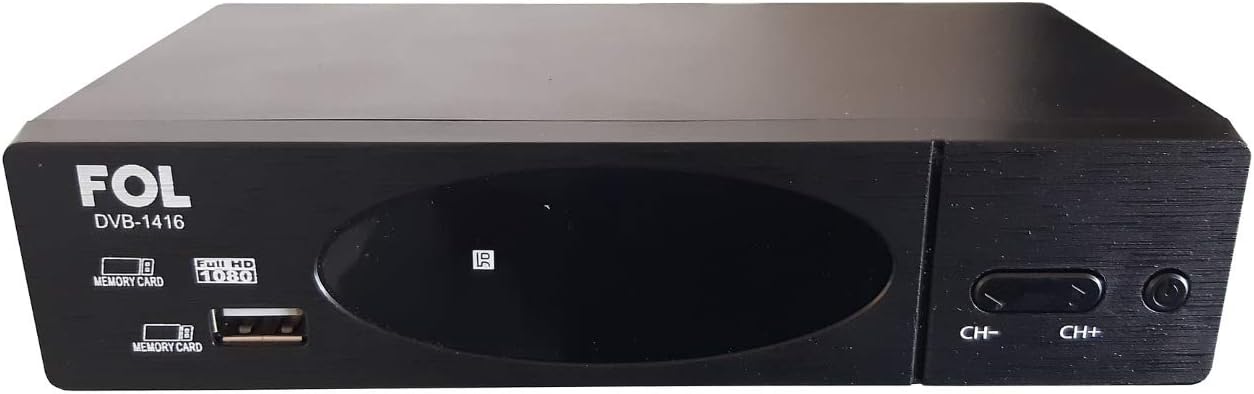
Image 3.1: Front view of the FOL DVB-1416 Digital Decoder. Visible features include the 'FOL DVB-1416' branding, a central display, a USB port, and 'CH-' and 'CH+' buttons for channel navigation.
Rear Panel
The rear panel provides all necessary connection ports for your television and antenna.

Image 3.2: Rear view of the FOL DVB-1416 Digital Decoder. Ports include RF IN, RF THROUGH, HDMI, YPbPr (Component Video), L/R Audio, Video (Composite), and Coaxial Digital Audio Out. The power input is also visible.
4. Setup
4.1 Connecting the Antenna
- Connect your terrestrial antenna cable to the RF IN port on the rear panel of the decoder.
- If you wish to pass the antenna signal through to another device (e.g., a TV with its own tuner), connect a coaxial cable from the RF THROUGH port to that device.
4.2 Connecting to Your Television
Choose one of the following connection methods:
HDMI Connection (Recommended for High Definition)
- Connect an HDMI cable from the HDMI port on the decoder to an HDMI input port on your television.
- Select the corresponding HDMI input on your TV using its remote control.
RCA (Composite Video) Connection
- Connect an RCA cable (yellow for video, red for right audio, white for left audio) from the VIDEO, R, and L ports on the decoder to the corresponding input ports on your television.
- Select the corresponding AV input on your TV using its remote control.
4.3 Powering On
- Connect the power adapter to the decoder's power input.
- Plug the power adapter into a wall outlet.
- The decoder will power on automatically or enter standby mode.
4.4 First-Time Setup and Channel Scan
Upon first power-on, the decoder will typically guide you through an initial setup process. Follow the on-screen instructions to:
- Select your preferred language.
- Perform an automatic channel scan to find available digital TV channels. This process may take several minutes.
5. Operating Instructions
Since this model does not include a remote control, all operations are performed using the buttons on the front panel.
5.1 Basic Functions
- Power On/Off: Press the Power button (usually on the right side of the front panel) to turn the decoder on or off (standby mode).
- Channel Change: Use the CH+ and CH- buttons to navigate through channels.
- Volume Control: (Information not available for front panel volume control. Volume typically controlled via TV remote.)
5.2 USB Media Playback / Recording
The decoder features a USB port for media playback and potentially recording (PVR function).
- Insert a USB flash drive or external hard drive into the USB port on the front panel.
- The decoder's display or on-screen menu (if accessible via TV) may indicate the presence of the USB device.
- To access media files or initiate recording, you may need to use the TV's remote control to navigate the decoder's on-screen menu, if available. Consult your TV's manual for controlling external devices.
6. Maintenance
6.1 Cleaning
- Always unplug the decoder from the power outlet before cleaning.
- Use a soft, dry cloth to wipe the exterior of the device.
- Do not use liquid cleaners, aerosols, or abrasive materials, as they may damage the finish or internal components.
6.2 Storage
If storing the decoder for an extended period, ensure it is unplugged, clean, and stored in a cool, dry place away from direct sunlight and extreme temperatures.
7. Troubleshooting
If you encounter issues with your FOL DVB-1416 decoder, refer to the following common problems and solutions:
| Problem | Possible Cause | Solution |
|---|---|---|
| No picture/No signal |
|
|
| No sound |
|
|
| Decoder does not power on |
|
|
8. Specifications
| Feature | Specification |
|---|---|
| Brand | FOL |
| Model | DVB-1416 |
| Part Number | DVB-1416 |
| Audio Output Type | Speakers (via TV connection) |
| Batteries Required | No |
| Remote Control Included | No |
| Package Dimensions | 20.4 x 14.6 x 5.9 cm |
| Weight | 400 g |
| ASIN | B08R123VR3 |
| First Available Date | February 9, 2021 |
9. Warranty and Support
For warranty information and technical support, please refer to the documentation provided at the point of purchase or contact your retailer. As specific warranty details are not provided in this manual, it is recommended to retain your purchase receipt for any warranty claims.
For further assistance, please contact the manufacturer or your local distributor.