
1. Product Overview
This manual provides detailed instructions for the installation, operation, and maintenance of your Foxsky 43FS-VS Full HD Smart LED TV. Please read this manual thoroughly before using the product to ensure proper and safe operation.

Image 1.1: Front view of the Foxsky 43-inch Full HD Smart LED TV, highlighting its frameless design, 30W sound, Chromecast built-in, and Quad Core Processor.
2. Package Contents
Verify that all items listed below are included in your product packaging. If any items are missing or damaged, please contact customer support.
- 1 x Foxsky LED TV
- 1 x Table Top Stand (set)
- 1 x Wall Mount (set)
- 1 x User Manual
- 1 x Warranty Card
- 1 x Remote Control
- Batteries for Remote Control

Image 2.1: Illustration of the items typically found inside the product box, including the TV unit, remote control, table stands, mounting screws, and a wall mount bracket.
3. Initial Setup
3.1 Mounting the TV
Your Foxsky TV can be set up using either the included table-top stand or a wall mount. Choose the method that best suits your viewing environment.
3.1.1 Table Top Stand Installation
- Carefully place the TV screen-down on a soft, clean surface to prevent scratches.
- Align the table stand with the screw holes on the bottom of the TV.
- Secure the stand using the provided screws. Ensure they are tightened firmly.
- Carefully lift the TV and place it on a stable, flat surface.
3.1.2 Wall Mount Installation
For wall mounting, it is recommended to seek professional assistance. Ensure the wall can support the weight of the TV and the mount. Use the provided wall mount and follow its specific installation instructions.
3.2 Power Connection
Connect the power cord to the TV's power input and then plug it into a standard AC power outlet (110 Volts).
3.3 Initial Power On and Setup Wizard
After connecting the power, press the power button on the TV or the remote control. The TV will guide you through an initial setup wizard, including language selection, network connection, and channel scanning.
4. Connectivity
Your Foxsky Smart LED TV offers various connectivity options for external devices and network access.
- HDMI Ports: Two HDMI ports are available for connecting set-top boxes, Blu-ray players, gaming consoles, and other HDMI-enabled devices.
- USB Ports: Two USB ports allow connection of hard drives and other USB devices for media playback.
- Wi-Fi: Built-in Wi-Fi enables wireless internet connectivity for smart TV features and online streaming.
- Other Ports: Includes RCA audio input, VGA, and RF input for antenna/cable connection.
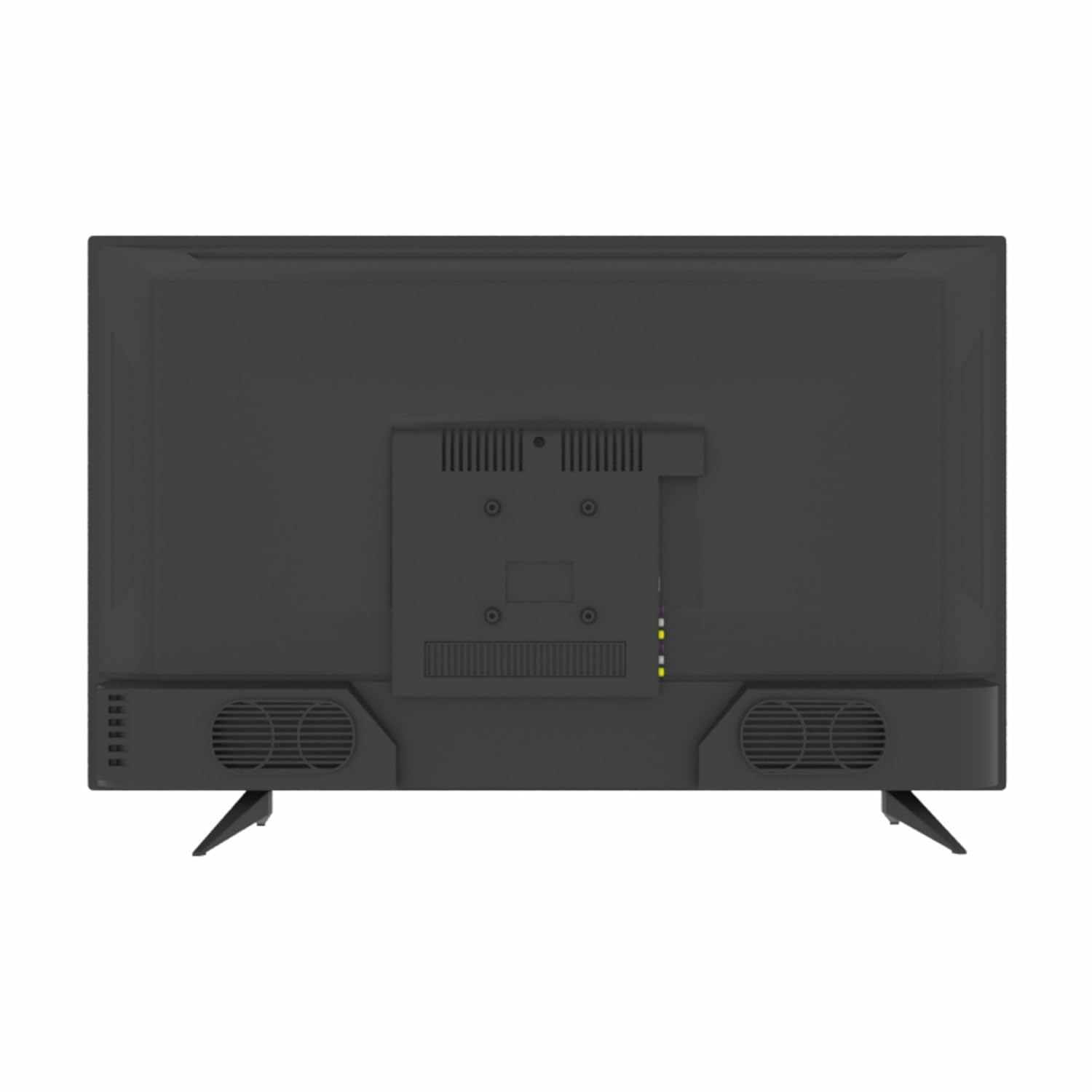
Image 4.1: Detailed view of the connectivity ports located on the back of the Foxsky TV, showing various input options.
5. Smart TV Features and Operation
The Foxsky 43FS-VS operates on an Android 9.0 based OS, providing a smart and interactive viewing experience.
5.1 Android OS and Applications
The TV comes with pre-installed applications and supports downloading more from the app store. Key supported applications include:
- Netflix
- YouTube
- Prime Video
- Sony Liv
- Disney+Hotstar
- Zee5
- JioCinema

Image 5.1: A visual representation of the smart TV's application interface, displaying a selection of popular streaming services.
5.2 Google Voice Assistant
Utilize the built-in Google Voice Assistant for hands-free control. Simply press the voice assistant button on your remote and speak commands to search for content, control playback, or get information.
5.3 Built-in Miracast and Chromecast
The TV features built-in Miracast and Chromecast, allowing you to wirelessly mirror content from compatible smartphones, tablets, or computers directly to your TV screen.
5.4 Remote Control Functions
The smart remote control provides easy access to all TV functions. It includes dedicated hotkeys for quick access to Netflix, Hotstar, and Amazon Prime Video, along with Google Assistant functionality.

Image 5.2: The Foxsky TV remote control, detailing its layout and key buttons for navigation and direct app access.
6. Display Features
Experience vibrant and clear visuals with the Foxsky TV's advanced display technologies.
- Resolution: Full HD (1920 x 1080 pixels) for sharp and detailed images.
- Panel Type: A+ Grade Panel ensures high picture quality and consistency.
- Micro Dimming: Enhances contrast by analyzing and adjusting brightness in different zones of the screen.
- True Color: Delivers accurate and lifelike color reproduction.
- Viewing Angle: A wide 178-degree viewing angle ensures consistent picture quality from various positions.
- HDR-10: High Dynamic Range support provides a wider range of colors and contrasts, making bright areas brighter and dark areas darker for a more immersive visual experience.

Image 6.1: A visual demonstration of the enhanced color and contrast provided by HDR technology compared to standard display.
7. Audio Features
The Foxsky TV is equipped with powerful audio features for an immersive sound experience.
- Sound Output: 30 Watts Output from two integrated speakers.
- Dolby Audio System: Provides rich, clear, and powerful sound.
- Dolby ATMOS & DTS: Supports advanced audio technologies for a more cinematic and immersive soundstage.

Image 7.1: Visual representation of the DTS Virtual: X sound technology, highlighting its capability to deliver immersive audio experiences.
8. Gaming Features
Enhance your gaming experience with dedicated features designed for smooth and responsive gameplay.
- Game Mode PLUS: Optimizes display settings for gaming, reducing input lag.
- VRR (Variable Refresh Rate): Ensures smoother gameplay by synchronizing the TV's refresh rate with the game's frame rate.
- ALLM (Auto Low Latency Mode): Automatically switches the TV to a low-latency mode when a gaming console is detected.
- eARC (Enhanced Audio Return Channel): Allows for high-quality audio transmission from the TV to a compatible sound system.

Image 8.1: Depiction of the Game Mode PLUS feature, emphasizing its benefits for ultra-smooth gaming and responsive performance.
9. Care and Maintenance
Proper care and maintenance will extend the life of your Foxsky TV.
- Cleaning the Screen: Use a soft, lint-free cloth specifically designed for electronics. Do not use harsh chemicals or abrasive cleaners. Lightly dampen the cloth with water if necessary, and wipe gently.
- Cleaning the Body: Wipe the TV's frame and stand with a soft, dry cloth.
- Ventilation: Ensure adequate ventilation around the TV. Do not block the ventilation openings.
- Power Off: Always turn off the TV and unplug it from the power outlet before cleaning or when not in use for extended periods.
10. Troubleshooting
If you encounter issues with your TV, refer to the following common solutions. If the problem persists, contact customer support.
| Problem | Possible Cause / Solution |
|---|---|
| No Power | Ensure the power cord is securely plugged into the TV and the wall outlet. Check if the outlet is working by plugging in another device. |
| No Picture / Black Screen | Check the input source (HDMI, AV, etc.) is correctly selected. Ensure external devices are powered on and connected properly. |
| No Sound | Check the volume level and ensure mute is not activated. Verify audio cables are connected correctly. If using external speakers, ensure they are powered on. |
| Remote Control Not Working | Check and replace batteries. Ensure there are no obstructions between the remote and the TV's IR sensor. |
| Wi-Fi Connection Issues | Ensure your Wi-Fi router is on and working. Try restarting the router and the TV. Re-enter the Wi-Fi password. |
| Smart Features Not Responding | Ensure the TV is connected to the internet. Try restarting the TV. Clear app cache if a specific app is problematic. |
11. Technical Specifications
Detailed specifications for the Foxsky 43FS-VS Full HD Smart LED TV.
| Feature | Specification |
|---|---|
| Model | 43FS-VS |
| Screen Size | 43 Inches (108 cm) |
| Display Technology | LED |
| Resolution | Full HD (1920 x 1080 Pixels) |
| Refresh Rate | 60 Hz |
| Viewing Angle | 178 Degrees |
| Aspect Ratio | 16:9 |
| Sound Output | 30 Watts |
| Operating System | Android 9.0 Based OS |
| RAM Memory | 1 GB |
| Storage Capacity | 8 GB |
| Connectivity | 2 HDMI, 2 USB, Wi-Fi |
| Power Source | AC |
| Voltage | 110 Volts |
| Product Dimensions (LxWxH) | 96 x 19.8 x 55.8 cm |
| Item Weight | 7.3 kg |
| Model Year | 2021 |

Image 11.1: Dimensional drawing of the Foxsky TV, providing measurements for width, height, and depth.
12. Warranty and Support
Your Foxsky TV comes with a manufacturer's warranty and dedicated customer support.
- Warranty Period: 1 Year warranty provided by Foxsky from the date of purchase.
- Manufacturer: Foxsky Electronics India Pvt. Ltd.
- Address: 49/26, Site-IV, Industrial Area, Sahibabad, Ghaziabad, (U.P.) - 201010
- Website: www.foxskyindia.com
- Toll Free No.: 785 003 2007
- Email: customercare@foxskyindia.com
For warranty claims or technical assistance, please contact Foxsky customer care directly using the provided contact information.