
1. Introduction
This manual provides essential information for the safe and efficient operation of the FBT SIMPHOENIX E550-2S0055L Variable Frequency Drive (VFD). This VFD is designed for precise motor control in applications such as CNC routers, terminal machines, wire-cutting machines, and dividing/cutting machines. It offers advanced features including Sensorless Vector Control (SVC), V/F control, and high adaptability to grid voltage fluctuations (enduring ±20% fluctuation).
2. Safety Information
WARNING: Failure to follow these safety instructions may result in serious injury or equipment damage.
- Refer to the instruction manual thoroughly before installation and operation.
- Do not connect AC power to the output terminals (UVW). This is for motor connection only.
- Do not remove any cover while applying power. Wait at least 10 minutes after disconnecting power before accessing internal components to allow capacitors to discharge.
- Securely ground (earth) the equipment to prevent electrical shock.
3. Product Overview
The FBT SIMPHOENIX E550-2S0055L VFD features a user-friendly control panel for easy configuration and monitoring.
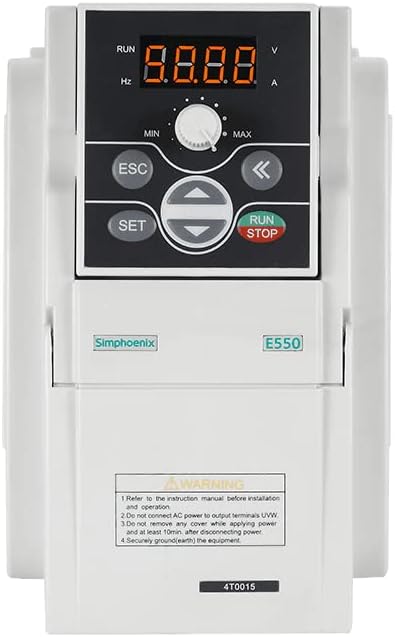
Figure 3.1: Front view of the FBT SIMPHOENIX E550-2S0055L VFD, showing the digital display, control buttons, and potentiometer.
3.1 Control Panel Features
- Digital Display: A 4-digit LED display shows operational parameters such as frequency (Hz), voltage (V), and current (A). Indicators for RUN status are also present.
- Potentiometer: A rotary knob labeled MIN/MAX for adjusting frequency or other parameters.
- ESC Button: Used to exit menus or cancel operations.
- SET Button: Used to enter menus or confirm settings.
- Directional Buttons (Up/Down/Left/Right): Used for navigation within menus and adjusting parameter values.
- RUN/STOP Button: Initiates or halts motor operation.
4. Setup and Installation
4.1 Electrical Connections
- Power Input: Connect the 220V AC power supply to the designated input terminals. Ensure the power source matches the VFD's voltage requirements.
- Motor Output: Connect the motor to the UVW output terminals. Do not connect AC power to these terminals.
- Grounding: Ensure the VFD is securely grounded (earthed) to a proper ground point.
- Control Wiring: Utilize the multifunctional input terminals for external control signals. The VFD supports 29 kinds of terminal function definitions and 16 kinds of programmable status outputs for flexible control.
4.2 Communication Interface
The VFD includes a standard RS485 communication interface. It supports the MODBUS protocol and Simphoenix self-defined protocols, allowing for easy integration with PLCs or other industrial control equipment.
5. Operating Instructions
5.1 Basic Operation
- Power On: Apply power to the VFD. The digital display will illuminate.
- Parameter Adjustment: Use the SET button to enter the parameter menu. Navigate with the directional buttons and adjust values using the potentiometer or directional buttons. Press SET to confirm and ESC to exit.
- Start Motor: Press the RUN button to start the motor. The RUN indicator will light up.
- Adjust Frequency: While the motor is running, the potentiometer can be used to adjust the output frequency, thereby controlling motor speed.
- Stop Motor: Press the STOP button to halt the motor.
5.2 Advanced Features
- Real-time Monitoring: The VFD provides vivid real-time monitoring of input and output current, voltage, and other operational parameters directly on the display.
- Self-Adaptive Control: Features special self-adaptive control technology for automatic current-limiting, voltage-limiting, and under-voltage suppression during operation.
- Built-in Counter: A built-in counter function allows for simple counting operations when matched with multifunctional terminals.
- PID Controller: An integrated and optimized PID controller facilitates closed-loop control over variables like temperature, simplifying control system structures and reducing costs.
6. Maintenance
Regular maintenance ensures the longevity and reliable operation of your VFD.
- Cleaning: Keep the VFD clean and free from dust and debris. Use a soft, dry cloth for cleaning. Do not use liquid cleaners.
- Inspection: Periodically inspect all electrical connections for tightness and signs of wear or damage.
- Cooling: Ensure adequate ventilation around the VFD to prevent overheating. Keep cooling fins clear.
- Power Disconnection: Always disconnect power and wait at least 10 minutes before performing any maintenance or inspection that requires opening the VFD cover.
7. Troubleshooting
This section provides general guidance for common issues. For complex problems, contact technical support.
- VFD Not Powering On:
- Check the main power supply connection.
- Verify input voltage (220V).
- Inspect fuses or circuit breakers.
- Motor Not Running:
- Ensure the RUN button has been pressed.
- Check motor wiring to UVW terminals.
- Verify motor parameters are correctly set in the VFD.
- Check for any error codes on the display and consult the full manual for their meaning.
- Abnormal Noise or Vibration:
- Check motor mounting and alignment.
- Verify motor parameters and VFD settings.
- Ensure the motor is suitable for VFD operation.
8. Specifications
| Feature | Specification |
|---|---|
| Model | E550-2S0055L |
| Brand | FBT / SIMPHOENIX |
| Input Voltage | 220V |
| Output Power | 5.5KW (5500 Watts) |
| Control Modes | SVC, V/F Control |
| Communication Interface | Standard RS485 (MODBUS, Simphoenix protocol) |
| Material | Copper (internal components) |
| Manufacturer | FBT |
9. Warranty and Support
For warranty information, technical support, or service inquiries, please contact your vendor or the manufacturer directly. Keep your purchase receipt for warranty claims.
You can visit the FBT Store for more products and information: FBT Store on Amazon