
FBT E550-2S0022
Contents
SIMPHOENIX E550-2S0022 Frequency Inverter Instruction Manual
Model: E550-2S0022
1. Introduction
This manual provides essential information for the safe and efficient installation, operation, and maintenance of the SIMPHOENIX E550-2S0022 Frequency Inverter. Please read this manual thoroughly before using the product and retain it for future reference.
2. Safety Information
Observe all safety precautions to prevent personal injury or damage to the equipment. The following warnings are critical for safe operation:
WARNING
- Refer to the instruction manual before installation and operation.
- Do not connect AC power to output terminals UVW.
- Do not remove any cover while applying power and at least 10 minutes after disconnecting power.
- Securely ground (earth) the equipment.
3. Product Overview
The SIMPHOENIX E550-2S0022 is a 2.2KW, 220V frequency inverter designed for various industrial applications, including terminal machines, wire-cutting machines, and dividing/cutting machines. It features SVC and V/F control, high adaptability to grid voltage fluctuations (up to ±20%), and special self-adaptive control technology for automatic current-limiting, voltage-limiting, and under-voltage suppression.
Key features include:
- Standard RS485 communication interface with optional MODBUS protocol.
- Hot-plugging panel support for system integration.
- Vivid real-time monitoring of input/output current, voltage, etc.
- Multi-functional input terminals (29 definitions) and programmable status outputs (16 types).
- Built-in counter for simple counting functions.
- Integrated and optimized PID controller for closed-loop control applications.
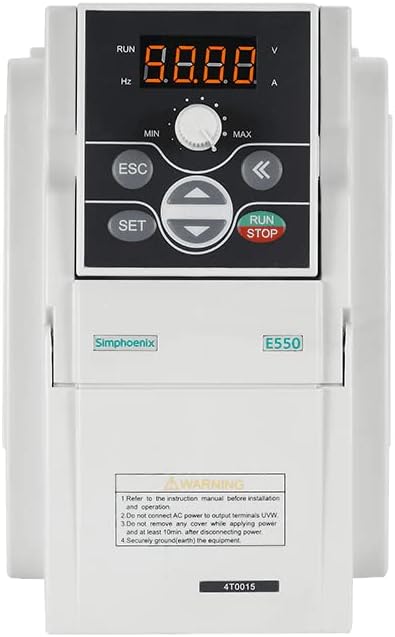
Figure 1: Front Panel of SIMPHOENIX E550-2S0022 Frequency Inverter.
The image displays the front panel of the SIMPHOENIX E550-2S0022 Frequency Inverter. It features a digital display showing '8.8.8.8' with indicators for RUN, Hz, V, and A. Below the display is a rotary knob for MIN/MAX adjustment. The control buttons include ESC, SET, directional arrows (up, down, left, right), and a combined RUN/STOP button. The lower section of the unit shows 'Simphoenix' and 'E550' branding, along with a warning label detailing important safety instructions for installation and operation, including grounding requirements.
4. Setup
Proper setup is crucial for the inverter's performance and safety. Ensure all power is disconnected before beginning installation.
4.1. Mounting
Mount the inverter in a well-ventilated area, away from direct sunlight, excessive dust, moisture, or corrosive gases. Ensure sufficient clearance around the unit for heat dissipation.
4.2. Wiring
- Power Input: Connect the 220V AC power supply to the designated input terminals.
- Motor Output: Connect the motor to the UVW output terminals. Do not connect AC power to these terminals.
- Grounding: Securely connect the inverter to an earth ground. This is a critical safety measure.
- Control Wiring: Connect control signals (e.g., start/stop, speed reference, communication) to the appropriate control terminals as per your application requirements.
5. Operating
The inverter's operation is controlled via its front panel and external control signals.
5.1. Control Panel Functions
- Digital Display: Shows operational parameters such as frequency (Hz), voltage (V), current (A), and status.
- RUN Indicator: Illuminates when the inverter is running.
- MIN/MAX Knob: Used for analog frequency adjustment or parameter setting.
- ESC Button: Used to exit menus or cancel operations.
- SET Button: Used to enter menus, confirm selections, or save parameters.
- Directional Arrows (Up/Down/Left/Right): Used for navigating menus and adjusting parameter values.
- RUN/STOP Button: Initiates or halts motor operation.
5.2. Basic Operation Sequence
- Ensure all wiring is correct and secure.
- Apply power to the inverter. The display will illuminate.
- Set desired operating frequency using the MIN/MAX knob or digital input.
- Press the RUN button to start the motor.
- Monitor the display for operational status.
- Press the STOP button to halt the motor.
6. Maintenance
Regular maintenance ensures the longevity and reliable operation of the inverter.
- Cleaning: Periodically clean the inverter's exterior and ventilation openings to prevent dust accumulation. Use a soft, dry cloth. Do not use liquid cleaners.
- Inspection: Regularly inspect wiring connections for tightness and signs of damage or corrosion.
- Cooling Fans: Check cooling fans for proper operation and clear any obstructions.
- Environmental Conditions: Ensure the operating environment remains within specified temperature and humidity ranges.
Always disconnect power and wait at least 10 minutes before performing any maintenance or inspection to allow capacitors to discharge.
7. Troubleshooting
This section provides general guidance for common issues. For complex problems, consult a qualified technician.
| Problem | Possible Cause | Solution |
|---|---|---|
| Inverter does not power on | No input power; Blown fuse; Internal fault | Check power supply; Replace fuse; Contact support |
| Motor does not run | Incorrect wiring; Parameter settings; Overload | Verify wiring; Check parameters; Reduce load |
| Overcurrent fault | Motor short circuit; Sudden load change; Acceleration time too short | Check motor and wiring; Adjust acceleration time; Reduce load |
| Overvoltage fault | Input voltage too high; Deceleration time too short | Check input voltage; Increase deceleration time |
8. Specifications
Detailed technical specifications for the SIMPHOENIX E550-2S0022 Frequency Inverter:
- Brand: FBT / SIMPHOENIX
- Model: E550-2S0022
- Voltage: 220 Volts
- Power: 2.2 KW
- Material Type: Copper (internal components)
- Control Method: SVC, V/F control
- Communication: Standard RS485 (MODBUS protocol optional)
- Features: Automatic current/voltage limiting, under-voltage suppression, real-time monitoring, multi-functional terminals, built-in counter, PID controller.
9. Warranty and Support
Specific warranty terms and conditions for the SIMPHOENIX E550-2S0022 Frequency Inverter are not provided in the available product information. Please refer to the product packaging or contact the seller/manufacturer directly for detailed warranty information and technical support.
Documents and downloads
Ask a question about this manual
Ask about setup, troubleshooting, compatibility, parts, safety, or missing instructions. Manuals+ will review the question and use this page’s manual context to help answer it.